
1. Úvod
The BLACK+DECKER CS1200 Circular Saw is a powerful and versatile tool designed for efficient cutting in wood and wood-based materials. This manual provides essential information for safe operation, proper setup, maintenance, and troubleshooting to ensure optimal performance and user safety.
This circular saw features a robust 1200W motor, a 165mm blade, and offers cutting depths of up to 55mm at 90 degrees and 37mm at 45 degrees. Its ergonomic design and integrated dust extraction port enhance user comfort and maintain a cleaner work environment.
2. Bezpečnostní pokyny
Always adhere to the following safety guidelines to prevent injury and ensure safe operation of your circular saw:
- Používejte osobní ochranné prostředky: Vždy používejte ochranné brýle, ochranu sluchu a vhodné rukavice.
- Udržujte čistou pracovní plochu: Nepořádek nebo tmavé prostory vedou k nehodám.
- Zajištění obrobku: Vždy třamp nebo zajistěte obrobek, aby se během řezání nepohyboval.
- Před úpravami odpojte: Disconnect the saw from the power source before changing blades, making adjustments, or performing maintenance.
- Zabraňte náhodnému spuštění: Před zapojením nástroje se ujistěte, že je vypínač v poloze vypnuto.
- Udržujte ruce čisté: Never place hands near the cutting area or the rotating blade.
- Používejte správnou čepel: Only use blades suitable for the material being cut and rated for the saw's speed.
- Zkontrolujte poškození: Inspect the tool and power cord for any damage before each use.
3. Komponenty přesview
Familiarize yourself with the main parts of your BLACK+DECKER CS1200 Circular Saw:
- Čepel: The cutting element, typically 165mm in diameter.
- Upper and Lower Blade Guards: Protect the user from the blade. The lower guard retracts during cutting.
- Hlavní rukojeť: For gripping and controlling the saw.
- Spouštěcí spínač: Aktivuje motor.
- Páka pro nastavení hloubky: Umožňuje nastavení hloubky řezu.
- Páka pro nastavení úkosu: Allows setting the cutting angle (bevel).
- Základní deska (bota): Podpírá pilu na obrobku.
- Port pro odsávání prachu: For connecting a vacuum cleaner.
- Tlačítko zámku vřetena: Locks the blade for easy changing.
- Paralelní vodítko: Pro vytváření rovných řezů rovnoběžných s hranou.
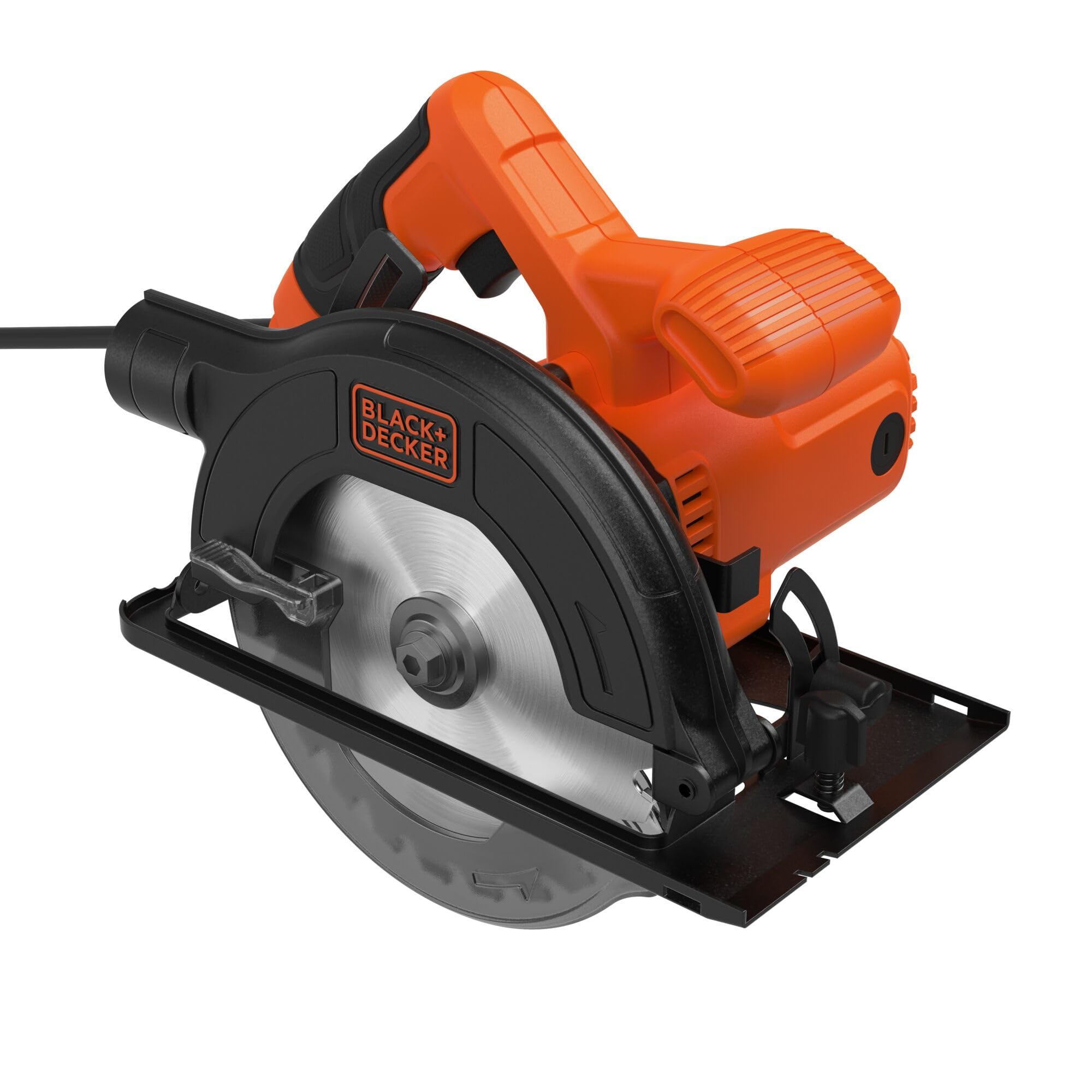
Obrázek 1: Boční strana view of the BLACK+DECKER CS1200 Circular Saw, highlighting the blade, handle, and guards.

Obrázek 2: Přední strana view of the BLACK+DECKER CS1200 Circular Saw, showing the blade and its protective guard.
4. Nastavení
4.1 Instalace a demontáž čepele
- Odpojit napájení: Always unplug the saw from the power outlet.
- Zatažení spodního ochranného krytu: Lift the lower blade guard lever to expose the blade.
- Zapnutí aretace vřetena: Stiskněte a podržte tlačítko aretace vřetena, abyste zabránili otáčení pilového kotouče.
- Povolte matici upínacího hřídele: Use the provided wrench to loosen the arbor nut by turning it counter-clockwise.
- Vyjměte čepel: Opatrně odstraňte vnější přírubu a starý nůž.
- Instalace nové čepele: Place the new 165mm TCT saw blade onto the arbor, ensuring the teeth are pointing in the direction of rotation indicated by the arrow on the guard.
- Bezpečná čepel: Replace the outer flange and tighten the arbor nut clockwise with the wrench while holding the spindle lock button. Do not overtighten.
4.2 Nastavení hloubky řezu
To set the desired cutting depth:
- Odpojit napájení: Odpojte pilu.
- Loosen Lever: Povolte páku pro nastavení hloubky řezu, která se nachází na boku pily.
- Nastavit hloubku: Raise or lower the base plate until the blade extends approximately 3mm below the workpiece.
- Utažení páky: Bezpečně utáhněte páku pro nastavení hloubky.
4.3 Nastavení úhlu zkosení
To make angled cuts (bevel cuts):
- Odpojit napájení: Odpojte pilu.
- Loosen Lever: Loosen the bevel adjustment lever, usually located at the front of the saw.
- Nastavení úhlu: Tilt the base plate to the desired angle (up to 45 degrees) using the angle scale.
- Utažení páky: Bezpečně utáhněte páku pro nastavení úkosu.
4.4 Odsávání prachu
The saw is equipped with a dust extraction port. For a cleaner work area, connect a suitable vacuum cleaner hose to this port. This helps to collect sawdust and maintain visibility of the cutting line.
5. Návod k obsluze
5.1 Spuštění a zastavení pily
- Začít: Plug the saw into a power outlet. Depress the trigger switch.
- Zastavit: Release the trigger switch. Allow the blade to come to a complete stop before setting the saw down.
5.2 Provedení řezu
- Příprava obrobku: Mark your cutting line clearly and secure the workpiece firmly.
- Pozice pily: Place the front of the base plate on the workpiece, ensuring the blade is clear of the material. Align the blade with your cutting line.
- Spuštění pily: Depress the trigger switch and allow the blade to reach full speed before entering the material.
- Začátek řezu: Slowly and steadily push the saw forward along the cutting line. Maintain a firm grip and keep the base plate flat against the workpiece.
- Kompletní řez: Continue pushing until the cut is complete. Release the trigger switch and wait for the blade to stop before removing the saw.
5.3 Using the Parallel Guide
The parallel guide assists in making straight cuts parallel to an edge of the workpiece.
- Insert Guide: Zasuňte paralelní doraz do drážek na přední straně základní desky.
- Upravit vzdálenost: Adjust the guide to the desired distance from the blade.
- Secure Guide: Tighten the locking screw to hold the guide in place.
- Provést řez: During cutting, keep the guide firmly against the edge of the workpiece.
6. Údržba
Pravidelná údržba zajistí dlouhou životnost a bezpečný provoz vaší okružní pily.
- Čištění: After each use, unplug the saw and use a soft brush or compressed air to clean dust and debris from the motor vents and blade guard area. Do not use water or solvents.
- Kontrola čepele: Pravidelně kontrolujte pilový kotouč, zda není ostrý, zda nemá praskliny nebo zda nechybí zuby. Tupé nebo poškozené kotouče ihned vyměňte.
- Kontrola kabelu: Check the power cord for cuts, fraying, or damage. If damaged, have it repaired by a qualified service technician.
- Mazání: Toto nářadí je navrženo pro bezúdržbový provoz. Není nutné žádné další mazání.
7. Řešení problémů
If you encounter issues with your BLACK+DECKER CS1200 Circular Saw, refer to the following common problems and solutions:
| Problém | Možná příčina | Řešení |
|---|---|---|
| Pila se nespustí | No power supply; Faulty switch; Damaged cord | Check power connection; Contact service center; Inspect cord for damage |
| Špatná kvalita řezu (hrubý, třískavý) | Dull or incorrect blade; Incorrect cutting depth; Too fast feed rate | Replace blade; Adjust cutting depth; Reduce feed rate |
| Nadměrné vibrace | Uvolněná čepel; Poškozená čepel; Opotřebovaná ložiska | Tighten arbor nut; Replace blade; Contact service center |
| Blade binds in material | Workpiece not supported correctly; Incorrect feed rate; Blade not sharp | Ensure proper workpiece support; Adjust feed rate; Replace blade |
Pokud problém přetrvává i po vyzkoušení těchto řešení, kontaktujte zákaznickou podporu BLACK+DECKER nebo autorizované servisní středisko.
8. Specifikace
Technical specifications for the BLACK+DECKER CS1200 Circular Saw:
| Funkce | Specifikace |
|---|---|
| Číslo modelu | CS1200-QS |
| Vstup napájení | 1200 wattů |
| Průměr čepele | 165 mm |
| Maximální hloubka řezu (90°) | 55 mm |
| Maximální hloubka řezu (45°) | 37 mm |
| Kapacita úkosu | 0-45 stupňů |
| Zdroj napájení | Elektrický kabel |
| Materiál čepele | Karbid wolframu |
| Hmotnost | 4.8 kg |
| Zahrnuté komponenty | 1 Circular Saw, 1 TCT Saw Blade, 1 Parallel Guide |
9. Záruka a podpora
Výrobky BLACK+DECKER jsou vyráběny podle vysoce kvalitních standardů a je na ně vztahuje záruka proti výrobním vadám. Konkrétní záruční podmínky naleznete v záruční kartě, která je součástí vašeho produktu, nebo navštivte oficiální webové stránky BLACK+DECKER. webmísto.
For technical assistance, spare parts, or service inquiries, please contact BLACK+DECKER customer support. Contact information can typically be found on the official webmístě nebo na obalu produktu.