
Beyution CD-R510
Beyution CD-R510 Remote Control Instruction Manual
For Pioneer DEH-P7800MP, DEH-P8600MP, MVH-S622BS Car Receivers
1. Konec produktuview
This document provides instructions for the Beyution CD-R510 replacement remote control. This remote is designed to function with specific Pioneer car audio receivers, offering convenient control over various functions.
Kompatibilní modely:
- Pioneer DEH-P7800MP
- Pioneer DEH-P8600MP
- Pioneer MVH-S622BS
The CD-R510 remote control utilizes infrared technology and operates effectively up to a maximum distance of 10 meters under optimal conditions.
2. Nastavení
The Beyution CD-R510 remote control is designed for immediate use with compatible Pioneer receivers and does not require any programming or pairing procedures.
Instalace baterie
- Najděte přihrádku na baterie na zadní straně dálkového ovladače.
- Otevřete kryt bateriového prostoru.
- Insert one CR2025 coin cell battery, ensuring the positive (+) terminal is facing upwards as indicated inside the compartment.
- Bezpečně zavřete kryt bateriového prostoru.
Once the battery is installed, the remote control is ready for operation.
3. Návod k obsluze
Point the remote control directly at the infrared sensor on your Pioneer car receiver. Ensure there are no obstructions between the remote and the receiver.
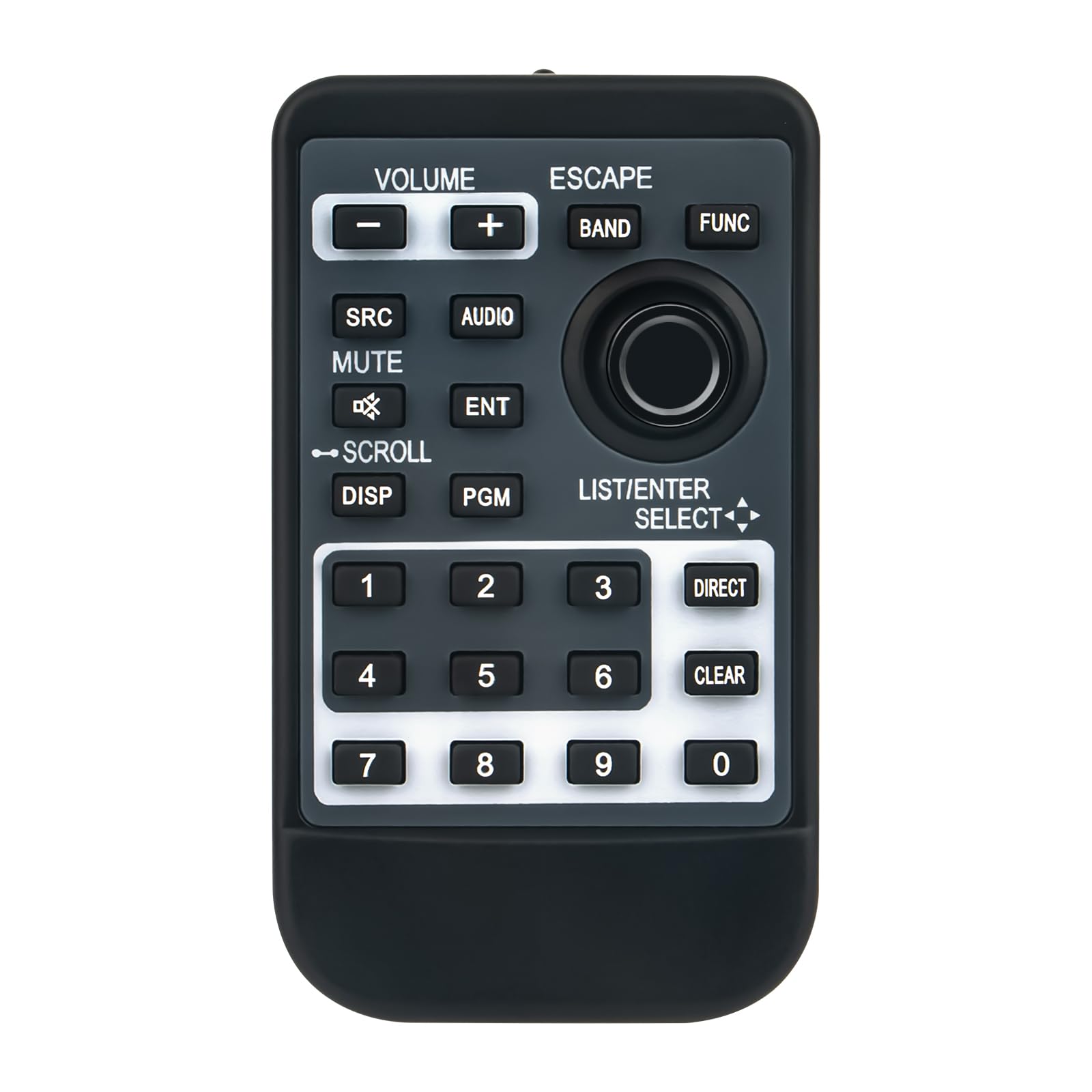
Obrázek 1: Přední view of the Beyution CD-R510 remote control. It features a dark gray body with black buttons and white text. Key sections include volume controls at the top left, navigation and function buttons in the center, and a numeric keypad at the bottom.
Funkce tlačítek:
- OBJEM (+/-): Zvyšuje nebo snižuje hlasitost zvuku.
- UNIKNOUT: Ukončí aktuální menu nebo zruší operaci.
- KAPELA: Přepíná mezi rozhlasovými pásmy (např. FM1, FM2, AM).
- FUNC (Funkce): Accesses various function menus or settings.
- SRC (Zdroj): Selects the audio source (e.g., Radio, CD, USB, Bluetooth).
- AUDIO: Opens the audio settings menu (e.g., Bass, Treble, Balance).
- ZTLUMIT: Toggles the audio mute function on or off.
- ENT (Enter): Potvrdí výběr nebo vstoupí do nabídky.
- SCROLL (with arrows): Navigates through lists, tracks, or menu options.
- DISP (Displej): Změní informace zobrazené na displeji přijímače.
- PGM (Program): Activates a programmable function, specific to the receiver model.
- LIST/ENTER SELECT (with arrows): Used for navigating lists and making selections.
- Numerická klávesnice (0-9): For direct input of numbers, such as radio station presets or track numbers.
- ŘÍDIT: Provides direct access to a specific function or input.
- JASNÝ: Vymaže aktuální vstup nebo výběr.
4. Údržba
Čištění
To clean the remote control, use a soft, dry cloth. Do not use liquid cleaners, abrasive pads, or chemical solvents, as these can damage the surface or internal components.
Výměna baterie
Replace the CR2025 battery when the remote's range decreases significantly or if it stops responding. Refer to the "Battery Installation" section for instructions.
Skladování
Store the remote control in a cool, dry place away from direct sunlight and extreme temperatures. If storing for an extended period, it is advisable to remove the battery to prevent leakage.
5. Řešení problémů
- Dálkové ovládání nereaguje:
- Ujistěte se, že je baterie správně nainstalována a není vybitá. V případě potřeby ji vyměňte.
- Check for any obstructions between the remote control and the receiver's infrared sensor.
- Verify that you are within the operational range (approximately 10 meters).
- Ujistěte se, že dálkový ovladač míří přímo na přijímač.
- Nefunkční konkrétní tlačítka:
- Clean the remote control surface and buttons with a soft, dry cloth to remove any dirt or debris that might be interfering with button presses.
- If only certain buttons are unresponsive, the remote may be damaged.
- Problémy s kompatibilitou:
- Ensure your Pioneer receiver model is listed as compatible (DEH-P7800MP, DEH-P8600MP, MVH-S622BS).
- If your model is not listed, the remote may not be compatible.
6. Specifikace
| Model: | CD-R510 |
| Značka: | Beyution |
| Technologie připojení: | Infračervený |
| Maximální provozní vzdálenost: | 10 metrů (přibližně 33 stop) |
| Materiál: | ABS plast |
| Rozměry produktu: | 7 x 1.5 x 0.5 palců (přibližně 17.8 x 3.8 x 1.3 cm) |
| Hmotnost položky: | 1.9 unce (cca 54 gramů) |
| Požadovaná baterie: | 1 x CR2025 coin cell (not included) |
7. Informace o podpoře
For further assistance or if you encounter issues not covered in this manual, please contact the seller or manufacturer directly. When contacting support, provide your product model (CD-R510) and the specific Pioneer receiver model you are using.
It is recommended to verify compatibility with your specific device model before purchase. If you have received a damaged or non-functional remote, please reach out to the point of purchase for a resolution.
Ask a question about this manual
Ask about setup, troubleshooting, compatibility, parts, safety, or missing instructions. Manuals+ will review the question and use this page’s manual context to help answer it.