
Lamzu Maya X
Uživatelská příručka k bezdrátové herní myši Lamzu Maya X
Model: Maya X
Zavedení
Thank you for choosing the Lamzu Maya X Wireless Gaming Mouse. This manual provides detailed instructions for setting up, operating, maintaining, and troubleshooting your new gaming mouse. Please read this manual thoroughly to ensure optimal performance and longevity of your device.

Image: The Lamzu Maya X Wireless Gaming Mouse, split to show its internal structure and accompanied by its 8K wireless dongle.
Klíčové vlastnosti
- Ultralehký: Weighing just 47g, the MAYA X mouse is designed to be lightweight yet sturdy, providing ultimate comfort during long gaming sessions.
- Symmetrical Shape Design: It is flexible and equally accommodating for palm, claw, or fingertip grip styles.
- Equipped with Optical Switches and Dust-Proof Encoder: Optical switches last three times longer than mechanical ones and can handle over 70 million cycles, respond quickly, give tactile feedback, and act fast. The Dust-Proof wheel encoder with 30-grid roller outputs 15 pulse signals, making games more precise and responsive.
- Pixart PAW 3950 Sensor: Powered by the latest flagship sensor. It supports up to 30,000 DPI and 750 IPS, with a maximum polling rate of 8,000 Hz when using the 8K dongle.
- Nordic 52840 MCU: Making battery more power efficient, providing fast response times, accurate motion tracking, and seamless performance without any lags during gameplay.
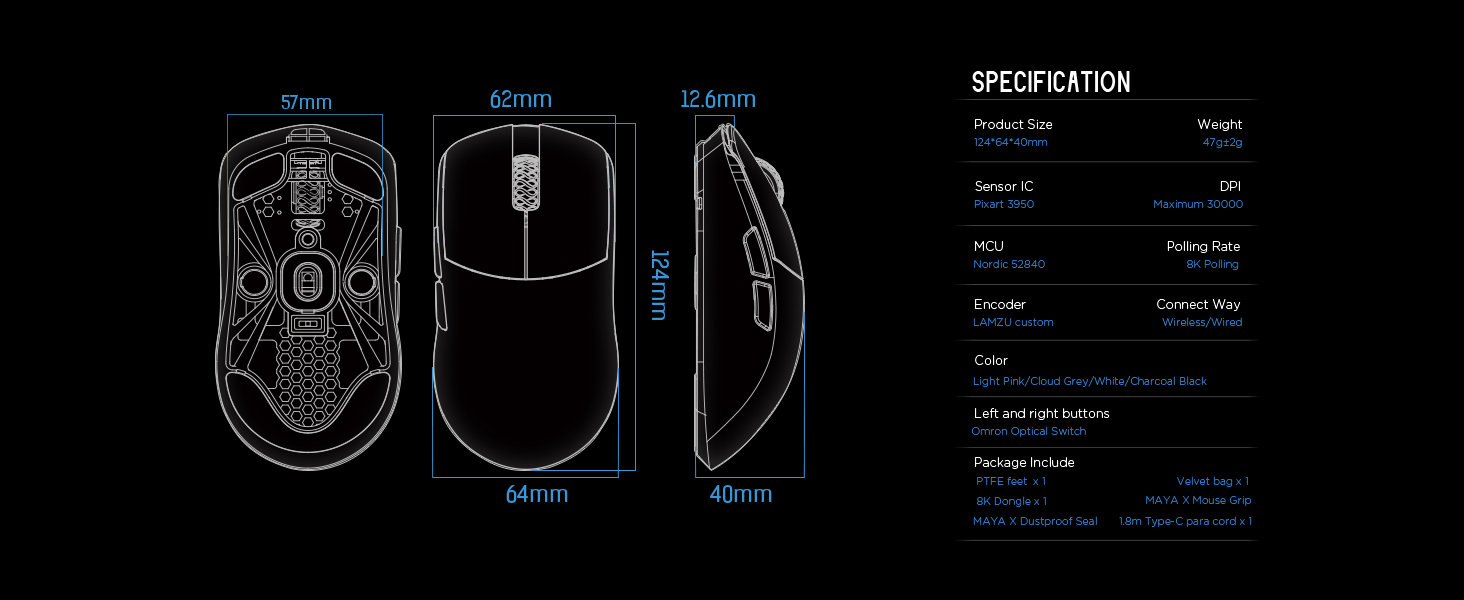
Image: Diagram illustrating the three common mouse grip types (palm, claw, fingertip) and how the symmetrical shape of the Maya X mouse accommodates them.

Obrázek: Detail view of the Pixart PAW 3950 sensor integrated circuit, highlighting its advanced technology.

Obrázek: Podrobný view of the Nordic 52840 Microcontroller Unit (MCU), emphasizing its role in efficient performance and 8K Polling Rate compatibility.
Průvodce nastavením
Obsah balení
- Lamzu Maya X Wireless Gaming Mouse
- PTFE Feet x 1 (extra set)
- 8K Dongle x 1
- Velvet Bag x 1
- MAYA X Mouse Grip
- MAYA X Dustproof Seal
- 1.8m Type-C Paracord x 1 (USB-C cable)
Počáteční připojení
The Lamzu Maya X mouse supports both 2.4G wireless and wired connections.
2.4G bezdrátové připojení
- Insert the included 8K dongle into an available USB port on your computer.
- Turn on the mouse using the On/Off switch located on the underside of the mouse.
- The mouse should automatically connect to the dongle. If not, refer to the software section for pairing instructions.
For optimal wireless performance, ensure the dongle is placed close to the mouse and away from sources of interference.
Drátové připojení
- Connect the provided 1.8m Type-C Paracord cable to the USB-C port on the front of the mouse.
- Připojte druhý konec kabelu k volnému portu USB na počítači.
- The mouse will function immediately in wired mode with a 1KHz polling rate.

Image: The Lamzu Maya X mouse demonstrating its dual connectivity modes: 2.4G wireless via dongle and wired via USB-C cable.
Software Installation (Optional but Recommended)
To unlock the full potential of your Lamzu Maya X mouse, including custom DPI settings, macro programming, and polling rate adjustments up to 8000Hz, download the official driver software from the Lamzu website. The software is web-based, eliminating the need for a local installation.
Návštěva: www.lamzu.com/support

Image: Screenshot of the Lamzu Aurora Web Driver interface, showing options for macro programming, button customization, DPI settings, polling rate, and LOD adjustment.
Ovládání myši
Funkce tlačítek
The Lamzu Maya X is a 6-button gaming mouse. Refer to the diagram below for button identification:

Image: Diagram illustrating the six programmable buttons on the Lamzu Maya X mouse: Left Click, Right Click, Scroll Wheel, DPI button, Forward side button, and Back side button. Also shows the On/Off switch on the underside.
- Levé kliknutí: Tlačítko primární akce.
- Klikněte pravým tlačítkem myši: Tlačítko sekundární akce.
- Rolovací kolečko: Pro funkci rolování a kliknutí prostředním tlačítkem myši.
- Tlačítko DPI: Cycles through preset DPI levels. Customizable via software.
- Forward Side Button: Default for forward navigation. Customizable.
- Back Side Button: Default for backward navigation. Customizable.
- Vypínač: Located on the underside of the mouse to power on/off.
Úprava DPI
The mouse features a Pixart PAW 3950 sensor supporting up to 30,000 DPI. You can adjust DPI settings through the dedicated DPI button or more precisely using the Lamzu Aurora Web Software ovladače.

Obrázek: Stylizovaný view of the Lamzu Maya X mouse highlighting its capability for up to 30,000 DPI, indicating high precision.
Míra hlasování
The Lamzu Maya X supports a maximum polling rate of 8,000 Hz when using the included 8K dongle. This high polling rate ensures smoother cursor movement and reduced input lag.

Image: The Lamzu Maya X mouse and its 8K dongle, promoting the 8K Polling Rate with Aurora Technology for enhanced performance.
Údržba
Čištění
- K otření povrchu myši použijte měkký, suchý hadřík.
- Pro odolnou špínu lehceampOtřete hadřík vodou nebo jemným čisticím roztokem. Vyhněte se agresivním chemikáliím.
- Clean the optical sensor area on the underside regularly with a cotton swab to ensure accurate tracking.
Péče o baterie
- The mouse uses a Lithium Ion battery. Avoid fully discharging the battery frequently to prolong its lifespan.
- Myš nabíjejte pomocí dodaného kabelu USB-C.
- Pokud myš delší dobu nepoužíváte, skladujte ji na chladném a suchém místě.
Replacing PTFE Feet
The package includes an extra set of PTFE feet. If the existing feet show significant wear, carefully peel them off and apply the new ones, ensuring the surface is clean and dry before application.

Obrázek: Spodní strana view of the Lamzu Maya X mouse, showing the PTFE feet, optical sensor, and on/off switch.
Odstraňování problémů
Myš nereaguje
- Zkontrolujte napájení: Ensure the mouse is turned on using the switch on the underside.
- Úroveň baterie: Pokud je baterie slabá, nabijte myš.
- Bezdrátové připojení: Ensure the 8K dongle is securely plugged into a USB port and within range. Try a different USB port.
- Kabelové připojení: Ujistěte se, že je kabel USB-C bezpečně připojen k myši i k počítači. Zkuste jiný port USB.
- Opravit: If using wireless, try re-pairing the mouse with the dongle via the software.
Inconsistent Tracking or Cursor Jitter
- Čistit senzor: Vyčistěte optický senzor na spodní straně myši.
- Povrch: Use the mouse on a clean, uniform surface. Avoid highly reflective or transparent surfaces.
- Nastavení DPI: Upravte nastavení DPI v softwaru na vhodnou úroveň.
- Míra hlasování: Ensure the polling rate is stable and appropriate for your system.
Buttons Not Functioning Correctly
- Kontrola softwaru: Verify button assignments in the Lamzu Aurora Web Software ovladače.
- Fyzická překážka: Check for any physical debris preventing button presses.
Specifikace
| Funkce | Detail |
|---|---|
| Rozměry produktu | 4.88 x 2.52 x 0.04 palce |
| Hmotnost položky | 1.66 unce (47 g) |
| Číslo modelu | Maya X |
| Baterie | 1 lithium-iontová baterie (součástí balení) |
| Datum první dostupnosti | 28. září 2024 |
| Výrobce | Lamzu |
| Země původu | Čína |
| Barva | Šedá |
| Technologie připojení | USB, 2.4G Wireless |
| Speciální funkce | Lehký |
| Technologie detekce pohybu | Optický (Pixart PAW 3950) |
| Maximální DPI | 30,000 DPI |
| Míra hlasování | Up to 8,000 Hz (with 8K dongle) |
| MCU | Nordic 52840 |
| Spínače | Optical Switches (Omron) |
| Kodér | Dust-Proof Encoder (30-grid) |
Záruka a podpora
Informace o záruce
Lamzu products typically come with a manufacturer's warranty. Please refer to the warranty card included in your product packaging or visit the official Lamzu webPodrobné záruční podmínky platné pro váš region naleznete na webových stránkách.
Zákaznická podpora
For technical assistance, troubleshooting, or any inquiries regarding your Lamzu Maya X mouse, please contact Lamzu customer support:
- Webmísto: www.lamzu.com/support
- E-mail: Obraťte se na úředníka webstránky pro kontaktní e-mail.
When contacting support, please have your product model (Maya X) and purchase information ready.
Související dokumenty - Maya X
 |
LAMZU Inca: Superlehká bezdrátová herní myš s rozlišením 8K Zažijte vrchol bezdrátového herního výkonu s myší LAMZU Inca, superlehkou bezdrátovou myší o hmotnosti 40 g, která je navržena pro přesnost a rychlost, disponuje senzorem Pixart 3950 a frekvencí dotazování až 8000 Hz. |
 |
Uživatelská příručka k bezdrátové herní myši Lamzu Maya 8K Podrobná uživatelská příručka pro bezdrátovou herní myš Lamzu Maya 8K Super Light, která zahrnuje specifikace, funkce a provozní pokyny. |
 |
LAMZU Mini Maya Wireless Mouse Product Manual Technical specifications and safety guidelines for the LAMZU Mini Maya Wireless Mouse, featuring a 3950 optical sensor and lightweight design. |
 |
Bezdrátová herní myš LAMZU Atlantis 4K – 26000 DPI Objevte LAMZU Atlantis 4K, superlehkou bezdrátovou herní myš navrženou pro výkon. Díky senzoru s rozlišením 26 000 DPI, bezdrátovému/kabelovému připojení 2.4 GHz a ergonomickému designu je ideální pro nadšence do esportu. Součástí balení jsou podrobné specifikace a informace o shodě s předpisy. |
 |
Uživatelská příručka k bezdrátové herní myši LAMZU Atlantis Mini 4K Uživatelská příručka k bezdrátové herní myši LAMZU Atlantis Mini 4K Super Light s podrobným popisem jejích funkcí, specifikací a použití. Zahrnuje informace o DPI, výdrži baterie, konektivitě a dalších informacích. |
 |
Bezdrátová herní myš LAMZU MAYAX Super Light - návod k obsluze a specifikace Podrobný návod k použití a specifikace pro bezdrátovou herní myš LAMZU MAYAX Super Light s rozlišením 30 000 DPI, hmotností 47 g a bezdrátovým/kabelovým připojením 2.4 GHz. |
Ask a question about this manual
Ask about setup, troubleshooting, compatibility, parts, safety, or missing instructions. Manuals+ will review the question and use this page’s manual context to help answer it.