
Zavedení
This manual provides essential information for the safe and effective use of your Yaheetech Gaming Chair. It covers assembly instructions, operational guidelines, maintenance tips, and troubleshooting common issues. Please read this manual thoroughly before assembly and use to ensure optimal performance and longevity of your chair.

Figure 1: Yaheetech Gaming Chair (Red/Black model)
The Yaheetech Gaming Chair is designed for extended periods of sitting, offering ergonomic support, a massage lumbar pillow, and a retractable footrest for enhanced comfort during gaming, work, or relaxation.
Bezpečnostní informace
Pro vaši bezpečnost a abyste zabránili poškození židle, dodržujte prosím následující pokyny:
- Avoid leaning back forcefully on the backrest to prevent tipping over.
- The chair is designed to support a maximum weight capacity of 300 lb. Exceeding this weight recommendation may result in reduced product stability or performance.
- Always follow the assembly instructions provided in this manual and refer to the user manual for safe operation of adjustable or folding chair mechanisms.
Obsah balení
Před zahájením montáže se ujistěte, že jsou všechny součásti přítomny a nepoškozené. Balení by mělo obsahovat:
- Uživatelská příručka
- Installation Hardware (screws, wrench)
- Chair Base with Casters
- Plynový výtahový válec
- Sedák
- Opěradlo
- Područky (2)
- Polštář na opěrku hlavy
- Lumbar Support Pillow (with USB massage function)
- Výsuvná opěrka nohou

Figure 2: Key components and ergonomic design highlights.
This image illustrates the ergonomic design, linkage armrests, breathable perforated leather, convenient back pocket, high-density foam cushioning, and larger base for stability, all of which are integral parts of the chair's design and assembly.
Nastavení a montáž
For detailed step-by-step assembly instructions, please refer to the included Installation Manual (PDF) or watch the official assembly video below. Ensure all screws are tightened securely before use.
Video 1: Yaheetech Gaming Chair Assembly Guide.
This video provides a visual guide to assembling your Yaheetech Gaming Chair, demonstrating each step from attaching the casters to securing the backrest and accessories.
A PDF version of the installation manual is also available for download: Instalační manuál (PDF)
Návod k obsluze
Nastavení výšky
To adjust the chair's height, locate the lever on the right side beneath the seat. Pull the lever upwards while seated to lower the chair, or pull it upwards while standing to raise the chair. Release the lever at your desired height.

Figure 3: Illustration of adjustable seat height and other features.
This image highlights the adjustable seat height (16.5"-20.3"), 135° reclining angle, foldable footrest, lockable backrest, and smooth 360° swivel function.
Sklopná opěrka zad
The backrest can recline up to 135 degrees. To recline, pull the lever on the left side of the seat upwards and lean back. Release the lever to lock the backrest in your preferred position. To return to an upright position, pull the lever and lean forward.
Ovládání opěrky nohou
To extend the footrest, pull it out from underneath the seat. To retract it, push it back in until it is fully stored.
Masážní bederní polštář
The lumbar pillow features a USB-powered massage function. Connect the USB cable from the pillow to any USB power source (e.g., power bank, computer USB port). Use the integrated switch on the cable to turn the massage function on or off. A convenient back pocket is provided to store the cable or a power bank.
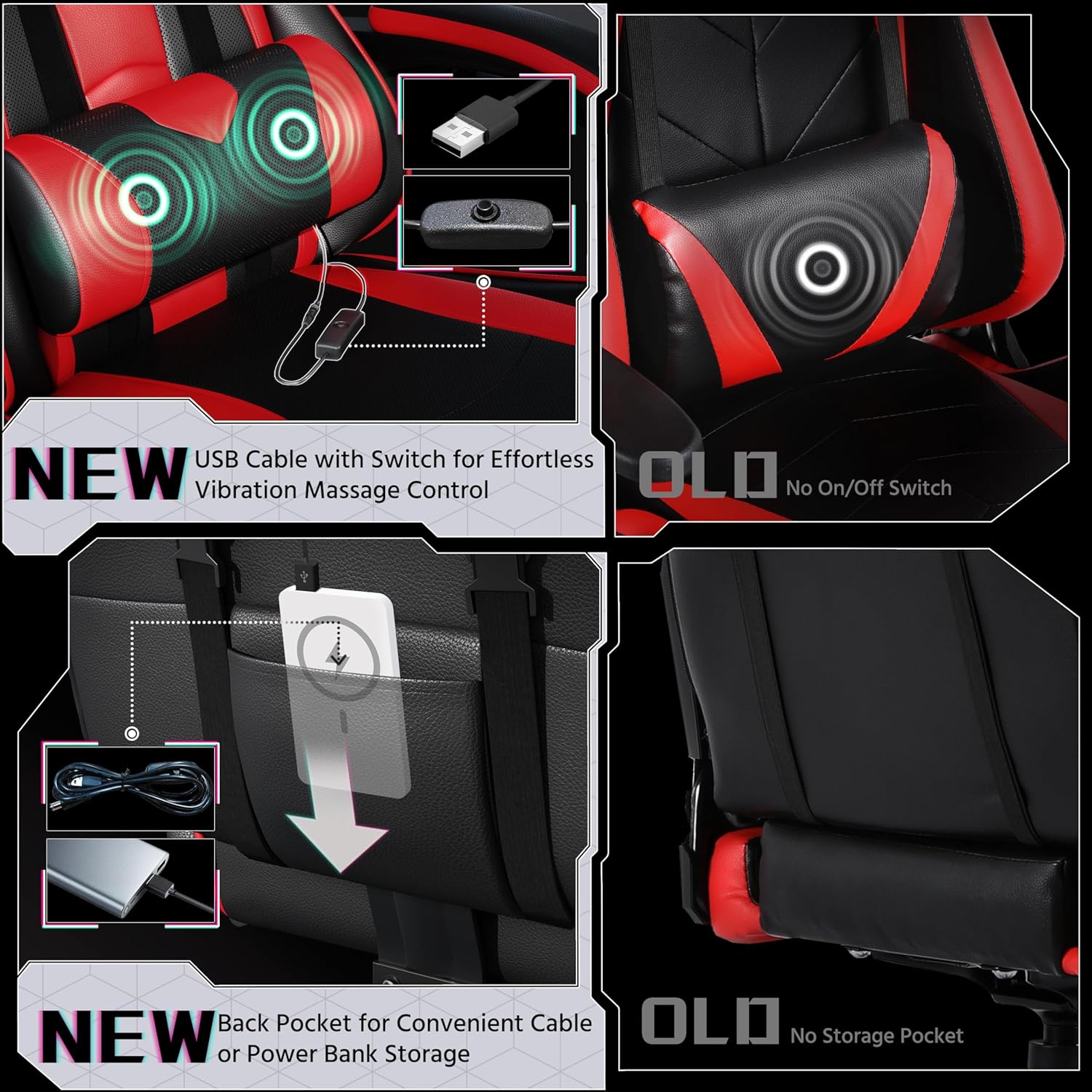
Figure 4: Details of the USB-powered massage lumbar pillow and back pocket.
This image shows the USB cable with switch for effortless vibration massage control and the new back pocket for convenient cable or power bank storage, enhancing user convenience.
Video 2: Demonstration of the Ergonomic Gaming Chair with Massage Lumbar Pillow.
This video showcases the massage lumbar pillow feature, demonstrating its connection and effect for enhanced comfort.
Funkce otáčení
The chair features a smooth 360-degree swivel function, allowing for easy movement and access to different areas around your desk without needing to reposition the entire chair.

Figure 5: Close-up of the chair's metal 5-star base and multi-directional PU casters.
The extra-wide silver-plated metal base and PU-edged casters ensure smooth and silent movement across various floor surfaces, contributing to the chair's stability and mobility.
Údržba a péče
To maintain the appearance and functionality of your Yaheetech Gaming Chair, follow these simple care instructions:
- Otřít: Použijte měkký, damp cloth to wipe down the faux leather surfaces. Avoid abrasive cleaners or solvents that may damage the material.
- Pravidelná kontrola: Pravidelně kontrolujte všechny šrouby a vruty, zda jsou pevně utažené. V případě potřeby je dotáhněte pro zachování stability.
- Péče o kolečka: Pro zajištění hladkého pohybu udržujte kolečka bez nečistot (vlasů, prachu atd.).
- Vyhněte se přímému slunečnímu záření: Dlouhodobé vystavení přímému slunečnímu záření může způsobit vyblednutí nebo popraskání umělé kůže.
Odstraňování problémů
If you encounter any issues with your gaming chair, refer to the common problems and solutions below:
| Problém | Možná příčina | Řešení |
|---|---|---|
| Chair Squeaks/Creaks | Uvolněné šrouby; tření mezi součástmi. | Tighten all assembly bolts. Apply a small amount of silicone lubricant to moving parts if needed. |
| Gas Lift Not Adjusting | Gas lift cylinder malfunction; lever mechanism issue. | Ujistěte se, že je páka pro nastavení výšky zcela zajištěna. Pokud problém přetrvává, může být nutné vyměnit plynový zvedací válec. |
| Massage Lumbar Pillow Not Vibrating | USB power issue; switch off. | Check USB connection to power source. Ensure the switch on the cable is in the "On" position. Try a different USB port or power source. |
| Chair Not Rolling Smoothly | Debris in casters; damaged casters. | Remove any hair or debris from the casters. If casters are damaged, they may need replacement. |
Specifikace
| Funkce | Detail |
|---|---|
| Značka | Yaheetech |
| Název modelu | Video Game Chairs (YAHEETECH-GC) |
| Barva | Červená / Černá |
| Rozměry produktu | 24.4"H x 28.5"Š x 52"V |
| Doporučená maximální hmotnost | 300 libry |
| Materiál | Faux Leather, Foam, Steel |
| Speciální funkce | USB with Switch, Adjustable Height, Arm Rest, Storage Bag, Foot Rest, Swivel, Reclining |
| Počet poloh vleže | 2 (up to 135 degrees) |
| Hmotnost položky | 38.2 libry |
| Zahrnuté komponenty | User Manual, Installation Hardware |
Záruka a podpora
For warranty information or further support, please refer to the product's packaging or contact Yaheetech customer service directly. You can also visit the official Yaheetech store on Amazon for more details: Obchod Yaheetech.