
1. Úvod
This manual provides detailed instructions for the proper use, setup, operation, and maintenance of your EBTOOLS Bluetooth Headset. Please read this manual thoroughly before using the product to ensure optimal performance and longevity.
2. Konec produktuview
2.1 Klíčové vlastnosti
- Otočný mikrofon: Easily adjust the microphone to the optimal angle for clear voice capture.
- Technologie Bluetooth 5.0: Ensures faster, more efficient, and stable wireless connectivity with compatible devices.
- Pohodlný design: Single-ear design with padded ear cushion and flexible headband for extended wear without discomfort.
- Dlouhá výdrž baterie: Up to 17 hours of talk time and 200 hours of standby time on a 2-hour charge.
- Univerzální kompatibilita: Works with laptops, cell phones, PCs, tablets, and other Bluetooth-enabled devices. Ideal for office, home, remote work, call centers, VoIP, and Skype.
2.2 Obsah balení
Ověřte, zda jsou v balení přítomny všechny položky:
- EBTOOLS Bluetooth Headset
- Nabíjecí základna
- Micro USB nabíjecí kabel
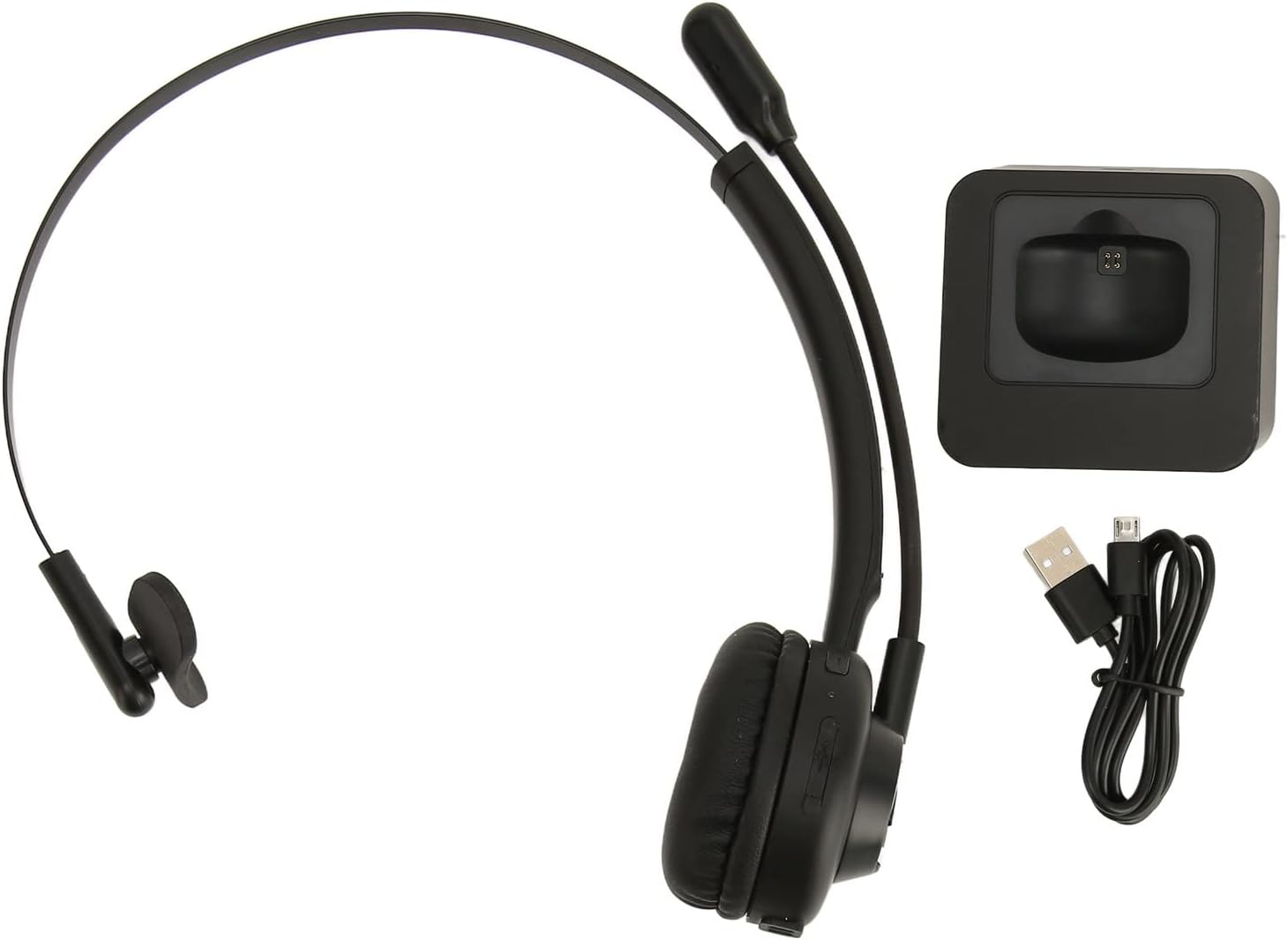
Image: The EBTOOLS Bluetooth Headset, its dedicated charging base, and a Micro USB charging cable, illustrating the complete package contents.
2.3 Headset Controls and Indicators

Image: A detailed diagram highlighting the Micro USB port, LED indicator, Volume Down button, Multifunctional button, and Volume Up button on the EBTOOLS Bluetooth Headset.
- Micro USB port: For direct charging of the headset.
- LED indikátor: Zobrazuje stav napájení, nabíjení a párování.
- Tlačítko hlasitosti: Snižuje hlasitost zvuku.
- Multifunctional Button: Controls power, pairing, call answer/end, and music playback.
- Tlačítko hlasitosti +: Zvyšuje hlasitost zvuku.
3. Nastavení
3.1 Nabíjení headsetu
Before first use, fully charge the headset. You can charge it using the included charging base or directly via the Micro USB port.
- Connect the Micro USB cable to the charging base and a power source (e.g., computer USB port, USB wall adapter).
- Place the headset onto the charging base, ensuring the charging contacts align. The LED indicator on the headset will show charging status.
- Alternatively, connect the Micro USB cable directly to the headset's Micro USB port and a power source.
- A full charge typically takes approximately 2 hours. The LED indicator will change color or turn off once fully charged.

Obrázek: Detailní záběr view of the headset's earcup, showing the charging contacts designed to connect with the charging base.
3.2 Párování se zařízením Bluetooth
Připojení náhlavní soupravy k zařízení:
- Zkontrolujte, zda je náhlavní souprava vypnutá.
- Stiskněte a podržte Multifunkční tlačítko for approximately 5-7 seconds until the LED indicator flashes red and blue alternately, indicating pairing mode.
- On your device (phone, PC, tablet), enable Bluetooth and search for new devices.
- Select "EBTOOLS Headset" (or similar name) from the list of available devices.
- Once connected, the LED indicator on the headset will typically flash blue slowly or turn solid blue.
- Pokud budete vyzváni k zadání hesla, zadejte „0000“.
3.3 Nošení headsetu
The headset is designed for comfort and flexibility.
- Adjust the flexible headband to fit comfortably over your head.
- The single ear design allows you to remain aware of your surroundings.
- Rotate the microphone boom to position it close to your mouth for optimal voice clarity. The microphone can be rotated 180 degrees to be worn on either the left or right ear.

Image: A person wearing the EBTOOLS Bluetooth Headset, demonstrating the comfortable fit and the adjustable, rotatable microphone positioned for clear communication.
4. Návod k obsluze
4.1 Zapnutí/vypnutí
- Zapnutí: Stiskněte a podržte Multifunkční tlačítko for approximately 3 seconds until the LED indicator flashes blue.
- Vypnout: Stiskněte a podržte Multifunkční tlačítko for approximately 3-5 seconds until the LED indicator flashes red and then turns off.
4.2 Nastavení hlasitosti
- Stiskněte tlačítko Tlačítko hlasitosti + to increase the listening volume.
- Stiskněte tlačítko Hlasitost - Tlačítko ke snížení hlasitosti poslechu.
4.3 Správa hovorů
- Přijmout hovor: Krátce stiskněte Multifunkční tlačítko když zazvoní příchozí hovor.
- Ukončit hovor: Krátce stiskněte Multifunkční tlačítko během hovoru.
- Odmítnout hovor: Stiskněte a podržte Multifunkční tlačítko for approximately 2 seconds when an incoming call rings.
- Znovu vytočit poslední číslo: Dvakrát stiskněte Multifunkční tlačítko když netelefonuje.
4.4 Music Playback (if supported by device)
- Přehrát/pozastavit: Krátce stiskněte Multifunkční tlačítko.
- Další skladba: Stiskněte a podržte Tlačítko hlasitosti +.
- Předchozí skladba: Stiskněte a podržte Hlasitost - Tlačítko.
4.5 Použití mikrofonu
The rotatable microphone ensures your voice is captured clearly.
- Adjust the microphone boom to be approximately 1-2 inches from your mouth.
- The microphone can be rotated 180 degrees to allow wearing the headset on either the left or right ear.

Obrázek: Detailní záběr view of the EBTOOLS headset's flexible microphone boom, highlighting its design for optimal voice pickup.
5. Údržba
5.1 Čištění
- Otřete sluchátka s mikrofonem měkkým, suchým nebo lehce navlhčeným hadříkem.amp tkanina.
- Nepoužívejte agresivní chemikálie, čisticí rozpouštědla ani silné čisticí prostředky.
- Zabraňte vniknutí vlhkosti do jakýchkoli otvorů.
5.2 Péče o baterii
- Charge the headset regularly, even if not in frequent use, to maintain battery health.
- Vyhněte se častému úplnému vybíjení baterie.
- Sluchátka skladujte na chladném a suchém místě mimo dosah extrémních teplot.
6. Řešení problémů
Pokud narazíte na problémy s náhlavní soupravou, podívejte se na následující běžná řešení:
| Problém | Možné řešení |
|---|---|
| Sluchátka se nezapínají. | Ensure the headset is charged. Connect it to the charging base or directly via USB. |
| Nelze spárovat se zařízením. | Ensure the headset is in pairing mode (LED flashing red/blue). Turn off and on your device's Bluetooth. Delete previous pairings on your device and try again. Ensure the headset is within range (typically 10 meters). |
| Žádný zvuk nebo nízká hlasitost. | Increase volume on both the headset and your connected device. Ensure the headset is selected as the audio output device on your computer or phone. Re-pair the headset. |
| Mikrofon nefunguje. | Ensure the microphone is positioned correctly. Check microphone settings on your connected device to ensure the headset is selected as the input device. |
| Přerušované připojení. | Move closer to your connected device. Avoid obstacles between the headset and device. Reduce interference from other wireless devices. |
7. Specifikace
| Funkce | Detail |
|---|---|
| Název značky | EBTOOLS |
| Číslo modelu | EBTOOLSrsgvuyg5fc |
| Technologie připojení | Bluetooth 5.0 |
| Hmotnost položky | 11.6 unce |
| Rozměry balení | 7.09 x 6.69 x 2.36 palce |
| Doba hovoru | Až 17 hodin |
| Pohotovostní doba | Až 200 hodin |
| Doba nabíjení | Přibližně 2 hodiny |
8. Záruka a podpora
For warranty information or technical support, please refer to the documentation included with your purchase or contact EBTOOLS customer service through the retailer where the product was purchased. Keep your proof of purchase for warranty claims.