
1. Úvod
Thank you for choosing the SOULION R80 PC Speaker. This device is a versatile soundbar designed for computers, laptops, tablets, and smartphones, offering multiple connectivity options, an integrated digital clock, and dynamic RGB lighting. This manual provides essential information for proper setup, operation, and maintenance to ensure optimal performance and longevity of your speaker.
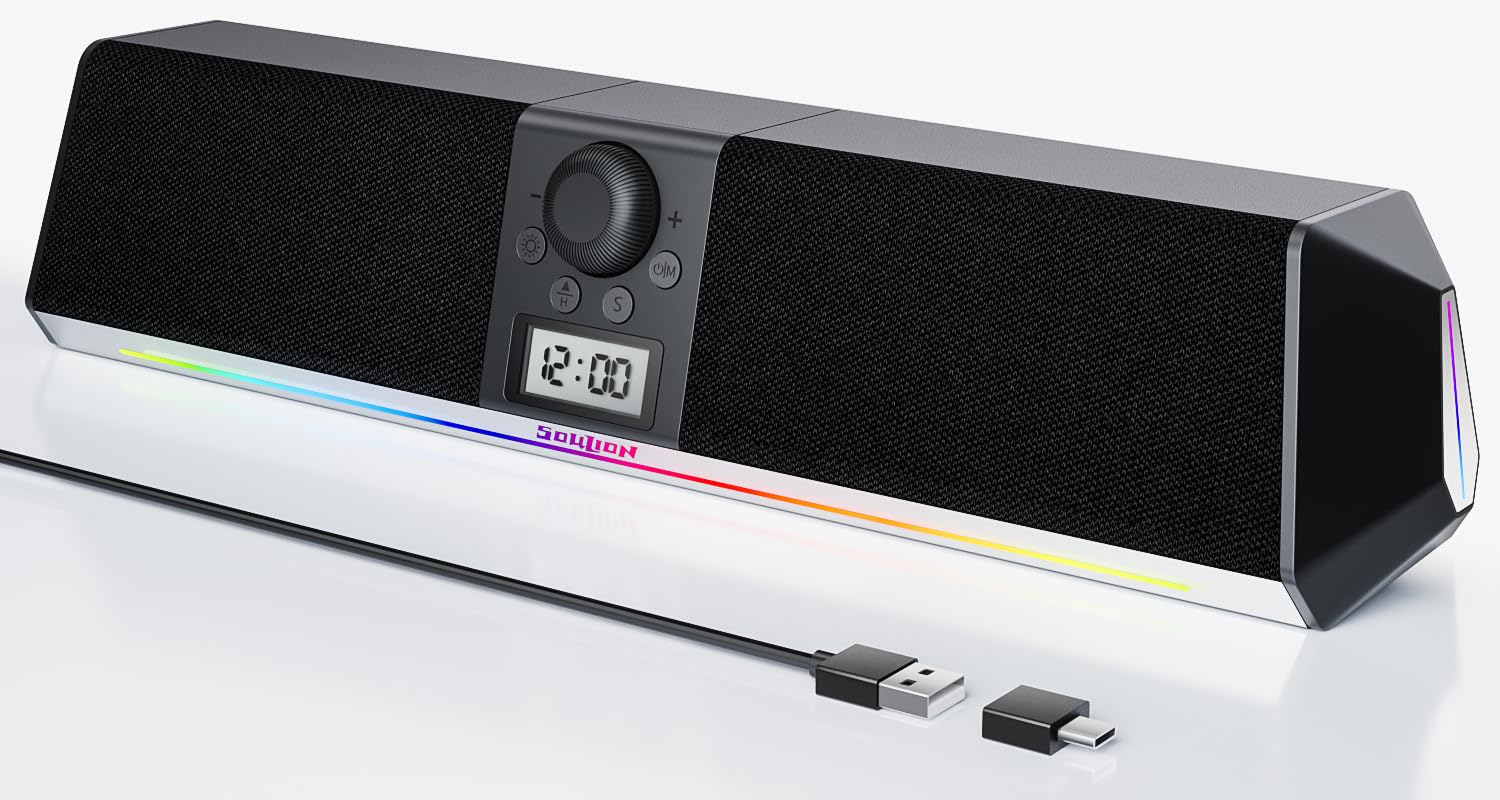
Image 1.1: SOULION R80 PC Speaker overview.
2. Obsah balení
Zkontrolujte prosím balení, zda neobsahuje následující položky:
- SOULION R80 Speaker Unit
- Adaptér USB-A na USB-C
- Uživatelská příručka
Poznámka: 2 AA batteries for the clock are not included and must be purchased separately. An AUX 3.5mm cable is also not included.
3. Vlastnosti produktu
- All-in-One Multifunction: Integrates an LCD digital clock and 5 colorful ambient lights, serving as both a speaker and a desktop decoration.
- Clear and Powerful Sound: Features two 10W (5W x 2) full-range speakers and two independent diaphragms for rich, clear audio. Independent buttons and a rotary knob for volume adjustment.
- Eye-Friendly Optional Lighting: Soft, downward-projecting light with 5 effects (gradient, rhythm, fixed color, etc.). Non-glaring and can be turned off. Light settings are memorized.
- Více režimů:
- Režim USB: Plug and Play compatibility with PCs, laptops, tablets, smartphones, and USB-C devices. No drivers required. (Not suitable for USB hubs).
- Režim Bluetooth: Stable wireless connection up to 10 meters. Supports quick pairing and memory clearing. (Requires USB power).
- Režim AUX: 3.5mm interface for older devices. (Requires a 3.5mm 3-pole cable, sold separately. USB power required).

Image 3.1: Internal speaker components for clear and powerful sound.
4. Nastavení
4.1 Zapnutí reproduktoru
The SOULION R80 speaker is USB-powered. Connect the USB cable from the speaker to an available USB port on your computer, laptop, or a USB power adapter (5V DC).
4.2 Installing Clock Batteries
The digital clock requires two AA batteries (not included) for initial activation and time setting. Locate the battery compartment on the back or bottom of the speaker, insert the batteries according to the polarity markings, and close the compartment. The clock will then be powered by the USB connection once connected.

Image 4.2: Battery compartment for the digital clock.
5. Návod k obsluze
5.1 Ovládací prvky Overview
The speaker features intuitive controls for power, volume, mode selection, and light effects.

Image 5.1: Control buttons and their functions.
- Power On/Off / Mode Switch (U|M button): Press and hold to power on/off. Short press to cycle through USB, Bluetooth, and AUX modes.
- Volume Control (Rotary Knob): Turn clockwise to increase volume, counter-clockwise to decrease.
- Light Mode Switch (Sun icon button): Short press to cycle through light effects. Press and hold to turn lights off/on.
- Clock Setting Buttons (H, S, Triangle buttons): Used for setting the digital clock.
5.2 Připojení k zařízením

Image 5.2: Various connection methods for the SOULION R80 speaker.
5.2.1 USB Mode (Plug and Play)
- Connect the speaker's USB cable to an available USB-A port on your computer or laptop.
- If your device has a USB-C port, use the included USB-A to USB-C adapter.
- The speaker will be automatically recognized by your operating system. Select "SOULION R80" as the audio output device in your sound settings.
Poznámka: Ensure the speaker is powered via USB. This mode does not require additional drivers. Avoid connecting to USB hubs for optimal performance.
5.2.2 Režim Bluetooth
- Ensure the speaker is powered via USB.
- Krátce stiskněte U|M button until the speaker announces "Bluetooth Mode" or the Bluetooth indicator light flashes.
- Na smartphonu, tabletu nebo notebooku povolte Bluetooth a vyhledejte dostupná zařízení.
- Select "SOULION R80" from the list to pair. A confirmation sound will indicate successful pairing.
- To clear Bluetooth memory, refer to the troubleshooting section or consult the full manual.
Poznámka: Bluetooth range is up to 10 meters.
5.2.3 Režim AUX
- Ensure the speaker is powered via USB.
- Krátce stiskněte U|M button until the speaker announces "AUX Mode".
- Connect a 3.5mm 3-pole audio cable (not included) from your audio source (e.g., PC, older tablet) to the AUX input port on the speaker.
Poznámka: For clearer audio and reduced background noise, USB or Bluetooth modes are generally recommended over AUX mode.
5.3 Setting the Digital Clock
To set the time on the integrated LCD digital clock:

Image 5.3: Step-by-step guide to setting the digital clock.
- Press the "H" key to select 12/24 hour format.
- Press the "S" key to select the hours for adjustment.
- Use the "Triangle" (up/down) keys to adjust the correct hour.
- Press the "S" key again to select the minutes for adjustment.
- Use the "Triangle" (up/down) keys to adjust the correct minutes.
- Finally, press the "S" key again to confirm and save the time.
5.4 Nastavení světelných režimů
The SOULION R80 features 5 different ambient light effects.

Image 5.4: Available LED light modes.
- Krátce stiskněte Přepínač světelného režimu (Sun icon button) to cycle through the 5 different light effects: Rainbow Light, Gradient Light, Rhythm Jump, Breathe Mode, and Monochrome Fixed.
- Stiskněte a podržte Přepínač světelného režimu to turn the ambient lights off or on.
The speaker remembers your last selected light effect even after being powered off and on.
6. Údržba
- Čištění: K čištění povrchu reproduktoru používejte měkký, suchý hadřík. Nepoužívejte tekuté čisticí prostředky ani abrazivní materiály.
- Skladování: Reproduktor skladujte na chladném a suchém místě mimo dosah přímého slunečního záření a extrémních teplot.
- Vyhněte se vodě: Reproduktor není vodotěsný. Chraňte jej před vodou a vysokou vlhkostí.
- Moc: Always use a stable 5V DC USB power source.
7. Řešení problémů
| Problém | Možná příčina | Řešení |
|---|---|---|
| Žádný zvuk |
|
|
| Bluetooth connection unstable or fails to pair |
|
|
| Clock not displaying or incorrect time |
|
|
| Světla nefungují nebo jsou zaseknutá |
|
|
8. Specifikace
| Název modelu | R80 |
| Značka | SOULION |
| Rozměry (D x Š x V) | 41.5 x 9.8 x 9.2 cm |
| Hmotnost | 940 gramů |
| Výstupní výkon reproduktoru | 10 wattů (5 W x 2) |
| Frekvenční odezva | 20 kHz |
| Technologie připojení | USB, Bluetooth |
| Režim zvukového výstupu | Stereo (2.0 kanálů) |
| Vstupní objemtage | 5 V (DC) |
| Typ montáže | Stolní držák |
| Materiál | Plast |
| Typ reproduktoru | Soundbar |
| Vlastnosti | LED Light, USB Port, Digital Clock |
| Doporučená použití | Computers, Smartphones, Tablets, Music Players, Gaming Consoles |
| Barva | Černý |
| Vodotěsný | Žádný |
| Dosah Bluetooth | 10 metrů |
| Kontrolní metoda | Tactile (Buttons, Rotary Knob) |
| Velikost reproduktoru | 2 palce (5 centimetrů) |
| Odstup signálu od šumu | 65 dB |
9. Záruka a podpora
Informace o záruce a zákaznické podpoře naleznete v dokumentaci dodané s vaším nákupem nebo se obraťte přímo na výrobce.
Manufacturer: Shenzhen Soulion Technology Co., LTD