
1. Úvod
This manual provides detailed instructions for the setup, operation, and maintenance of your BPXX Bluetooth Thermal Shipping Label Printer, Model D463B. This printer is designed for efficient and clear printing of various thermal labels, including 4x6 inch shipping labels, with a resolution of 203 DPI. It supports both Bluetooth connectivity via the 'Ezlabel' mobile application and USB connection to computers.
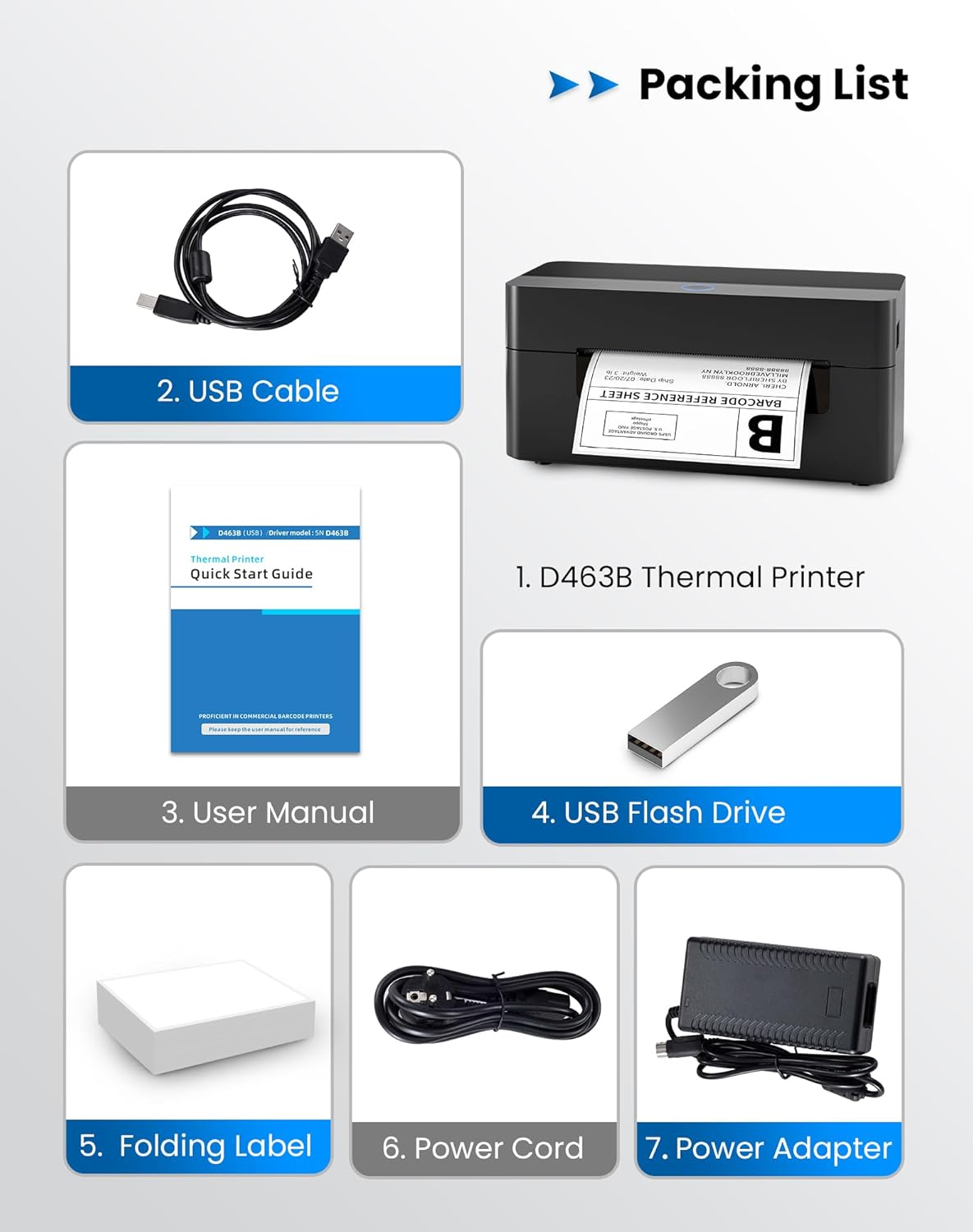
2. Seznam balení
Ověřte prosím, zda jsou ve vašem balení obsaženy všechny níže uvedené položky:
- 1 x BPXX D463B Thermal Printer
- 1 x USB kabel
- 1 x Uživatelská příručka
- 1 x USB flash disk (s ovladači)
- 1 x Folding Label (sample roll)
- 1 x Napájecí kabel
- 1 x napájecí adaptér
3. Průvodce nastavením
3.1 Hardwarové připojení
- Connect the power adapter to the printer's power port and plug the power cord into an electrical outlet.
- Open the printer cover and load the thermal labels. Ensure the labels are facing the correct direction for printing and are properly aligned within the guide rails.
- Pevně zavřete kryt tiskárny.

3.2 Instalace softwaru a ovladačů
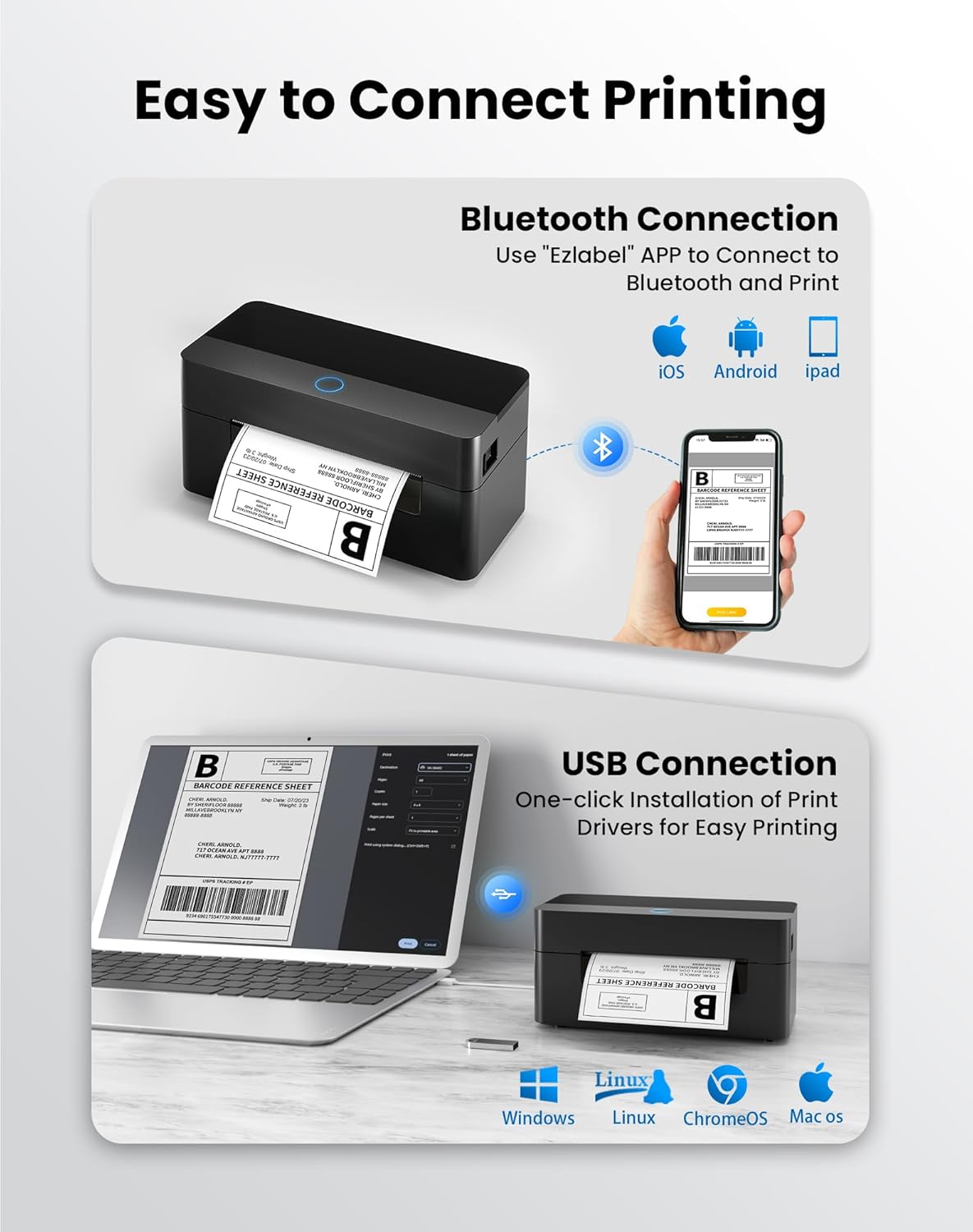
3.2.1 Mobilní aplikace (připojení Bluetooth)
For mobile printing, download the 'Ezlabel' application from your device's app store (available for iOS and Android).
- Hledat 'Ezlabel' in the App Store (iOS) or Google Play Store (Android).
- Stáhněte a nainstalujte aplikaci.
- Povolte na svém mobilním zařízení Bluetooth.
- Open the 'Ezlabel' app and follow the in-app instructions to connect to your BPXX D463B printer via Bluetooth.
3.2.2 Computer Driver (USB Connection)
For computer printing, install the appropriate drivers for your operating system (Windows, Mac OS, Linux, ChromeOS). Drivers are provided on the included USB flash drive or can be downloaded from the official webmísto.
- Insert the provided USB flash drive into your computer.
- Locate and run the installer for your operating system.
- Dokončete instalaci ovladače podle pokynů na obrazovce.
- Alternatively, download drivers from: BPXX Driver Download
4. Návod k obsluze
4.1 Načítání štítků
Ensure the thermal labels are loaded correctly for optimal printing. The printer supports thermal labels with widths ranging from 1 to 4.5 inches, including standard 4x6 inch shipping labels.
- Otevřete horní kryt tiskárny.
- Place the roll of thermal labels into the label compartment, ensuring the printable side faces upwards.
- Feed the first label through the printer's output slot until it is slightly extended.
- Upravte vodítka štítků tak, aby těsně odpovídala šířce štítků, ale nebyla příliš utažená.
- Zavřete horní kryt. Tiskárna automaticky detekuje velikost štítku a provede kalibraci.

4.2 Printing via Bluetooth (Mobile App)
- Ensure the printer is powered on and connected to the 'Ezlabel' app via Bluetooth.
- Open the 'Ezlabel' app on your mobile device.
- Select or create your desired label design. The app includes preset templates for various label sizes.
- Confirm print settings such as label size and quantity.
- Spusťte příkaz k tisku z aplikace.
4.3 Printing via USB (Computer)
- Připojte tiskárnu k počítači pomocí dodaného kabelu USB.
- Ujistěte se, že jsou ovladače tiskárny správně nainstalovány.
- Open the document or application from which you wish to print (e.g., a PDF viewer, shipping software).
- Select the BPXX D463B printer from your printer options.
- Adjust print settings as needed (e.g., paper size to 4x6 inches for shipping labels).
- Send the print command.
4.4 Supported Platforms and Print Quality
The BPXX D463B printer is compatible with major shipping carriers and e-commerce platforms, facilitating the printing of shipping labels, return labels, and postage štítky.
- Shipping Carriers: FedEx, UPS, USPS, DHL, EasyPost, etc.
- E-commerce Platforms: Amazon, Shopify, Etsy, eBay, Walmart, etc.
The printer utilizes a high-quality thermal print head and advanced algorithms to deliver clear and sharp barcodes and text at 203 DPI resolution. It achieves a high-speed output of 152mm/s, capable of printing approximately 72 4x6 inch shipping labels per minute.


5. Údržba
Pravidelná údržba zajišťuje optimální výkon a prodlužuje životnost vaší tiskárny.
- Čištění tiskové hlavy: Use an alcohol swab or a specialized thermal printer cleaning pen to gently wipe the print head. Ensure the printer is off and cooled down before cleaning.
- Čištění exteriéru: Otřete vnější povrch tiskárny měkkým,amp tkanina. Vyhněte se používání agresivních chemikálií nebo abrazivních materiálů.
- Odstranění prachu: Periodically use compressed air to clear any dust or paper debris from inside the label compartment.
6. Řešení problémů
If you encounter issues with your BPXX D463B printer, refer to the following common problems and solutions:
- Tiskárna nereaguje:
- Ensure the power cord is securely connected and the printer is turned on.
- For Bluetooth connection, verify that Bluetooth is enabled on your device and the printer is paired within the 'Ezlabel' app.
- For USB connection, check the USB cable connection and ensure drivers are correctly installed. Try a different USB port or cable.
- Poor Print Quality (Faint/Streaky Prints):
- Vyčistěte tiskovou hlavu podle pokynů v části Údržba.
- Ujistěte se, že používáte vysoce kvalitní termoštítky.
- Check print density settings in the 'Ezlabel' app or printer preferences on your computer.
- Štítky se nepodávají správně:
- Verify that labels are loaded correctly and aligned with the guide rails.
- Ujistěte se, že v dráze štítku nejsou žádné překážky.
- Perform a label calibration from the printer settings or app if available.
- Printer Offline Error:
- Restartujte tiskárnu i počítač/mobilní zařízení.
- Re-establish the Bluetooth or USB connection.
- Check printer status in your operating system's printer settings.
7. Specifikace produktu
| Název modelu | D463B |
| Značka | BPXX |
| Technologie tisku | Tepelný |
| Technologie připojení | Bluetooth, USB |
| Maximální rozlišení tisku | 203 x 203 Dots Per Inch (DPI) |
| Maximální rychlost tisku | 152 mm/s (72 labels per minute) |
| Maximální velikost média | 4 x 6 palce |
| Podporovaná šířka štítku | 1 - 4.5 palce |
| Kompatibilní zařízení | PC (Windows, Mac OS, Linux, ChromeOS), Smartphones (iOS, Android) |
| Kontrolní metoda | App ('Ezlabel'), USB |
| Rozměry produktu | 7.3"H x 3.3"Š x 3.3"V |
| Hmotnost položky | 1.6 libry |
| Zahrnuté komponenty | Printer, USB Cable, User Manual, USB Flash Drive, Sample Labels, Power Cord, Power Adapter |
8. Záruka a podpora
The BPXX D463B Thermal Shipping Label Printer comes with a limited warranty. For specific warranty terms and conditions, please refer to the documentation included with your product or contact BPXX customer support.
For technical assistance, troubleshooting, or any inquiries regarding your product, please contact BPXX customer support through the official webwebu nebo kontaktních informací uvedených na obalu produktu.