
1. Konec produktuview
The CAPOXO Wired 1080p Full HD Video Recording Camera is designed for discreet surveillance and recording. This device captures high-definition video with audio, features motion detection, and includes a night lamp for low-light conditions. It operates without Wi-Fi, storing recordings directly onto a memory card for easy access.
This manual provides detailed instructions for setting up, operating, and maintaining your CAPOXO camera to ensure optimal performance.
2. Obsah balení
Ověřte, zda jsou v balení přítomny všechny položky:
- CAPOXO Wired 1080p Full HD Video Recording Camera
- USB kabel
- Uživatelská příručka
Poznámka: A Micro SD card (16GB, 32GB, or 64GB Class 10 recommended) and a 5V/1A charger are not included and must be purchased separately.
3. Vlastnosti produktu
- Full HD 1080p Video Recording: Zachycuje jasné video ve vysokém rozlišenítage.
- Záznam zvuku: Nahrává zvuk spolu s videem.
- Detekce pohybu: Automatically triggers video recording when motion is detected.
- Noc Lamp Schopnost: Equipped with white LED lights for recording in low-light or dark conditions.
- Nepřetržité nahrávání: Records directly to a Micro SD card (not included).
- Snadné nastavení: Wired operation, no complex Wi-Fi configuration required.
- Přenosný design: Compact and easy to carry or clip.
- Otočný objektiv: 90° rotatable lens for wider viewing úhly.

Image: The CAPOXO camera featuring its 90-degree rotatable lens, allowing for flexible recording angles.

Obrázek: Detail view of the CAPOXO camera's rotatable lens mechanism, highlighting its design for wider field of view.
4. Průvodce nastavením
4.1 Nabíjení fotoaparátu
- Before first use, charge the camera for at least 1 hour.
- Connect the camera to a 5V/1A charger (not included) using the provided USB cable.
- Kontrolka nabíjení se během nabíjení rozsvítí a po úplném nabití zhasne.
- A full charge provides up to 3 hours of continuous operation. The camera can also be used while charging for extended recording.
4.2 Vložení Micro SD karty
- Ujistěte se, že je fotoaparát vypnutý.
- Vyhledejte slot pro kartu Micro SD na boku fotoaparátu.
- Gently insert a Class 10 Micro SD card (16GB, 32GB, or 64GB) into the slot until it clicks into place.
- Chcete-li kartu vyjmout, jemně ji znovu zatlačte, dokud nevyskočí.

Image: Diagram showing the CAPOXO camera's various components, including the Micro SD card slot, ON/OFF switch, and recording buttons.
5. Návod k obsluze
5.1 Zapnutí/vypnutí
- Pro zapnutí posuňte ON/OFF přepněte do polohy „ZAPNUTO“.
- Chcete-li vypnout, posuňte ON/OFF přepněte do polohy „VYPNUTO“.

Image: A hand demonstrating how to operate the CAPOXO camera, highlighting the easy-to-use ON/OFF switch for one-button recording.
5.2 Nahrávání videa
- Ujistěte se, že je kamera zapnutá a je vložena karta Micro SD.
- Slide the "SAVE -> VIDEO" switch to the "VIDEO" position to start recording.
- The indicator light will flash to confirm recording is in progress.
- To stop recording, slide the "SAVE -> VIDEO" switch back to the "SAVE" position. The video file budou uloženy na Micro SD kartu.
5.3 Záznam detekce pohybu
The camera automatically records 1080p HD videos when motion is detected. This feature is active when the camera is powered on and in recording mode.
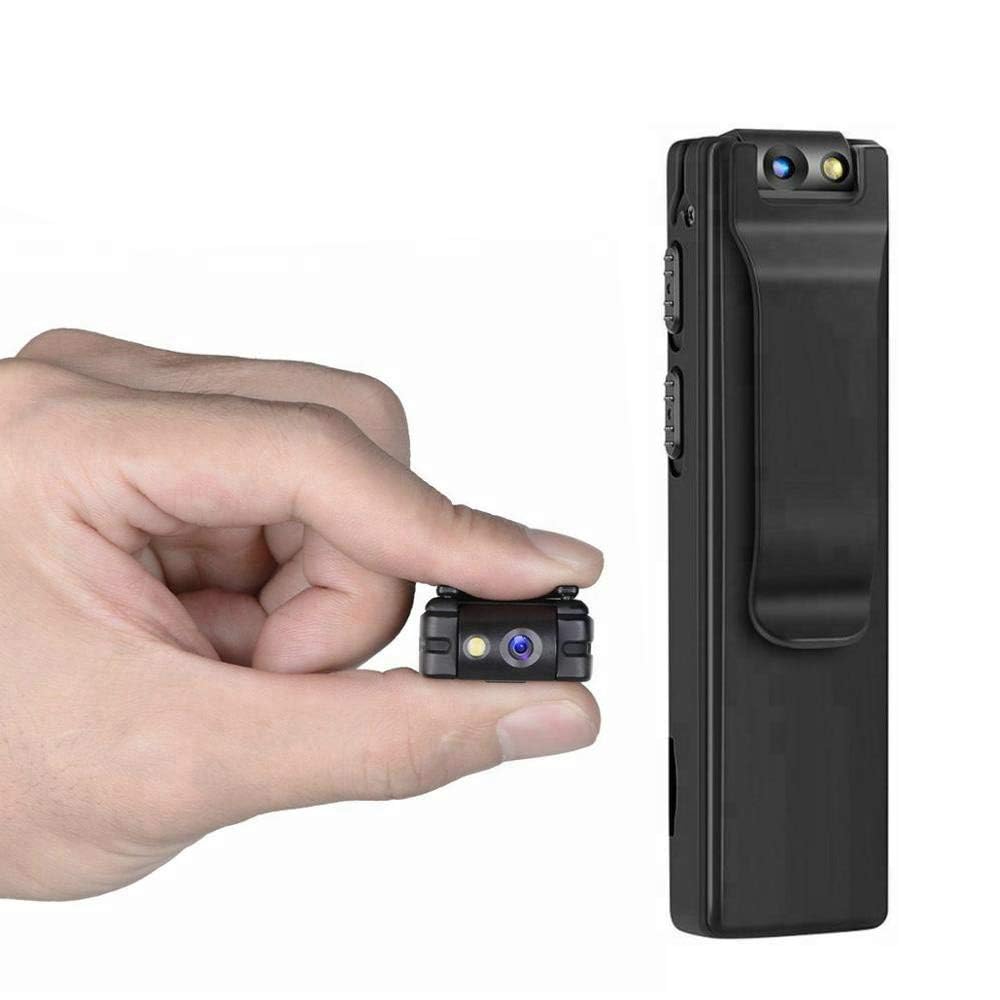
Image: Illustration of the CAPOXO camera's motion detection feature, showing it capturing activity in a room.
5.4 Night Lamp Režim
The camera is equipped with white LED lights to enhance visibility and recording quality in low-light or dark environments.
- To activate the night lamp, slide the "ON -> LAMP" switch to the "LAMP"pozice".
- To deactivate, slide the switch back to the "ON" position.
5.5 Fotografování
- Ujistěte se, že je kamera zapnutá.
- Press the "PHOTO" button once to take a still image. The indicator light may flash briefly.
- Photos are saved to the Micro SD card.
5.6 Viewnahrávky
- Vypněte fotoaparát.
- Remove the Micro SD card from the camera.
- Insert the Micro SD card into a computer's card reader or a compatible device.
- Přístup k files on the Micro SD card to view vaše nahraná videa a fotografie.

Image: The CAPOXO camera shown in different usage environments, including an office, car, laboratory, and home, demonstrating its versatility.

Image: The CAPOXO camera depicted in diverse settings such as business meetings, family gatherings, children playing, and outdoor adventures, illustrating its broad application.
6. Údržba
- Čištění: Use a soft, dry cloth to clean the camera body. Do not use liquid cleaners or solvents.
- Péče o čočky: Gently wipe the lens with a microfiber cloth designed for optics. Avoid touching the lens with bare fingers.
- Skladování: Fotoaparát skladujte na chladném a suchém místě mimo dosah přímého slunečního záření a extrémních teplot.
- Životnost baterie: Chcete-li prodloužit životnost baterie, vyvarujte se častého úplného vybíjení. Pravidelně ji nabíjejte, i když ji delší dobu nepoužíváte.
- Správa SD karet: Regularly back up important recordings and format the Micro SD card periodically to maintain optimal performance and prevent data corruption.
7. Řešení problémů
Kamera se nezapíná
- Ensure the battery is charged. Connect the camera to a charger for at least 1 hour.
- Ověřte, zda je vypínač ZAP/VYP v poloze „ZAPNUTO“.
Nelze nahrávat video
- Check if a Micro SD card is properly inserted.
- Ujistěte se, že je na kartě Micro SD dostatek volného místa.
- Verify the Micro SD card is Class 10 and within the supported capacity (16GB, 32GB, 64GB).
- Format the Micro SD card if it's a new card or if you encounter issues.
Nízká kvalita videa
- Ujistěte se, že objektiv fotoaparátu je čistý a bez šmouh nebo prachu.
- Check lighting conditions. Use the night lamp v prostředí se slabým osvětlením.
Detekce pohybu nefunguje
- Ensure the camera is powered on and in recording mode.
- Verify there are no obstructions blocking the camera's view.
Camera Unresponsive (Reset)
- If the camera becomes unresponsive, locate the "RESET" button (often a small pinhole).
- Use a thin object (like a paperclip) to gently press and hold the reset button for a few seconds.
- The camera should restart.
8. Specifikace
| Značka | CAPOXO |
| Číslo modelu | Capoxo-A-Cctv-Camera |
| Rozlišení záznamu videa | 1080p Full HD |
| Technologie připojení | Wired (USB for charging/data transfer) |
| Typ paměti Flash | Micro SD (supports 16GB, 32GB, 64GB Class 10) |
| Formát záznamu videa | AVI |
| Podporovaný formát zvuku | AAC |
| Speciální funkce | Motion Detection, Night Lamp, HD Resolution, 90° Rotatable Lens |
| Životnost baterie | Až 3 hodin (po plném nabití) |
| Nabíjecí vstup | 5V/1A (charger not included) |
| Rozměry (DxŠxV) | 9 x 2.5 x 1 centimetrů |
| Hmotnost položky | 250 g |
| Zahrnuté komponenty | Camera, USB Cable, Manual |
9. Záruka a podpora
For warranty information or technical support, please refer to the contact details provided with your purchase documentation or visit the official CAPOXO webmísto.
Uschovejte si prosím doklad o koupi pro případné reklamace.