
H3C H3C Magic NX15-UK
H3C Magic NX15 AX1500 Dual Band Gigabit Wi-Fi 6 Router User Manual
Model: H3C Magic NX15-UK
1. Úvod
The H3C Magic NX15 is a high-performance Gigabit Wi-Fi 6 router designed to provide a fast and reliable internet experience. Featuring a vertical design, full gigabit network ports, and Wi-Fi 6 (802.11ax) technology on the 5GHz band, it ensures high-speed connectivity. Equipped with four high-gain external antennas and EasyMesh compatibility, it offers wide and flexible network signal coverage. Enhanced security is provided through WPA3 encryption. This manual provides essential information for setting up, operating, and maintaining your H3C Magic NX15 router.
2. Obsah balení
Pečlivě zkontrolujte obsah balení. Pokud některé položky chybí nebo jsou poškozené, obraťte se na svého prodejce.
- H3C Magic NX15 AX1500 Dual Band Gigabit Wi-Fi 6 Router
- Napájecí adaptér
- Ethernetový kabel
- Stručný návod k instalaci (tato příručka)
3. Konec produktuview
Familiarize yourself with the components and interfaces of your H3C Magic NX15 router.
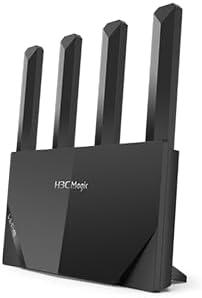
Obrázek 3.1: Přední view of the H3C Magic NX15 router, showcasing its vertical design and four external antennas.
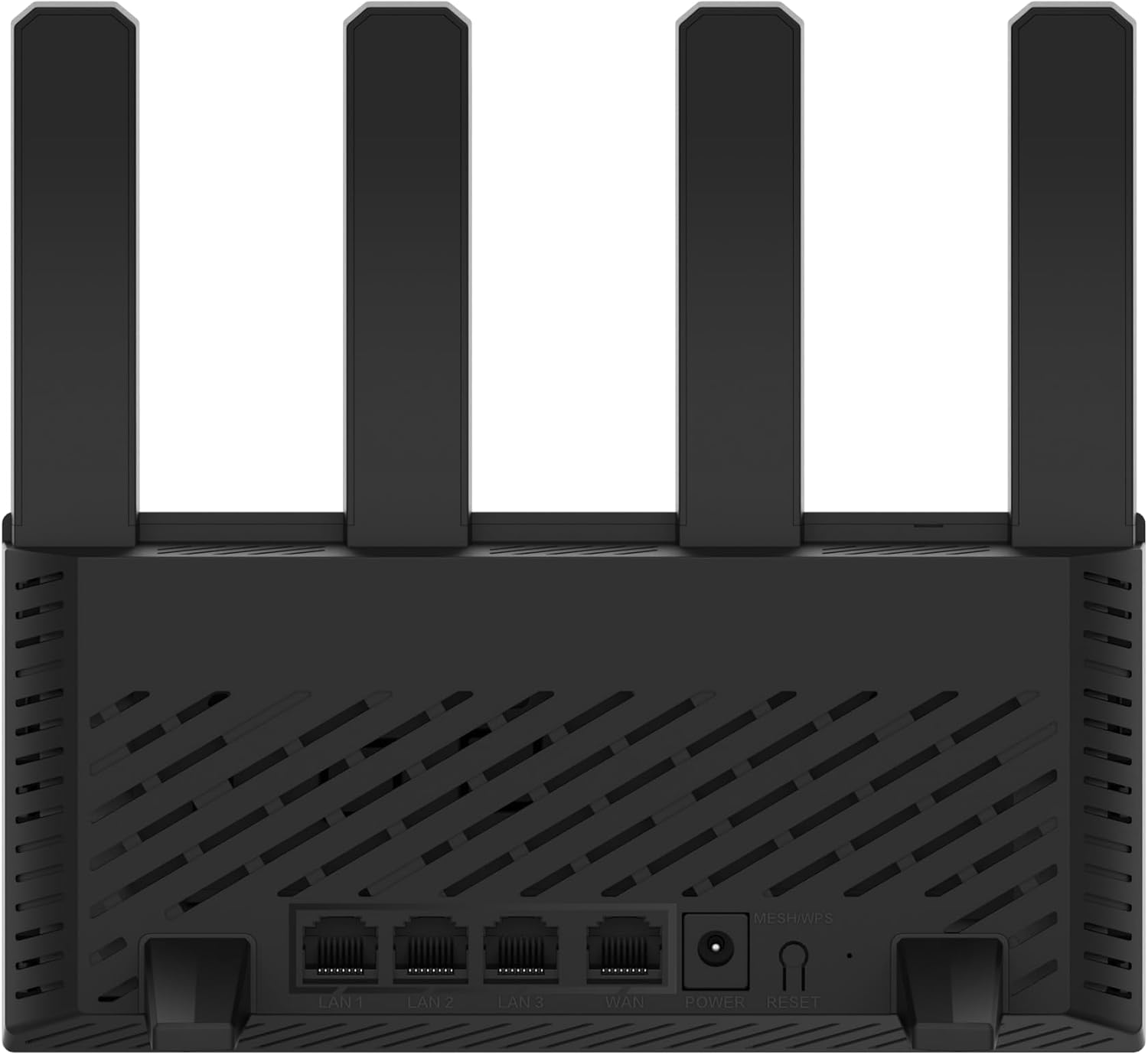
Obrázek 3.2: Zadní view of the H3C Magic NX15 router, displaying the LAN ports, WAN port, power input, and Reset/WPS button.

Obrázek 3.3: Nahoru view of the H3C Magic NX15 router, highlighting the ventilation design for heat dissipation.

Obrázek 3.4: Strana view of the H3C Magic NX15 router, showing the sleek profile and additional ventilation slots.
Popis portů a tlačítek:
- Port WAN: Připojuje se k modemu nebo síti poskytovatele internetových služeb (ISP).
- LAN porty (LAN1, LAN2, LAN3): Připojte se k drátovým zařízením, jako jsou počítače, herní konzole nebo chytré televizory.
- Napájecí port: Připojuje se k přiloženému napájecímu adaptéru.
- Tlačítko Reset/WPS:
- Press briefly to activate WPS (Wi-Fi Protected Setup) for easy connection of compatible devices.
- Press and hold for approximately 5-10 seconds to restore the router to factory default settings.
- Antén: Four high-gain external antennas for optimal Wi-Fi signal coverage.
4. Průvodce nastavením
Follow these steps to set up your H3C Magic NX15 router for the first time.
- Rozbalte router: Opatrně vyjměte router a veškeré příslušenství z obalu.
- Umístění routeru: Umístěte router na centrální místo ve vaší domácnosti nebo kanceláři, mimo dosah překážek a zdrojů rušení (např. mikrovlnných trub, bezdrátových telefonů). Zajistěte dobré větrání.
- Připojení k napájení: Connect the included power adapter to the router's power port and then plug the adapter into a power outlet. Wait for the router to power on and its indicator lights to stabilize.
- Připojení k modemu: Connect one end of the provided Ethernet cable to the WAN port on your H3C Magic NX15 router and the other end to your modem's LAN port.
- Připojení zařízení (volitelné): For wired connections, connect an Ethernet cable from one of the router's LAN ports to your computer or other network device.
- Připojení k Wi-Fi:
- Na počítači nebo mobilním zařízení vyhledejte dostupné sítě Wi-Fi.
- Vyberte název sítě Wi-Fi (SSID) vytištěný na štítku ve spodní části routeru.
- Enter the Wi-Fi password (also printed on the router's label) when prompted.
- Stránka pro správu přístupového routeru:
- Otevřete a web prohlížeč (např. Chrome, Firefox, Edge).
- Zadejte výchozí IP adresu (obvykle
192.168.1.1orh3cmagic.com) into the address bar and press Enter. Refer to the router's label for the exact address. - Follow the on-screen instructions to complete the initial setup, including setting a new administrator password and configuring your internet connection type (e.g., PPPoE, DHCP, Static IP).
5. Návod k obsluze
This section details the key features and how to operate your H3C Magic NX15 router.
5.1 Dual-Band Wi-Fi Operation
The H3C Magic NX15 supports dual-band Wi-Fi (2.4GHz and 5GHz) for optimal performance. It features intelligent band steering, which automatically directs your devices to the best available band (2.4GHz for wider coverage, 5GHz for higher speeds) without manual selection.
- Pásmo 2.4 GHz: Provides wider coverage and better penetration through walls, suitable for general browsing and devices further from the router.
- Pásmo 5 GHz: Offers higher speeds and lower latency, ideal for streaming 4K video, online gaming, and high-bandwidth applications, typically for devices closer to the router.
5.2 Intelligent Management via Mobile App
Manage your router conveniently using the dedicated H3C mobile application. The app allows for easy network settings configuration, network speed optimization, and various other operations.
- Stáhněte si aplikaci: Hledat the "H3C Magic" app in your device's app store (Google Play Store for Android or Apple App Store for iOS).
- Instalace a spuštění: Nainstalujte aplikaci a otevřete ji.
- Přihlásit se: Use your router's administrator credentials to log in to the app.
- Spravovat nastavení: Z aplikace můžete:
- Change Wi-Fi names and passwords.
- Monitorujte připojená zařízení.
- Nastavte rodičovskou kontrolu.
- Configure guest Wi-Fi networks.
- Optimize network performance.
5.3 EasyMesh for Whole-Home Wi-Fi
The H3C Magic NX15 supports EasyMesh technology, allowing you to expand your Wi-Fi coverage by adding additional compatible H3C mesh units. This creates a seamless whole-home Wi-Fi network, eliminating dead zones in large or complex house types.
- Refer to the EasyMesh setup guide provided with your additional mesh units for detailed instructions on expanding your network.
- Ensure all mesh units are compatible with the EasyMesh standard.
5.4 Funkce zabezpečení sítě
The router includes multiple functions to enhance your private network's security:
- Šifrování WPA3: Provides the latest and strongest Wi-Fi security protocol.
- Access Allowlist/Denylist: Control which devices can connect to your network based on their MAC addresses.
- Hostující Wi-Fi: Vytvořte pro hosty samostatnou Wi-Fi síť a zajistěte tak bezpečnost a soukromí vaší hlavní sítě.
- Rodičovská kontrola: Spravujte dobu přístupu k internetu a blokujte nevhodný obsah pro konkrétní zařízení.
These security features can be configured via the router's web management interface or the H3C mobile app.
6. Údržba
Proper maintenance ensures the longevity and optimal performance of your H3C Magic NX15 router.
- Umístění: Keep the router in a well-ventilated area, away from direct sunlight, heat sources, and moisture. The stereoscopic heat dissipation design with a large metal heat sink helps maintain stable operation.
- Čištění: Regularly dust the router's exterior and ventilation slots with a soft, dry cloth. Do not use liquid cleaners or aerosols.
- Aktualizace firmwaru: Pravidelně kontrolujte a instalujte aktualizace firmwaru prostřednictvím routeru web management interface or the mobile app. Firmware updates often include performance improvements, new features, and security patches.
- Restartování: Pokud máte problémy se sítí, zkuste restartovat router odpojením napájecího adaptéru na 10 sekund a jeho opětovným zapojením.
- Zabezpečení: Regularly change your Wi-Fi password and router administrator password to strong, unique combinations.
7. Řešení problémů
Tato část se zabývá běžnými problémy, se kterými se můžete setkat, a nabízí řešení.
| Problém | Možná příčina | Řešení |
|---|---|---|
| Žádný přístup k internetu |
|
|
| Wi-Fi Signal Weak or Unstable |
|
|
| Nelze přistupovat na stránku Správa routeru |
|
|
| Forgot Router Administrator Password | Heslo bylo ztraceno | Press and hold the Reset/WPS button on the router for 5-10 seconds to restore factory default settings. You will then need to reconfigure the router. |
8. Specifikace
Detailed technical specifications for the H3C Magic NX15 router.
| Funkce | Detail |
|---|---|
| Název modelu | H3C Magic NX15 |
| Číslo modelu položky | H3C Magic NX15-UK |
| Značka | H3C |
| Bezdrátové Standardní | 802.11ax (Wi-Fi 6) |
| Třída frekvenčního pásma | Dvoupásmové (2.4 GHz a 5 GHz) |
| Antény | 4 externí antény s vysokým ziskem |
| Porty | Gigabit WAN, Gigabit LAN (x3) |
| Speciální funkce | Access Point Mode, EasyMesh, WPA3 Security, Parental Control, Guest Wi-Fi, App Management |
| Rozměry (balení) | 21 x 19.4 x 6.3 cm |
| Hmotnost (balení) | 500 g |
| Výrobce | H3C |
| Země původu | Čína |
| První dostupný termín | 24. srpna 2024 |
9. Záruka a podpora
The H3C Magic NX15 router comes with a standard manufacturer's warranty. For specific warranty terms and conditions, please refer to the warranty card included in your product packaging or visit the official H3C webmísto.
Technická podpora:
If you encounter any issues or have questions regarding your H3C Magic NX15 router, please contact H3C technical support.
- Online podpora: Visit the official H3C support webStránka s nejčastějšími dotazy, průvodci řešením problémů a soubory ke stažení ovladačů/firmwaru.
- Kontaktní údaje: Refer to the H3C website or your product documentation for regional contact numbers and email support.
Please have your product model number (H3C Magic NX15-UK) and serial number ready when contacting support.
Ask a question about this manual
Ask about setup, troubleshooting, compatibility, parts, safety, or missing instructions. Manuals+ will review the question and use this page’s manual context to help answer it.