
CCYLEZ CCYLEZ6gksbyu8q1
CCYLEZ 16MP Digital Camera with Microphone User Manual
Model: CCYLEZ6gksbyu8q1
Zavedení
Děkuji za nákupasing the CCYLEZ 16MP Digital Camera. This manual provides detailed instructions on how to set up, operate, and maintain your camera to ensure optimal performance. This camera is designed for capturing high-resolution photos and 1080P videos, featuring a 16X digital zoom, a 2.4-inch display, and a professional external microphone for enhanced audio recording. Please read this manual thoroughly before using the product.
Bezpečnostní informace
- Nevystavujte fotoaparát vodě nebo vlhkosti.
- Zabraňte pádu fotoaparátu na zem nebo jeho vystavení silným nárazům.
- Chraňte fotoaparát před extrémními teplotami a přímým slunečním zářením.
- Používejte pouze schválené příslušenství a napájecí adaptéry.
- Nepokoušejte se fotoaparát rozebírat ani opravovat sami. Požádejte o pomoc zákaznickou podporu.
- Uchovávejte mimo dosah dětí.
Obsah balení
Zaškrtněte prosím políčko u následujících položek:
- 1 x CCYLEZ Digital Camera
- 1 x Camera Accessory (Strap)
- 1 x protiprachový kryt
- 2 x návody k použití
- 1 x Professional Microphone
- 1 x USB kabel
- 1 x zvukový kabel

Image: All included components, including the camera, microphone, cables, and dust cover.
Konec produktuview
Přední View
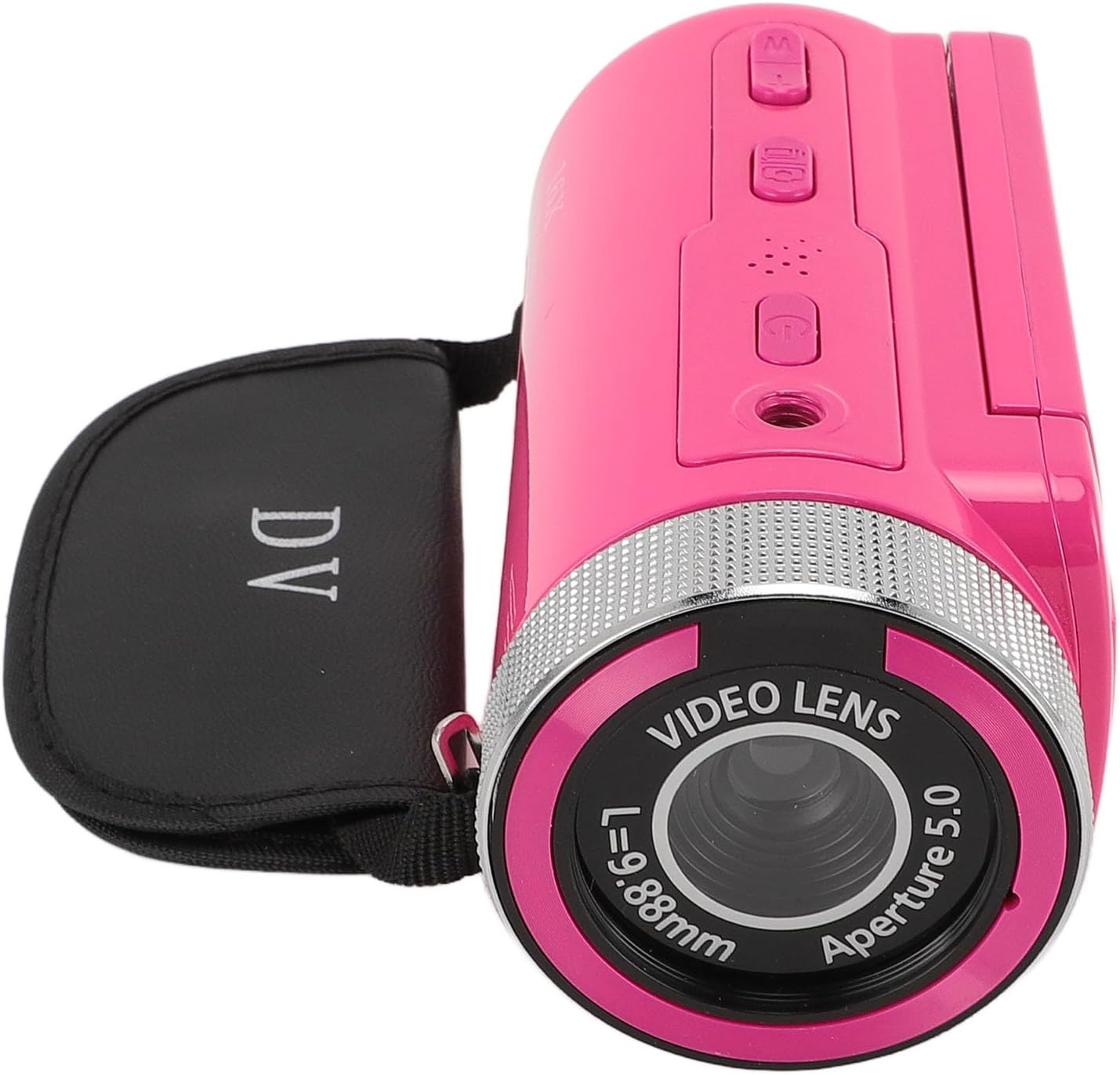
Image: The front of the camera, highlighting the video lens, aperture, and the 16X Digital Zoom label.
- Video Lens: Zachycuje obrázky a videa.
- Držák mikrofonu: Point for attaching the external microphone.
- 16x digitální zoom: Indicates the camera's digital zoom capability.
Zadní View a displej

Image: The camera's rear, showing the open 2.4-inch display and control buttons.
- 2.4palcový HD displej: Swivel screen for viewing and framing shots.
- Vypínač: Zapíná/vypíná fotoaparát.
- Tlačítko režimu: Přepíná mezi režimy foto a video.
- Navigační tlačítka: Pro navigaci v menu a ovládání zoomu.
- Tlačítko nahrávání/spouště: Spustí/zastaví nahrávání videa nebo pořídí fotografii.
Nastavení
1. Nabíjení baterie
The camera comes with a built-in 1020mAh lithium battery. Before first use, ensure the battery is fully charged. Connect the camera to a power source using the provided USB cable. The charging indicator light will illuminate during charging and turn off when fully charged.
2. Inserting a Storage Card
This camera supports storage cards up to 128GB (not included). Locate the memory card slot, usually on the side or bottom of the camera. Insert the card with the metal contacts facing the correct direction until it clicks into place. To remove, gently push the card in until it springs out.
3. Attaching the Professional Microphone

Image: The camera with the external microphone securely attached, ready for use.
- Locate the microphone mount on top of the camera.
- Slide the microphone into the mount until it is secure.
- Connect the microphone's audio cable to the camera's microphone input jack (typically a 3.5mm port).
- Ensure the connection is firm for optimal audio capture.
4. Počáteční zapnutí
Press and hold the Power button for a few seconds to turn on the camera. The 2.4-inch HD display will light up. You may need to set the date and time during the first startup.
Návod k obsluze
1. Zapnutí/vypnutí
- Zapnutí: Stiskněte a podržte tlačítko Napájení.
- Vypnutí: Znovu stiskněte a podržte tlačítko napájení, dokud se obrazovka nevypne.
2. Switching Modes (Photo/Video)
Press the Mode button to toggle between photo capture mode and video recording mode. The current mode will be indicated on the display.
3. Pořizování fotografií

Image: The camera's 2.4-inch HD display showing a clear image, demonstrating its photo capture capability.
- Ujistěte se, že je fotoaparát v režimu fotografie.
- Frame your shot using the 2.4-inch display.
- Press the Shutter button to take a picture. The camera supports up to 16MP photos.
4. Nahrávání videí

Image: The camera in use, recording video with the attached microphone, highlighting its 1080P video resolution capability.
- Přepněte do režimu nahrávání videa.
- Press the Record button to start recording. A red indicator or timer will appear on the screen.
- Press the Record button again to stop recording. The camera supports 1080P, 720P, and 480P video resolutions.
5. Použití digitálního zoomu
While in photo or video mode, use the zoom buttons (often integrated with navigation buttons) to zoom in or out. The camera features 16X digital zoom.
6. Navigace v menu
Press the Menu button to access camera settings. Use the navigation buttons to scroll through options and the OK/Shutter button to select. Settings include image resolution, video resolution, timestamp, exposure, and more.
7. Přehrávání

Image: The camera's screen displaying a recorded video or photo during playback, showing people shaking hands.
- Press the Playback button (if available, or navigate via Menu) to review vaše pořízené fotografie a videa.
- Pro procházení použijte navigační tlačítka files.
- Press the OK/Shutter button to play videos or view photos in full screen.
8. Připojení k počítači
Connect the camera to your computer using the provided USB cable. The camera will typically appear as a removable disk, allowing you to transfer files. Ensure the camera is powered on when connected.
Údržba
- Čištění: Use a soft, dry cloth to clean the camera body. For the lens and screen, use a specialized lens cleaning cloth and solution. Avoid abrasive materials.
- Skladování: When not in use, store the camera in a cool, dry place, away from dust and direct sunlight. Remove the memory card if storing for extended periods.
- Péče o baterie: Fully charge the battery before long-term storage and recharge every few months to maintain battery health.
Odstraňování problémů
| Problém | Možná příčina | Řešení |
|---|---|---|
| Fotoaparát se nezapne. | Slabá baterie; vadná baterie; problém s tlačítkem napájení. | Charge the battery fully. Ensure the power button is pressed correctly. |
| Nelze fotografovat/nahrávat videa. | No memory card; memory card full; incorrect mode. | Vložte paměťovou kartu. Smažte nepotřebné files or replace the card. Switch to the correct mode. |
| Špatná kvalita zvuku. | Microphone not connected properly; microphone settings. | Ensure the microphone is securely attached and connected. Check audio settings in the camera menu. |
| Kamera zamrzne. | Software glitch; memory card issue. | Remove and reinsert the battery (if possible). Format the memory card (back up data first). |
Specifikace
| Funkce | Specifikace |
|---|---|
| Značka | CCYLEZ |
| Číslo modelu | CCYLEZ6gksbyu8q1 |
| Efektivní rozlišení | 16 MP |
| Rozlišení videa | 1080P, 720P, 480P |
| Digitální zoom | 16x |
| Velikost obrazovky | 2.4 palce |
| Storage Card Support | Max 128 GB (není součástí dodávky) |
| Baterie | 1020mAh Lithium Battery (built-in) |
| Mikrofon | Profesionální interníview Mikrofon (externí) |
| Technologie připojení | USB |
| File Formát (video) | MP4 |
| File Format (Image) | JPEG |
| Spodní rozhraní | 1/4 standard screw hole |
Záruka a podpora
This product comes with a standard manufacturer's warranty. For detailed warranty information, please refer to the separate warranty card included in your package or visit the official CCYLEZ website. If you encounter any issues or require technical assistance, please contact CCYLEZ customer support through their official channels.
Pro další pomoc prosím navštivte CCYLEZ Store on Amazon.
Ask a question about this manual
Ask about setup, troubleshooting, compatibility, parts, safety, or missing instructions. Manuals+ will review the question and use this page’s manual context to help answer it.