
1. Úvod
Welcome to the user manual for your new DOOGEE N55PRO Unlocked Cell Phone. This guide provides essential information to help you set up, operate, maintain, and troubleshoot your device. Please read this manual thoroughly to ensure optimal performance and longevity of your smartphone.
2. Obsah balení
Upon opening your DOOGEE N55PRO package, please verify that all the following items are included:
- Chytrý telefon DOOGEE N55PRO
- USB nabíjecí kabel
- Napájecí adaptér
- Nástroj pro vysunutí SIM karty
- Rychlý průvodce
- Záruční list
3. Zařízení skončiloview
Familiarize yourself with the physical components and features of your DOOGEE N55PRO.
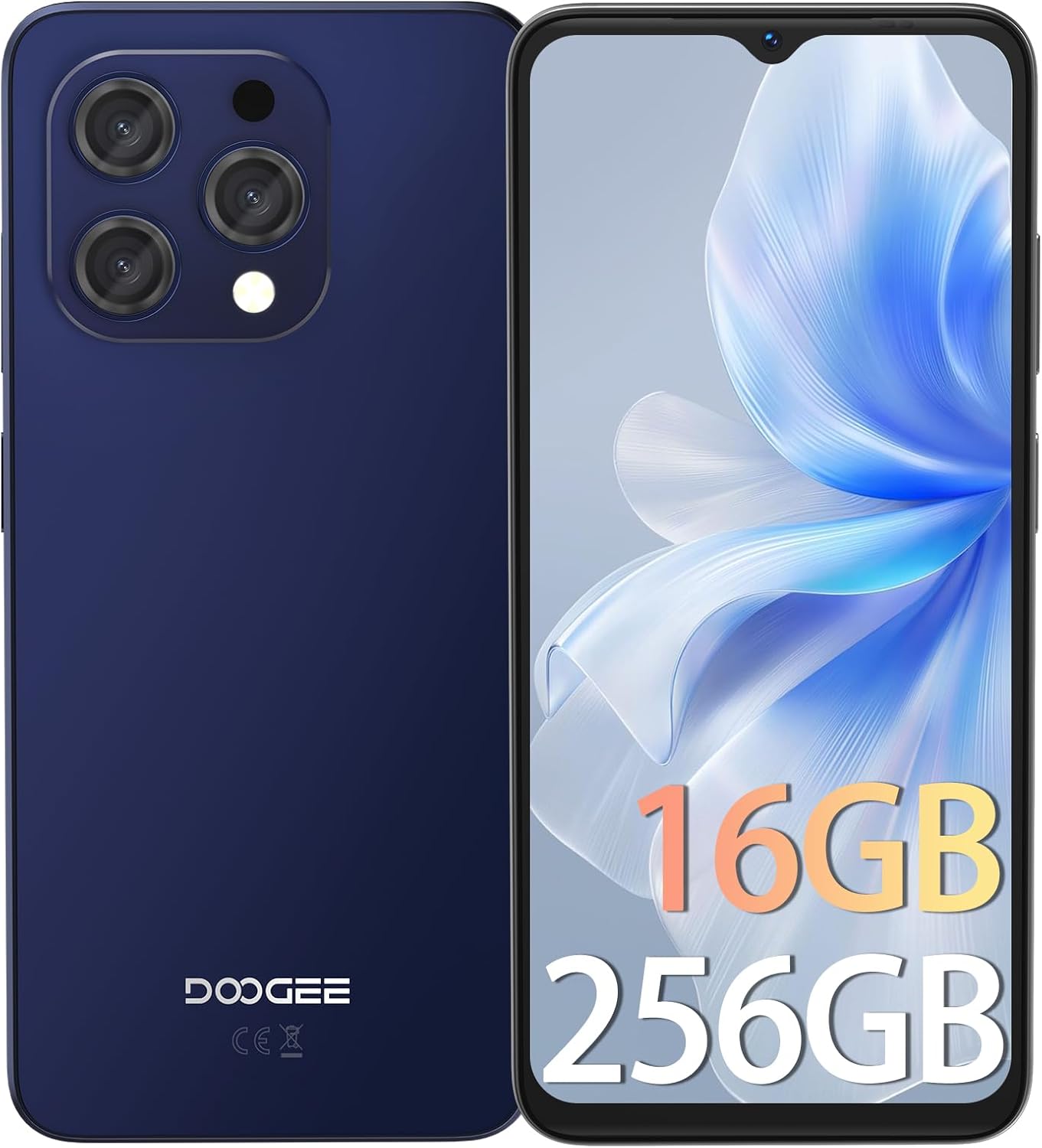
Obrázek 3.1: Přední a zadní view of the DOOGEE N55PRO smartphone. The front features a large display with a waterdrop notch for the front camera, while the back shows the multi-camera module and the DOOGEE branding.
Klíčové vlastnosti:
- Zobrazit: 6.56-inch HD+ 90Hz IPS Waterdrop Screen for smooth visuals and vibrant colors.
- Procesor: Octa-Core processor for efficient performance.
- Paměť a úložiště: 16GB RAM (with expansion technology) and 256GB ROM, expandable up to 1TB via TF card.
- Kamery: Dual Camera system with a 13MP rear camera and an 8MP front camera.
- Baterie: 5150 mAh super-large battery for extended usage.
- Operační systém: Android 14, offering the latest features and security updates.
- Konektivita: 4G cellular technology, Wi-Fi, Bluetooth, and a 3.5mm headphone jack.
- Zabezpečení: Face Unlock ID for convenient and secure access.

Obrázek 3.2: Illustration highlighting the 16GB RAM (with expansion technology) and 256GB ROM, expandable to 1TB, powered by an Octa-Core processor.

Obrázek 3.3: Close-up of the DOOGEE N55PRO's 6.56-inch HD+ 90Hz IPS Waterdrop Screen, emphasizing its silky smooth, bright colors, high saturation, and fine image quality.

Obrázek 3.4: Visual representation of the DOOGEE N55PRO's 5150 mAh super-large battery, indicating long-lasting power.

Obrázek 3.5: Depiction of the DOOGEE N55PRO's Dual Camera system, featuring a 13MP rear camera and an 8MP front camera, with exampfotky.

Obrázek 3.6: Visual representation of the Android 14 operating system interface on the DOOGEE N55PRO, showcasing various app screens.

Obrázek 3.7: Nadview of key features including Face Unlock ID, Dual 4G support, device weight (186g), and the 3.5mm connection port.
4. Nastavení
4.1. Vložení SIM karty (kart) a karty MicroSD
- Vyhledejte držák SIM karty na boku telefonu.
- Vložte nástroj pro vysunutí SIM karty do malého otvoru vedle zásobníku a jemně zatlačte, dokud zásobník nevyskočí.
- Vložte kartu (karty) Nano-SIM a/nebo kartu MicroSD do určených slotů v držáku. Ujistěte se, že zlaté kontakty směřují dolů.
- Opatrně zatlačte zásobník zpět do telefonu, dokud nezacvakne na místo.
4.2. Počáteční zapnutí a nastavení
- Stiskněte a podržte tlačítko napájení (obvykle na pravé straně), dokud se neobjeví logo DOOGEE.
- Follow the on-screen instructions to select your language, connect to Wi-Fi, set up your Google account, and configure security settings like Face Unlock ID.
4.3. Nabíjení zařízení
Before first use, it is recommended to fully charge your phone. Connect the USB charging cable to the phone's charging port and the power adapter, then plug the adapter into a wall outlet. The battery indicator on the screen will show charging status.
5. Provoz
5.1. Základní navigace
- Dotyková obrazovka: Klepnutím vyberete, přejetím prstem posouváte, přiblížením rozevřením prstů.
- Domovská obrazovka: Přístup k aplikacím, widgetům a oznámením.
- Navigační lišta: Use the Back, Home, and Recent Apps buttons (or gestures) at the bottom of the screen.
5.2. Volání a odesílání zpráv
- Volání: Open the Phone app, dial a number or select a contact, then tap the call icon.
- Zprávy: Open the Messages app, tap 'Start chat', enter a recipient, type your message, and tap send.
5.3. Připojení k internetu
- Wi-Fi: Go to Settings > Network & internet > Wi-Fi. Turn Wi-Fi on, select a network, and enter the password if required.
- Mobilní data: Go to Settings > Network & internet > Mobile network. Ensure Mobile data is turned on.
5.4. Použití fotoaparátu
Open the Camera app. Tap the shutter button to take a photo. Swipe left or right to switch between photo, video, and other modes. Use the front/rear camera toggle to switch between the 13MP rear camera and the 8MP front camera.
5.5. Bezpečnostní prvky
Your DOOGEE N55PRO supports Face Unlock ID. To set it up, go to Settings > Security > Face Unlock and follow the on-screen instructions to register your face.
6. Údržba
6.1. Čištění zařízení
Use a soft, lint-free cloth to gently wipe the screen and body of your phone. Avoid using harsh chemicals or abrasive materials, as they can damage the device's finish.
6.2. Péče o baterie
- Nevystavujte telefon extrémním teplotám.
- Používejte pouze originální nabíječku nebo certifikovanou kompatibilní nabíječku.
- Nenechávejte telefon nabíjet příliš dlouho po úplném nabití.
6.3. Aktualizace softwaru
Regularly check for software updates to ensure your phone has the latest features, security patches, and performance improvements. Go to Settings > System > System update to check for and install available updates.
6.4. Zálohování dat
It is recommended to regularly back up your important data (photos, contacts, documents) to a cloud service (like Google Drive) or a computer to prevent data loss.
7. Řešení problémů
Tato část se zabývá běžnými problémy, se kterými se můžete setkat u svého DOOGEE N55PRO.
| Problém | Možné řešení |
|---|---|
| Telefon se nezapne | Ensure the battery is charged. Connect to a charger for at least 10 minutes, then try powering on again. If unresponsive, perform a forced restart by holding the Power button for 10-15 seconds. |
| Aplikace padá nebo zamrzávají | Clear the cache of the problematic app (Settings > Apps > [App Name] > Storage & cache > Clear cache). If the issue persists, restart the phone or reinstall the app. |
| Nelze se připojit k Wi-Fi | Ensure Wi-Fi is enabled. Restart your router and phone. Forget the network and reconnect. Check if other devices can connect to the same Wi-Fi network. |
| Špatná kvalita hovoru nebo žádný signál | Zkontrolujte, zda je vaše SIM karta správně vložena. Přesuňte se do oblasti s lepším pokrytím sítě. Restartujte telefon. Pokud problém přetrvává, kontaktujte svého mobilního operátora. |
| Baterie se rychle vybíjí | Reduce screen brightness, close unused apps running in the background, disable unnecessary features like GPS or Bluetooth when not in use. Check battery usage in Settings to identify power-hungry apps. |
8. Specifikace
Detailed technical specifications for the DOOGEE N55PRO.
| Funkce | Specifikace |
|---|---|
| Název modelu | N55PRO |
| Operační systém | Android 14 |
| Velikost obrazovky | 6.56 palce |
| Kapacita paměti | 256 GB |
| BERAN | 16GB (with expansion technology) |
| Buněčná technologie | 4G |
| Technologie připojení | Wi-Fi |
| Bezdrátový nosič | Odemčeno pro všechny přepravce |
| Zadní kamera | 13 MP |
| Přední kamera | 8 MP |
| Kapacita baterie | 5150 XNUMX mAh |
| Rozměry produktu | 6.42 x 2.95 x 0.31 palce |
| Hmotnost položky | 6.5 unce (185 gramů) |
| Vstup lidského rozhraní | Dotyková obrazovka |
| Barva | Yellow (as per product data, though images show blue/black) |
| Datum první dostupnosti | 19. prosince 2024 |
9. Záruka a podpora
Your DOOGEE N55PRO comes with a standard manufacturer's warranty. Please refer to the warranty card included in your package for specific terms and conditions, including warranty period and coverage details. For technical support, service, or further inquiries, please visit the official DOOGEE website or contact their customer service department. Contact information can typically be found on the DOOGEE webna webu nebo na záručním listu.
10. Bezpečnostní informace
Před použitím zařízení si prosím přečtěte všechny bezpečnostní informace, abyste zajistili jeho bezpečné a správné používání. Nesprávné použití může způsobit poškození zařízení nebo zranění osob.
- Zařízení nerozebírejte ani neupravujte.
- Nevystavujte zařízení extrémním teplotám, přímému slunečnímu záření nebo ohni.
- Udržujte zařízení mimo dosah vody a vlhkosti.
- Používejte pouze schválené nabíječky a příslušenství.
- Nepoužívejte zařízení při řízení nebo obsluze těžkých strojů.
- Respect local regulations regarding mobile phone usage.