
1. Úvod
This manual provides detailed instructions for the EKSA E5000 BT Wireless Gaming Headset. It covers setup, operation, maintenance, and troubleshooting to ensure optimal performance and user experience. Please read this manual thoroughly before using the headset.

Image 1.1: The EKSA E5000 BT Wireless Gaming Headset, showcasing its design and included USB dongle.
2. Obsah balení
Ověřte, zda jsou v balení přítomny všechny položky:
- EKSA E5000 BT Wireless Gaming Headset
- Detachable Noise-Canceling Microphone
- Bezdrátový vysílač 2.4 GHz USB-A
- USB-C to USB-A Adapter (integrated with 2.4GHz transmitter)
- 3.5mm audio kabel
- Nabíjecí kabel USB (typu C)
- Uživatelská příručka
- Carrying Pouch (if included with your specific model variant)
3. Konec produktuview a ovládací prvky
Seznamte se s komponenty a ovládacími prvky headsetu.
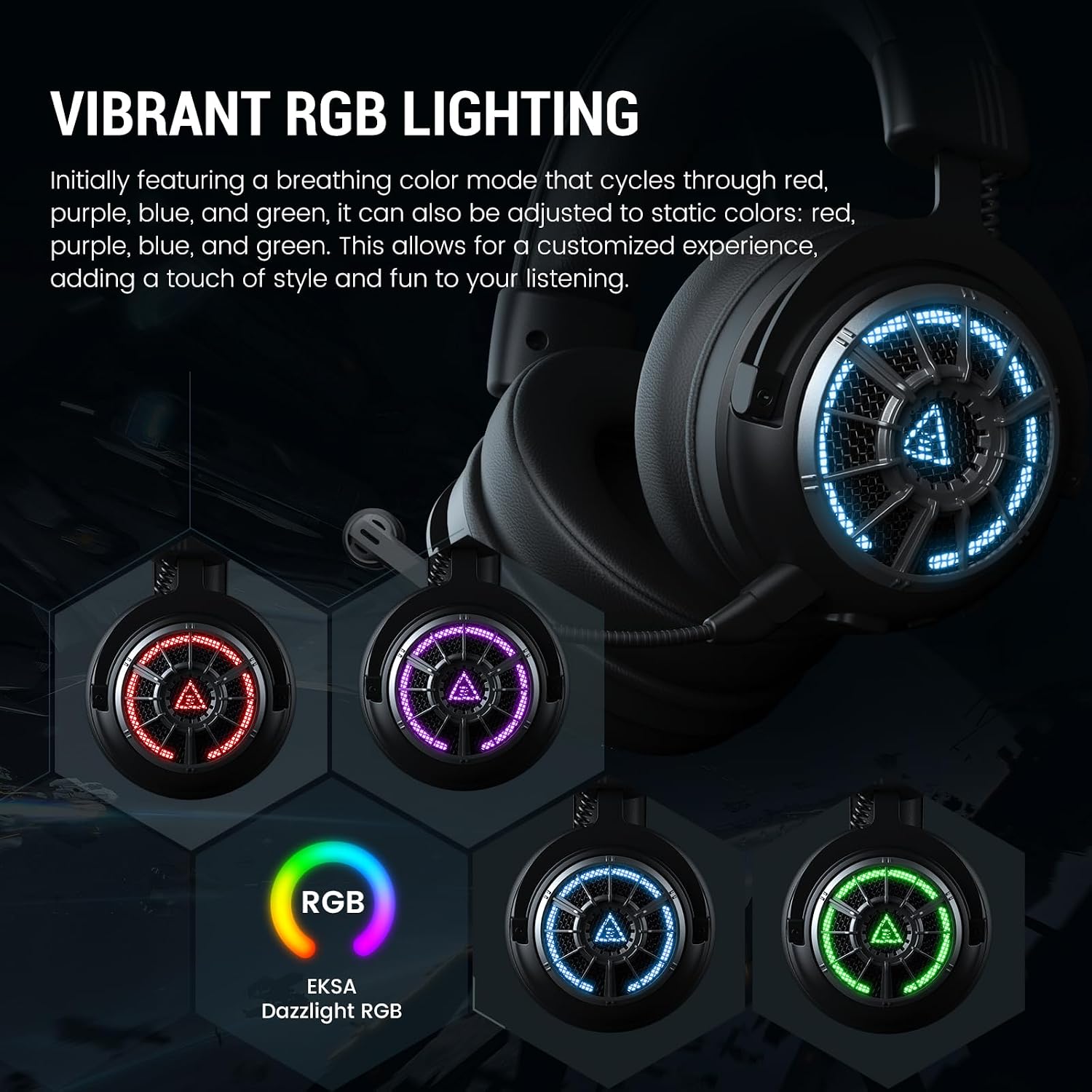
Obrázek 3.1: Konecview of headset controls including volume wheel, microphone mute, power/light switch, Type-C interface, and microphone interface.
- Kolečko hlasitosti: Upravuje úroveň zvukového výstupu.
- Tlačítko ztlumení mikrofonu: Zapíná/vypíná mikrofon.
- Power/Light Switching Button: Powers the headset on/off, controls RGB lighting modes, and manages play/pause functions in Bluetooth mode.
- Rozhraní typu C: Used for charging and 2.4GHz wireless connection (when the transmitter is plugged in).
- Rozhraní mikrofonu: Port for connecting the detachable microphone.
4. Setup and Connection Modes
The EKSA E5000 BT headset supports three connection modes: 2.4GHz Wireless, Bluetooth 5.3, and 3.5mm Wired.

Image 4.1: Visual representation of the three available connection modes and their compatible devices.
4.1. Bezdrátové připojení 2.4 GHz
This mode provides a low-latency, lossless wireless connection for PC, PS5, PS4, Mac, and Nintendo Switch (docked mode).
- Plug the 2.4GHz USB-A wireless transmitter into an available USB port on your device (PC, PS5, PS4, Mac, Switch dock).
- If your device only has a USB-C port, use the integrated USB-C adapter on the transmitter.
- Zapněte sluchátka stisknutím a podržením tlačítka napájení, dokud se nerozsvítí kontrolka.
- The headset will automatically pair with the transmitter. The indicator light will turn solid blue when connected.
- Ujistěte se, že v nastavení systému jsou jako vstupní a výstupní zvukové zařízení vybrána sluchátka.
Note: The wireless transmitter chip is located inside the Type-C port of the dongle. The dongle must be plugged into a USB or Type-C port for the 2.4GHz connection to function.
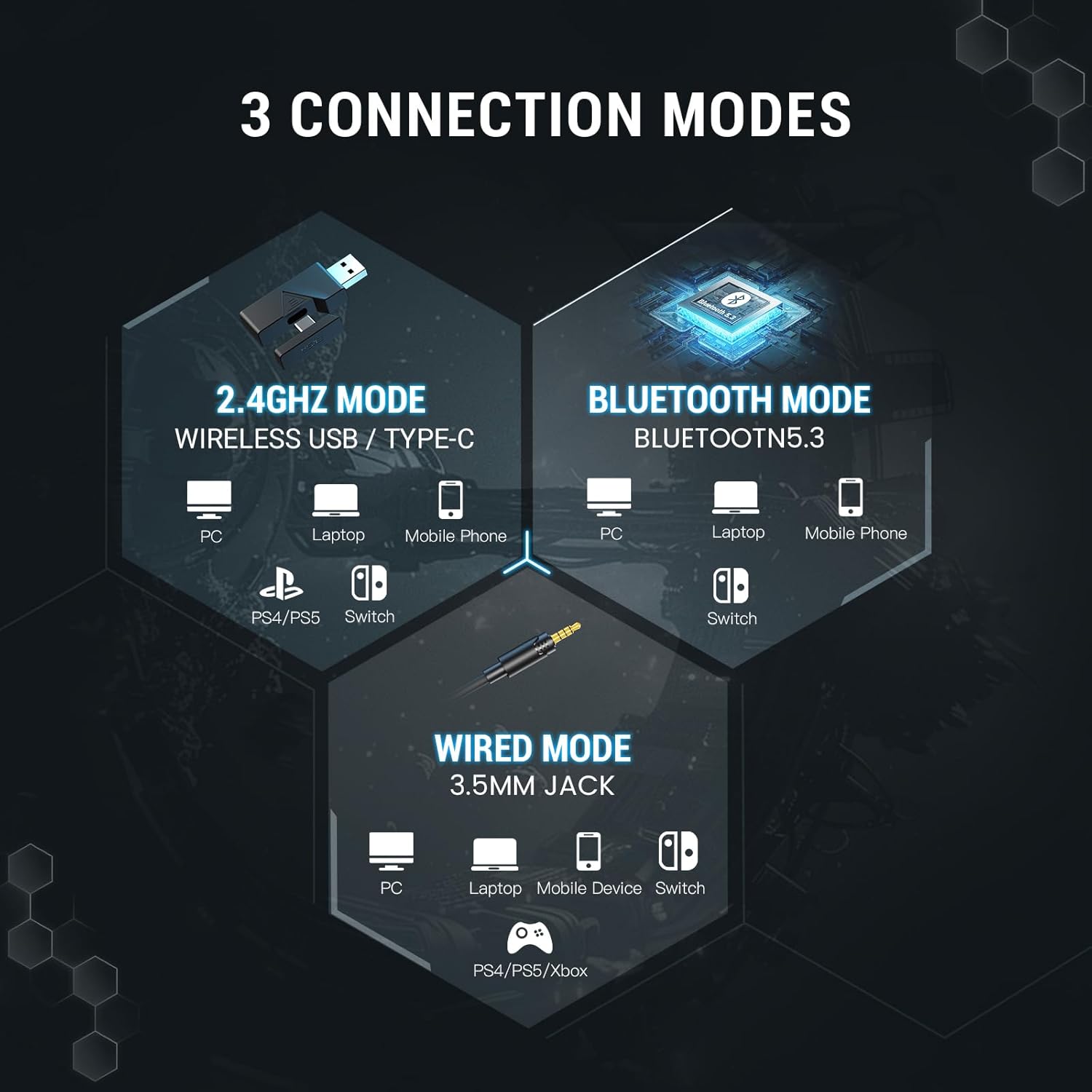
Image 4.2: The 2.4GHz wireless transmitter and its connection to the headset, highlighting stable, ultra-low latency technology.
4.2. Připojení Bluetooth 5.3
Connect wirelessly to Bluetooth-enabled devices such as PCs, laptops, mobile phones, and Nintendo Switch (undocked).
- Zapněte náhlavní soupravu.
- Press and hold the Power/Light Switching button for approximately 5 seconds until the indicator light flashes blue and red, indicating pairing mode.
- On your device, go to Bluetooth settings and search for "EKSA E5000 BT".
- Select the headset to pair. The indicator light will turn solid blue upon successful connection.
4.3. Drátové připojení 3.5 mm
Use the 3.5mm audio cable for universal compatibility with devices like PC, laptops, mobile devices, Nintendo Switch, PS4, PS5, and Xbox Series X/S.
- Připojte jeden konec 3.5mm audio kabelu k 3.5mm jacku na sluchátkách.
- Druhý konec připojte k 3.5mm audio portu na vašem zařízení.
- The headset will operate in passive wired mode. Power is not required for basic audio.
Note: The Xbox Series consoles only support 3.5mm wired connections for this headset. RGB lighting will not function in wired mode.

Image 4.3: Detailed compatibility matrix showing headphone, microphone, and mute function support for various devices across Bluetooth, USB Dongle Wireless, Type-C Dongle Wireless, and 3.5mm Audio Wired connections.
5. Audio Features and Software
5.1 Prostorový zvuk
The EKSA E5000 BT headset features 7.1 Surround Sound for an immersive audio experience, particularly beneficial for gaming. This feature is enabled through the EKSA SoundBase software.

Image 5.1: Visual representation of 7.1 Surround Sound technology enhancing the gaming experience.
- Stažení ovladače: To utilize 7.1 surround sound, download the EKSA 7.1 driver from the official EKSA webmísto.
- Kompatibilita: The EKSA 7.1 surround sound driver is compatible only with Windows 10/11 operating systems.
- Aktivace: After installing the driver and ensuring the 2.4GHz transmitter is connected, select the 7.1 surround sound mode within the software.

Image 5.2: The EKSA SoundBase Software interface, offering sound customization options including 7.1 Surround Sound, Stereo Sound, and Mic ENC.
5.2. 50mm Neodymium Drivers
The headset is equipped with powerful 50mm neodymium magnet drivers that deliver clear audio, enhancing the perception of in-game sounds like footsteps and positional audio.

Obrázek 5.3: Detailní view of the 50mm magnetic neodymium driver, illustrating its role in delivering high-resolution audio and powerful low-frequency sound.
5.3. Dual Chamber Design
An innovative dual-chamber design processes low and high-frequency sounds separately. This optimization ensures enhanced bass effects and clear highs, contributing to a richer and more detailed sound experience.

Image 5.4: Cross-section diagram of the dual chamber drivers, showing separate chambers for high, mid, and bass frequencies to reduce distortion and enhance clarity.
5.4. Ultra-Low Latency
The headset features ultra-low latency (less than 30ms) in 2.4GHz wireless mode, ensuring precise synchronization between audio and visual cues for competitive gaming.
6. Detachable Noise-Canceling Microphone
The headset includes a high-performance detachable microphone with noise-canceling capabilities.
- Zrušení hluku: Effectively filters out background noise, ensuring clear voice communication during gaming or calls.
- Flexibilita: The microphone can be easily attached or removed as needed for convenience and storage.
- Používání: Insert the microphone into the dedicated microphone interface on the headset. Use the microphone mute button on the headset to toggle its active state.

Image 6.1: Illustration of the detachable noise-cancelling microphone, demonstrating its ability to suppress environmental sounds for clear voice pickup.
7. Komfortní a designové prvky
The EKSA E5000 BT headset is designed for extended comfort during long gaming sessions.
- Ergonomický design: Features soft ear pads and an adjustable headband.
- Vhodné pro brýle: Specially designed ear pads reduce pressure for users wearing glasses.
- Nastavitelná čelenka: Easily adjust the headband height for a personalized fit.

Image 7.1: Features contributing to headset comfort, including adjustable height, memory foam earcups, 45-degree rotation, and a glasses-friendly design.
7.1. RGB osvětlení
The headset features vibrant RGB lighting on the earcups.
- Režimy: Initially features a breathing color mode that cycles through red, purple, blue, and green.
- Přizpůsobení: Can be adjusted to static colors (red, purple, blue, green) via the Power/Light Switching button.
- Poznámka: RGB lighting is not active in 3.5mm wired mode.

Image 7.2: The EKSA E5000 BT headset displaying its vibrant RGB lighting in different colors.
8. Návod k obsluze
8.1. Zapnutí/vypnutí
- Zapnutí: Press and hold the Power/Light Switching button for 3 seconds.
- Vypnout: Press and hold the Power/Light Switching button for 3 seconds.
8.2. Ovládání hlasitosti
- Otočte Objemové kolo pro zvýšení hlasitosti.
- Otočte Objemové kolo dolů pro snížení hlasitosti.
8.3. Ztlumení mikrofonu
- Stiskněte tlačítko Tlačítko ztlumení mikrofonu once to mute the microphone. The indicator light on the microphone will turn red.
- Press the button again to unmute. The indicator light will turn off.
8.4. RGB Light Switching
- Krátce stiskněte Power/Light Switching Button to cycle through RGB lighting modes (breathing, static colors, off).
8.5. Baterie a nabíjení
Sluchátka mají vestavěnou dobíjecí baterii.
- Doba nabíjení: Přibližně 2.5 hodiny na plné nabití.
- Životnost baterie: Up to 100 hours (Bluetooth, lights off) / 45 hours (Bluetooth, lights on); 80 hours (2.4GHz, lights off) / 25 hours (2.4GHz, lights on).
- Nabíjení: Connect the USB charging cable to the headset's Type-C port and a power source (e.g., computer USB port, USB wall adapter). The indicator light will show charging status.
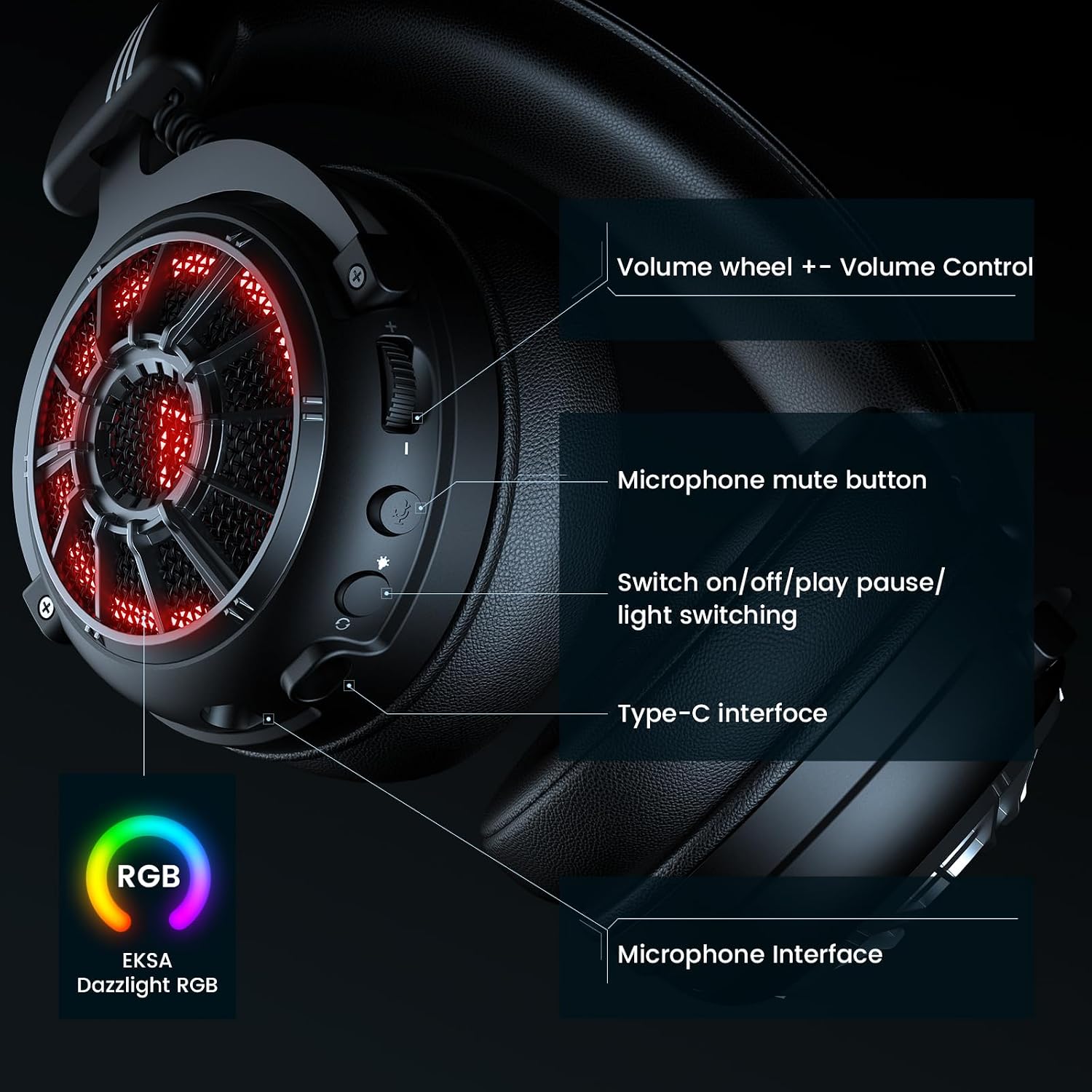
Image 8.1: Battery life specifications for 2.4GHz wireless and Bluetooth modes, with and without RGB lighting, and charging time.
9. Údržba
Správná údržba zajistí dlouhou životnost a výkon vaší sluchátkové soupravy.
- Čištění: K čištění sluchátek s mikrofonem používejte měkký, suchý hadřík. Nepoužívejte agresivní chemikálie ani abrazivní materiály.
- Skladování: Store the headset in a cool, dry place, away from direct sunlight and extreme temperatures. Use the provided carrying pouch for protection during travel or storage.
- Péče o kabely: Avoid sharply bending or twisting cables to prevent damage.
- Voděodolnost: Sluchátka nejsou voděodolná. Zabraňte kontaktu s tekutinami.
10. Řešení problémů
Pokud narazíte na problémy s náhlavní soupravou, podívejte se na následující běžná řešení.
| Problém | Možná příčina | Řešení |
|---|---|---|
| Z sluchátek se nehlásí žádný zvuk |
|
|
| Mikrofon nefunguje |
|
|
| Bezdrátové připojení 2.4 GHz je nestabilní/nepřipojuje se |
|
|
| Problémy s párováním pomocí rozhraní Bluetooth |
|
|
| 7.1 Surround Sound not working |
|
|
For further assistance, please visit the official EKSA support webmísto.
11. Specifikace
| Funkce | Detail |
|---|---|
| Název modelu | E5000 BT |
| Technologie připojení | Bezdrátové připojení 2.4 GHz, Bluetooth 5.3, kabelové připojení 3.5 mm |
| Typ zvukového ovladače | Dynamický ovladač |
| Velikost ovladače | 50mm neodym |
| Frekvenční rozsah | 20 Hz - 20,000 XNUMX Hz |
| Mikrofon | Detachable, Noise-Canceling |
| Speciální funkce | 7.1 Surround Sound (PC only), Dual Chamber Design, Ultra-Low Latency, RGB Lighting, Adjustable Headband, Memory Foam Earcups |
| Výdrž baterie (s vypnutými světly) | Bluetooth: 100 hours, 2.4GHz: 80 hours |
| Výdrž baterie (s rozsvícenými světly) | Bluetooth: 45 hours, 2.4GHz: 25 hours |
| Doba nabíjení | 2.5 hodin |
| Kompatibilní zařízení | PC, PS5, PS4, Mac, Switch, Laptops, Desktops, Gaming Consoles, Tablets, Telephones, Smartphones |
| Hmotnost | 2.12 libry |
| Barva | X-Black Wireless |
12. Záruka a podpora
EKSA products are designed for reliability and performance. For information regarding warranty coverage, technical support, or to register your product, please visit the official EKSA webmísto.