1. Úvod
This manual provides essential information for the safe and efficient operation of your Phomemo M834 Portable Thermal Printer. Please read it thoroughly before using the device and retain it for future reference. The Phomemo M834 is an inkless thermal printer designed for portable use, offering high-resolution printing for various documents and notes.

Image: The Phomemo M834 printer highlights its key advantages such as Bluetooth wireless connectivity, inkless printing, portability, ease of setup, lightweight design, and multi-size thermal paper support, contrasting with common limitations of other printers like wired connections, ink requirements, and bulkiness.
2. Bezpečnostní informace
Observe the following safety precautions to prevent damage to the printer or personal injury:
- Tiskárnu sami nerozebírejte, neopravujte ani neupravujte.
- Chraňte tiskárnu před vodou, vlhkostí a přímým slunečním zářením.
- Use only Phomemo-approved thermal paper. Using other paper types may damage the print head.
- Ensure the printer is placed on a stable surface during operation.
- Uchovávejte mimo dosah dětí.
- Nedotýkejte se tiskové hlavy ihned po tisku, může být horká.
- Pro nabíjení použijte dodaný kabel USB-C.
3. Obsah balení
Ověřte, zda jsou v balení přítomny všechny položky:
- Phomemo M834 Portable Printer
- Printer Carry Case
- USB-C kabel
- Adaptér USB-C na USB
- Uživatelská příručka
- Thermal Paper Roll (8.5" width)
- Additional Thermal Paper Rolls (4.33", 3.14", 2.08" widths)

Image: The package contents include the Phomemo M834 portable printer, a printer case, a USB-C cable, a USB-C to USB adapter, a user guide, and multiple rolls of thermal paper in various widths (8.5", 4.33", 3.14", 2.08").
4. Konec produktuview
The Phomemo M834 is a compact and versatile thermal printer. It features a 300 dpi print resolution for clear output and supports various thermal paper sizes and types. Its inkless technology eliminates the need for cartridges, reducing operational costs.
Klíčové vlastnosti:
- High Print Clarity: 300 dpi resolution for sharp text and images.
- Versatile Paper Support: Compatible with US Letter, A4, 4.33'', 3.14'', 2.08'' paper sizes, and roll, fold, or ordinary thermal paper types.
- Prodloužená životnost baterie: 2600mAh rechargeable battery supports over 160 pages of continuous printing.
- Široká kompatibilita zařízení: Connects via Bluetooth to smartphones (Android, iOS) and USB to PCs (Windows 10/11, Linux, ChromeOS, macOS).
- Technologie bez inkoustu: Uses thermal printing, requiring no ink, toner, or ribbons.

Image: The Phomemo M834 portable thermal printer is shown with its carrying case, various sizes of thermal paper rolls, and a smartphone displaying the Phomemo app, illustrating its wireless connectivity and portability.

Image: A visual comparison demonstrates the superior clarity of 300 DPI printouts from the Phomemo M834 compared to standard 203 DPI prints, highlighting the enhanced detail and readability.

Image: This graphic illustrates the Phomemo M834's 2600mAh large capacity battery, emphasizing its USB-C fast charging capability and the ability to print over 160 sheets on a full charge.
5. Pokyny k nastavení
5.1 Nabíjení tiskárny
- Připojte dodaný kabel USB-C k nabíjecímu portu tiskárny.
- Druhý konec zapojte do napájecího adaptéru USB (není součástí balení) nebo do portu USB počítače.
- The indicator light will show charging status. A full charge typically takes a few hours.
5.2 Vkládání termopapíru
- Open the printer's paper cover.
- Insert the thermal paper roll or folded paper, ensuring the printable side faces the print head.
- Upravte vodítka papíru tak, aby těsně odpovídala šířce papíru.
- Pevně zavřete kryt papíru.

Image: The Phomemo M834 printer is depicted with its paper compartment open, showcasing support for five paper sizes (US Letter, A4, 4.33'', 3.14'', 2.08'') and four types: single sheet, continuous folding, inner roll, and stickers.
6. Návod k obsluze
6.1 Zapnutí/vypnutí
Press and hold the power button for 3 seconds to turn the printer on or off.
6.2 Připojení k zařízení
6.2.1 Bluetooth Connection (Smartphones/Tablets)
- Download the Phomemo app from your device's app store.
- Ujistěte se, že je na vašem smartphonu nebo tabletu povoleno rozhraní Bluetooth.
- Open the Phomemo app and follow the on-screen instructions to search for and connect to your M834 printer.
6.2.2 Připojení USB (PC/notebook)
- Připojte tiskárnu k počítači pomocí dodaného kabelu USB-C.
- Install the appropriate printer driver from the official Phomemo webmísto.
- Once the driver is installed, the printer will be recognized by your operating system.
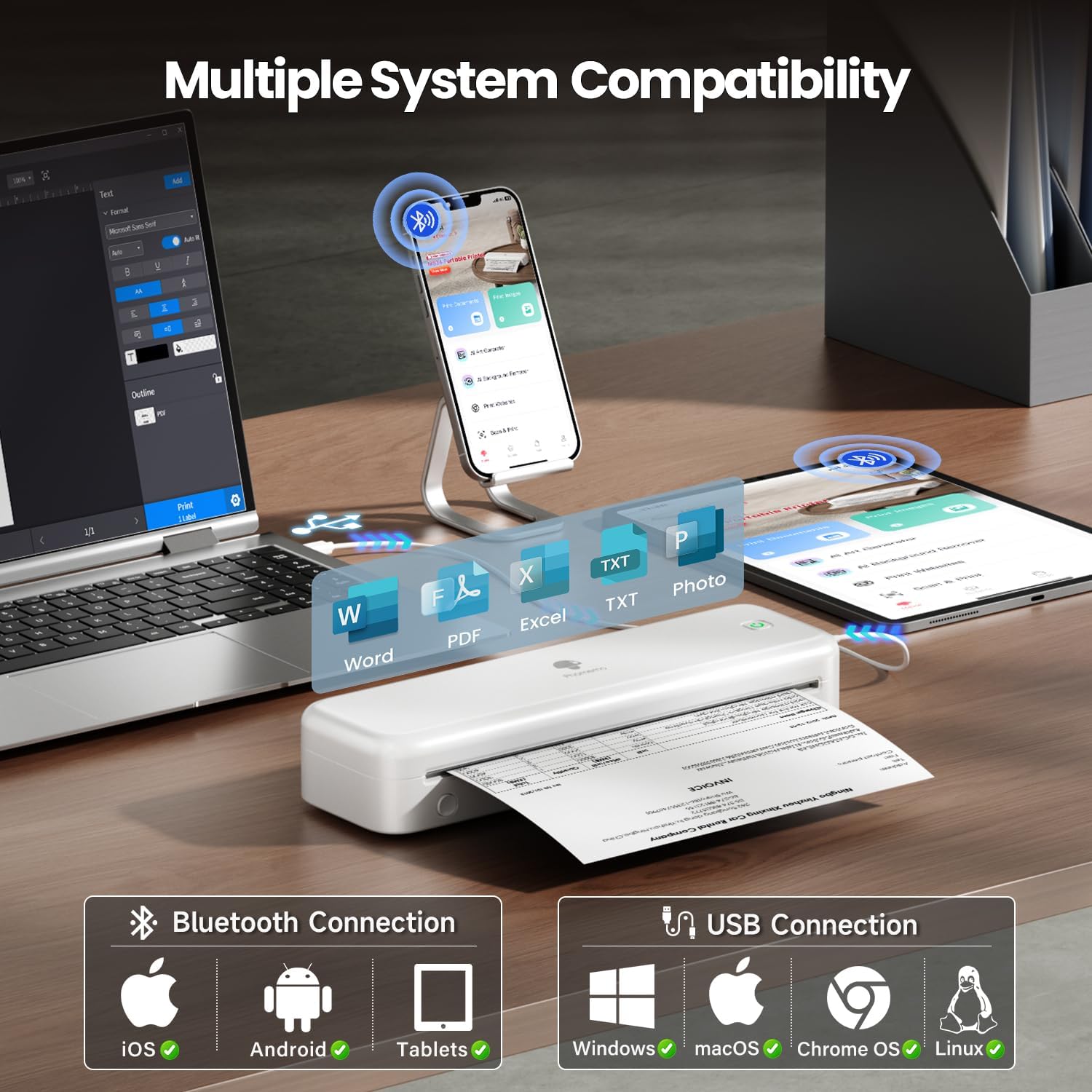
Image: The Phomemo M834 printer demonstrates its broad compatibility, connecting via Bluetooth to iOS, Android, and Tablets, and via USB to Windows, macOS, Chrome OS, and Linux systems, supporting various document formats like Word, PDF, Excel, and text files.
6.3 Tisk
- Otevřete dokument nebo obrázek, který chcete vytisknout, na připojeném zařízení.
- Select the print option within the application.
- Choose the Phomemo M834 as your printer.
- Adjust print settings (e.g., paper size, density) as needed.
- Spusťte tiskovou úlohu.
7. Údržba
7.1 Čištění tiskové hlavy
Pravidelné čištění tiskové hlavy zajišťuje optimální kvalitu tisku.
- Vypněte tiskárnu a odpojte ji od napájení.
- Otevřete papírový kryt.
- Jemně otřete tiskovou hlavu vatovým tamponem, lehceampzakončené isopropylalkoholem.
- Před zavřením krytu a zapnutím tiskárny nechte tiskovou hlavu zcela vyschnout.
7.2 Skladování
Tiskárnu skladujte na chladném a suchém místě mimo dosah přímého slunečního záření a extrémních teplot. Pokud ji skladujete delší dobu, ujistěte se, že je baterie částečně nabitá (kolem 50 %), abyste prodloužili její životnost.
8. Řešení problémů
| Problém | Možná příčina | Řešení |
|---|---|---|
| Tiskárna se nezapne | Slabá baterie; Tlačítko napájení nebylo správně stisknuto | Charge the printer; Press and hold the power button for 3 seconds |
| Špatná kvalita tisku | Print head dirty; Incorrect paper type; Low battery | Clean the print head; Use Phomemo thermal paper; Charge the printer |
| Nelze se připojit přes Bluetooth | Bluetooth vypnutý; Tiskárna není viditelná; Problém s aplikací | Ensure Bluetooth is on; Restart printer and app; Re-pair device |
| Zaseknutý papír | Paper loaded incorrectly; Damaged paper | Open cover, remove jammed paper, reload correctly; Use undamaged paper |
| Tiskárna nebyla počítačem rozpoznána | Driver not installed; Loose USB connection | Install latest driver from Phomemo website; Check USB cable connection |
9. Specifikace
| Funkce | Detail |
|---|---|
| Model | M834 |
| Technologie tisku | Tepelný |
| Rozlišení tisku | 300 x 300 DPI |
| Konektivita | Bluetooth, USB |
| Kompatibilní operační systémy | Android, iOS, Windows 10/11, Linux, ChromeOS, macOS |
| Kapacita baterie | Lithium-polymer 2600 mAh |
| Maximální vstupní kapacita listu | 160 pages (continuous printing) |
| Max Monochrome Printing Speed | 6 ppm |
| Podporované velikosti papíru | US Letter, A4, 4.33'', 3.14'', 2.08'' |
| Rozměry produktu | 29 x 11.2 x 9.8 cm |
| Hmotnost položky | 1.23 kg |
10. Záruka a podpora
For warranty information and customer support, please refer to the official Phomemo webnebo se obraťte přímo na jejich zákaznický servis. Uschovejte si účtenku jako doklad o koupi pro případ reklamace.
Phomemo Official Webmísto: www.phomemo.com