
Q16 Pro
Q16 Pro Over Ear Open Ear Bluetooth 5.4 Earbuds User Manual
Model: Q16 Pro | Brand: generic
1. Úvod
The Q16 Pro Over Ear Open Ear Bluetooth 5.4 Earbuds are designed to provide a comfortable and immersive audio experience. Featuring a full-color LCD touch screen for intuitive control, these true wireless earbuds offer adaptive active noise reduction, an adjustable equalizer, and Bluetooth 5.4 connectivity for stable and high-quality sound transmission. The open-ear design ensures comfort during extended wear while allowing awareness of your surroundings.
2. Obsah balení
The Q16 Pro package typically includes the following items:
- Q16 Pro Over Ear Earbuds (1 pair)
- Charging Case with Touch Screen Display
- Nabíjecí kabel USB typu C.
- Uživatelská příručka
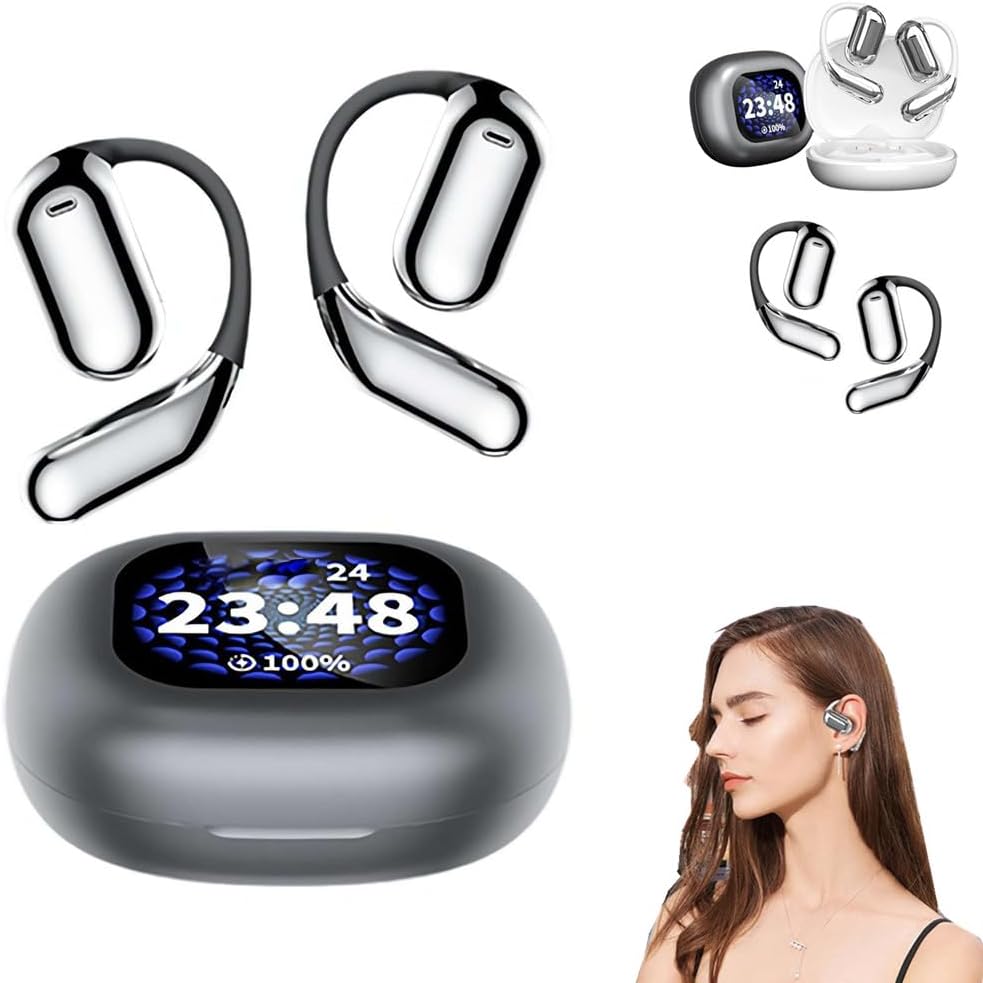
Image: The Q16 Pro earbuds and their charging case, showcasing the integrated display and the comfortable over-ear design.
3. Průvodce nastavením
3.1 Nabíjení zařízení
Before first use, fully charge the Q16 Pro earbuds and their charging case. The charging case has a built-in battery that can recharge the earbuds multiple times.
- Připojte dodaný kabel USB typu C k nabíjecímu portu na pouzdře.
- Druhý konec kabelu připojte ke kompatibilnímu napájecímu adaptéru USB (není součástí balení) nebo k portu USB počítače.
- The display on the charging case will indicate the charging status. A full charge for the case takes approximately 1.5 hours.
- Place the earbuds into their respective slots in the charging case. They will begin charging automatically. The case display will show the earbud battery levels.
3.2 Párování Bluetooth
To connect your Q16 Pro earbuds to a Bluetooth-enabled device:
- Ujistěte se, že jsou sluchátka nabitá a vložená do nabíjecího pouzdra.
- Otevřete nabíjecí pouzdro. Sluchátka se automaticky přepnou do režimu párování.
- Na svém zařízení (chytrý telefon, tablet, počítač) přejděte do nastavení Bluetooth.
- Hledat available devices. Select "Q16 Pro" from the list.
- Once connected, the earbuds will indicate successful pairing, and the case display may show a connection icon.
- Sluchátka se po vyjmutí z pouzdra automaticky znovu připojí k poslednímu spárovanému zařízení, pokud je na zařízení povoleno Bluetooth.

Image: Depiction of the advanced Bluetooth 5.4 chip, highlighting its role in faster and more stable signal transmission for the Q16 Pro earbuds.
4. Provoz
4.1 Ovládání na dotykové obrazovce
The Q16 Pro features a full-color LCD touch screen on the charging case, allowing for intuitive control of various functions without needing to access your paired device. Functions include:
- Přehrávání hudby: Přehrávání, pozastavení, přeskakování skladeb.
- Ovládání hlasitosti: Upravte hlasitost zvuku.
- Noise Reduction Control: Toggle Adaptive Active Noise Reduction (ANC) on/off or adjust levels.
- Equalizer Switching: Select from various preset equalizer modes (e.g., Bass, Jazz, Vocal).
- Prostorové zvukové efekty: Switch between intelligent music, game, and movie modes for an immersive experience.
- Správa hovorů: Přijímat, ukončovat nebo odmítat hovory.

Image: The Q16 Pro charging case display, illustrating the full-color touch screen and various features like active noise reduction, stereo sound, and HiFi audio.

Image: The Q16 Pro charging case display showing multiple interface options for controlling music, settings, and other functions with a single finger.
4.2 Zvukové funkce
The Q16 Pro earbuds are equipped with advanced audio technologies for a superior listening experience:
- Adaptive Active Noise Reduction (ANC): Effectively blocks external noise, allowing for a tranquil listening environment.
- Nastavitelný ekvalizér: Přizpůsobte si svého zvukového profesionálafile with various presets to match your music preferences, enhancing bass, jazz, or vocal clarity.
- Prostorové zvukové efekty: Experience immersive audio with dedicated modes for music, gaming, and movies, creating a sense of presence.
- Redukce šumu při volání ENC: Ensures clear voice calls by reducing environmental noise during conversations.
- High Precision Laminated Horn: Delivers sound-grade surround sound with high elastic magnetic bass moving coil and polymeric ceramic treble single units.

Image: Visual representation of the Q16 Pro's spatial audio capabilities, creating an immersive and realistic sound field.

Obrázek: Explodoval view illustrating the internal components of the Q16 Pro earbud, highlighting the high-precision laminated horn and sound-grade surround sound technology.
4.3 Pohodlí při nošení
The Q16 Pro earbuds are designed for comfort and extended wear. Weighing approximately 8 grams per ear, their open-ear design avoids direct insertion into the ear canal, reducing discomfort and allowing you to remain aware of your surroundings while enjoying audio.

Image: A comparison showing the Q16 Pro's comfortable over-ear design versus traditional in-ear headphones, emphasizing reduced ear pain and secure fit.
5. Údržba
Proper maintenance ensures the longevity and optimal performance of your Q16 Pro earbuds.
- Čištění: Use a soft, dry, lint-free cloth to wipe the earbuds and charging case. Do not use abrasive cleaners, alcohol, or chemical solvents.
- Skladování: Pokud sluchátka nepoužíváte, uložte je do nabíjecího pouzdra, aby byly chráněny před prachem a poškozením. Skladujte na chladném a suchém místě mimo dosah přímého slunečního záření a extrémních teplot.
- Vyhněte se vodě: Sluchátka nejsou vodotěsná. Chraňte je před vodou, deštěm nebo nadměrnou vlhkostí.
6. Řešení problémů
If you encounter issues with your Q16 Pro earbuds, refer to the following common problems and solutions:
| Problém | Možná příčina | Řešení |
|---|---|---|
| Sluchátka se nenabíjejí | Charging cable not connected properly; dirty charging contacts; low power adapter. | Ensure cable is securely connected. Clean charging contacts on earbuds and case with a dry cotton swab. Use a standard 5V USB power adapter. |
| Nelze spárovat se zařízením | Sluchátka nejsou v režimu párování; Bluetooth na zařízení vypnuté; dříve spárované zařízení ruší. | Ensure earbuds are in pairing mode (open case). Turn Bluetooth off and on again on your device. Forget "Q16 Pro" from your device's Bluetooth list and re-pair. |
| Žádný zvuk nebo nízká hlasitost | Volume too low on device/earbuds; earbuds not properly seated; connection issue. | Increase volume on both your device and via the earbud touch controls. Ensure earbuds are securely in your ears. Reconnect Bluetooth. |
| Přerušované připojení | Too far from device; interference; low earbud battery. | Stay within 10 meters (33 feet) of your device. Avoid strong electromagnetic interference. Charge earbuds fully. |
7. Specifikace
| Funkce | Detail |
|---|---|
| Model produktu | Q16 Pro |
| Verze Bluetooth | V5.4 |
| Frekvenční rozsah | 2.4 GHz ~ 2.48 GHz |
| Přenosová vzdálenost | >10m (bezbariérový) |
| Nabíjecí rozhraní | Rozhraní typu C |
| Kapacita baterie (pouzdro) | 500 XNUMX mAh |
| Výdrž baterie (sluchátka) | Až 40 hodin (s nabíjecím pouzdrem) |
| Doba nabíjení (pouzdro) | Přibližně 1.5 hodiny |
| Kontrolní metoda | Touch Screen, Media Control |
| Umístění uší | Otevřete ucho |
| Form Factor | Přes Ucho, V Uchu |
| Barva | Černý |
| Výrobce | generický |
| Země původu | Čína |
8. Záruka a podpora
Tento produkt je dodáván se standardní zárukou výrobce. Konkrétní záruční podmínky naleznete v dokumentaci dodané s vaším nákupem nebo se obraťte přímo na prodejce.
For technical support, troubleshooting assistance beyond this manual, or warranty claims, please contact the retailer or manufacturer through the contact information provided at the point of purchase. Please have your product model (Q16 Pro) and purchase details ready when contacting support.
Ask a question about this manual
Ask about setup, troubleshooting, compatibility, parts, safety, or missing instructions. Manuals+ will review the question and use this page’s manual context to help answer it.