
Zavedení
This manual provides detailed instructions for the setup, operation, and maintenance of your hosabely SK80-Mic Podcast Equipment Bundle. This all-in-one audio mixer with an XLR microphone kit is designed to enhance your live streaming, podcasting, recording, gaming, and music performance experiences. Please read this manual thoroughly before use to ensure optimal performance and longevity of your device.
Obsah balení
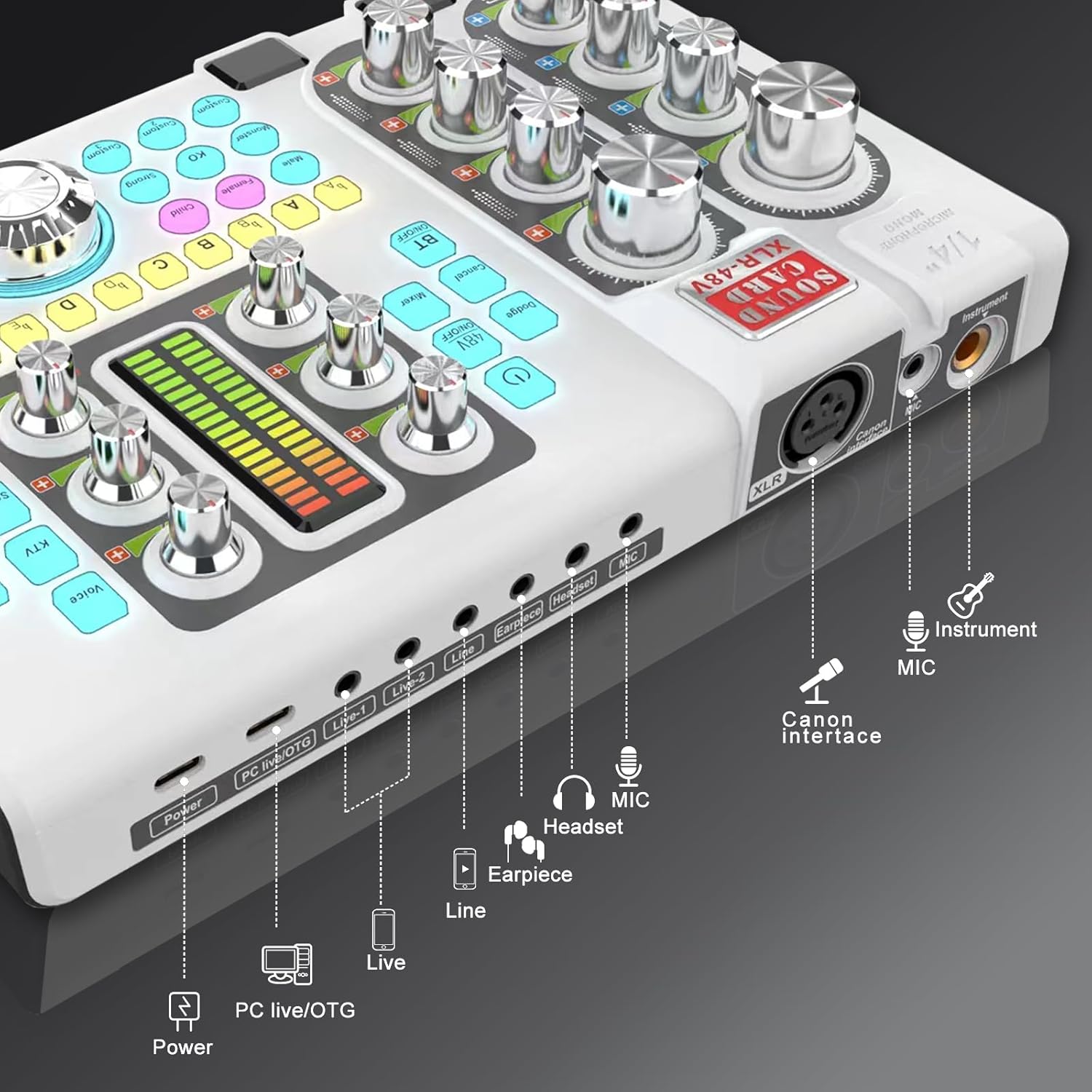
Upon opening your hosabely SK80-Mic Podcast Equipment Bundle, please verify that all the following items are included:
- 1 x Live Sound Card (Audio Mixer)
- 1 x 48V Condenser XLR Microphone
- 1 x Adjustable Long Arm Microphone Stand
- 1 x Pop filtr
- 1 x Anti-wind Foam Cap
- 1 x USB nabíjecí kabel
- 1 x audio kabel
- 1 x kabel Type-C to Type-C
- 1 x anglická uživatelská příručka

Image: All components included in the hosabely SK80-Mic Podcast Equipment Bundle.
Konec produktuview
The hosabely SK80-Mic Podcast Equipment Bundle is an integrated audio solution for content creators. It features a high-quality 48V condenser XLR microphone, an adjustable long-arm microphone stand, and a versatile live sound card. This setup is designed to provide clear and crisp audio, real-time voice modification, and dynamic sound effects for professional and engaging content.
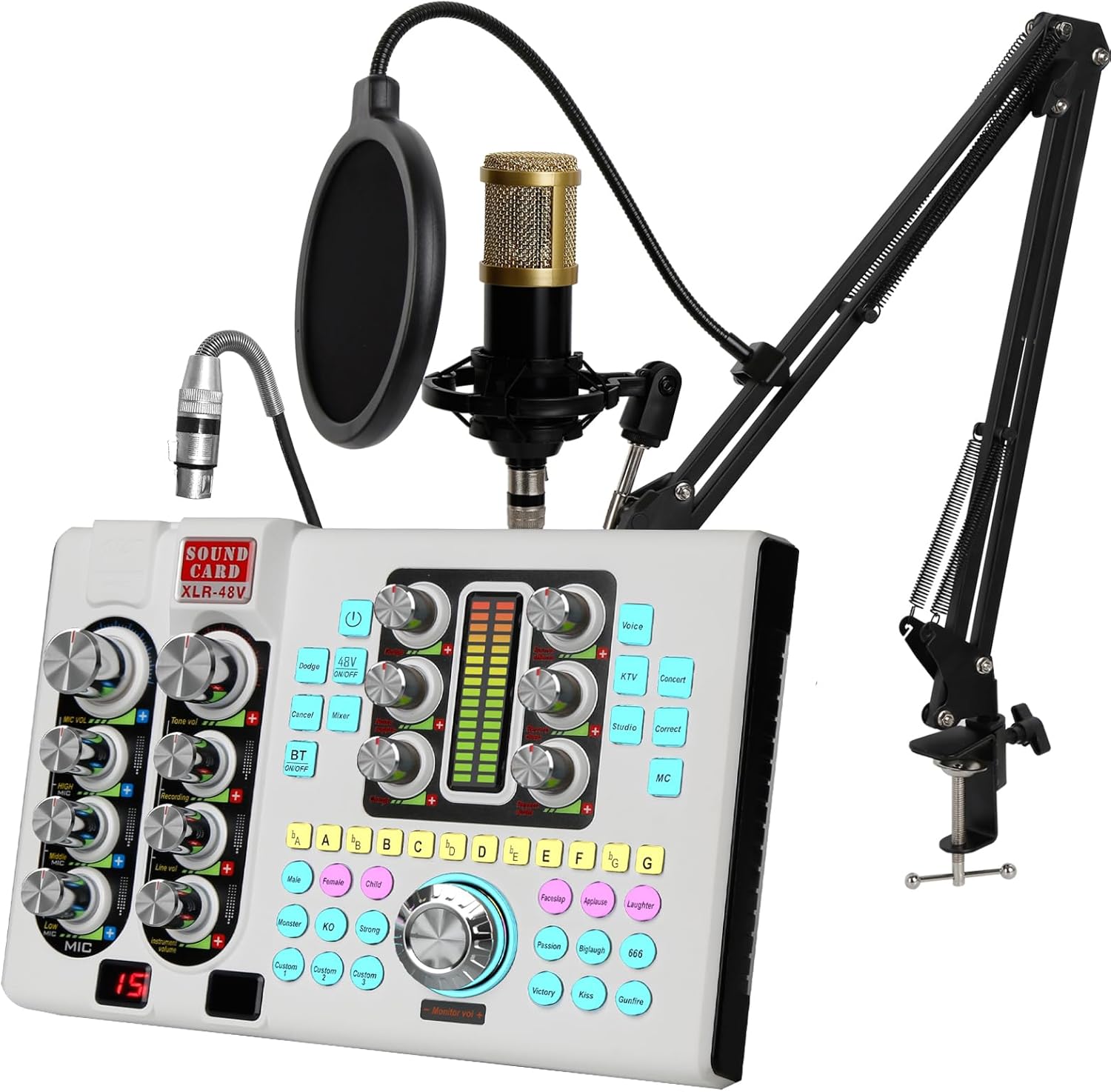
Image: The complete hosabely SK80-Mic Podcast Equipment Bundle.

Image: Comparison highlighting key features of the hosabely SK80-Mic, including battery, wireless connectivity, instrument compatibility, voice FX, and noise reduction.
Průvodce nastavením
1. Sestava mikrofonu
Assemble the 48V condenser XLR microphone with the adjustable long-arm stand, shock mount, and pop filter. Ensure all connections are secure.
Obrázek: Podrobný view of the XLR Condenser Microphone Kit, showing the 16mm mic core, cardioid pickup, and metal mic arm stand.
Video: Instructions on how to assemble the BM8000 Condenser Microphone Kit.
2. Connecting the Audio Mixer
The SK80-Mic audio mixer offers various connectivity options. Refer to the diagram below for port identification.
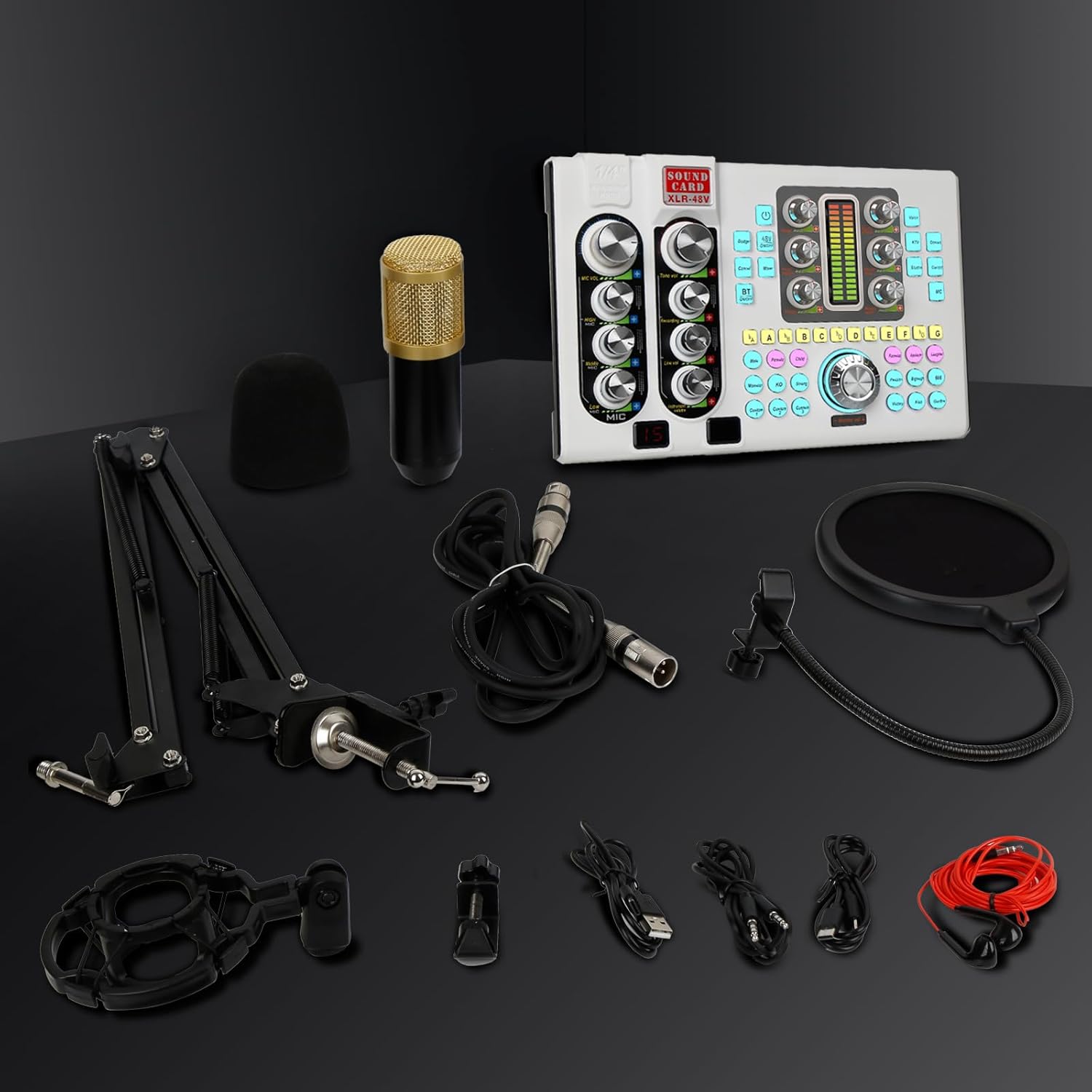
Image: Diagram illustrating various connection ports on the SK80-Mic Audio Mixer, including Power, PC live/OTG, Live 1/2, Line, Earpiece, Headset, MIC, Canon Interface (XLR), and Instrument.
Připojení k PC
Use the provided USB cable to connect the mixer to your PC. Ensure the mixer is recognized as an audio input/output device in your computer's sound settings.
Video: Demonstration on how to connect the SK80 Audio Mixer to a PC.
Připojení k chytrému telefonu
Use the appropriate cables (Type-C to Type-C or Audio Cable with adapter if needed) to connect your smartphone to the mixer's 'Live' port.
Video: Demonstration on how to connect the SK80 Audio Mixer to a smartphone.
Connecting to a Gaming Console (e.g., PS5)
Connect the mixer to your gaming console using the appropriate USB cable. Configure the console's audio settings to use the mixer as the input/output device.
Video: Instructions on how to connect the SK80 Audio Mixer to a PS5 gaming console.
Návod k obsluze
1. Zapnutí/vypnutí
Press and hold the power button (usually labeled with a power icon) for a few seconds to turn the mixer on or off. The display will illuminate upon powering on.
2. Ovládání hlasitosti
Adjust the individual volume knobs for the microphone (MIC VOL), music (MUSIC VOL), and monitor output to achieve desired audio levels. The main output fader controls the overall volume sent to your audience or recording.

Obrázek: Overview of the SK80-Mic mixer's controls for fine-tuning microphone volume, pitch, and tone, including 4 knobs for mic high/mid/low, 12 sound pitches, 6 reverb modes, and 2 knobs for reverb depth/width.
3. Sound Effects and Voice Changes
The mixer features 11 vibrant live sound effects and 4 amusing voice changes (Male, Female, Child, Monster). Use the dedicated buttons and the VOICE CHANGE knob to activate and adjust these effects.

Image: The SK80-Mic's interface for various sound pads and voice changes, including 3 customized sound pads, up to 11 ambient sounds, and 4 voice changes.
4. Customizable Sound Pads
The SK80 podcast mixer offers 3 sound pads that can be tailored to your needs. With one-key looping, each pad allows you to record up to 30 seconds of audio. You can also adjust the volume of each pad to your liking. Upload audio from your smartphone, PC, microphone, or Bluetooth device for podcast recording.
5. XLR-48V Microphone Input
The mixer provides an XLR microphone input with built-in 48V phantom power. This allows direct connection of condenser microphones without additional peripherals. Note: 48V is off by default to save power; press the 48V button to turn it on.
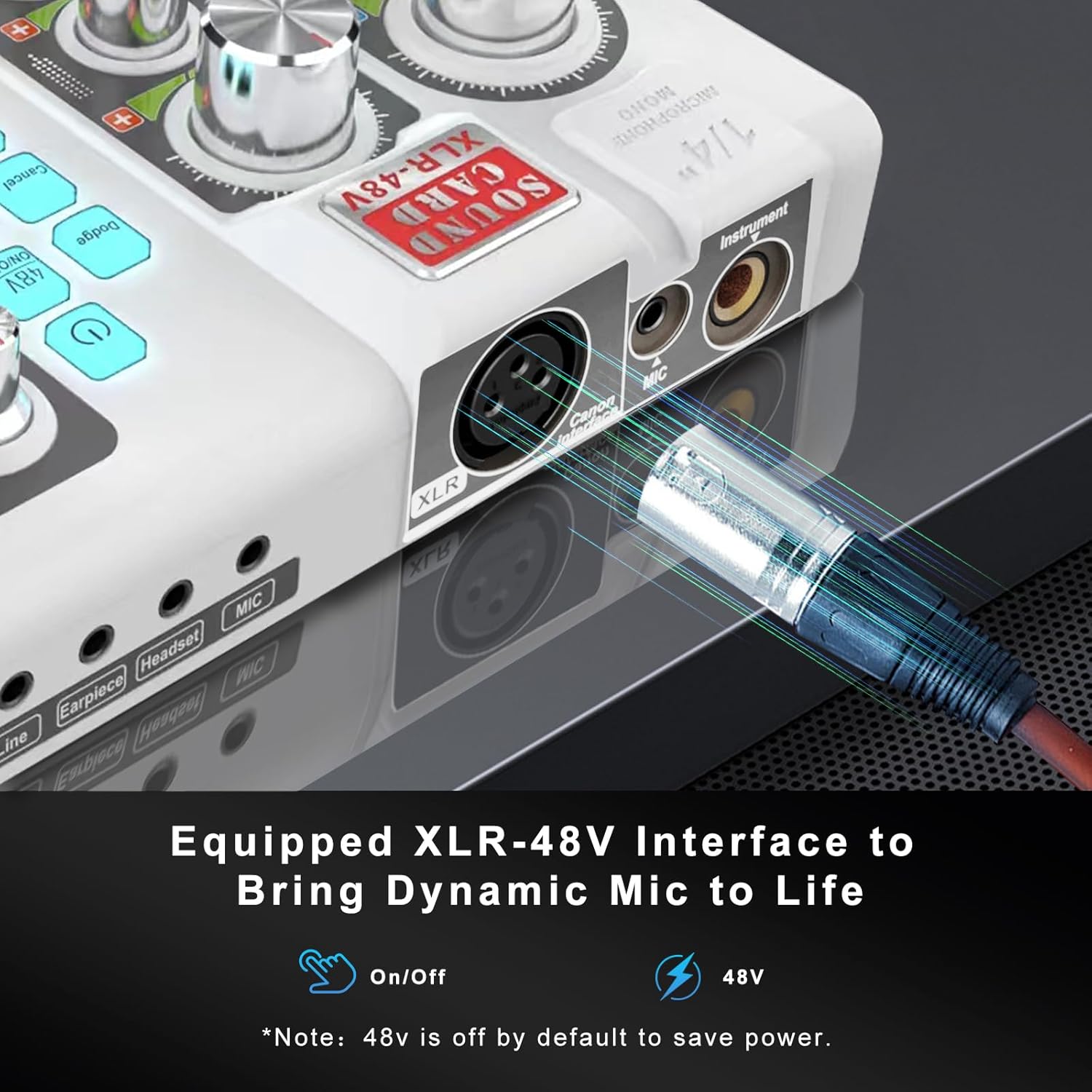
Image: Close-up of the XLR-48V interface on the SK80-Mic, showing the On/Off switch for 48V phantom power.
6. Redukce šumu
The sound board includes a Noise Reduction function to minimize environmental noise. This improves vocal clarity and monitoring. The display shows a 15-level noise reduction indicator.
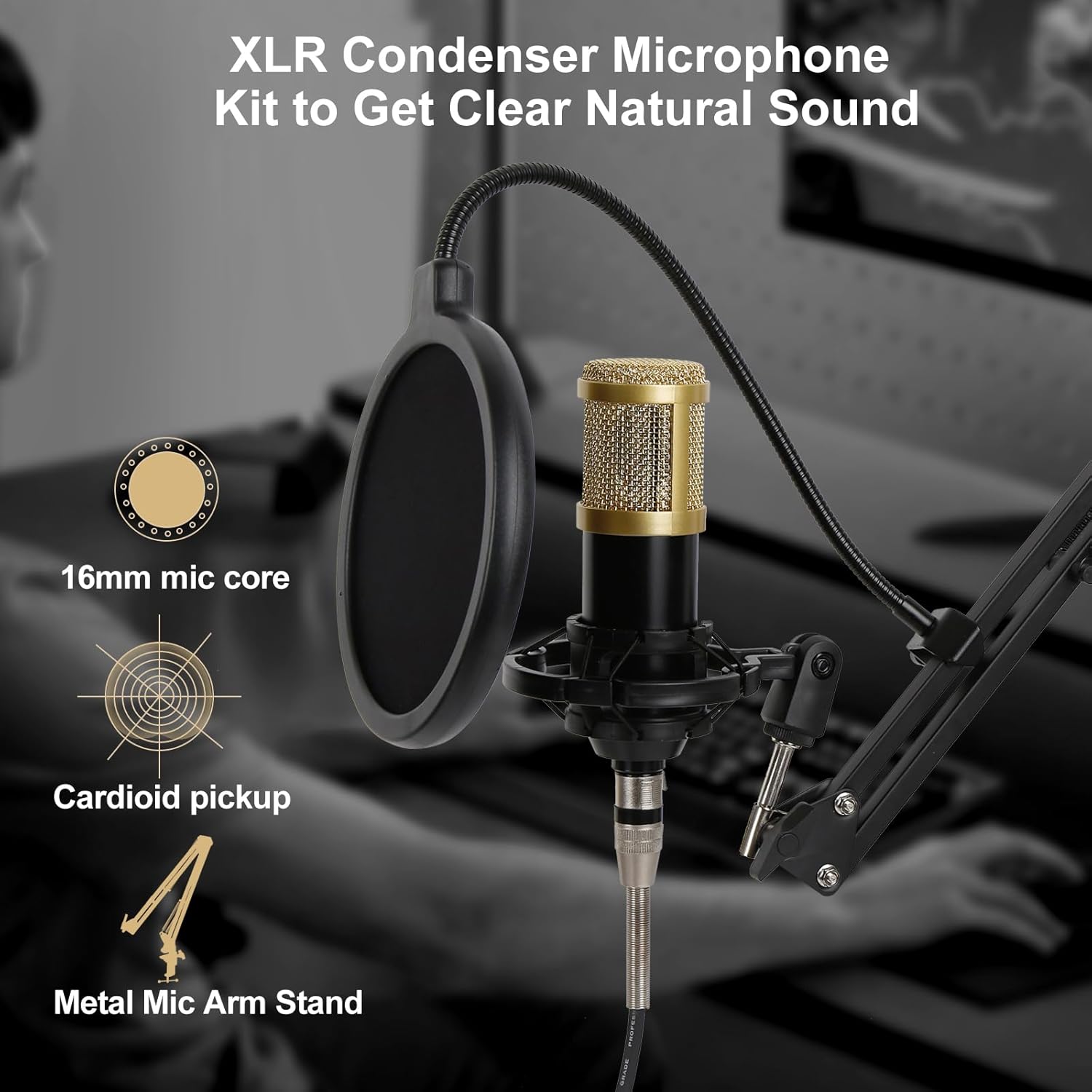
Image: The SK80-Mic's display showing the 15-level noise reduction feature. Note: The right display is for decoration only.
7. Karaoke Singing Modes
Enjoy 3-5 hours of uninterrupted karaoke singing with multiple singing modes and 6 reverb effects (VOICE/KTV/STUDIO/CONCERT/CORRECT/MC). Adjust the reverb volume knob for precise control.
8. Připojení Bluetooth
The mixer supports Bluetooth for wireless audio input. Pair your device with the mixer to stream background music. The Bluetooth range is approximately 10 meters.
9. Loopback Feature
The loopback feature allows audio resources from your PC (music, video, games, websites) to be heard by your streaming audience and recorded by your recording device. Enable this function when recording songs using a computer. Disabling loopback means PC audio is heard through monitoring headphones but not recorded or heard by the audience, helping to avoid unnecessary echoes.
Údržba
To ensure the longevity and optimal performance of your hosabely SK80-Mic Podcast Equipment Bundle, follow these maintenance guidelines:
- Čištění: Use a soft, dry cloth to clean the mixer and microphone. Avoid using liquid cleaners or abrasive materials.
- Skladování: Zařízení skladujte na chladném a suchém místě mimo dosah přímého slunečního záření a extrémních teplot.
- Zacházení: Handle all components with care to prevent physical damage. Avoid dropping the mixer or microphone.
- Kabely: Regularly check cables for any signs of wear or damage. Replace damaged cables immediately to prevent performance issues or safety hazards.
Odstraňování problémů
If you encounter any issues with your hosabely SK80-Mic Podcast Equipment Bundle, refer to the following troubleshooting tips:
- Bez napájení: Ensure the mixer is fully charged or connected to a power source. Press and hold the power button for 5 seconds to turn it on.
- Žádný zvuk mikrofonu: Check if the microphone is securely connected to the XLR input. Ensure the 48V phantom power is activated if using a condenser microphone. Adjust the MIC VOL knob.
- No Music Playback via Bluetooth: Ensure Bluetooth is enabled on both the mixer and your device. Check that the SK80 is paired correctly. Adjust the MUSIC VOL knob.
- Statický nebo nejasný zvuk: Check all cable connections. Ensure the microphone is not too far from the sound source. Try adjusting the Noise Reduction feature.
- Echoes in Recording: If using loopback, ensure it is enabled correctly. If not using loopback, ensure it is disabled to prevent unwanted echoes.
Specifikace
| Funkce | Detail |
|---|---|
| Hmotnost položky | 4.11 libry |
| Rozměry balení | 16.18 x 8.19 x 4.8 palce |
| Číslo modelu položky | SK80-Mic |
| Baterie | Jsou vyžadovány 1 lithium-polymerové baterie. (v ceně) |
| Typ baterie | Lithium Polymer |
| Zdroj napájení | Napájení z baterie |
| Značka | hosabely |
| Technologie připojení | USB |
| Počet kanálů | 3 |
| Zvukový vstup | XLR |
| Výrobce | hosabely |
Záruka a podpora
Your hosabely SK80-Mic Podcast Equipment Bundle comes with a standard manufacturer's warranty. Please refer to the warranty card included in your package for specific terms and conditions. For technical support, troubleshooting assistance, or any inquiries, please contact hosabely customer service through the contact information provided in your product documentation or on the official hosabely webmísto.