
Keychron KYCN-K13M-H3
Uživatelská příručka k bezdrátové RGB mechanické klávesnici Keychron K13 Max
Model: KYCN-K13M-H3
1. Úvod
Thank you for choosing the Keychron K13 Max Wireless RGB Mechanical Keyboard. This manual provides detailed instructions on setting up, operating, maintaining, and troubleshooting your new keyboard. Please read this manual thoroughly to ensure optimal performance and longevity of your device.
The Keychron K13 Max is a high-performance 80% layout (TKL) mechanical keyboard designed for both productivity and gaming. It offers triple connectivity modes: ultra-low latency 2.4 GHz wireless, stable Bluetooth 5.1, and reliable wired USB Type-C. With QMK/VIA programmability, hot-swappable Gateron low-profile mechanical switches, and vibrant RGB backlighting, it provides a customizable and comfortable typing experience across macOS, Windows, and Linux systems.
2. Konec produktuview
The Keychron K13 Max features a compact 80% layout, retaining essential keys while saving desk space. It comes equipped with Gateron low-profile mechanical switches and durable double-shot PBT keycaps. The keyboard's internal structure includes advanced IXPE acoustic foam and latex foam for a quiet and comfortable typing sound profile.
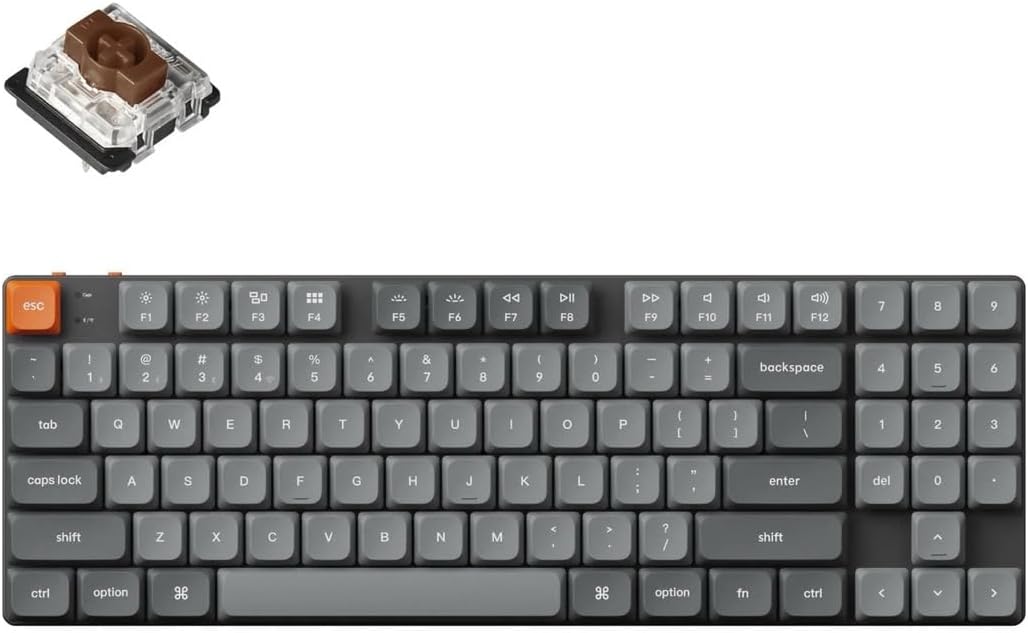
Image: Keychron K13 Max keyboard with a detached Gateron low-profile switch, illustrating the full keyboard layout and the hot-swappable switch mechanism.
Klíčové vlastnosti:
- Trojitá konektivita: 2.4 GHz Wireless, Bluetooth 5.1, and Wired USB Type-C.
- Programovatelnost QMK/VIA: Full key remapping, macros, and shortcuts via open-source firmware.
- Přepínače vyměnitelné za provozu: Easily change Gateron low-profile mechanical switches without soldering.
- RGB podsvícení: 22 types of RGB backlight options for personalized aesthetics.
- Kompatibilita s více operačními systémy: Seamlessly switch between macOS, Windows, and Linux.
- Acoustic Foam: IXPE and latex foam for enhanced typing sound and feel.

Image: A studio shot of the Keychron K13 Max keyboard, highlighting its sleek design and compact form factor.
3. Nastavení
Počáteční nabíjení:
Before first use, it is recommended to fully charge the keyboard. Connect the provided USB Type-C cable to the keyboard's Type-C port and the other end to a USB power source (e.g., computer USB port, wall adapter). The charging indicator light will show the charging status.
Připojení klávesnice:
K13 Max podporuje tři režimy připojení:
- Bezdrátové připojení 2.4 GHz:
- Locate the 2.4 GHz receiver (dongle) included with your keyboard.
- Zapojte přijímač 2.4 GHz do volného portu USB na počítači.
- On the keyboard, slide the mode switch (usually on the top left side) to the '2.4G' position.
- The keyboard should automatically connect. If not, press Fn + 4 (for 2.4G pairing) for 4 seconds until the indicator light flashes rapidly, then release.
- Připojení Bluetooth:
- Slide the mode switch on the keyboard to the 'BT' position.
- To enter pairing mode, press and hold Fn + 1 (for Bluetooth device 1), Fn + 2 (for Bluetooth device 2), or Fn + 3 (for Bluetooth device 3) for 4 seconds until the indicator light flashes rapidly.
- On your computer or device, enable Bluetooth and search for 'Keychron K13 Max'.
- Select the keyboard and complete the pairing process.
- You can switch between paired Bluetooth devices by pressing Fn + 1, Fn + 2, or Fn + 3 briefly.
- Wired USB Type-C Connection:
- Připojte dodaný kabel USB typu C z klávesnice k portu USB počítače.
- Slide the mode switch on the keyboard to the 'Cable' position.
- Klávesnice bude rozpoznána jako standardní USB klávesnice.
Přepínač operačního systému:
The K13 Max has a switch to toggle between macOS and Windows/Android layouts. Ensure this switch is set to your operating system for correct key functionality (e.g., Alt/Option, Win/Command keys).

Obrázek: Boční view of the Keychron K13 Max keyboard, demonstrating the two adjustable typing angles for ergonomic comfort.
4. Ovládání klávesnice
Multimediální klávesy:
The K13 Max includes 12 dedicated multimedia keys (F1-F12) accessible via the Fn key. These keys control media playback, volume, and other system functions. Refer to the keycap legends for specific functions.
Ovládání RGB podsvícení:
The keyboard offers 22 types of RGB backlight effects. Use the dedicated backlight key (usually Fn + Lightbulb icon) to cycle through effects. Use Fn + Arrow keys or other designated keys to adjust brightness, speed, and color of the backlighting.
QMK/VIA Programming:
The Keychron K13 Max is fully compatible with QMK firmware and VIA software, allowing for advanced customization of key assignments, macros, and lighting effects. To use VIA:
- Stáhněte si software VIA z oficiálního webu Keychron. webstránky nebo použijte web-based VIA application.
- Connect the keyboard to your computer via the wired USB Type-C connection.
- Open the VIA application. It should automatically detect your K13 Max keyboard.
- You can now remap keys, create macros, and customize lighting layers directly within the VIA interface. Changes are saved directly to the keyboard's firmware.

Image: The Keychron K13 Max keyboard in a typical desk setup, demonstrating its integration into a workspace.
5. Údržba
Čištění:
Chcete-li klávesnici vyčistit, nejprve ji odpojte od všech zdrojů napájení. Použijte měkký hadřík, který nepouští vlákna, lehce navlhčený.ampened with water or a mild cleaning solution to wipe down the keycaps and frame. For dust and debris between keys, use compressed air or a small brush. Avoid using harsh chemicals or abrasive materials.
Přepínače s výměnou za provozu:
The K13 Max features hot-swappable sockets, allowing you to change switches without soldering. Use the provided switch puller tool to carefully remove existing switches. Align the pins of the new switch with the holes on the PCB and gently press down until it clicks into place. Ensure the switch is fully seated to avoid bent pins.
6. Řešení problémů
Klávesnice nereaguje:
- Ujistěte se, že je klávesnice nabitá.
- Check the mode switch (2.4G/BT/Cable) is set correctly for your connection type.
- U sítě 2.4 G se ujistěte, že je hardwarový klíč bezpečně zapojený.
- V případě Bluetooth zařízení v případě potřeby znovu spárujte.
- Try connecting via wired USB Type-C to rule out wireless issues.
Klíče se neregistrují:
- If a specific key is not working, try hot-swapping the switch with a known working one to determine if the switch or the socket is faulty.
- Ujistěte se, že je spínač zcela zasunut do své zásuvky.
- Check for any debris under the keycap or around the switch.
Problémy s odpojením Bluetooth:
- Ujistěte se, že je klávesnice v dosahu vašeho zařízení.
- Zkontrolujte, zda nedochází k rušení jinými bezdrátovými zařízeními.
- Aktualizujte ovladače Bluetooth vašeho zařízení.
- Znovu spárujte klávesnici se zařízením.
7. Specifikace

Image: Detailed diagram showing the physical dimensions of the Keychron K13 Max keyboard and its low-profile Gateron switch.
| Funkce | Popis |
|---|---|
| Název modelu | Keychron K13 Max |
| Číslo modelu | KYCN-K13M-H3 |
| Rozložení | 80% TKL, QWERTY ANSI US (90 keys) |
| Spínače | Gateron Low-Profile Mechanical (Hot-Swappable) |
| Materiál krytky klíče | Low-Profile Dvojitý vstřik PBT |
| Materiál rámu | ABS + hliníkový rám |
| Konektivita | 2.4 GHz Wireless, Bluetooth 5.1, Wired USB Type-C |
| Polling Rate (2.4Ghz & Wired) | 1000 Hz |
| Rychlost dotazování (Bluetooth) | 90 Hz |
| N-Key Rollover (NKRO) | Ano (bezdrátový a kabelový režim) |
| Podsvícení | 22 Types of RGB Backlight |
| Baterie | 2000 mAh Rechargeable Li-Polymer |
| Wireless Working Time (Backlight Off) | Až 154 hodin |
| Kompatibilní systém | macOS / Windows / Linux |
| Rozměry | 346 x 118.5 mm (13.62 x 4.66 palců) |
| Hmotnost | 600 g / 1.32 lbs |
| Úhel psaní | 3.37º, 4.2º, and 6.7º |
| MCU | 32bitový procesor ARM Cortex-M4 STM32F402 (256 kB flash paměti) |
8. Záruka a podpora
Keychron products typically come with a limited warranty. For specific warranty terms and conditions, please refer to the warranty card included with your product or visit the official Keychron webUschovejte si doklad o koupi pro případ reklamace.
For technical support, troubleshooting assistance, or to inquire about replacement parts, please visit the Keychron support page on their official website. You can usually find FAQs, driver downloads, and contact information for customer service there.
Ask a question about this manual
Ask about setup, troubleshooting, compatibility, parts, safety, or missing instructions. Manuals+ will review the question and use this page’s manual context to help answer it.