
V020
V020 Car Scanner User Manual
Your Smart OBD2 Diagnostic Tool
1. Úvod
This user manual provides comprehensive instructions for the operation and maintenance of the V020 Car Scanner. The V020 is a state-of-the-art automotive fault diagnosis tool designed for modern vehicles, offering seamless connectivity and comprehensive diagnostic capabilities. It utilizes an OBD2 interface to identify and resolve various vehicle issues.
Please read this manual thoroughly before using the device to ensure proper operation and to maximize its benefits.

Image 1.1: The V020 Car Scanner device. This compact device connects to your vehicle's OBD2 port for diagnostic functions.
2. Klíčové vlastnosti
The V020 Car Scanner offers a range of functionalities to assist with vehicle diagnostics:
- One-Click Automatic Connection: Effortlessly pairs with your vehicle for immediate diagnostics.
- Dedicated APP Pairing: Syncs with an exclusive mobile application for enhanced control and insights.
- Automotive Fault Diagnosis: Utilizes the OBD2 interface to diagnose a wide range of vehicle issues.
- Přečtěte si chybové kódy motoru: Quickly identifies Diagnostic Trouble Codes (DTCs) indicating vehicle malfunctions.
- Vymazání chybových kódů: Resets the vehicle's system and turns off the Malfunction Indicator Light (MIL) after repairs.
- Informace o vozidle: Provides access to vital data about your car's performance and health, including VIN and calibration numbers.
- Baterie Voltage čtení: Monitors the vehicle's battery health.
- Monitored Test and Freeze Frame Data Stream: Captures and analyzes critical data points during tests and at the moment a fault code is set.
- Test výkonu: Evaluates vehicle capabilities such as acceleration and braking performance.
- MIL (Malfunction Indicator Light) Status: Checks the status of your vehicle's warning system.
- Podpora více jazyků: Supports English, German, French, Spanish, Russian, Chinese, Japanese, and Uygur languages.
- Kompatibilita operačního systému: Supports Apple iOS and Android operating systems for the dedicated app.

Image 2.1: Screenshot of the V020 Car Scanner app interface, highlighting major functions such as reading/clearing fault codes, vehicle information, and battery voltage čtení.
3. Specifikace
The following table details the technical specifications of the V020 Car Scanner:
| Parametr | Hodnota |
|---|---|
| Model produktu | V020 |
| Provozní svtage | 9-16V |
| Teplota provozního prostředí | -20 až 65 °C (-4 až 149 °F) |
| Skladovací teplota | -30 až 70 °C (-22 až 158 °F) |
| Velikost produktu | 62.5 x 46.4 x 23.5 mm |
| Hmotnost produktu | 27g (Product only) / 42g (with packaging) |
| Podporované jazyky | English, German, French, Spanish, Russian, Chinese, Japanese, Uygur |
| Zdroj napájení | Elektrické napájení (přes port OBD2) |
| Výrobce | ČAOJUE |

Image 3.1: Visual representation of the V020 Car Scanner's specification parameters, including dimensions, weight, and operating conditions.
4. Nastavení a počáteční připojení
Follow these steps to set up your V020 Car Scanner and establish an initial connection:
- Vyhledejte port OBD2: Zásuvka OBD2 se obvykle nachází pod palubní deskou na straně řidiče vozidla. Pokud ji nemůžete najít, podívejte se do návodu k obsluze vozidla.
- Connect the V020 Scanner: Firmly plug the V020 Car Scanner into the vehicle's OBD2 port. Ensure a secure connection. The device will power on automatically.
- Download the Dedicated App: Hledat the official V020 diagnostic app on your mobile device's app store (Apple App Store for iOS or Google Play Store for Android). Download and install the app.
- Povolit Bluetooth: On your mobile device, ensure Bluetooth is enabled.
- Otevřete aplikaci a připojte se: Launch the V020 app. The app will automatically detect and attempt to connect to the V020 Car Scanner via Bluetooth. Follow any on-screen prompts to complete the pairing process.

Image 4.1: The V020 Car Scanner connecting automatically via Bluetooth to the dedicated mobile application. The app initializes and displays connection status.
5. Návod k obsluze
Once connected, the V020 app provides access to various diagnostic functions. Ensure your vehicle's ignition is in the "ON" position (engine off or running, depending on the test) for accurate readings.
5.1. Reading and Clearing Engine Fault Codes
This function allows you to identify and clear Diagnostic Trouble Codes (DTCs) that trigger the Malfunction Indicator Light (MIL).
- From the main app interface, select "Read Trouble Codes" or a similar option.
- The app will scan the vehicle's systems and display any stored, pending, or permanent DTCs.
- To clear codes, select "Clear Trouble Codes" or "Clear MIL". Confirm the action when prompted. This will turn off the MIL.
Poznámka: Clearing codes only turns off the light; it does not fix the underlying problem. Address the issue before clearing codes to prevent recurrence.
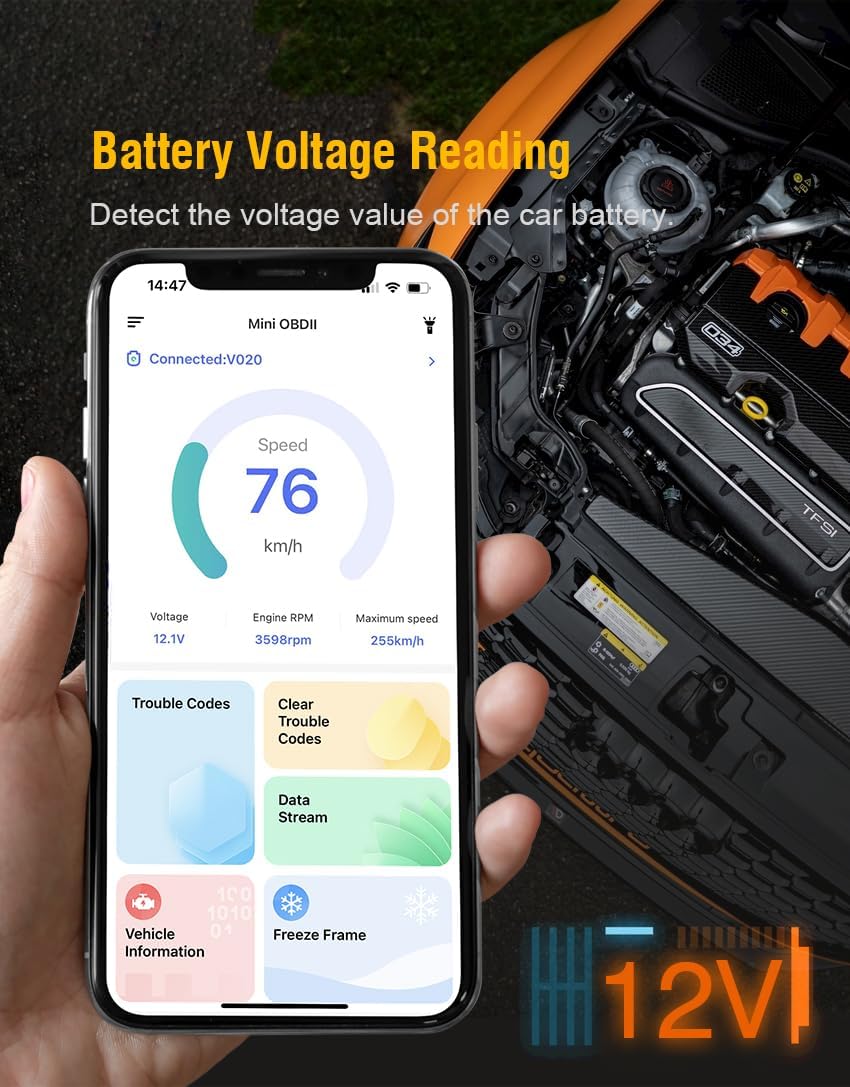
Image 5.1: The V020 app displaying a list of engine fault codes (DTCs) and the option to clear them, demonstrating the process of turning off the Malfunction Indicator Light.
5.2. Informace o vozidle
Access important vehicle identification and calibration data.
- Select "Vehicle Information" from the app menu.
- View details such as Vehicle Identification Number (VIN), Calibration Identification (CAL ID), and Calibration Verification Numbers (CVN).
5.3. Baterie Voltage Čtení
Sledujte stav baterie vašeho vozidlatage v reálném čase.
- Navigate to the "Battery Voltage Reading" section in the app.
- The app will display the current battery voltage, helping you assess its health.
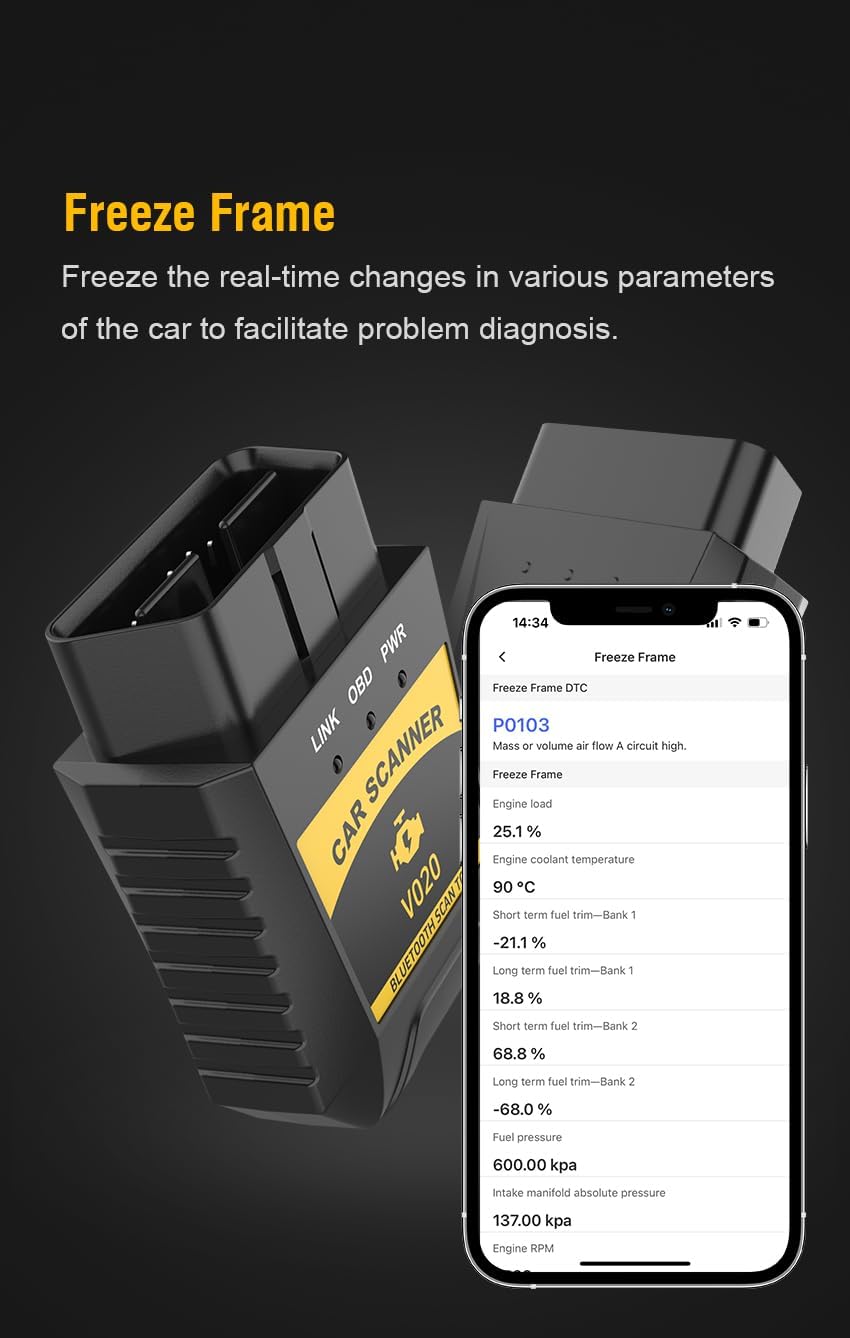
Image 5.2: The V020 app displaying real-time battery voltage readings, along with other vehicle parameters like speed and engine RPM.
5.4. Monitored Test and Freeze Frame Data Stream
These functions provide detailed insights into vehicle performance and fault conditions.
- Monitorovaný test: Allows you to check the status of various vehicle monitors (e.g., Misfire, Fuel System, O2 Sensor) since DTCs were last cleared.
- Freeze Frame: Captures a snapshot of engine conditions (parameters like engine RPM, coolant temperature, fuel pressure) at the exact moment a fault code is set. This data is crucial for diagnosing intermittent issues.
- Datový tok: Displays real-time sensor data from the vehicle, allowing for live monitoring of various parameters.
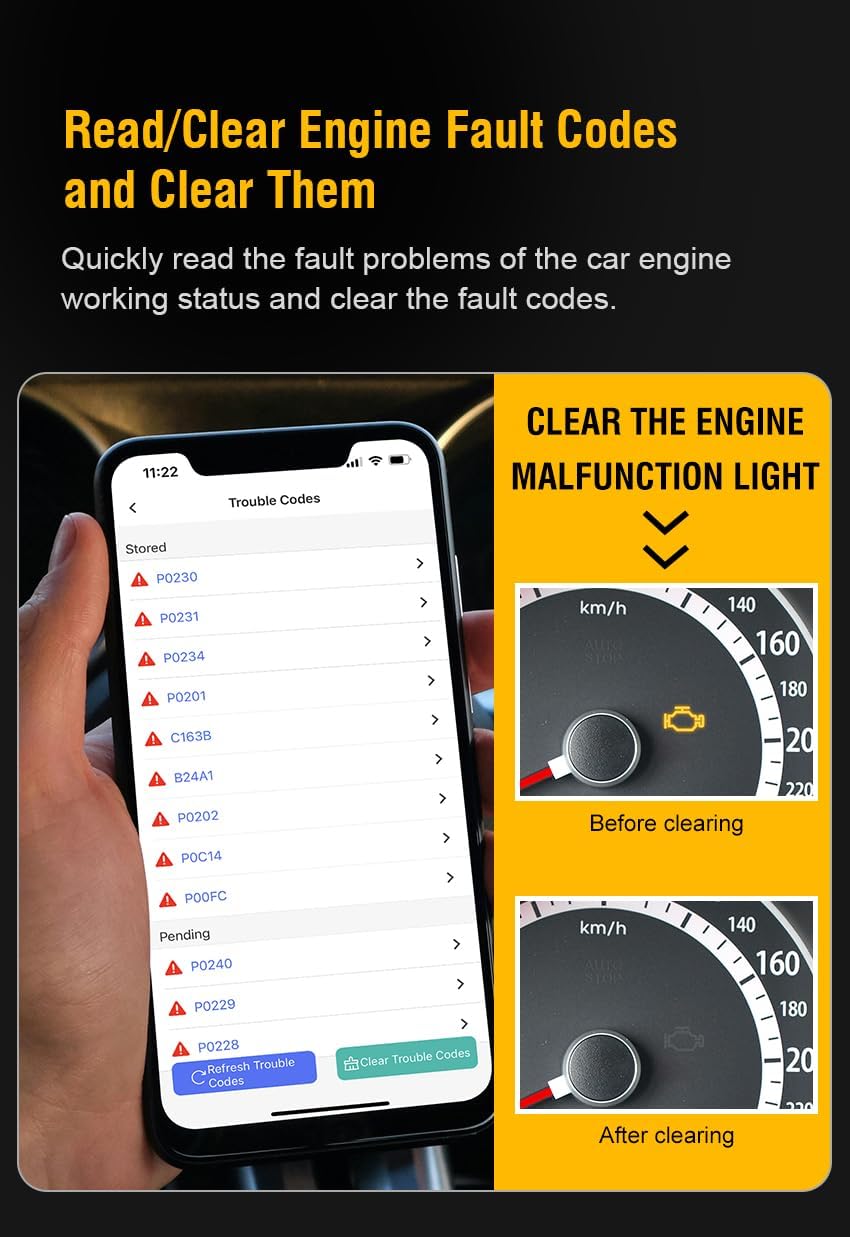
Image 5.3: Screenshots from the V020 app illustrating Monitored Test results, MIL (Malfunction Indicator Light) status, and detailed Vehicle Information.

Image 5.4: The V020 app displaying Freeze Frame data, which captures various engine parameters at the moment a Diagnostic Trouble Code (DTC) was recorded.
5.5. Zkouška výkonu
Evaluate your vehicle's acceleration and braking performance.
- Select "Performance Test" in the app.
- Follow the on-screen instructions to perform tests such as 0-100 km/h acceleration, braking distance from a certain speed, and distance testing (e.g., time to travel 500 meters).
Image 5.5: The V020 app's Performance Test section, illustrating options for measuring acceleration, braking performance, and distance traveled.
6. Údržba
To ensure the longevity and optimal performance of your V020 Car Scanner, follow these maintenance guidelines:
- Čištění: Zařízení otřete měkkým, suchým hadříkem. Nepoužívejte abrazivní čisticí prostředky ani rozpouštědla.
- Skladování: Skener skladujte na chladném a suchém místě, mimo dosah přímého slunečního záření a extrémních teplot.
- Zacházení: Zabraňte pádu zařízení nebo jeho vystavení silným nárazům.
- Aktualizace softwaru: Periodically check the dedicated app for software updates to ensure compatibility and access to new features.
7. Řešení problémů
If you encounter issues while using the V020 Car Scanner, refer to the following common problems and solutions:
| Problém | Možná příčina | Řešení |
|---|---|---|
| Zařízení se nezapne. | Loose connection to OBD2 port; Vehicle ignition not on; Vehicle battery low. | Ensure the scanner is firmly plugged into the OBD2 port. Turn the vehicle ignition to the "ON" position. Check vehicle battery voltage. |
| App cannot connect to the scanner. | Bluetooth not enabled on mobile device; Scanner not powered on; App not updated; Interference. | Enable Bluetooth on your mobile device. Ensure the scanner is powered on (connected to OBD2 port). Update the app to the latest version. Move away from strong electromagnetic interference sources. |
| Cannot read fault codes. | Vehicle ignition off; OBD2 port issue; Vehicle not OBD2 compliant. | Ensure vehicle ignition is in the "ON" position. Check the OBD2 port for damage. Verify your vehicle is OBD2 compliant (most vehicles manufactured after 1996 in the US are). |
| Codes clear but MIL comes back on. | Underlying vehicle issue not resolved. | Clearing codes only resets the light. The underlying problem must be diagnosed and repaired for the MIL to stay off. |
8. Informace o podpoře a záruce
For technical assistance, product inquiries, or warranty claims, please contact the manufacturer or your point of purchase. Refer to the packaging or product documentation for specific contact details.
The V020 Car Scanner comes with a standard manufacturer's warranty. Please retain your proof of purchase for warranty service. Warranty terms and conditions may vary; consult the provided warranty card or contact customer support for details.
Ask a question about this manual
Ask about setup, troubleshooting, compatibility, parts, safety, or missing instructions. Manuals+ will review the question and use this page’s manual context to help answer it.