
1. Úvod
Thank you for choosing the Antec GSK850 ATX3.1 850W Full Modular Power Supply Unit (PSU). This manual provides essential information for the proper installation, operation, and maintenance of your new power supply. The GSK850 is designed to deliver stable and efficient power to your computer system, featuring ATX3.1 and PCIe 5.1 compatibility, 80 PLUS Gold certification, and a full modular design for optimized cable management.

Figure 1.1: Antec GSK850 850W Full Modular Power Supply Unit
2. Bezpečnostní informace
Please read and follow all safety instructions carefully before installing or operating the PSU. Failure to do so may result in personal injury or damage to the product or system components.
- Elektrické nebezpečí: Neotevírejte zdroj casing. Vysoký objemtagUvnitř se nacházejí žádné části, i když je jednotka odpojena od sítě. Uvnitř nejsou žádné součásti, které by mohl uživatel opravit.
- Větrání: Ensure adequate ventilation around the PSU. Do not block the fan or ventilation openings.
- vlhkost: Do not expose the PSU to water or excessive humidity.
- Teplota: Provozujte zdroj v rámci specifikovaného teplotního rozsahu. Vyhněte se extrémnímu horku nebo chladu.
- Základy: Always connect the PSU to a grounded power outlet.
- Vypnout: Always disconnect the AC power cord from the wall outlet before installing, removing, or servicing the PSU or any connected components.
3. Obsah balení
Ověřte, zda jsou v balení přítomny všechny položky:
- Antec GSK850 ATX3.1 850W Full Modular Power Supply Unit
- Modular Cable Set (see Section 4.2 for details)
- AC napájecí kabel
- Montážní šrouby
- Uživatelská příručka (tento dokument)
4. Konec produktuview
4.1 Klíčové vlastnosti
- ATX3.1 & PCIe 5.1 Compatible: Designed to meet the latest standards for reliability and power efficiency, ensuring compatibility with modern hardware, including NVIDIA GeForce RTX 40 Series graphics cards.
- Certifikace 80 PLUS Gold: Achieves high power efficiency, reducing energy consumption and heat generation.
- Full Modular Cable Management: Allows users to connect only the necessary cables, improving airflow and reducing clutter inside the PC case.
- High-Quality Japanese Capacitors: Ensures tight voltage regulation, minimal ripple and noise, and extended lifespan.
- PhaseWave Design (LLC + DC-DC): Zajišťuje stabilní a efektivní dodávku energie.
- Zero RPM Manager: The fan remains off at low loads for silent operation, activating only when necessary.
- 120mm FDB Silent Fan: Features a fluid-dynamic bearing fan for quiet operation and durability.
- CircuitShield Protection Suite: Comprehensive industrial-grade protections including OCP, OVP, UVP, SCP, OPP, OTP, SIP, and NLO for system safety.
4.2 Modular Cable Management and Compatibility
The full modular design of the GSK850 allows for flexible cable management, enabling you to use only the cables required for your system. This reduces cable clutter, improves internal airflow, and simplifies installation.

Figure 4.1: Modular Cable Connectors and ATX 3.1 / PCIe 5.1 Compatibility

Figure 4.2: Detailed Cable and Connector Information
4.3 Vnitřní komponenty a konstrukce
The GSK850 incorporates high-quality components for reliable performance and longevity.

Figure 4.3: High-Quality Japanese Capacitors for enhanced stability and lifespan.

Figure 4.4: PhaseWave Design (LLC + DC-DC) for superior power delivery efficiency.
4.4 Chladicí systém
The PSU features an advanced cooling system to maintain optimal temperatures and quiet operation.
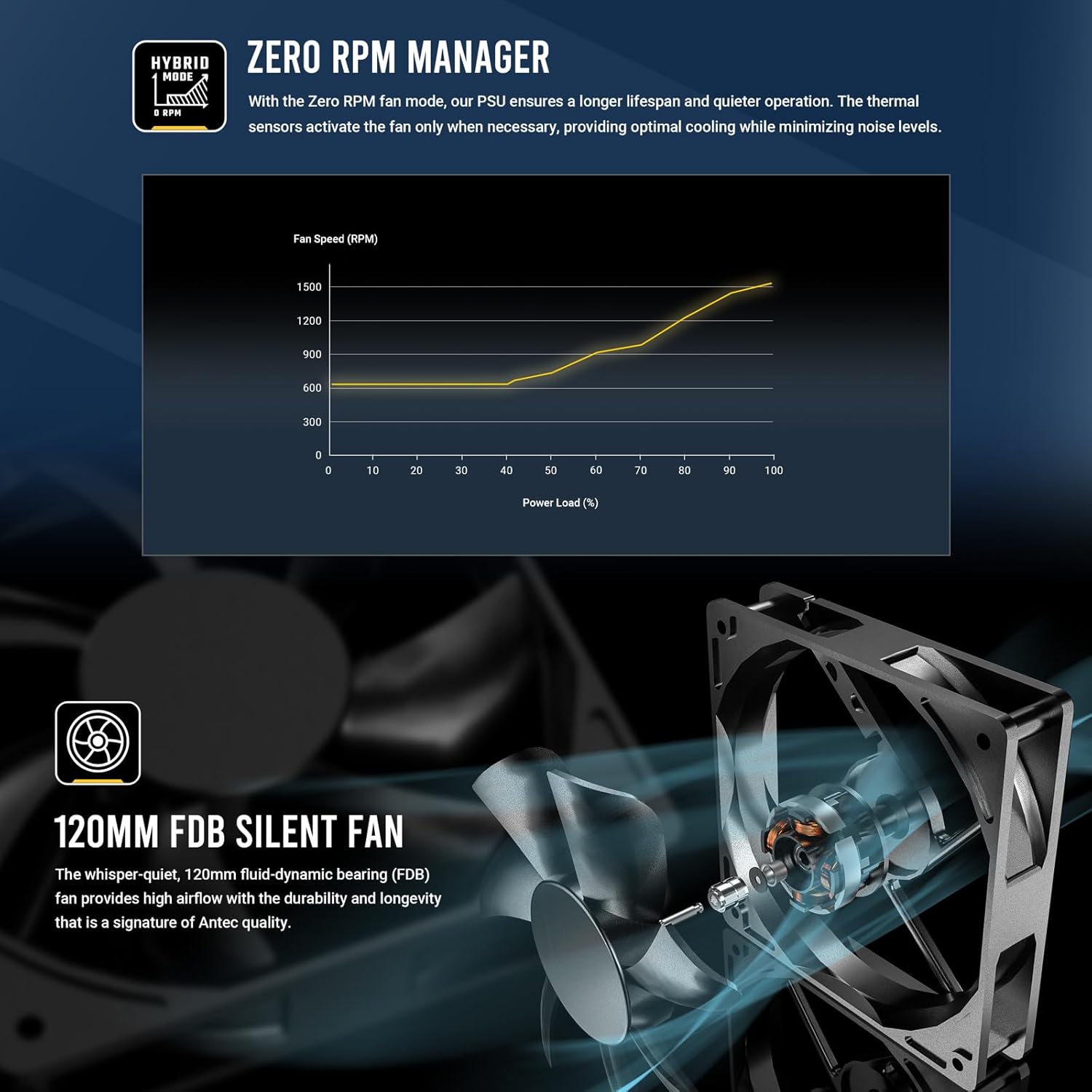
Figure 4.5: Zero RPM Manager fan curve, illustrating silent operation at low loads.

Figure 4.6: The 120mm Fluid-Dynamic Bearing (FDB) fan provides high airflow with low noise.
4.5 Compact Size
The GSK850 is designed with a compact form factor, making it suitable for a wide range of PC cases.

Figure 4.7: Compact dimensions of the GSK850 PSU, showing reduced volume compared to larger units.
5. Nastavení a instalace
Follow these steps to install your Antec GSK850 PSU into your computer system:
- Připravte si systém: Ujistěte se, že je počítač zcela vypnutý a odpojený od zásuvky. Otevřete kryt počítače.
- Demontáž starého zdroje (pokud je k dispozici): If replacing an existing PSU, disconnect all cables from the old PSU and remove its mounting screws. Carefully slide it out of the case.
- Montáž nového zdroje: Slide the Antec GSK850 into the PSU mounting bay of your computer case. Align the screw holes and secure the PSU with the provided mounting screws.
- Připojení základních kabelů: Refer to Figure 4.2 for cable types and lengths. Connect the necessary modular cables to the PSU first, then to your motherboard and components:
- 24pinový kabel základní desky ATX: Connect to your motherboard's main power connector.
- 8-pin (4+4) CPU Power Cable(s): Connect to your motherboard's CPU power connector(s).
- PCIe 5.1 12VHPWR (16-pin) or 8-pin (6+2) PCIe Cables: Connect to your graphics card(s) as required.
- Napájecí kabely SATA: Connect to SSDs, HDDs, and optical drives.
- Kabely Molex: Connect to any peripherals requiring Molex power.
- Správa kabelů: Kabely veďte úhledně za přihrádkou základní desky nebo do vyhrazených prostor pro správu kabelů, abyste zlepšili proudění vzduchu a estetiku.
- Zavřete skříň a připojte napájení: Once all connections are secure, close your computer case. Plug the AC power cord into the PSU and then into a grounded wall outlet.
6. Návod k obsluze
Operating the Antec GSK850 PSU is straightforward:
- Zapnutí: After installation, ensure the power switch on the back of the PSU is in the 'ON' (I) position. Then, power on your computer using the case's power button.
- Režim nulových otáček: The PSU's fan will remain off when the power load is low, providing silent operation. As the system load increases, the fan will automatically activate and adjust its speed to maintain optimal temperatures. This is normal operation and indicates the Zero RPM Manager is functioning correctly.
- Vypnout: To power off your system, use the operating system's shutdown function. For complete power disconnection, switch the PSU's power switch to the 'OFF' (O) position and unplug the AC power cord from the wall outlet.
7. Údržba
Správná údržba zajišťuje dlouhou životnost a optimální výkon vašeho zdroje:
- Odstranění prachu: Periodically clean dust from the PSU's fan grille and ventilation openings using compressed air. Ensure the PSU is powered off and unplugged before cleaning.
- Kontrola kabelů: Occasionally inspect all connected cables for any signs of wear, damage, or loose connections.
- Prostředí: Ensure the PSU operates in a clean, dry, and well-ventilated environment.
8. Řešení problémů
If you encounter issues with your Antec GSK850 PSU, refer to the following common troubleshooting steps:
- Bez napájení:
- Ujistěte se, že je napájecí kabel bezpečně zapojený do zdroje napájení i do zásuvky.
- Check that the PSU's power switch on the back is in the 'ON' (I) position.
- Verify all modular cables are securely connected to both the PSU and the components.
- Otestujte zásuvku ve zdi pomocí jiného zařízení, abyste se ujistili, že je pod proudem.
- Nestabilita/pády systému:
- Ensure your PSU wattage je dostatečné pro všechny komponenty vašeho systému.
- Zkontrolujte, zda nejsou uvolněné kabelové spoje.
- The PSU's CircuitShield protection suite (OCP, OVP, UVP, SCP, OPP, OTP, SIP, NLO) will automatically shut down the PSU in case of an electrical fault to protect your components. If this occurs, disconnect power, check for short circuits or faulty components, and then attempt to restart.

Figure 8.1: CircuitShield Protection Suite
- Ventilátor se netočí:
- The GSK850 features Zero RPM mode. The fan will not spin at low loads. This is normal. The fan will activate when the system load increases.
- If the fan does not spin even under high load, ensure there are no obstructions and contact support if the issue persists.
If the problem persists after following these steps, please contact Antec customer support.
9. Specifikace
| Funkce | Specifikace |
|---|---|
| Název modelu | GSK850 US |
| Značka | Antec |
| Výstupní Wattage | 850W |
| Form Factor | ATX |
| Certifikace účinnosti | 80 PLUS Gold |
| PFC | Aktivní PFC |
| Způsob chlazení | Vzduch (120mm ventilátor FDB) |
| Modulární typ | Plně modulární |
| Rozměry (DxŠxV) | 5.51 x 3.38 x 5.9 palce (140 x 86 x 150 mm) |
| Hmotnost | 5.6 libry |
| Barva | Černý |
| Kompatibilní zařízení | Osobní počítač |
| Typ konektoru | ATX |
10. Záruka a podpora
The Antec GSK850 ATX3.1 850W Full Modular PSU comes with a 7-letá záruka od data nákupu. Tato záruka se vztahuje na vady materiálu a zpracování při běžném používání.
For technical support, warranty claims, or further assistance, please visit the official Antec webnebo se obraťte na jejich zákaznický servis. Uschovejte si doklad o koupi pro ověření záruky.
Antec Official Webmísto: www.antec.com