
Devoko 0457
Devoko L-Shaped Gaming Desk Instruction Manual
Model: 0457
1. Úvod
Thank you for choosing the Devoko L-Shaped Gaming Desk. This manual provides essential information for the safe assembly, proper use, and maintenance of your new desk. Please read these instructions carefully before beginning assembly and retain them for future reference.

Image 1.1: The Devoko L-Shaped Gaming Desk in a typical gaming setup.
2. Bezpečnostní informace
Caution: Assembly required.
Ensure all tools and components are present before starting. Follow the instructions carefully to avoid injury or damage to the product. Keep small parts away from children. Do not stand or sit on the desk during assembly. Always place the desk on a flat, stable surface.
3. Obsah balení
The package includes all necessary accessories and hardware for assembly. Please verify that all components are present and undamaged before proceeding. If any parts are missing or damaged, please contact customer support.
- Desk panels (L-shaped sections)
- Leg frames (Z-shaped design)
- Connecting hardware (screws, bolts, washers)
- Montážní nástroje (např. imbusový klíč)
- Nastavitelné podložky na nohy
4. Pokyny k instalaci a montáži
Assembly typically takes one person approximately 30 minutes. Follow these steps for a smooth installation:
- Rozbalení a identifikace součástí: Carefully remove all components from the packaging. Lay them out on a clean, soft surface to prevent scratches. Refer to the included parts list (if available) to identify each piece.
- Sestavte rámy nohou: Attach the Z-shaped leg frames to the designated support beams using the provided screws and tools. Ensure all connections are secure but do not overtighten initially.
- Připevnění panelů stolu: Position the L-shaped desk panels onto the assembled leg frames. Align the pre-drilled holes and secure the panels to the frames using the appropriate hardware.
- Connect L-Shape Sections: Join the two L-shaped desk sections together at the corner using the provided connectors and screws. Ensure a flush and stable connection.
- Utáhněte všechny upevňovací prvky: Once all parts are loosely assembled, carefully place the desk upright. Then, systematically tighten all screws and bolts to ensure maximum stability. Avoid overtightening to prevent damage.
- Instalace opěrek nohou: Screw the adjustable foot pads into the bottom of each leg. These pads help level the desk on uneven floors and protect your flooring.
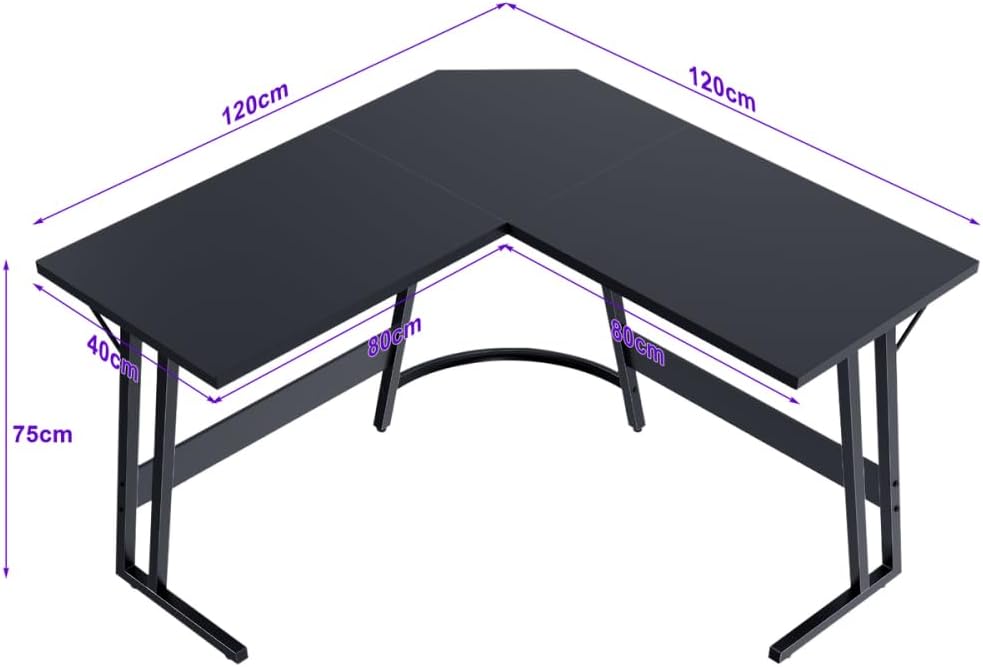
Obrázek 4.1: Rozměry stolu pro plánování prostoru.
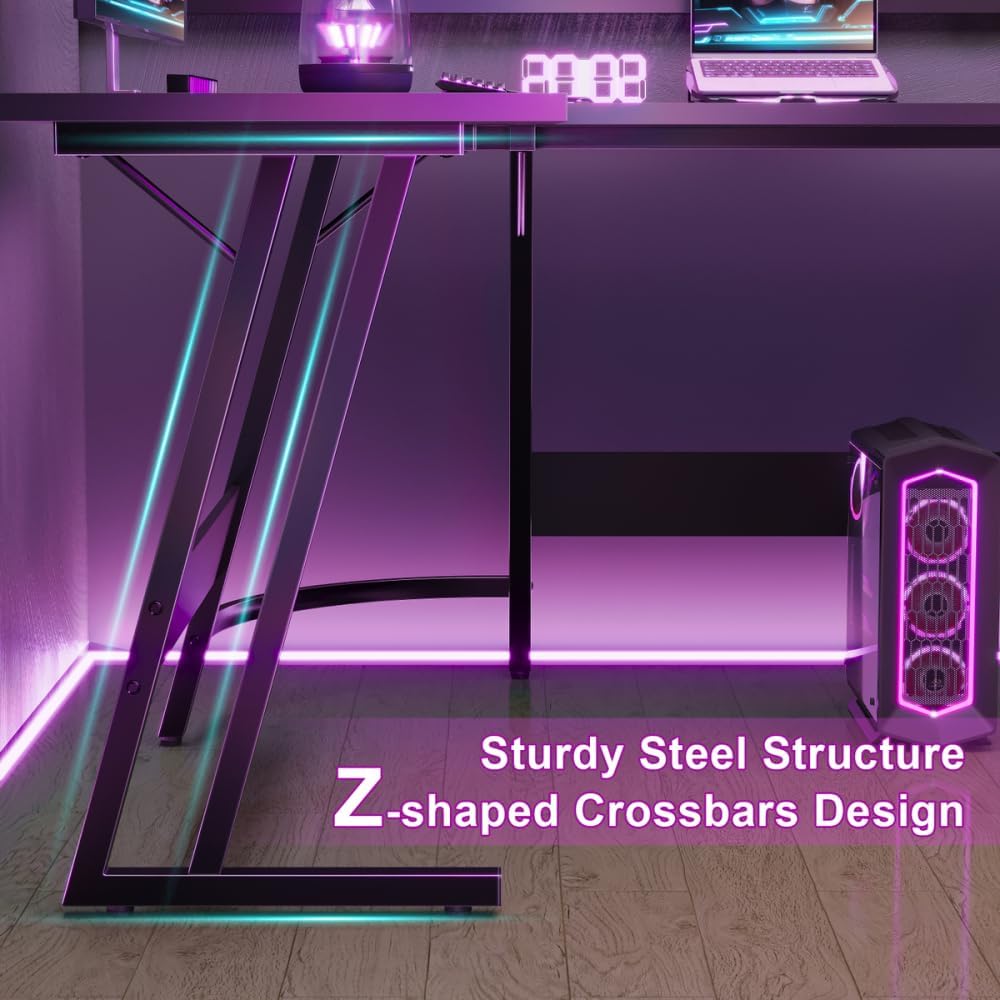
Image 4.2: Detail of the Z-shaped leg design for enhanced stability.
5. Návod k obsluze
The Devoko L-Shaped Gaming Desk is designed to provide a spacious and ergonomic workspace for various activities, including gaming, studying, and office work.
- Prostorný pracovní prostor: The 120 x 120 x 75 cm dimensions offer ample surface area to accommodate multiple monitors, a keyboard, mouse, PC tower, laptop, and other peripherals.
- Ergonomický design: The L-shape provides a comfortable setup, allowing for easy access to all your equipment and promoting better posture with generous legroom underneath.
- Všestranné použití: Utilize one side for your main gaming or work setup and the other for secondary tasks, storage, or additional display space.

Image 5.1: The desk provides ampprostor pro nohy pro pohodlné používání.
6. Údržba
To ensure the longevity and appearance of your Devoko L-Shaped Gaming Desk, follow these simple maintenance guidelines:
- Čištění: Otřete povrch stolu měkkým, damp cloth. Avoid abrasive cleaners or harsh chemicals that could damage the matt texture or finish.
- Rozlití: Clean up spills immediately to prevent staining or damage to the engineered wood tabletop.
- Kontrola hardwaru: Pravidelně kontrolujte všechny šrouby a vruty, zda jsou pevně utažené. V případě potřeby je dotáhněte pro zachování stability.
- Vyhněte se nadměrné hmotnosti: While sturdy, avoid placing excessively heavy items on the desk that could exceed its weight capacity.

Image 6.1: Detail of the matt texture and adjustable foot pads.
7. Řešení problémů
Pokud narazíte na nějaké problémy se stolem, podívejte se na následující běžná řešení:
- Chvění stolu:
- Ujistěte se, že všechny montážní šrouby a vruty jsou zcela utažené.
- Adjust the foot pads on the bottom of the legs to level the desk on uneven floors.
- Verify that the desk is placed on a flat and stable surface.
- Chybějící/poškozené díly: If you find any parts missing or damaged upon unboxing, do not proceed with assembly. Contact Devoko customer support immediately for assistance.
- Obtížnost sestavení: Review Pečlivě si přečtěte pokyny k montáži. Ujistěte se, že pro každý krok používáte správné spojovací materiály. Pokud problémy přetrvávají, zvažte vyhledání pomoci od jiné osoby.
8. Specifikace
| Funkce | Detail |
|---|---|
| Značka | Devoko |
| Číslo modelu | 0457 |
| Barva | Černý |
| Rozměry produktu (D x Š x V) | 120 x 120 x 75 cm |
| Materiál | Metal (Base), Engineered Wood (Top) |
| Hmotnost položky | 19 kg |
| Tvar | Tvar |
| Design stolu | Počítačový stůl |
| Styl | Moderní |
| Typ dokončení | Matný |
| Speciální funkce | L-shaped, Z-shaped reinforced legs, Scratch-resistant tabletop |
9. Záruka a podpora
Information regarding specific warranty terms and customer support contact details for the Devoko L-Shaped Gaming Desk Model 0457 is not provided in this manual. Please refer to the product packaging or the retailer's webstránky s informacemi o záruce a kontakty na zákaznický servis.
Ask a question about this manual
Ask about setup, troubleshooting, compatibility, parts, safety, or missing instructions. Manuals+ will review the question and use this page’s manual context to help answer it.