
1. Úvod
Thank you for choosing an Aveek Professional Audio Mixer. This manual provides detailed instructions for the setup, operation, and maintenance of your Aveek F-5A Professional Audio Mixer and Aveek MIX400 4-Channel Low Noise Mini Line Audio Mixer. Please read this manual thoroughly before using your device to ensure proper functionality and to prevent damage.
The Aveek audio mixer series is designed to provide high-quality audio mixing solutions for various applications, from home studios to live performances. Both models offer distinct features tailored to different user needs.

Image 1.1: Aveek F-5A (left) and Aveek MIX400 (right) Audio Mixers. The F-5A is a multi-channel mixer with XLR inputs and USB connectivity, while the MIX400 is a compact 4-channel line mixer.
2. Důležité bezpečnostní pokyny
- Před uvedením do provozu si pečlivě přečtěte tyto pokyny.
- Uschovejte si tyto pokyny pro budoucí použití.
- Dbejte všech varování na výrobku a v návodu k obsluze.
- Nepoužívejte toto zařízení v blízkosti vody.
- Čistěte pouze suchým hadříkem.
- Nezakrývejte žádné větrací otvory. Nainstalujte v souladu s pokyny výrobce.
- Neinstalujte v blízkosti zdrojů tepla, jako jsou radiátory, tepelné regulátory, kamna nebo jiná zařízení (včetně amplifikátory), které produkují teplo.
- Nepodceňujte bezpečnostní účel polarizované nebo uzemněné zástrčky. Polarizovaná zástrčka má dvě čepele, přičemž jedna je širší než druhá. Zástrčka zemnícího typu má dvě čepele a třetí zemnící kolík. Široká čepel nebo třetí hrot jsou určeny pro vaši bezpečnost. Pokud dodaná zástrčka nepasuje do vaší zásuvky, požádejte elektrikáře o výměnu zastaralé zásuvky.
- Chraňte napájecí kabel před šlapáním nebo přiskřípnutím, zejména u zástrček, zásuvek a v místě, kde vychází z přístroje.
- Používejte pouze nástavce/příslušenství určené výrobcem.
- Odpojte toto zařízení během bouřky s blesky nebo když se delší dobu nepoužívá.
- Veškeré opravy svěřte kvalifikovanému servisnímu personálu. Servis je nutný, pokud bylo zařízení jakýmkoli způsobem poškozeno, například je poškozen napájecí kabel nebo zástrčka, pokud do zařízení vnikla tekutina nebo do něj spadly předměty, zařízení bylo vystaveno dešti nebo vlhkosti, nefunguje normálně. , nebo byla vypuštěna.
3. Obsah balení
Please check the package contents upon unboxing. If any items are missing or damaged, contact Aveek customer support.
- Aveek Audio Mixer (F-5A or MIX400, depending on model purchased)
- Power Adapter (5V-2A Type-C for F-5A, 5V for MIX400)
- USB Type-C to USB Cable (for F-5A)
- Uživatelská příručka (tento dokument)
4. Konec produktuview a funkce
4.1 Aveek F-5A Professional Audio Mixer
The Aveek F-5A is a versatile professional audio mixer designed for comprehensive sound control and recording. It features multiple input options and advanced functionalities.
- Mikrofonní/linkové vstupy: 3 XLR/TRS combo jacks for microphones or line-level instruments.
- Stereo linkové vstupy: L/R 6.35mm and L/R RCA stereo inputs for connecting CD players, keyboards, or computers.
- Rozhraní USB-B: Built-in sound card for direct connection to computers, mobile phones, or tablets for mixing and recording. Requires a USB to Phone OTG Adapter for mobile devices.
- Rozhraní USB-A: For MP3 music playback from a USB stick or recording audio output to a USB stick.
- Konstrukce s ultra nízkou hlučností: Utilizes a 5V-2A (Type-C) adapter power supply and six ROHM low-noise operational ampzesilovače pro vynikající kvalitu zvuku.
- výstupy: L/R RCA output and L/R 6.35mm Main output for active speakers, power ampzáchranné svíčky nebo aktivní zvukové systémy.
- Fantomová síla: Fantomové napájení +48V pro kondenzátorové mikrofony.
- Efekty: Built-in digital effects processor (Reverb, Delay).

Image 4.1: Front panel overview of the Aveek F-5A mixer, detailing input jacks, control knobs (gain, treble, bass, effect, volume), USB ports, and output connections.
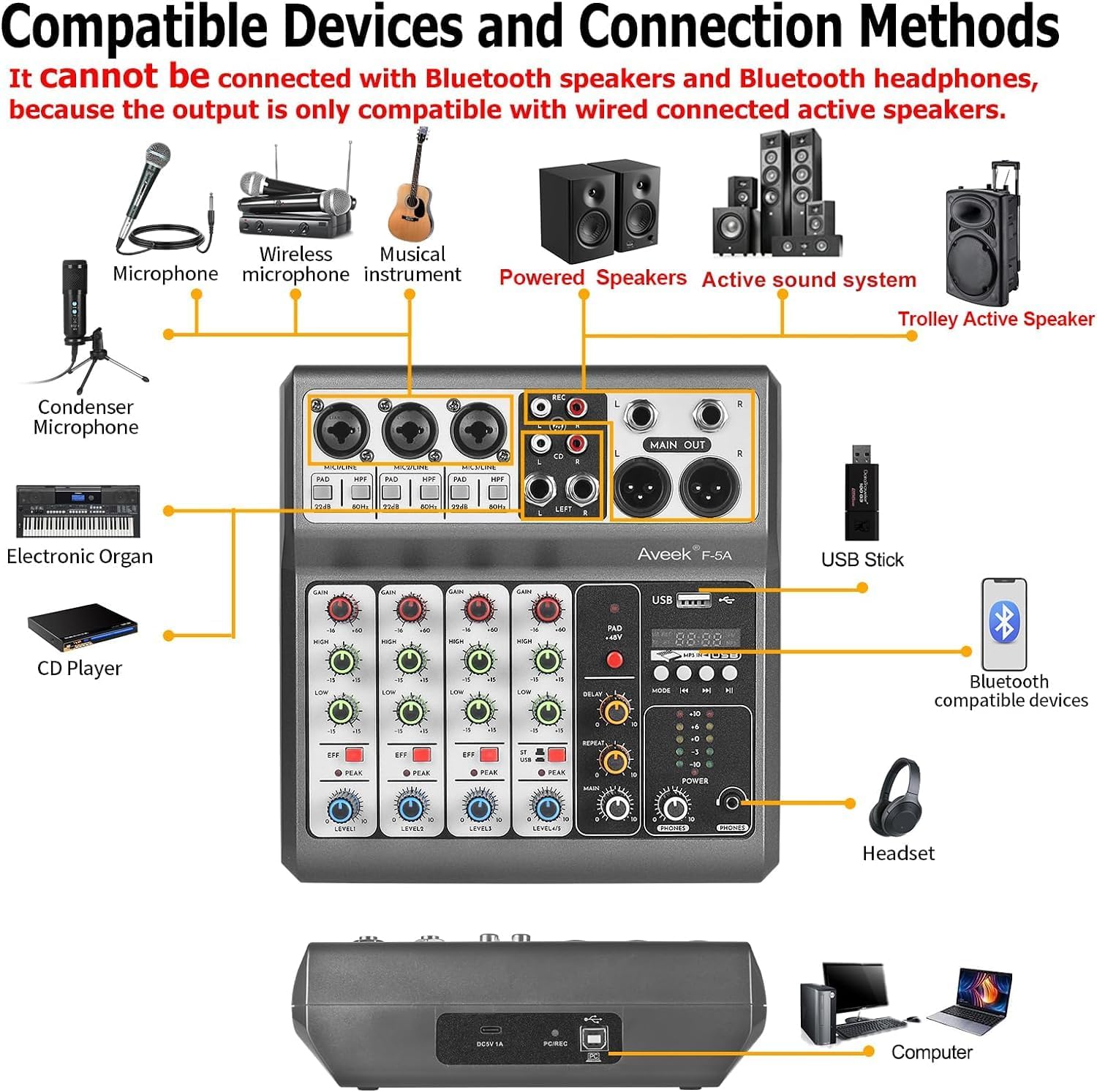
Image 4.2: Diagram illustrating compatible devices and connection methods for the Aveek F-5A mixer, including microphones, instruments, speakers, and computers. Note: Bluetooth output devices are not supported.
4.2 Aveek MIX400 4-Channel Low Noise Mini Line Audio Mixer
The Aveek MIX400 is a compact and efficient 4-channel stereo line mixer, ideal for combining multiple audio sources into a single output with minimal noise.
- 4-Inputs 1-Output: Four independent stereo/mono input channels combining into one stereo output.
- Kompatibilita vstupu: Suitable for dynamic microphones, electronic instruments, CDs, and computers.
- Ultranízká hlučnost: Designed for superior sound quality with low noise and minimal distortion.
- Kompaktní design: Small footprint for easy integration into any setup.

Image 4.3: Front panel of the Aveek MIX400, showing four input channels with individual volume controls, mono/stereo switches, and a master output volume control.
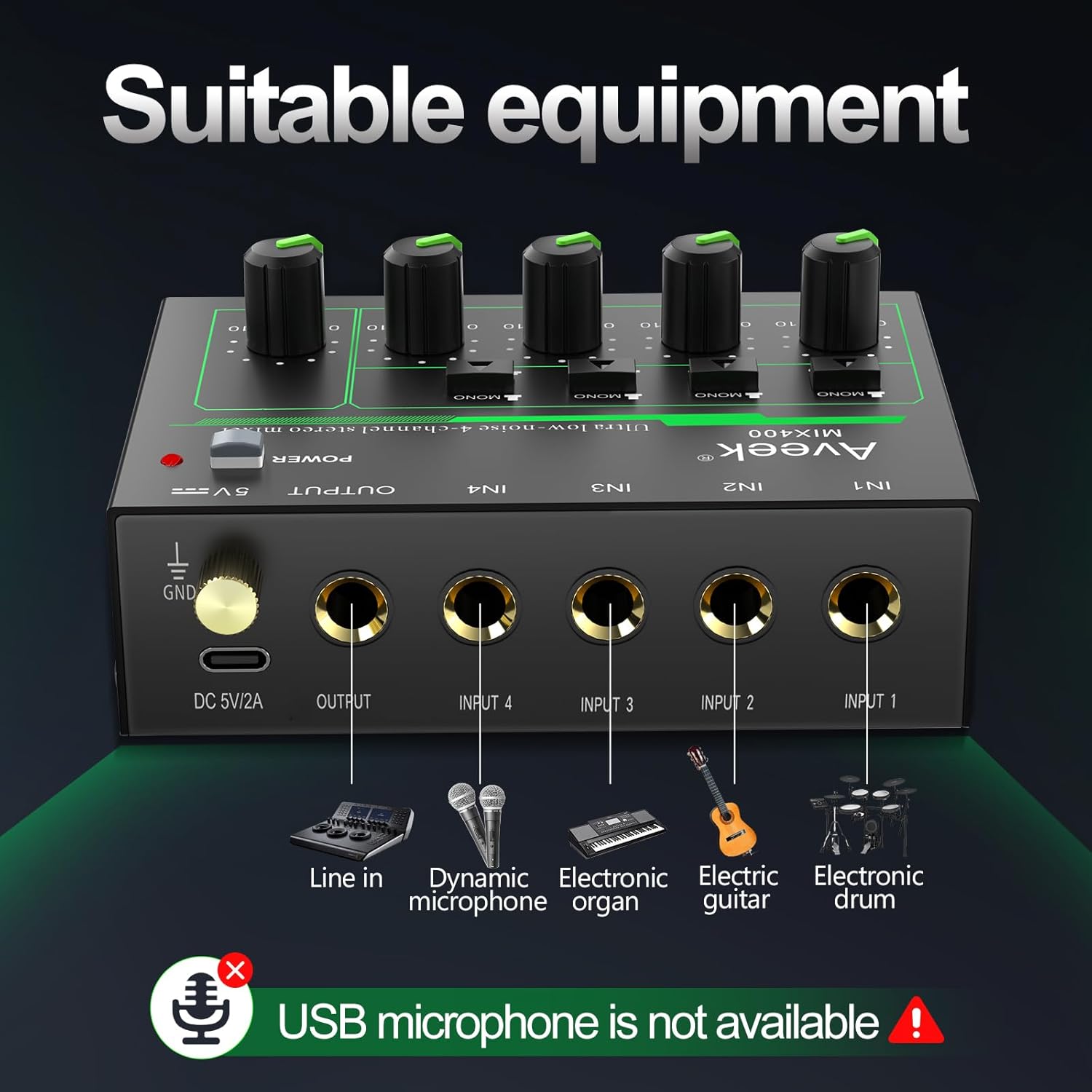
Image 4.4: Diagram illustrating suitable equipment for the Aveek MIX400, including line-in devices, dynamic microphones, electronic organs, electric guitars, and electronic drums. USB microphones are not supported.
5. Nastavení a připojení
5.1 Zapnutí mixážního pultu
Both Aveek mixers require external power. Ensure the mixer is turned off before connecting the power supply.
- Aveek F-5A: Connect the provided USB Type-C to USB cable to the mixer's Type-C power port and then to the 5V-2A power adapter. Plug the adapter into a standard wall outlet. The F-5A can also be powered by a power bank or a computer's USB port.
- Aveek MIX400: Connect the provided 5V power adapter to the mixer's DC 5V/2A port and then to a standard wall outlet.
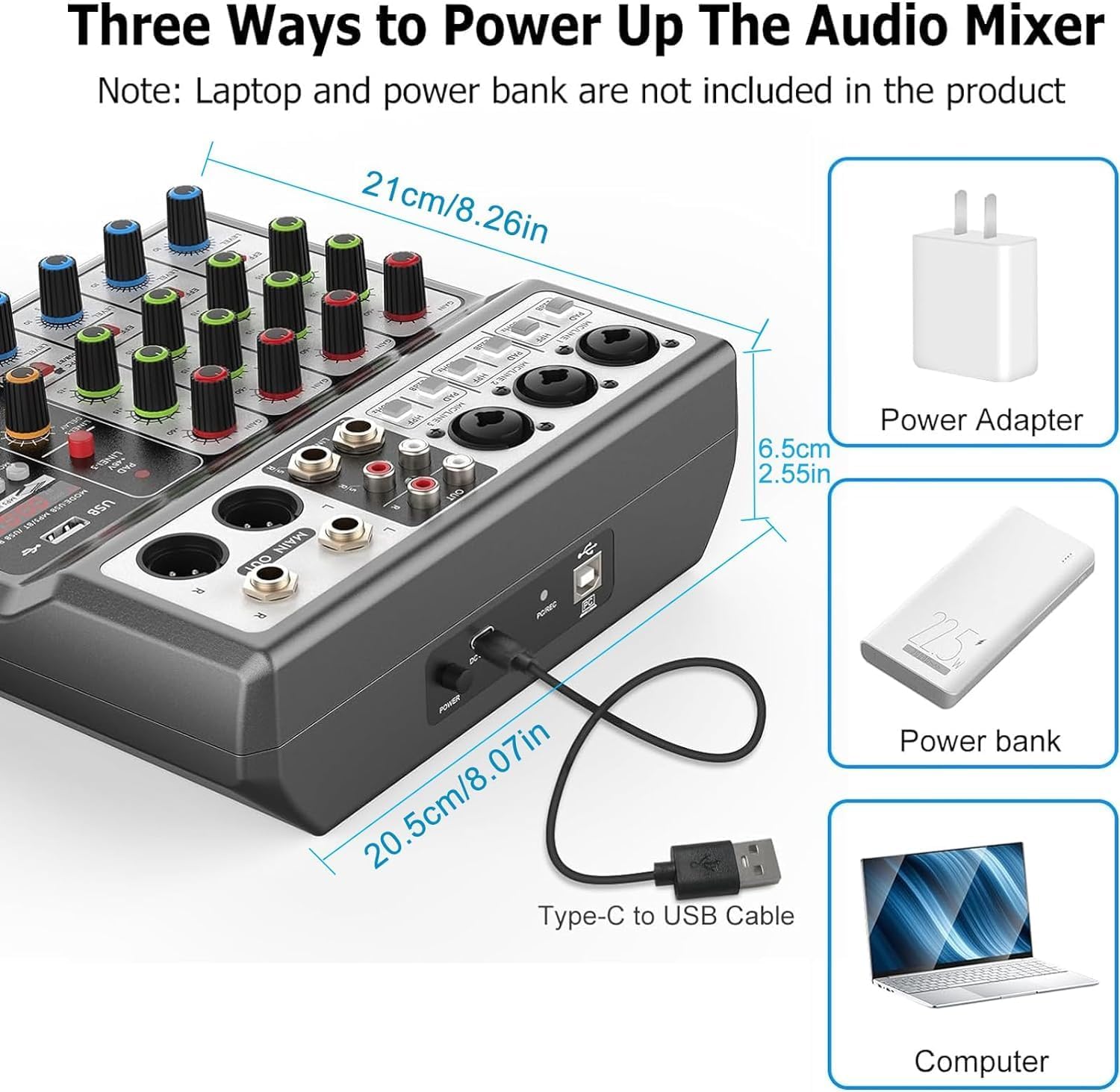
Image 5.1: Powering options for the Aveek F-5A mixer, including a power adapter, power bank, or computer USB port via a Type-C to USB cable.
5.2 Connecting Audio Devices (Aveek F-5A)
Refer to Image 4.1 and 4.2 for visual guidance.
- Mikrofony: Connect dynamic or condenser microphones to the XLR/TRS combo jacks (MIC1, MIC2, MIC3). For condenser microphones, activate the +48V phantom power switch if required.
- Přístroje/linková zařízení: Connect instruments (e.g., guitar, keyboard) or other line-level devices to the TRS inputs or the L/R RCA stereo inputs.
- Computer/Mobile Device (USB-B): Use a USB-B cable to connect the mixer to your computer for recording or playback. For mobile phones/tablets, an OTG adapter is required for data transfer.
- USB Stick (USB-A): Insert a USB stick into the USB-A port for MP3 playback or recording.
- výstupy: Connect your active speakers, power amplifier, or active sound system to the MAIN OUT (6.35mm TRS) or RCA OUT jacks.
- Sluchátka: Pro monitoring připojte sluchátka do konektoru PHONES.
5.3 Connecting Audio Devices (Aveek MIX400)
Refer to Image 4.3 and 4.4 for visual guidance.
- Vstupy: Connect your audio sources (e.g., dynamic microphone, electronic organ, electric guitar, electronic drum, CD player) to the IN1, IN2, IN3, IN4 jacks. These are 1/4" TS/TRS inputs.
- výstup: Connect the mixer's OUTPUT jack to your active speakers or ampživější.

Obrázek 5.2: Detailní view of the Aveek MIX400 input and output jacks, illustrating the use of TRS for stereo and TS for mono connections.

Image 5.3: The Aveek MIX400 connected to a dynamic microphone, demonstrating a typical input setup. USB microphones are not compatible.
6. Provoz
6.1 Aveek F-5A Operation
- Zapnutí: After connecting all devices and power, press the POWER switch to turn on the mixer.
- Vstupní zisk: Adjust the GAIN knob for each channel to set the input level. Ensure the PEAK indicator does not light up consistently, which indicates clipping.
- Vyrovnání: Use the TREBLE and BASS knobs to adjust the high and low frequencies for each channel.
- Efekty: Use the EFF knob to send a portion of the channel signal to the internal effects processor. Adjust the MP3 playback adjustment and Reverb/Delay controls for desired effect.
- Hlasitost kanálu: Adjust the CHANNEL VOLUME knob for each input to balance the mix.
- Hlavní hlasitost: Use the MASTER VOLUME knob to control the overall output level.
- Sledování: Adjust the MONITOR VOLUME knob for headphone output.
- Funkce USB:
- USB-B (PC/Mobile): When connected to a computer, the mixer acts as an audio interface. Select it as your input/output device in your operating system's sound settings.
- USB-A (Playback/Record): Insert a USB stick. Use the MODE/USB/MP3/BT/REC controls to play MP3 files or record the main mix directly to the USB stick.
6.2 Aveek MIX400 Operation
- Zapnutí: After connecting all devices and power, press the POWER switch to turn on the mixer. The power indicator light will illuminate.
- Vstupní režim: For each input channel (IN1-IN4), select either MONO (TS input) or STEREO (TRS input) using the switch.
- MONO Mode: Recommended for mono sound input. Mono sound uses one channel output in Stereo mode.
- STEREO Mode: Stereo sound uses two channels output in any mode.
- Vstupní hlasitost: Adjust the individual volume control knob for each input channel (IN1-IN4) to balance the levels of your audio sources.
- Master Output Volume: Adjust the OUTPUT volume control knob to set the overall output level of the mixed audio.
Image 6.1: Front panel of the Aveek MIX400, highlighting the power switch, mono/stereo input mode selectors, individual input volume controls, and master output volume control.
7. Údržba
- Čištění: K čištění vnějšího povrchu mixéru používejte měkký, suchý hadřík. Nepoužívejte tekuté čisticí prostředky ani rozpouštědla.
- Skladování: Pokud se mixér delší dobu nepoužívá, skladujte jej na chladném a suchém místě, mimo dosah přímého slunečního záření a extrémních teplot.
- Větrání: Zajistěte dostatečné větrání kolem mixéru, abyste zabránili přehřátí. Neblokujte větrací otvory.
- Správa kabelů: Avoid bending or pinching cables, especially power cords, to prevent damage.
8. Řešení problémů
| Problém | Možná příčina | Řešení |
|---|---|---|
| Žádná síla | Power cable not connected; power adapter faulty; power outlet not working. | Check power connections; try a different power outlet; ensure correct power adapter is used. |
| Žádný zvukový výstup | Output cables not connected; output volume too low; incorrect input selection; connected to passive speakers. | Verify output cable connections; increase MASTER VOLUME; ensure input devices are active; connect to active speakers or an ampživější. |
| Zkreslený zvuk | Input gain too high (clipping); faulty cables; impedance mismatch. | Reduce input GAIN (F-5A) or individual channel volume (MIX400); replace cables; ensure compatible devices are connected. |
| Microphone not working (F-5A) | +48V phantom power not enabled for condenser mic; mic cable faulty; mic gain too low. | Activate +48V switch; check/replace mic cable; increase GAIN. |
| USB recording/playback issues (F-5A) | Incorrect USB mode selected; USB stick not formatted correctly; USB to OTG adapter not working (for mobile). | Ensure correct USB mode; format USB stick to FAT32; verify OTG adapter functionality. |
If you encounter issues not listed here or if the problem persists, please contact Aveek customer support for assistance.
9. Specifikace
General Specifications (Applicable to both models where relevant)
- Značka: Aveek
- Zdroj napájení: Elektrický kabel
- Technologie připojení: USB (F-5A), Line (MIX400)
- Typ výstupního konektoru: RCA, TRS
Profesionální audio mixážní pult Aveek F-5A
- Vstupní kanály: 3 x XLR/TRS Combo, 1 x Stereo 6.35mm, 1 x Stereo RCA
- Výstupní kanály: 1 x Stereo 6.35mm Main Out, 1 x Stereo RCA Out, 1 x Headphone Out
- USB rozhraní: USB-B (PC/Mobile), USB-A (Playback/Record)
- Fantomová síla: +48V
- Napájení: 5V-2A (typ C)
- Rozměry (přibližné): 21cm (W) x 20.5cm (D) x 6.5cm (H) / 8.26in (W) x 8.07in (D) x 2.55in (H)
Image 9.1: Approximate dimensions of the Aveek F-5A mixer.
Aveek MIX400 4-Channel Low Noise Mini Line Audio Mixer
- Počet kanálů: 4 vstupy, 1 výstupy
- Typ vstupu: 1/4" TS/TRS (Mono/Stereo selectable)
- Typ výstupu: 1/4" TRS
- Napájení: 5V DC
10. Záruka a podpora
Aveek products are designed for reliability and performance. For information regarding warranty coverage, technical support, or service inquiries, please refer to the warranty card included with your product or visit the official Aveek webmísto.
For direct assistance, you may contact Aveek customer support through the retailer where the product was purchased or via the contact information provided on the Aveek brand store page on Amazon: Aveek Store.