
1. Důležité bezpečnostní informace
Please read this manual carefully before assembly and use. Keep this manual for future reference. Incorrect assembly or use may cause damage or injury.
- Nosnost: Do not exceed the maximum weight capacity of 40 kg (88 lbs) for the TV and 5 kg (11 lbs) for the shelf. Overloading can result in serious injury or property damage.
- Velikost televizoru: Tento stojan je určen pro televizory s úhlopříčkou od 32 do 70 palců. Ujistěte se, že váš televizor spadá do této kategorie.
- Kompatibilita VESA: Verify your TV's VESA mounting pattern is between 100x100mm and 400x400mm.
- Bezpečnostní opatření proti převrácení: Always install the included anti-tip wire to secure the TV stand to the wall, preventing accidental tipping, especially in households with children or pets.
- Stabilní umístění: Umístěte televizní stolek na rovný, stabilní a vodorovný povrch. Neumísťujte jej na nerovný povrch ani do blízkosti okrajů, kde by se mohl snadno převrátit.
- Shromáždění: Assemble the product according to the instructions provided. Do not modify the structure or use parts not supplied by the manufacturer.
- Správa kabelů: Use the integrated cable management features to prevent tripping hazards and keep cables organized.
2. Obsah balení
Before starting assembly, ensure all parts and hardware are present and undamaged. Refer to the parts list and diagrams in the included assembly guide.
- TV Stand Components (Base, Vertical Support, TV Bracket, Shelf)
- Assembly Hardware (Screws, washers, nuts, Allen wrench)
- Anti-Tip Safety Wire and Wall Anchors
- Klipy pro správu kabelů
- Instruction Manual (English and Japanese)

Obrázek: Overview of TV stand compatibility and load capacities.
3. Nastavení a montáž
Follow these steps for proper assembly. It is recommended to have two people for certain steps, especially when mounting the TV.
- Rozbalení a identifikace součástí: Carefully unpack all components and lay them out. Compare them with the parts list in the separate assembly guide to ensure everything is present.
- Sestavte základnu: Attach the vertical support column to the wooden base using the provided screws and tools. Ensure all connections are secure.
- Install the Shelf: The shelf can be adjusted to 5 different height levels. Choose your desired height and secure the shelf to the vertical support.
- Připevnění držáků televizoru k televizoru: Secure the TV mounting brackets to the back of your television. Ensure the correct screws and spacers are used for your TV's VESA pattern.
- Upevnění televizoru na stojan: With assistance, carefully lift the TV and hook the brackets onto the vertical support's mounting plate. Secure the TV using the safety locks. The TV bracket offers 3 height levels, and the metal pole offers 4 height levels, providing a total of 12 height adjustment options for the TV.
- Install Anti-Tip Wire: Attach one end of the anti-tip wire to the TV stand and the other end to a wall stud or appropriate wall anchor. This is a crucial safety step.
- Správa kabelů: Route all TV and device cables through the integrated cable management clips on the back of the stand for a tidy and safe setup.

Image: Detailed dimensions and height adjustment options for the TV stand.

Image: Illustration of the anti-tip safety wire installation.
4. Návod k obsluze
The Rfiver TV Stand offers flexible viewmožnosti:
- Nastavení výšky: The TV can be adjusted to 12 different height levels, ranging from 113.2 cm to 128.2 cm (from floor to top of TV). To adjust, loosen the securing screws on the vertical support, slide the TV to the desired height, and re-tighten the screws firmly.
- Funkce otáčení: The TV mount allows for a 25-degree swivel to the left or right. Gently push the TV to achieve your preferred viewing angle. This feature provides a comfortable viewing experience from various positions in the room.
- Seřízení police: The accessory shelf can be adjusted to 5 different height positions to accommodate various media devices, soundbars, or decorative items. Loosen the shelf screws, move to the desired slot, and re-tighten.

Image: TV height adjustment feature.
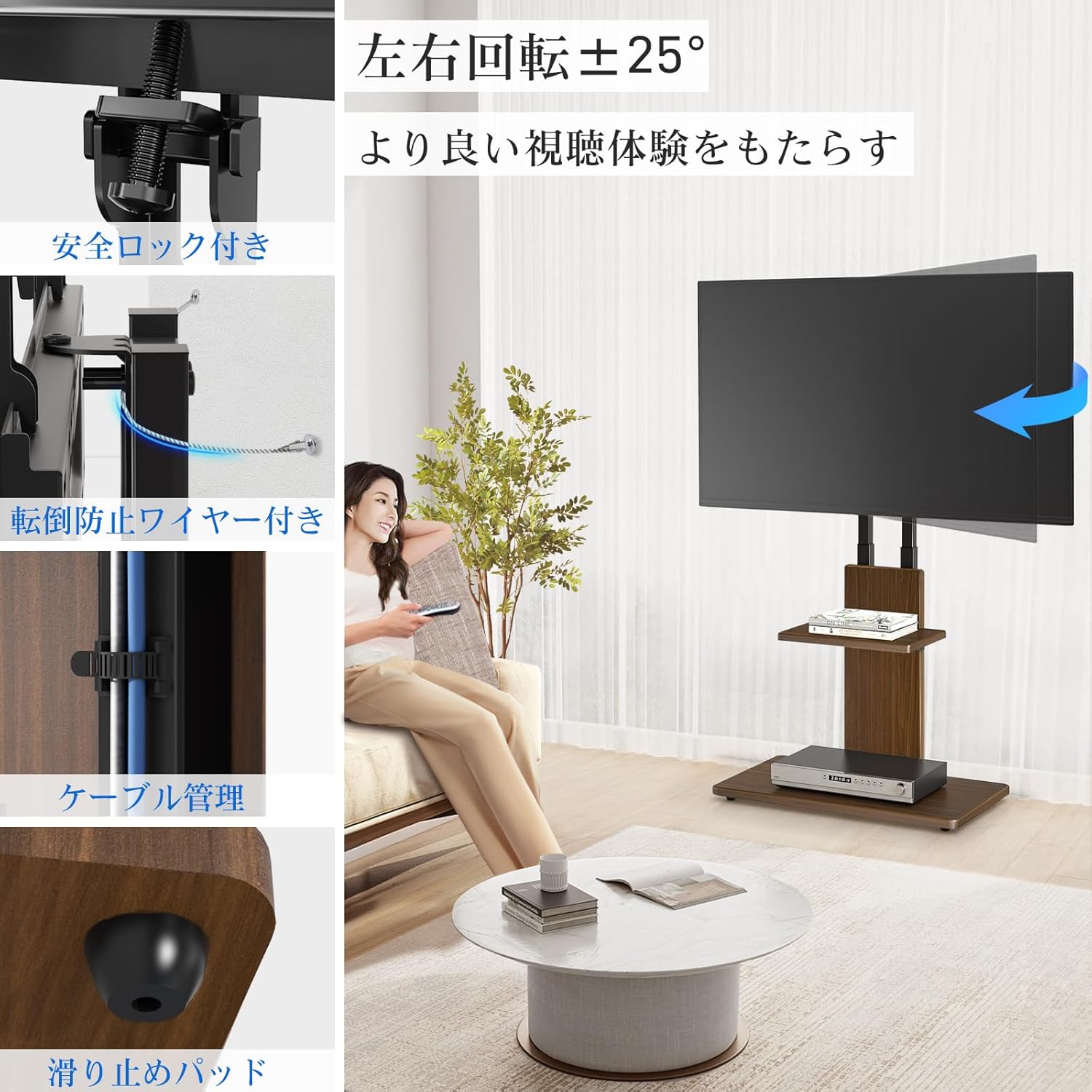
Image: Swivel function and other features.
5. Údržba
To ensure the longevity and appearance of your Rfiver TV Stand:
- Čištění: Povrchy otřete měkkým, suchým hadříkem. V případě odolných skvrn použijte lehceamp Lze použít hadřík a ihned osušit. Nepoužívejte agresivní chemikálie ani abrazivní čisticí prostředky.
- Kontrola hardwaru: Pravidelně kontrolujte všechny šrouby a spoje, zda jsou pevně utažené. V případě potřeby je dotáhněte.
- Anti-Tip Wire: Regularly inspect the anti-tip wire and its wall attachment for any signs of wear or loosening.
- Vyhněte se přetížení: Do not place items heavier than the specified weight limits on the TV or shelf.
6. Řešení problémů
Pokud narazíte na jakékoli problémy s televizním stolkem, podívejte se na následující běžná řešení:
- Stojan je vratký:
- Ujistěte se, že všechny montážní šrouby jsou zcela utažené.
- Verify the stand is on a flat and level surface.
- Check if the anti-tip wire is properly installed and taut.
- TV není vodorovně:
- Re-check the TV mounting brackets on the back of the TV to ensure they are evenly aligned.
- Adjust the height of the TV on the stand, ensuring both sides are at the same level before tightening.
- Chybějící části:
- Carefully re-check all packaging materials. If parts are still missing, contact Rfiver customer support.
- Obtížnost s nastavením výšky/otočení:
- Ensure all locking mechanisms or screws related to the adjustment are loosened before attempting to move the TV or shelf. Re-tighten after adjustment.
7. Specifikace
| Značka | Rfiver |
| Název modelu | Wall-Leaning TV Stand |
| Kompatibilní zařízení | Televize, monitor |
| Kompatibilní velikost TV | 32 až 70 palců |
| Maximum TV Load Capacity | 40 kg (88 lb) |
| Maximální nosnost police | 5 kg (11 lb) |
| Kompatibilita VESA | 100x100 mm až 400x400 mm (horizontálně x vertikálně) |
| Height Adjustment (TV) | 12 levels, 113.2 cm to 128.2 cm (floor to top of TV) |
| Height Adjustment (Shelf) | 5 úrovní |
| Úhel otočení | ±25 degrees (Left/Right) |
| Materiál | Alloy Steel, MDF Wood |
| Barva | Hnědý |
| Typ montáže | Floor Mount (Wall-leaning) |
| Rozměry produktu (D x Š x V) | 60 x 40 x 113-128.2 cm |
| Hmotnost položky | 12.6 kg |

Image: Rfiver TV Stand in a living room setting.
8. Záruka a podpora
Rfiver is committed to providing high-quality products and customer satisfaction. For any questions, concerns, or warranty claims, please contact our customer support team.
- Informace o záruce: Specific warranty details may vary. Please refer to the warranty card included with your product or visit the official Rfiver webwebu pro nejaktuálnější informace.
- Zákaznická podpora: If you require assistance with assembly, troubleshooting, or have any product-related inquiries, please reach out to our dedicated support team. Contact information can typically be found on our webmístě nebo na obalu produktu.