
1. Důležité bezpečnostní pokyny
Please read all instructions carefully before assembling and using your Dolonm Power Lift Recliner Chair. Retain this manual for future reference.
- Ensure all connections are secure before plugging the chair into a power outlet.
- Používejte pouze dodaný napájecí adaptér.
- Udržujte děti a domácí zvířata v dostatečné vzdálenosti od pohyblivých částí křesla.
- Do not allow liquids to spill on the chair or its electrical components.
- Maximální nosnost této židle je 350 lb (158 kg)Nepřekračujte tento limit.
- If you have any health concerns, consult your doctor before using the massage or heat functions.
- Avoid placing hands or feet near the chair's mechanism during operation.
2. Obsah balení
Your Dolonm Power Lift Recliner Chair is shipped in two separate boxes. Please ensure all components are present before beginning assembly.
- Část opěradla
- Seat Base Section (with armrests and footrest)
- Napájecí adaptér
- Wired Remote Control for Lift/Recline
- Wired Remote Control for Massage/Heat

Figure 2.1: Packaging and Weight Capacity. The chair arrives in two boxes (Box A and Box B) and supports a maximum weight of 350 lbs.
3. Nastavení a montáž
Assembly of your recliner chair is designed to be straightforward and requires no additional tools.
- Opatrně vybalte všechny součásti z obou krabic.
- Place the seat base section in your desired location.
- Align the backrest section with the metal slots on the seat base. Slide the backrest down firmly until it locks into place. You should hear a click.
- Connect the power adapter to the chair's power input, typically located at the rear or side of the base.
- Zapojte napájecí adaptér do uzemněné elektrické zásuvky.
- Connect the remote controls to their respective ports on the chair.

Obrázek 3.1: Sestava přesview. This diagram illustrates the primary sections of the chair and their connection points for assembly.
4. Návod k obsluze
4.1 Funkce elektrického zvedání a sklápění
The chair features a dual motor mechanism for smooth and independent control of the backrest and footrest. Use the dedicated remote control for these functions.
- Sklon: Press and hold the 'Recline' button on the remote. The backrest will lean back, and the footrest will extend. Release the button when you reach your desired position.
- Asistence při zvedání/vstávání: Press and hold the 'Lift' button on the remote. The chair will gently tilt forward and lift, assisting you in standing up. Release the button when you reach your desired height.
- Návrat do vzpřímené polohy: Press and hold the 'Upright' button (or the opposite of recline) until the chair returns to its standard seated position.
4.2 Masážní a tepelné funkce
The chair is equipped with 8 vibrating massage nodes and a lumbar heating function, controlled by a separate remote.
- Masážní uzly: The 8 vibrating nodes are located in the back, lumbar, thighs, and legs. Each point can be activated individually or in combination.
- Režimy masáže: Vyberte si z 3 různých masážních režimů a přizpůsobte si zážitek.
- Lumbar Heat: Activate the lumbar heat function for soothing warmth in the lower back area.
- Funkce časovače: Set the massage duration for 15, 30, or 60 minutes using the timer button on the remote.
4.3 nabíjecí porty USB
Two USB charging ports are integrated into the chair, typically on the side armrest, allowing you to charge low-power devices such as smartphones or tablets. Note: These ports are not designed for high-power devices like laptops.
4.4 boční kapsy
Convenient side pockets are provided for storing remote controls, magazines, or other small items.

Figure 4.1: Chair Features and Controls. This image highlights the massage and heat zones on the chair and displays the two remote controls for operation.
5. Vlastnosti produktuview
The Dolonm Power Lift Recliner Chair Model 7878 offers a range of features designed for comfort and convenience:
- Duální motorový systém: Provides independent control for lift, recline, and footrest positions.
- 8bodová vibrační masáž: Targets back, lumbar, thighs, and legs with multiple modes.
- Bederní vyhřívání: Offers soothing warmth to the lower back.
- USB nabíjecí porty: Conveniently charge low-power electronic devices.
- Boční úložné kapsy: For easy access to remotes and personal items.
- Genuine Leather Upholstery: Durable and comfortable seating surface.
- Heavy-Duty Motion Mechanism: Ensures smooth and reliable operation.
- Vysoká nosnost: Podporuje uživatele do hmotnosti 350 kg.
6. Údržba a péče
Správná péče prodlouží životnost a vzhled vašeho polohovacího křesla.
- Cleaning Leather Upholstery: Otřete měkkým, damp cloth. For tougher stains, use a mild leather cleaner according to its instructions. Avoid harsh chemicals or abrasive cleaners.
- Napájecí kabel: Regularly inspect the power cord for any damage. Do not use the chair if the cord is frayed or damaged.
- Generální inspekce: Pravidelně kontrolujte všechna připojení a pohyblivé části, abyste se ujistili, že jsou bezpečně upevněné a správně fungují.
- Vyhněte se přímému slunečnímu záření: Prolonged exposure to direct sunlight can cause leather to fade or crack.
7. Řešení problémů
Pokud narazíte na problémy s křeslem, podívejte se na následující běžné problémy a jejich řešení:
| Problém | Možná příčina | Řešení |
|---|---|---|
| Chair does not move/operate. | Žádné napájení, uvolněné připojení, problém se vzdáleným ovládáním. | Ensure power cord is securely plugged into the wall outlet and the chair. Check all cable connections. Verify remote control is connected. |
| Funkce masáže/vyhřívání nefunguje. | Remote not connected, power issue. | Ensure the massage/heat remote is properly connected. Check main power supply. |
| USB porty nenabíjejí zařízení. | Device incompatible, power issue. | Confirm the device is low-power (e.g., smartphone, not laptop). Check main power supply to the chair. |
| Neobvyklý hluk během provozu. | Uvolněné součásti, ucpání. | Inspect for any loose screws or obstructions around the mechanism. If noise persists, contact customer support. |
If the problem persists after attempting these solutions, please contact Dolonm customer support for assistance.
8. Specifikace
Detailed specifications for the Dolonm Power Lift Recliner Chair Model 7878:
- Značka: Dolonm
- Model: 7878
- Barva: Černý
- Materiál: Pravá kůže
- Rozměry produktu (ve svislé poloze): 38.18 cm Š x 40.15 cm H x 41.33 cm V
- Product Dimensions (Fully Reclined): Přibližně 38.18 cm Š x 69.68 cm H x 25.19 cm V
- Lift Height (Max): Approximately 57.08"
- Rozměry sedáku: 22.83" Š x 22.04" H x 18.5" V (od podlahy)
- Nosnost: 350 lb (158 kg)
- Speciální vlastnosti: Power Lift, Recline, 8-Point Vibration Massage, Lumbar Heat, USB Charging Ports, Side Pockets
- Typ motoru: Duální motor
Figure 8.1: Overall Product Dimensions. This image provides a comprehensive view of the chair's dimensions in various positions.

Figure 8.2: Lifted Position Dimensions. Detailed measurements for the chair when fully lifted.
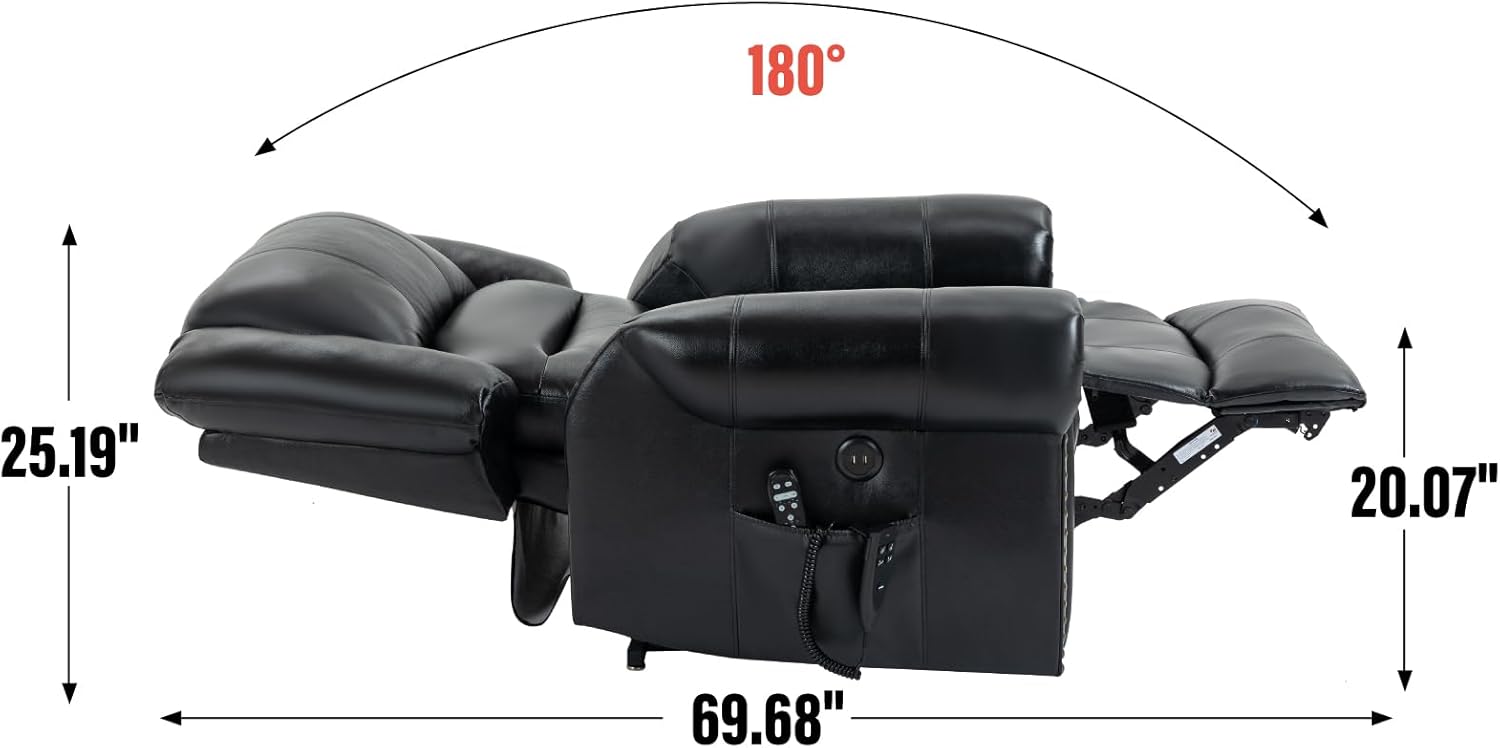
Figure 8.3: Reclined Position Dimensions. Detailed measurements for the chair when fully reclined.

Figure 8.4: Upright Position Dimensions. Detailed measurements for the chair in its standard upright position.
9. Záruka a podpora
For warranty information, product support, or to report any issues not covered in this manual, please contact Dolonm customer service. Refer to your purchase documentation for specific warranty terms and contact details.
You can typically find support contact information on the Dolonm brand webwebu nebo prostřednictvím vašeho původního prodejce.