
1. Úvod
This manual provides detailed instructions for the safe installation, operation, and maintenance of your PHORUS 48-inch Modern White Ceiling Fan with Lights and Remote/APP Control. Please read all instructions carefully before beginning installation and retain this manual for future reference.
2. Bezpečnostní informace
- Před instalací nebo servisem se ujistěte, že je napájení odpojeno jističem.
- Veškeré zapojení musí být v souladu s národními a místními elektrotechnickými předpisy. Pokud nejste s elektroinstalací obeznámeni, poraďte se s kvalifikovaným elektrikářem.
- Ventilátor musí být namontován s minimální vzdáleností 2.1 metru od podlahy k zadní hraně lopatek.
- Montážní konstrukce musí být schopna unést hmotnost ventilátoru (přibližně 13.4 liber).
- Během instalace nebo čištění neohýbejte držáky čepelí.
- Tento ventilátor je určen pro vnitřní použití.
3. Obsah balení
Před zahájením instalace ověřte, zda jsou všechny komponenty přítomny:
- Sestava motoru ventilátoru
- Závěsná deska
- 5 Fan Blades
- LED diodaampodstín
- Dálkové ovládání (se 2 bateriemi AAA)
- Šrouby a montážní materiál
- Návod k použití

4. Specifikace
| Funkce | Specifikace |
|---|---|
| Značka | FORUS |
| Název modelu | #8907 |
| Velikost | 48 palců |
| Barva | Bílý |
| Materiál | Akryl, plast |
| Typ motoru | Stejnosměrný motor (30 W) |
| Světelný zdroj | LED (28W) |
| Světlé barvy | 3 (White, Warm, Neutral) |
| Rozsah stmívání | Plynulá (10 %–100 %) |
| Rychlosti větru | 6 |
| Kontrolní metoda | Dálkové ovládání, ovládání aplikací |
| Speciální funkce | Reversible Function, 2-Hour Timer, Memory Function |
| Úroveň zvuku | Pod 35 dB |
| Rozměry produktu | 48 cm D x 48 cm Š x 10.83 cm V |
| Hmotnost položky | 13.4 libry |
5. Nastavení a instalace
5.1 Kontrolní seznam před instalací
- Ujistěte se, že je napájení vypnuto hlavním jističem.
- Confirm you have all necessary tools (screwdriver, drill, wire strippers, etc.).
- Verify that the ceiling junction box is securely mounted and capable of supporting the fan.
5.2 Postup instalace
- Attach Blades to Motor Assembly: Secure each of the five fan blades to the motor assembly using the provided screws. Ensure the 'THIS SIDE UP' marking on the blade attachment is facing upwards.
- Install LED Light Board: Carefully place the LED light board into the designated area on the motor assembly and secure it with screws. Connect the LED wires.
- Attach LED Lampodstín: Umístěte LED lampshade over the light board and twist it clockwise until it is securely fastened.
- Mount Hanging Board: Secure the hanging board to your ceiling junction box using appropriate screws. Ensure it is firmly attached.
- Připojení kabeláže: Connect the fan's electrical wires to your household wiring. The typical connections are: Black (Live) to Black (Live), White (Neutral) to White (Neutral), and Yellow/Green (Ground) to Green (Ground). Use the provided wire connectors.
- Secure Fan to Hanging Board: Lift the fan assembly and attach it to the hanging board, ensuring all wires are tucked safely inside the canopy. Secure the fan with the provided screws.
6. Návod k obsluze
6.1 Funkce dálkového ovládání
The included remote control allows for convenient operation of your ceiling fan:
- Zapnutí/vypnutí: Stisknutím tlačítka napájení zapnete nebo vypnete ventilátor a světlo.
- Rychlost ventilátoru: Select from 6 wind speeds (1-6) to adjust airflow.
- Světlo zapnuto/vypnuto: Ovládejte světlo nezávisle na ventilátoru.
- Teplota barev: Cycle through 3 light colors: White (6000K), Neutral (4500K), and Warm (3000K).
- Stmívání: Nastavte jas světla od 10 % do 100 %.
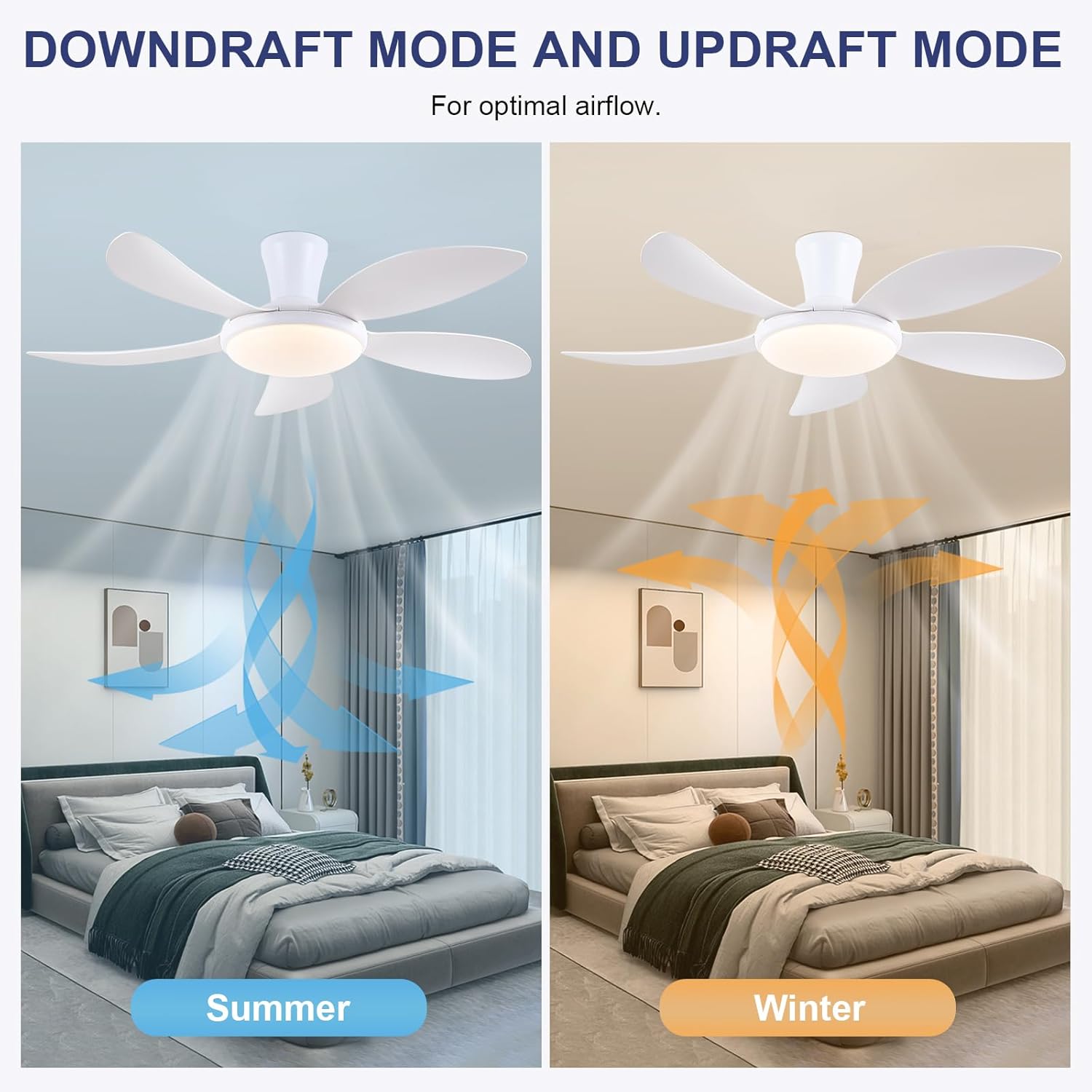
- Reverzibilní funkce: Press the F/R key to change the blade rotation direction for summer (downdraft) or winter (updraft) modes. The fan will stop briefly before reversing.
- Časovač: Nastavte 2hodinový časovač pro automatické vypnutí.
- Noční režim: Activates a low-speed fan and dim light setting.

6.2 Remote Code Pairing
If the remote control is not responding, it may need to be paired:
- Turn off the main power supply to the fan for one minute.
- Turn on the main power supply and simultaneously long-press the 'Code Key' button on the remote control for 3-5 seconds.
- The fan light will blink 2-3 times, indicating successful code matching. The remote can now be operated normally.
6.3 Ovládání APP
Control your fan using the 'Fan Lamp Pro' mobile application:
- Stáhnout APP: Naskenujte QR kód uvedený na obrázcích produktů nebo vyhledejte „Fan L“amp Pro“ ve vašem obchodě s aplikacemi.
- Připojení přes Bluetooth: Ujistěte se, že je v telefonu povoleno Bluetooth.
- Spárovat zařízení: Open the app, add a new device, and follow the on-screen instructions to connect to your fan. The fan light will blink twice upon successful connection.
- Funkce: The app allows control over fan speeds, light colors, dimming, reverse function, and timer settings, similar to the remote control.
6.4 Fan Speed and Airflow
- Úrovně 1-2: Low Comfortable Wind, suitable for sleep.
- Úrovně 3-4: Medium Natural Wind, suitable for daily life.
- Úrovně 5-6: High Cooling Wind, suitable for hot weather.

6.5 Nastavení osvětlení
- The LED light source supports stepless dimming and memory function, retaining your last brightness and color temperature setting.
- Choose from 3 color temperatures: 3000K (Warm Light), 4500K (Natural Light), and 6000K (White Light).

6.6 Reverzibilní funkce
The reversible DC motor allows you to change the direction of the fan seasonally:
- Letní režim (směrný tah): Blades rotate counter-clockwise, pushing cool air downwards.
- Zimní režim (vzestupný proud vzduchu): Blades rotate clockwise, drawing cool air up and circulating warm air downwards.
7. Údržba
- Čištění: Ventilátor otřete měkkým hadříkemamp tkanina. Nepoužívejte abrazivní čisticí prostředky nebo rozpouštědla.
- Péče o čepel: The ABS blades are designed to be easy to clean and resistant to deformation.
- Pravidelné kontroly: Pravidelně kontrolujte všechna spojení a šrouby, abyste se ujistili, že jsou bezpečně utažené.
8. Řešení problémů
Pokud narazíte na problémy s ventilátorem, podívejte se na následující běžné problémy a jejich řešení:
- Ventilátor nefunguje: Check power supply, ensure all wiring connections are secure, and verify remote control pairing.
- Světlo nefunguje: Check power supply, ensure light wires are connected, and verify remote control pairing.
- Ventilátor je hlučný: Ensure all screws are tightened, especially on the blades and mounting bracket. Check for any obstructions.
- Dálkové ovládání nefunguje: Replace batteries, ensure line of sight to the fan, and re-pair the remote control as per section 6.2.
- Problémy s připojením k aplikaci: Ensure Bluetooth is on, the app is updated, and try re-pairing the device.
9. Záruka a podpora
PHORUS provides a one-year quality warranty for this product. For any damage or quality problems, free replacement service is offered. If you have any questions or require assistance, please contact PHORUS customer service. You will receive a satisfactory answer within 24 hours.
For additional support and resources, please visit the official PHORUS webwebu nebo se podívejte na kontaktní informace uvedené při nákupu.