
Rraycom BW6
Rraycom BW6B Wireless Battery-Powered Security Camera
Návod k použití
1. Úvod
Thank you for choosing the Rraycom BW6B Wireless Battery-Powered Security Camera. This manual provides detailed instructions for the installation, operation, and maintenance of your new security camera. Please read this manual thoroughly before use to ensure proper functionality and to maximize the benefits of your device. This camera is designed for outdoor use, offering 2K QHD resolution, color night vision, AI motion detection, and two-way audio communication, powered by a built-in battery and solar panel for continuous operation.
2. Konec produktuview
2.1. Obsah balení
Zkontrolujte prosím, zda jsou v balení přítomny všechny komponenty:
- Rechargeable Battery Security Camera
- Solární panel
- Kovový držák
- Screws Set & 1*User Manual
- USB kabel
2.2. Klíčové vlastnosti
- Solární napájení s baterií 10 000 mAh: Ensures 365 days of uninterrupted protection with a 3W solar panel and robust built-in battery.
- 2K QHD Resolution & 130° Wide View: Provides clear, detailed video and a broad field of view pro komplexní monitorování.
- Plně barevné noční vidění: Captures vivid images even in low-light conditions up to 33ft.
- Advanced AI Motion Detection: Intelligently analyzes and recognizes human motion, sending real-time alerts to your device.
- Obousměrný hovor a siréna: Allows for remote communication and includes a customizable siren and spotlight for deterrence.
- Flexibilní možnosti úložiště: Supports both cloud storage and local Micro SD card storage (up to 256GB) without subscription fees.
- IP65 voděodolný: Navrženo tak, aby odolalo různým venkovním povětrnostním podmínkám.
2.3. Schéma produktu a komponenty

Obrázek 2.3.1: Přední strana view of the Rraycom BW6B security camera with its accompanying solar panel.

Figure 2.3.2: Illustration of the camera and solar panel providing continuous power, highlighting 365 days of non-stop operation.
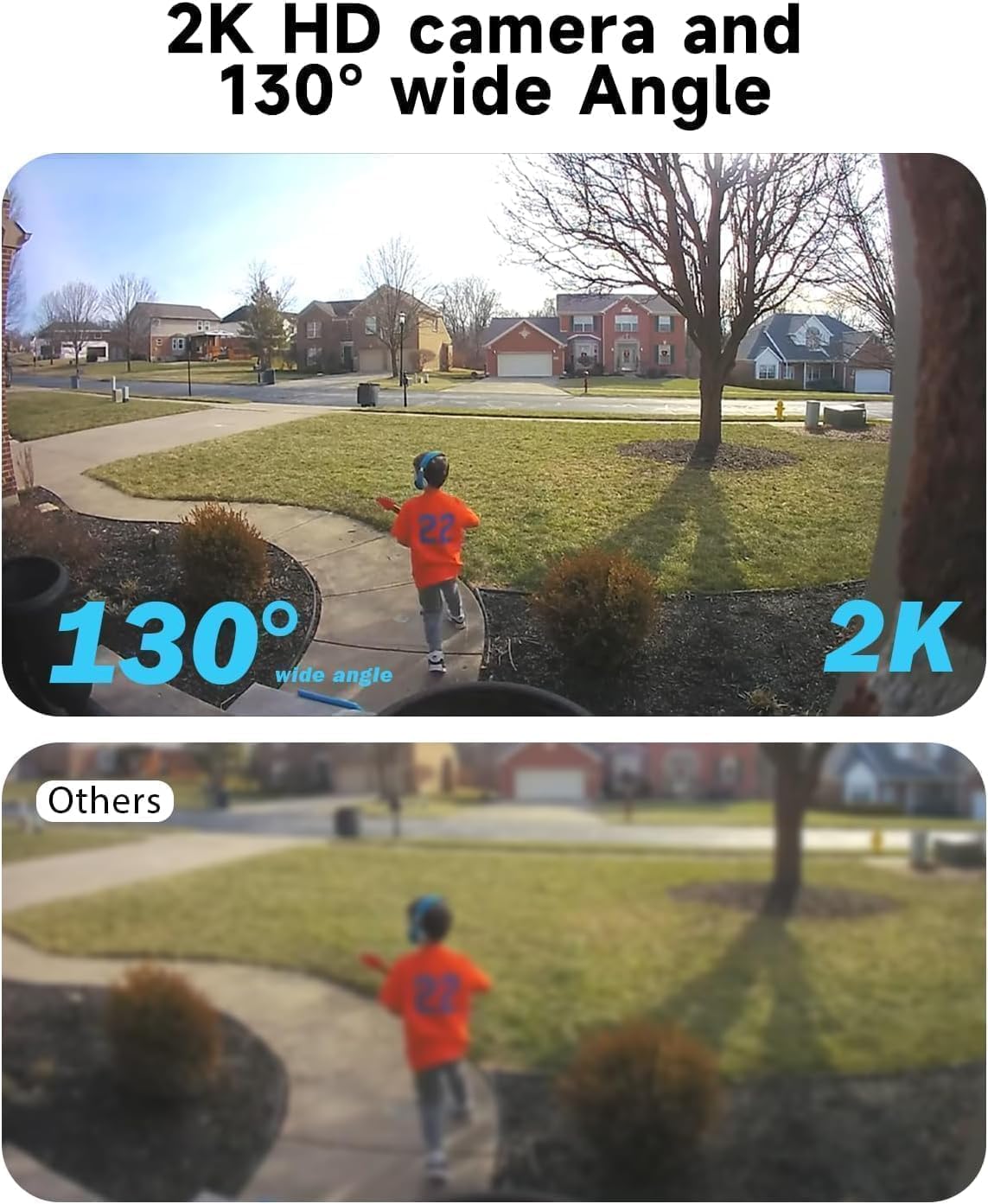
Figure 2.3.3: Comparison demonstrating the 2K HD resolution and 130-degree wide-angle view of the camera versus a standard view.

Figure 2.3.4: Depiction of the AI motion detection feature, showing a detected person and the camera's response with siren and spotlight.

Figure 2.3.5: Illustration of the two-way audio functionality, enabling communication through the camera.

Obrázek 2.3.6: Přample of the 2K HD color night vision, showing clear imagery in low-light conditions up to 33 feet.

Figure 2.3.7: Diagram showing the camera's support for both cloud storage and local SD card storage (up to 256GB).

Figure 2.3.8: Demonstration of the camera's compatibility with Amazon Alexa for voice control and viewIng.
3. Průvodce nastavením
3.1. Počáteční nabíjení
Before initial use, fully charge the camera's built-in 5200mAh battery using the provided USB cable. Connect the USB cable to the camera's charging port and a standard 5V USB power adapter (not included). The charging indicator light will show the charging status.
3.2. Stažení aplikace a registrace účtu
- Scan the QR code in the included user manual or search for the "Rraycom" app in your mobile device's app store (iOS or Android).
- Stáhněte a nainstalujte aplikaci.
- Otevřete aplikaci a zaregistrujte si nový účet pomocí své e-mailové adresy. Postupujte podle pokynů na obrazovce k dokončení registrace a přihlášení.
3.3. Párování fotoaparátu
- Ujistěte se, že je vaše mobilní zařízení připojeno k síti Wi-Fi s frekvencí 2.4 GHz. Kamera nepodporuje Wi-Fi s frekvencí 5 GHz.
- In the Rraycom app, tap the "+" icon to add a new device.
- Select "Wireless Camera" or the appropriate camera model.
- Power on the camera. If the camera is not in pairing mode (indicated by a flashing blue light), press and hold the reset button for 5 seconds until you hear a prompt.
- Follow the app's instructions to enter your Wi-Fi password. The app will generate a QR code.
- Hold your phone with the QR code approximately 6-8 inches (15-20 cm) in front of the camera lens until you hear a confirmation sound.
- Once connected, the camera's indicator light will turn solid blue. You can then name your camera and complete the setup.
3.4. Instalace a umístění
The Rraycom BW6B camera is 100% wire-free, offering flexible installation. Choose a location with good Wi-Fi signal and where the solar panel can receive direct sunlight for several hours daily.
- Místo montáže: Identify a suitable outdoor location that provides the desired viewing angle (130° wide view) and is within Wi-Fi range. Consider areas prone to activity for optimal motion detection.
- Umístění solárního panelu: Mount the solar panel in an unshaded area that receives maximum direct sunlight throughout the day. Connect the solar panel cable to the camera's charging port.
- Bezpečná montáž: Use the provided metal mount and screws to securely attach the camera and solar panel to a wall or other stable surface. Adjust the camera angle to cover your desired surveillance area.
4. Návod k obsluze
4.1. Živě View a přehrávání
- Open the Rraycom app and select your camera from the device list to access the live view.
- Z živého vysílání view interface, you can take screenshots, record video manually, and access two-way audio.
- Na view zaznamenané footage, tap on the "Playback" or "History" option within the camera interface. You can browse recordings by date and time.
4.2. Nastavení detekce pohybu
- V aplikaci přejděte do nastavení fotoaparátu.
- Locate "Motion Detection" or "PIR Settings".
- Adjust sensitivity levels (Low, Medium, High) to optimize detection and minimize false alarms.
- Enable or disable push notifications for motion events.
- Configure detection zones if available to focus on specific areas.
4.3. Two-Way Audio and Siren
- V přímém přenosu view, tap the microphone icon to activate two-way audio. Speak into your phone to communicate through the camera's speaker.
- To activate the siren alarm or spotlight, look for the respective icons in the live view or camera settings. You can also customize siren messages.
4.4. Režimy nočního vidění
The camera supports full-color night vision. This mode automatically activates in low-light conditions to provide clear, colored images up to 33 feet.
4.5. Správa úložiště
- Micro SD karta: Insert a Micro SD card (up to 256GB, not included) into the designated slot on the camera. The camera will automatically begin recording motion-triggered events to the card.
- Cloudové úložiště: The Rraycom camera offers cloud storage options. Refer to the app for details on free trial periods and available plans.
- You can access and manage both local and cloud recordings through the app's playback section.
4.6. Amazon Alexa Integration
The Rraycom BW6B camera is compatible with Amazon Alexa. To integrate:
- Ensure your camera is properly set up in the Rraycom app.
- Otevřete aplikaci Amazon Alexa.
- Go to "Skills & Games" and search for the "Rraycom" skill.
- Enable the skill and link your Rraycom account.
- Discover devices. You can now use voice commands like "Alexa, show me the [camera name]" on compatible Alexa devices with screens.
5. Údržba
5.1. Čištění kamery a solárního panelu
Regular cleaning ensures optimal performance:
- Wipe the camera lens and solar panel surface with a soft, damp hadříkem k odstranění prachu, nečistot nebo nečistot.
- Avoid using harsh chemicals or abrasive materials that could scratch the lens or panel.
- Ensure the solar panel is free from obstructions (e.g., leaves, snow) that could block sunlight.
5.2. Péče o baterie
While the solar panel provides continuous charging, occasional checks are recommended:
- Monitor the battery level via the Rraycom app.
- If the camera is installed in an area with limited sunlight, you may need to manually charge the camera using the USB cable periodically.
- Avoid exposing the camera to extreme temperatures for prolonged periods, as this can affect battery life.
5.3. Aktualizace firmwaru
Rraycom may release firmware updates to improve performance or add new features. Check the app regularly for update notifications and follow the instructions to install them. Ensure the camera has sufficient battery life before starting an update.
6. Řešení problémů
| Problém | Možná příčina | Řešení |
|---|---|---|
| Fotoaparát se nepřipojuje k Wi-Fi. | Incorrect Wi-Fi password, 5GHz network, weak signal, camera too far from router. | Ensure 2.4GHz Wi-Fi. Verify password. Move camera closer to router or use a Wi-Fi extender. Reset camera and try pairing again. |
| Blurry image or poor video quality. | Protective film on lens, dirty lens, poor lighting, network bandwidth issues. | Remove any protective film. Clean the camera lens with a soft cloth. Ensure adequate lighting. Check your internet speed. |
| Detekce pohybu nefunguje nebo je příliš citlivá. | Incorrect sensitivity settings, obstructions, environmental factors (e.g., swaying branches). | Adjust motion detection sensitivity in the app. Ensure camera is positioned correctly to cover the desired area. Minimize environmental factors that could trigger false alarms. |
| Baterie se nenabíjí nebo se rychle vybíjí. | Insufficient sunlight on solar panel, faulty solar panel connection, extreme temperatures. | Ensure solar panel is in direct sunlight and free from obstructions. Check solar panel cable connection. Manually charge the camera via USB if needed. |
| Two-way audio issues (e.g., distorted sound). | Microphone/speaker obstruction, network latency, software glitch. | Ensure nothing is blocking the camera's microphone or speaker. Check network stability. Restart the app or camera. |
7. Specifikace
| Funkce | Detail |
|---|---|
| Název modelu | BW6 |
| Vnitřní/venkovní použití | Venkovní |
| Rozlišení záznamu videa | 2K QHD |
| Viewúhel | 130 stupňů |
| Rozsah nočního vidění | 33 Feet (Full-Color) |
| Zdroj napájení | Solar Powered, Battery (5200 mAh) |
| Technologie připojení | Bezdrátové připojení (Wi-Fi, 2.4 GHz) |
| Kompatibilní zařízení | Android & iOS Smartphones, Amazon Alexa |
| Detekce pohybu | Advanced AI Motion Detection (PIR Sensor) |
| Zvuk | 2-pásmový zvuk |
| Možnosti úložiště | Cloudové úložiště, karta Micro SD (až 256 GB) |
| Úroveň odolnosti proti vodě | IP65 Vodotěsný |
| Materiál | ABS plast |
| Snímková frekvence | 15 snímků za sekundu |
| svtage | 5 V (DC) |
| Wattage | 17 watthodin |
8. Záruka a zákaznická podpora
Rraycom provides a 1-year warranty for the BW6B Wireless Battery-Powered Security Camera, covering manufacturing defects and malfunctions under normal use. Please retain your proof of purchase for warranty claims.
For technical assistance, troubleshooting, or warranty inquiries, please contact Rraycom customer support:
- E-mail: aftersale@rraycom.com
- Online podpora: Visit the official Rraycom webweb s častými dotazy a dalšími zdroji.

Figure 8.1: Rraycom Customer Service contact details.
Ask a question about this manual
Ask about setup, troubleshooting, compatibility, parts, safety, or missing instructions. Manuals+ will review the question and use this page’s manual context to help answer it.