
Zavedení
This manual provides comprehensive instructions for the setup, operation, maintenance, and troubleshooting of your BPXX D463B Bluetooth Thermal Label Printer. Please read this manual thoroughly before using the printer to ensure proper function and longevity of the device.
Bezpečnostní informace
- Use only the original power adapter provided with the printer.
- Nevystavujte tiskárnu vodě ani nadměrné vlhkosti.
- Neumísťujte tiskárnu na přímé sluneční světlo ani do blízkosti zdrojů tepla.
- Keep the printer away from dust and debris to prevent internal damage.
- Nepokoušejte se tiskárnu rozebírat ani opravovat sami. Požádejte o pomoc zákaznickou podporu.
- Během provozu zajistěte dostatečné větrání kolem tiskárny.
Obsah balení
Ověřte, zda jsou v balení obsaženy všechny níže uvedené položky:
- BPXX D463B USB & Bluetooth Printer
- USB kabel
- Napájecí adaptér
- Napájecí kabel
- U Disk (USB flash drive with drivers and guide)
- OTG adaptér
- Labels (sample roll)
- Rychlý průvodce

Image: Contents of the BPXX D463B Thermal Label Printer package.
Konec produktuview
The BPXX D463B is a compact and efficient thermal label printer designed for various labeling needs, including shipping labels, product labels, and more. It features both Bluetooth and USB connectivity for versatile use across different operating systems.

Obrázek: Přední strana view of the BPXX D463B Thermal Label Printer in operation.
Klíčové vlastnosti:
- Vysoce kvalitní tisk: 203dpi resolution for clear images, text, and barcodes.
- Duální konektivita: Supports Bluetooth for iOS, Android, and Windows, and USB for Windows, Mac OS, Linux, and ChromeOS.
- Široká kompatibilita: Works with major e-commerce and shipping platforms like Amazon, Shopify, eBay, UPS, USPS, FedEx, and more.
- Rychlá rychlost tisku: Up to 152mm/s (72 sheets of 4x6 labels per minute).
- Automatická detekce štítků: Automatically identifies label size for ease of use.
- Odolná tisková hlava: Features an aluminum alloy print head with smart temperature control for prolonged service life.
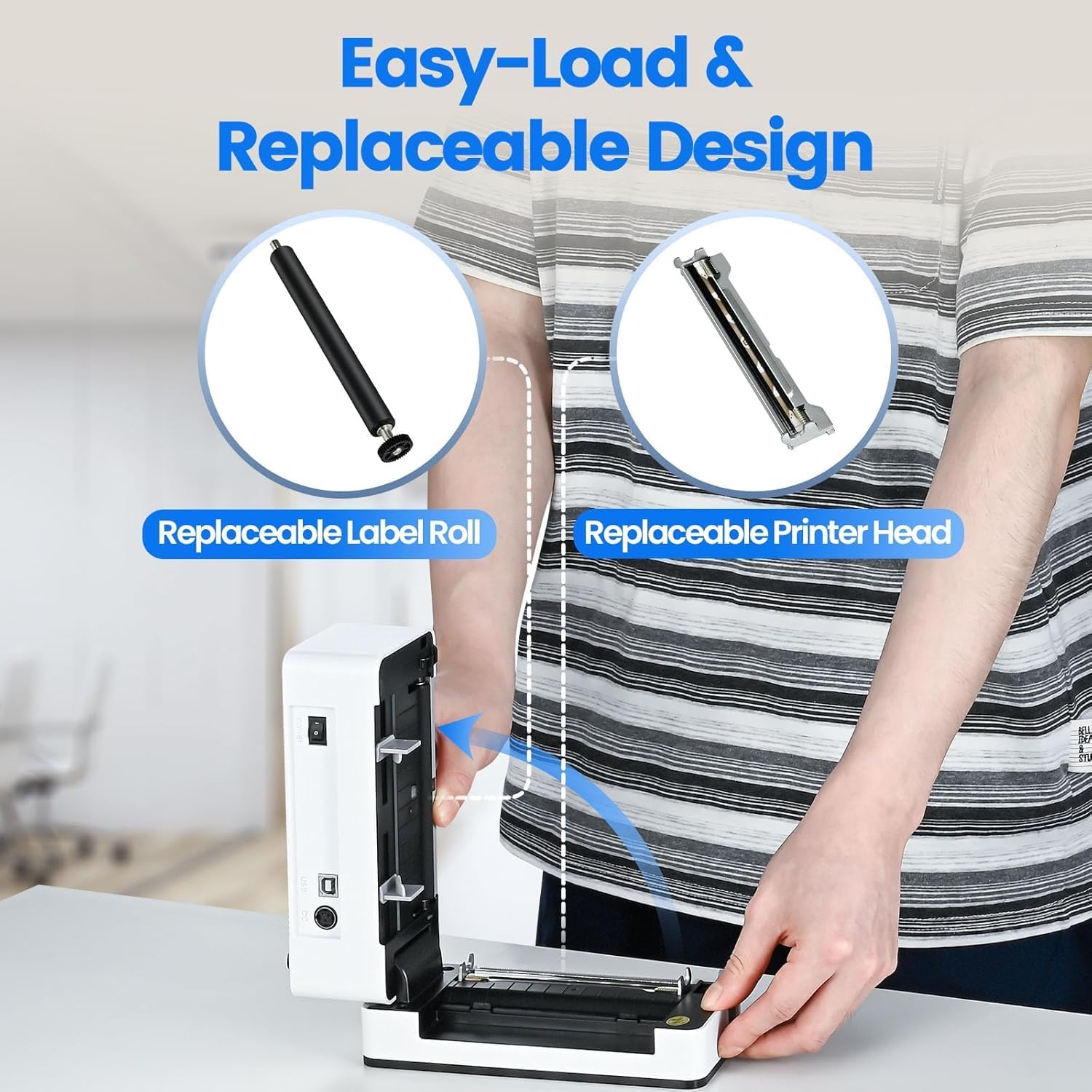
Image: The printer's aluminum alloy print head, designed for durability and extended service life.
Nastavení
1. Načítání štítků
- Otevřete horní kryt tiskárny.
- Insert the thermal labels into the label compartment, ensuring the printable side is facing up.
- Upravte vodítka štítků tak, aby těsně odpovídala šířce štítků.
- Close the top cover. The printer will automatically detect the label size and feed a few labels to calibrate.

Image: Illustration of the easy-load label mechanism.
2. Připojení k vašemu zařízení
The D463B printer offers both Bluetooth and USB connectivity.

Image: Connectivity options for the BPXX D463B printer.
Bluetooth Connection (iOS, Android, Windows):
- Ensure the printer is powered on. The indicator light should be blue.
- Download the "4Barcode" APP from your device's app store (iOS/Android) or install the driver for Windows from the provided U Disk.
- Povolte Bluetooth na svém mobilním zařízení nebo počítači.
- Open the "4Barcode" APP or the printer driver software.
- Hledat available Bluetooth devices and select "D463B" or a similar name.
- Pair the device. Once paired, you can begin printing wirelessly.
USB Connection (Windows, Mac OS, Linux, ChromeOS):
- Connect one end of the USB cable to the printer and the other end to your computer.
- Vložte dodaný USB disk do počítače.
- Follow the instructions on the U Disk to install the appropriate printer drivers for your operating system. A detailed installation guide video is included on the U Disk.
- Once drivers are installed, the printer will be recognized by your computer and ready for use.
Obsluha tiskárny
Proces tisku
After successful setup and connection, you can print labels from various applications and platforms.

Image: Demonstrating the printer's high-speed and high-definition printing capabilities.
- Otevřete dokument nebo štítek file you wish to print (e.g., a shipping label PDF).
- Vyberte možnost tisku v aplikaci.
- Choose the "BPXX D463B" printer from the list of available printers.
- Ensure the correct label size is selected in the print settings (e.g., 4x6 inches). The printer supports various label sizes up to 4.1 inches in width.
- Potvrďte nastavení tisku a spusťte tisk.

Image: The printer's maximum 4.1-inch label width capability and auto-detection feature.
Kompatibilita platformy
The BPXX D463B is compatible with a wide range of e-commerce and shipping platforms, streamlining your workflow:
- Amazonka
- Shopify
- eBay
- Shopee
- UPS
- USPS
- Shippo
- FedEx
- Etsy
- Lodní stanice
- PayPal
- A mnoho dalších.

Image: The printer's compatibility with major e-commerce and shipping platforms.
Údržba
Čištění tiskárny
Regular cleaning ensures optimal print quality and extends the life of your printer.
- Před čištěním tiskárnu vypněte a odpojte ji od zdroje napájení.
- Lehce používejte měkký hadřík, který nepouští vlákna dampened with isopropyl alcohol to clean the print head. Allow it to dry completely before use.
- Wipe down the exterior of the printer with a dry, soft cloth.
- Odstraňte veškerý prach nebo nečistoty štítků z přihrádky na štítky.
Výměna komponentů
The BPXX D463B is designed for easy replacement of key components to maximize its lifespan.
Image: Easy-load and replaceable design for label roll and printer head.
Replacing the Label Roll:
Follow the "Loading Labels" instructions in the Setup section to replace an empty label roll.
Replacing the Printer Head:
While the aluminum alloy print head is designed for durability, it is replaceable if needed. Refer to the detailed instructions provided on the U Disk or contact customer support for guidance on replacing the print head.
Odstraňování problémů
| Problém | Možná příčina | Řešení |
|---|---|---|
| Printer not powering on. | Napájecí kabel není připojen; problém se zásuvkou. | Ujistěte se, že je napájecí kabel bezpečně připojen. Zkuste jinou zásuvku. |
| Nelze se připojit přes Bluetooth. | Bluetooth not enabled; incorrect app/driver; printer not discoverable. | Ensure Bluetooth is on. Use the "4Barcode" APP. Restart printer and device. |
| Poor print quality (faded, unclear). | Print head dirty; incorrect label type; low-quality labels. | Clean the print head. Ensure you are using thermal labels. Try new labels. |
| Štítky se nepodávají správně. | Labels improperly loaded; label guides not adjusted. | Reload labels, ensuring they are straight and guides are snug. |
| Printer not recognized by computer (USB). | Drivers not installed; faulty USB cable/port. | Install drivers from the U Disk. Try a different USB cable or port. |
Specifikace
| Funkce | Detail |
|---|---|
| Název modelu | D463B |
| Technologie tisku | Tepelný |
| Technologie připojení | Bluetooth, USB |
| Rozlišení tisku | 203 DPI (bodů na palec) |
| Maximální rychlost tisku (černobíle) | 152mm/s (72 sheets 4x6 labels/min) |
| Maximální šířka štítku | 4.1 palců |
| Compatible Label Sizes | 4"x6", 3"x2", 3"x1", 2"x1", 2-5/16" x 4" inches |
| Kompatibilní zařízení | Laptops, PCs, Tablets, Smartphones |
| Podporovaný OS | iOS, Android, Windows, Mac OS, Linux, ChromeOS |
| Rozměry produktu | 3.35"H x 3.35"Š x 7.28"V |
| Hmotnost položky | 3.12 libry |
| Zdroj napájení | AC adaptér (součástí balení) |

Image: The compact size of the BPXX D463B printer.
Záruka
The BPXX D463B Thermal Label Printer comes with a jednoletá záruka od data nákupu. Tato záruka se vztahuje na výrobní vady a poruchy při běžném používání. Nevztahuje se na škody způsobené nesprávným použitím, nehodami, neoprávněnými opravami nebo přírodními katastrofami.
Uschovejte si prosím doklad o koupi pro uplatnění záruky.
Zákaznická podpora
For any questions, technical assistance, or warranty claims, please contact BPXX customer support through the following channels:
- E-mail: Refer to the contact information provided in your product packaging or on the official BPXX webmísto.
- Online podpora: Visit the BPXX official webweb s nejčastějšími dotazy, ovladači a zdroji podpory.
When contacting support, please have your printer model (D463B) and purchase information ready.