
Pecron E500LFP
Uživatelská příručka přenosné elektrárny Pecron E500LFP
Model: E500 LFP Značka: Pecron
1. Úvod
The Pecron E500LFP Portable Power Station is a versatile and reliable power solution designed for various applications, including home use, RV trips, camping, and emergency backup. Featuring a 576Wh LiFePO4 battery and 600W AC output, it provides stable and efficient power for multiple devices. This manual provides detailed instructions for safe and effective operation, maintenance, and troubleshooting of your E500LFP unit.

Figure 1.1: The Pecron E500LFP Portable Power Station, a compact and robust power solution.
2. Bezpečnostní informace
Please read and understand all safety warnings and instructions before using the Pecron E500LFP. Failure to follow these guidelines may result in electric shock, fire, serious injury, or property damage.
- Jednotku nerozebírejte, neopravujte ani neupravujte.
- Avoid exposure to rain, moisture, or direct sunlight for prolonged periods.
- Keep away from heat sources, open flames, and flammable materials.
- Během používání zajistěte řádné větrání, aby nedošlo k přehřátí.
- Do not operate if the unit or cables are damaged.
- Uchovávejte mimo dosah dětí a domácích zvířat.
- Dispose of the battery and unit according to local regulations.

Figure 2.1: The E500LFP features a built-in Battery Management System (BMS) for enhanced safety and stable power delivery.
3. Obsah balení
Ověřte, zda je v balení obsaženo vše:
- Pecron E500LFP Power Station (x1)
- Nabíjecí kabel AC (x1)
- Nabíjecí kabel do auta (x1)
- Pouzdro na příslušenství (x1)
- Uživatelská příručka (x1)
4. Konec produktuview
The Pecron E500LFP is equipped with various ports and features for maximum utility.
4.1. Porty a funkce
- Střídavý výstup (x2): For standard household appliances (600W Pure Sine Wave).
- USB-A výstup (x2): For charging smartphones, tablets, and other USB devices.
- USB-C výstup (x1): 100W Power Delivery for fast charging compatible devices.
- Cigar Port (x1): 12V DC output for car appliances.
- DC 5525 Output (x2): Pro specifická zařízení napájená stejnosměrným proudem.
- Bezdrátová nabíječka (x1): Convenient charging pad on top of the unit.
- LED světlo: Integrated light for illumination in dark environments.
- LCD displej: Zobrazuje stav baterie, vstupní/výstupní proudtage, remaining time, and alarms.

Obrázek 4.1: Přesview of the 9 versatile output options available on the E500LFP.

Obrázek 4.2: Detailní view of the LCD display, showing various indicators and information.
5. Nastavení
5.1. Počáteční nabíjení
Before first use, fully charge your Pecron E500LFP. This ensures optimal battery performance and longevity.
- Connect the AC Charging Cable to the AC input port on the power station.
- Plug the other end of the AC Charging Cable into a standard wall outlet.
- The LCD display will indicate charging status. The unit is fully charged when the battery icon is full and the input wattage klesne na nulu.
A full charge via AC can take approximately 1.5 hours.
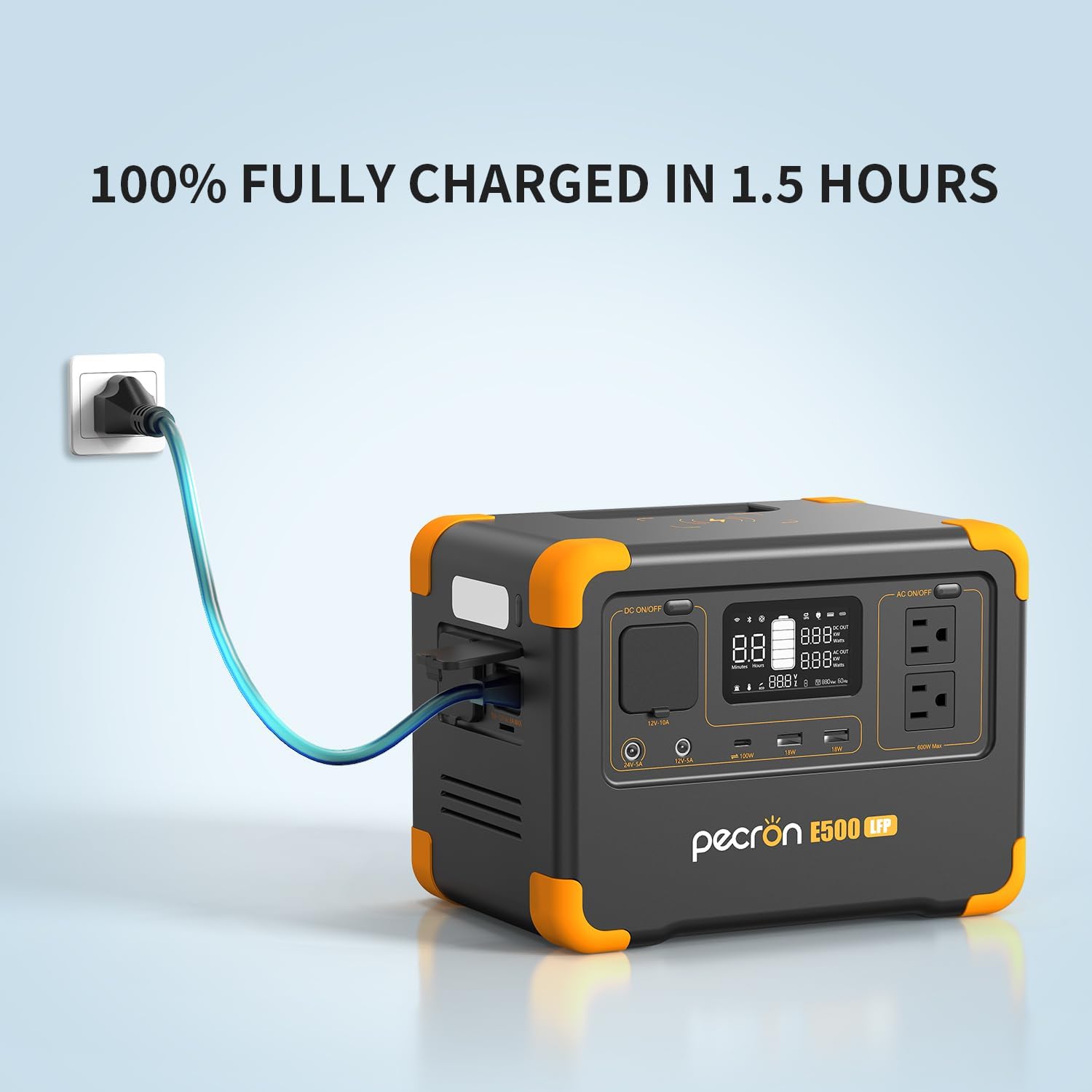
Figure 5.1: The E500LFP can be fully charged in approximately 1.5 hours using AC fast charging.
6. Návod k obsluze
6.1. Zapnutí/vypnutí
To power on the unit, press and hold the main power button for 5 seconds. The LCD display will illuminate. To power off, press and hold the main power button again until the display turns off.
6.2. Používání zásuvek střídavého proudu
- Ujistěte se, že je elektrárna zapnutá.
- Stisknutím tlačítka „AC ON/OFF“ aktivujete zásuvky střídavého proudu. Na displeji se rozsvítí indikátor AC.
- Plug your AC-powered device into one of the AC outlets.
- When finished, press the "AC ON/OFF" button again to turn off the AC outlets and conserve power.
6.3. Using USB and DC Outputs
- Ujistěte se, že je elektrárna zapnutá.
- For USB-A, USB-C, Cigar Port, or DC 5525 outputs, simply plug in your device. These ports are typically active when the unit is on.
- For wireless charging, place your compatible device on the designated wireless charging pad on top of the unit.
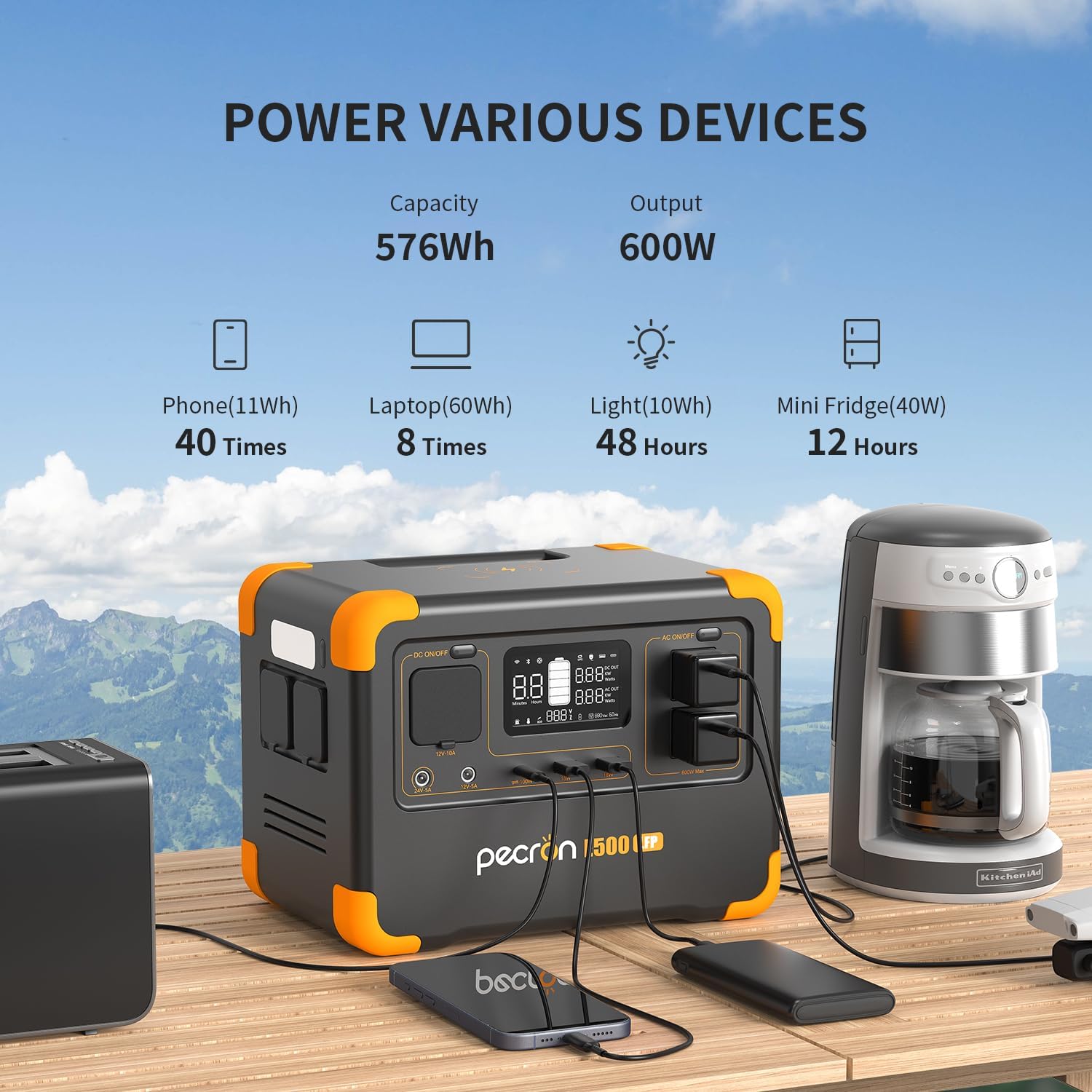
Figure 6.1: The E500LFP can power a wide range of devices, from phones and laptops to mini-fridges.

Figure 6.2: The portable design makes it ideal for outdoor activities like campIng.

Figure 6.3: The integrated LED light provides convenient illumination for various situations.
6.4. Funkce UPS
The E500LFP features an Uninterruptible Power Supply (UPS) function, allowing it to switch to battery power within 8-20ms in case of a power outage. This helps prevent data loss for connected devices.

Figure 6.4: The UPS function ensures continuous power supply to critical devices during outages.
7. Nabíjení elektrárny
The Pecron E500LFP offers multiple charging methods:
- AC nástěnná zásuvka: Fully charges in approximately 1.5 hours with 500W AC fast charging.
- USB-C: Can be charged via USB-C in approximately 6 hours.
- Solární panel: Compatible with 100W solar panels, charging in approximately 6 hours (solar panel sold separately).
- Nabíjení auta: Charges from your vehicle's 12V outlet in approximately 6 hours.
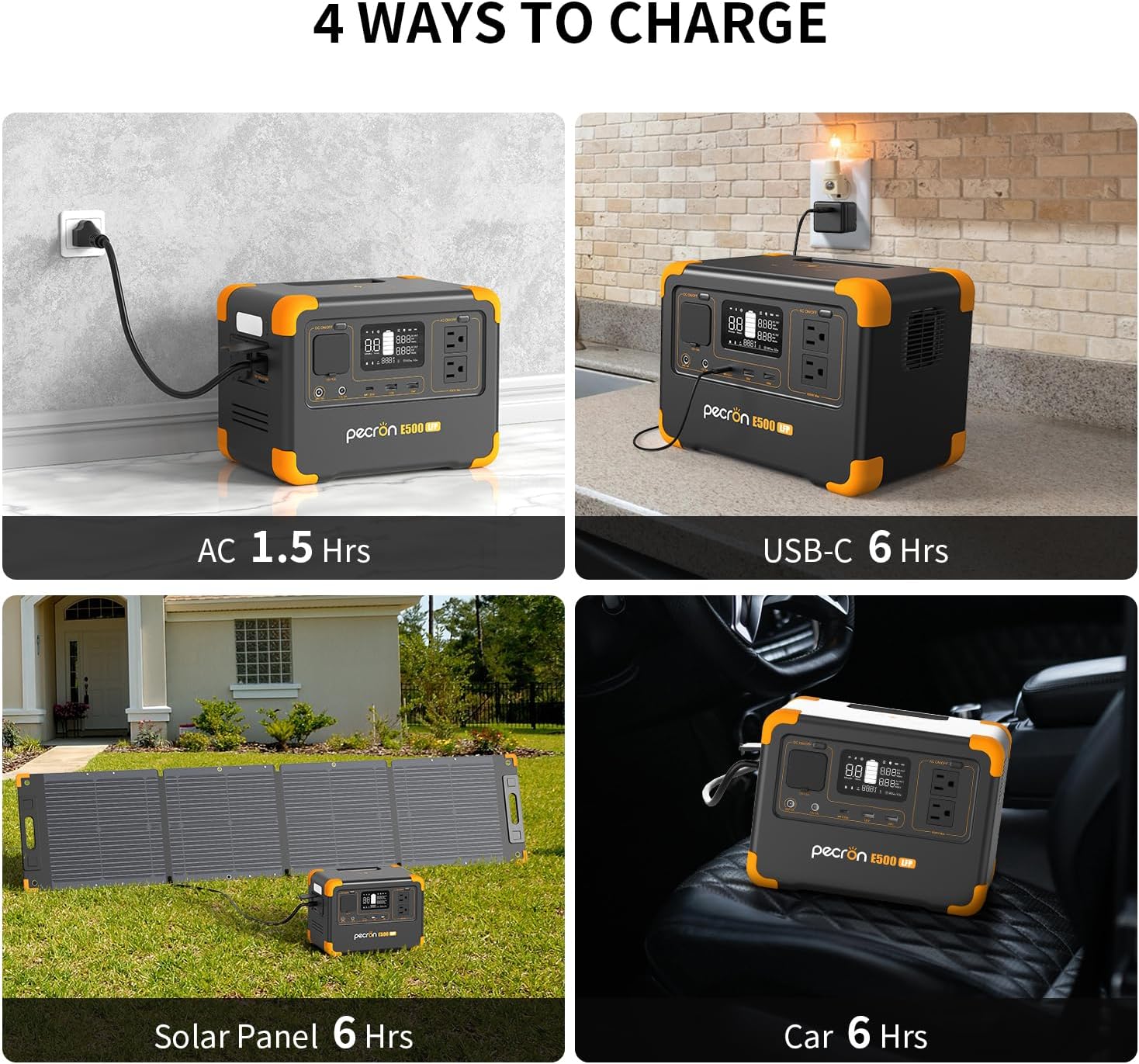
Figure 7.1: The E500LFP supports multiple charging methods for convenience.
8. Údržba
8.1. Skladování
To ensure the longevity of your E500LFP:
- Turn off the unit and store it in a dry, well-ventilated place at normal room temperature.
- For long-term storage, it is recommended to discharge the battery to 30% every three months and recharge it to 60% to sustain the battery life.

Figure 8.1: Proper storage guidelines for the Pecron E500LFP.
8.2. Životnost baterie
The E500LFP utilizes LiFePO4 battery technology, which offers a longer lifespan compared to traditional lithium-ion batteries. It can retain 80% of its original capacity after 3500 complete charge cycles.

Figure 8.2: The LiFePO4 battery ensures extended durability and cycle life.
9. Řešení problémů
If you encounter issues with your Pecron E500LFP, refer to the following common problems and solutions:
| Problém | Možná příčina | Řešení |
|---|---|---|
| Jednotka se nezapne. | Battery is fully discharged; Power button not held long enough. | Charge the unit; Press and hold the power button for 5 seconds. |
| Výstup střídavého proudu nefunguje. | AC output not activated; Device draws too much power. | Press the AC ON/OFF button; Check device wattage (max. 600 W). |
| Pomalé nabíjení. | Using a low-power charging method (e.g., car charger vs. AC). | Use the AC fast charging cable for quickest charge. |
| Přehřátí jednotky. | Špatné větrání; Nadměrné zatížení. | Zajistěte volné proudění vzduchu kolem jednotky; Snižte připojené zatížení. |
10. Specifikace
| Funkce | Detail |
|---|---|
| Název modelu | E500LFP Solar Generator |
| Typ baterie | LiFePO4 |
| Kapacita | 576 Wh |
| AC výstup | 600W Pure Sine Wave (2 outlets) |
| Výstup USB-A | 2 porty |
| Výstup USB-C | 100W PD (1 port) |
| Doutník Port | 1 port |
| DC 5525 výstup | 2 porty |
| Bezdrátové nabíjení | Ano |
| Doba nabíjení AC | Approx. 1.5 hours (500W) |
| Solar/Car Charging Time | Approx. 6 hours (100W Solar Panel) |
| Rozměry | 10 cm D x 6.8 cm Š x 7.4 cm V |
| Hmotnost | 14 libry |
| Speciální funkce | Portable, Fast Charging, Large Capacity, Long Last, Safety, Smart Control, UPS |
11. Záruka a podpora
Pecron offers a 2+1 years worry-free warranty for the E500LFP Portable Power Station. For any inquiries, technical assistance, or warranty claims, please contact Pecron customer service.
Customer Service: Available 24 hours a day, 7 days a week.
For more information, visit the official Pecron store: Pecron Amazon Store
12. Produktové video
Watch the official product video for a visual guide on the Pecron E500LFP Portable Power Station's features and uses.
Video 12.1: Oficiální video s produktemasing the Pecron E500LFP Portable Power Station in various scenarios, including outdoor use and home backup.
Ask a question about this manual
Ask about setup, troubleshooting, compatibility, parts, safety, or missing instructions. Manuals+ will review the question and use this page’s manual context to help answer it.