
1. Úvod
Thank you for choosing the BOSGAME P2 Mini PC. This compact and powerful computer is designed to meet a wide range of computing needs, from everyday tasks to demanding applications. Equipped with an Intel Alder Lake Core i7-12700H processor, 32GB DDR4 RAM, and a 512GB NVMe SSD, it offers robust performance in a small form factor. This manual provides essential information for setting up, operating, and maintaining your Mini PC.

Image 1.1: The BOSGAME P2 Mini PC, a compact and powerful computing solution.
2. Co je v krabici
Prosím, ověřte, zda jsou v balení přítomny všechny položky:
- Mini PC P2 12700H x1
- Uživatelská příručka x1
- HDMI 2.0 kabel x1
- 19V 6.32A, 120W Power Adapter x1
- VESA Mount & Screws x1
3. Konec produktuview
The BOSGAME P2 Mini PC is engineered for efficiency and versatility. Its compact design allows it to fit into various environments, from office desks to home entertainment setups, without occupying significant space.
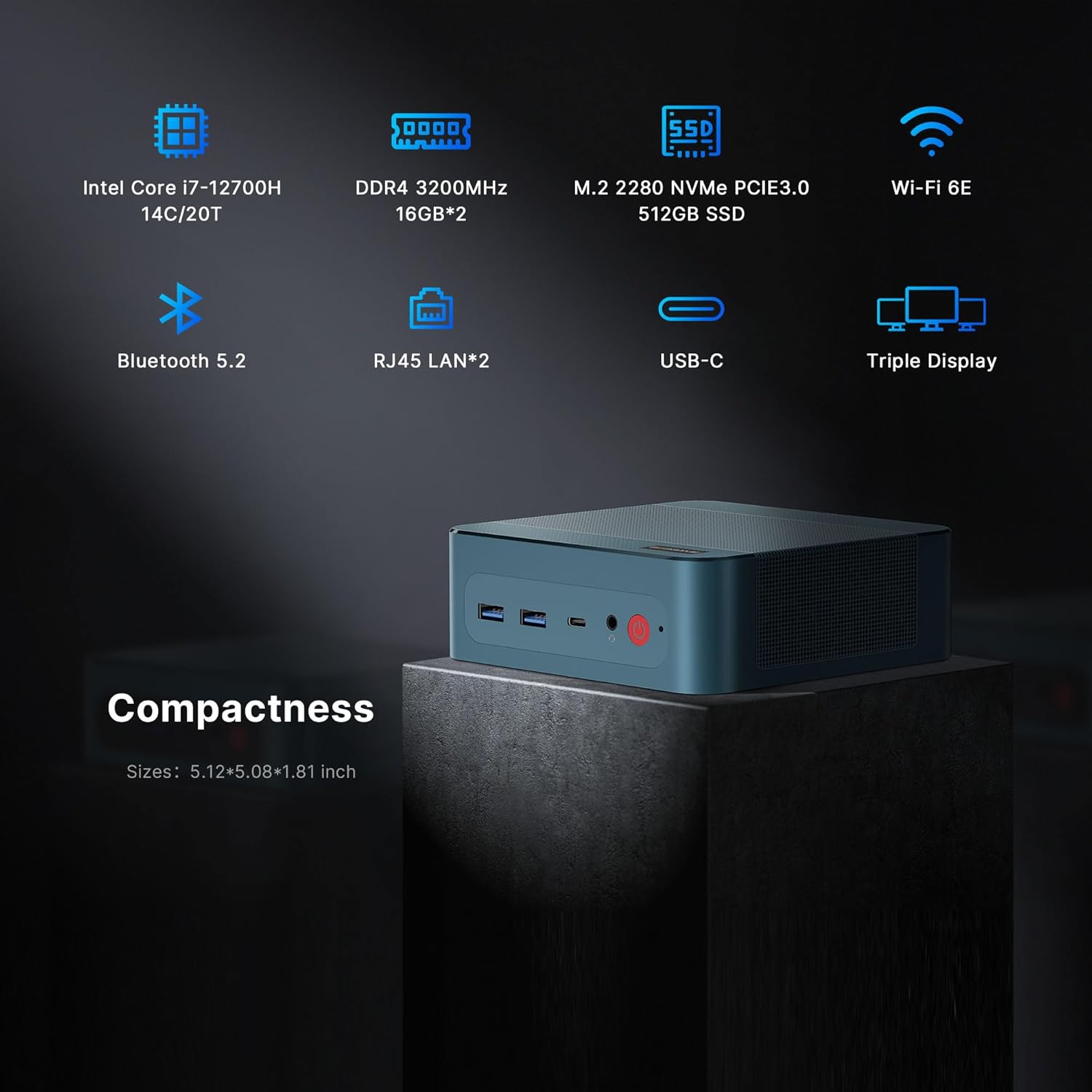
Obrázek 3.1: Konecview of the BOSGAME P2 Mini PC highlighting its compact size and key specifications like Intel Core i7-12700H, DDR4 3200MHz, M.2 2280 NVMe SSD, Wi-Fi 6E, Bluetooth 5.2, Dual RJ45 LAN, USB-C, and Triple Display support.

Image 3.2: The BOSGAME P2 Mini PC integrated into a modern workspace, showcasing its small footprint next to a monitor.
4. Klíčové vlastnosti
4.1. Procesor
The BOSGAME P2 is powered by the Intel Alder Lake Core i7-12700H processor, featuring 14 cores and 20 threads with a maximum boost clock of 4.70 GHz. This processor is designed for efficient multitasking and handling demanding applications.
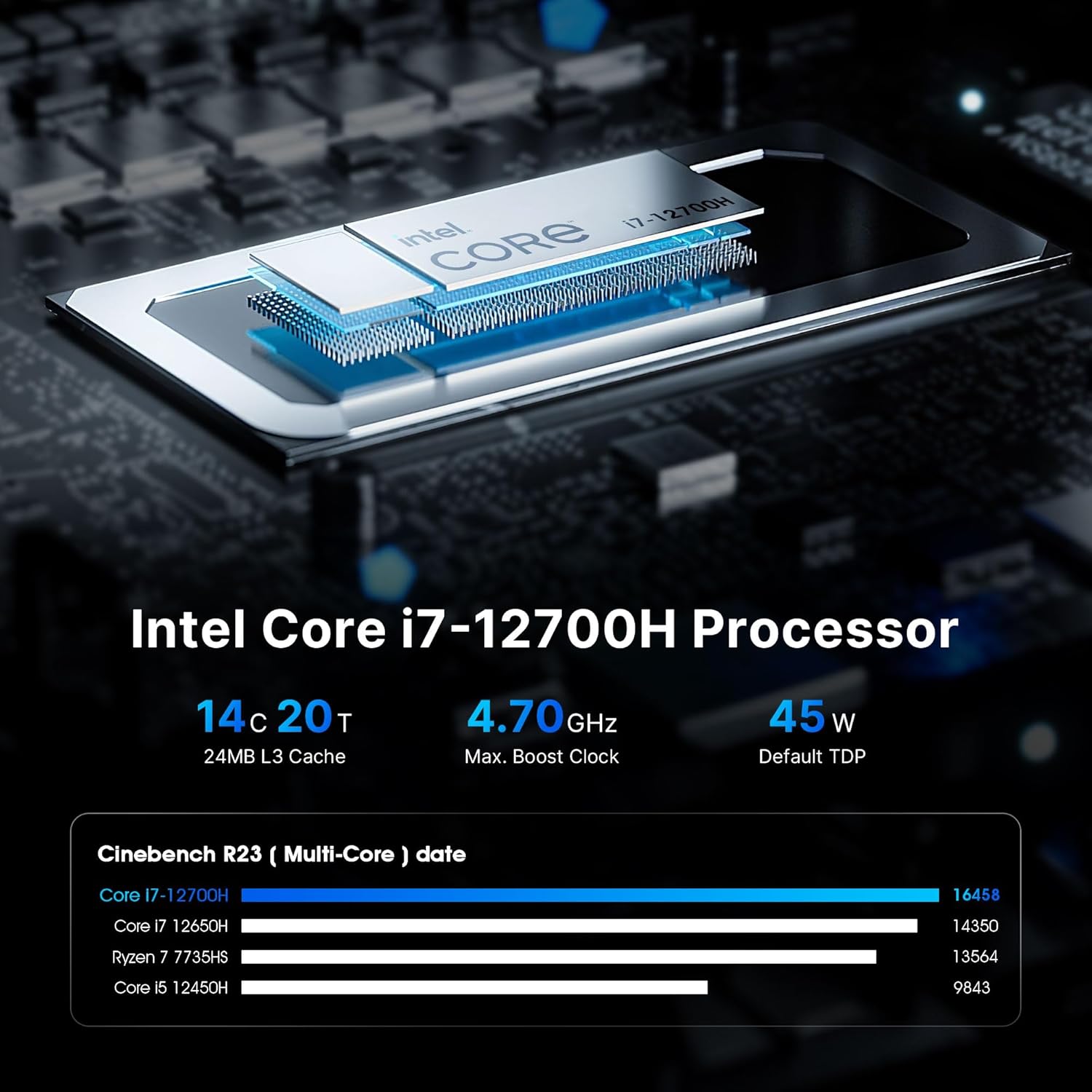
Obrázek 4.1: Detailní view of the Intel Core i7-12700H processor, highlighting its 14 cores, 20 threads, 4.70 GHz max boost clock, and 45W TDP. A benchmark comparison chart is also shown.

Image 4.2: Performance comparison chart for the 12th Gen Intel Core i7-12700H processor against other CPUs, showing its single-core and multi-core scores.

Image 4.3: A visual comparison of performance improvements between the Intel Core i7-12700H and Intel Core i7-1165G7 in various tasks like C4D render, V-Ray render, Keyshot rendering, and X264 benchmark encoding time.
4.2. Paměť a úložiště
The Mini PC comes with 32GB (16GBx2) of dual-channel DDR4 3200MHz SODIMM RAM, ensuring smooth multitasking. For storage, it includes a 512GB NVMe M.2 2280 SSD. The system supports up to 8TB of storage with two NVMe M.2 2280 SSD slots (2x4TB).

Image 4.4: Illustration of the DDR4 3200MHz SODIMM memory modules and the M.2 2280 NVMe 512GB SSD, emphasizing speed and capacity.

Image 4.5: Visual representation of the expandable memory (32GB DDR5 SODIMM x2, up to 64GB) and storage (512GB PCIe 4.0x4, Max 2TB) capabilities, suitable for work and entertainment.
4.3. Konektivita
The BOSGAME P2 offers comprehensive connectivity options:
- USB porty: 2x USB 3.2, 2x USB 2.0, 1x USB4 (supports Thunderbolt 4)
- Video výstupy: 1x HDMI 2.0, 1x DisplayPort, 1x USB4 (supports 8K 60Hz display)
- Síť: Dual 2.5GbE LAN ports, WiFi 6E (2.4GHz, 5GHz)
- Bezdrátový: Bluetooth 5.2
- Zvuk: 3.5 mm audio rozhraní

Image 4.6: Diagram illustrating the various ports on the BOSGAME P2 Mini PC, including USB 3.2, Thunderbolt 4, Audio Jack, Power, DP, HDMI, RJ45, and DC, along with examples of compatible office, home, and entertainment equipment.

Image 4.7: Highlights the faster wireless network (WiFi 6E 2x2) and strong LAN capabilities (2.5x faster than WiFi 5), along with Bluetooth 5.2 for seamless connectivity.

Image 4.8: A diagram illustrating the powerful wireless connectivity of the BOSGAME P2, showing connections to various devices like monitors, speakers, mobile phones, and network components via Wi-Fi 6 and Bluetooth 5.2.

Image 4.9: Close-up of the dual 2.5G RJ45 LAN ports, emphasizing their speed advantage over traditional Gigabit ports for improved network performance.
4.4. Triple Display Support
The Mini PC supports triple 4K 60Hz displays via 1x HDMI 2.0, 1x DisplayPort, and 1x USB4 (which supports 8K 60Hz). This capability enhances productivity and provides an immersive viewzkušenosti pro různé aplikace.

Image 4.10: The BOSGAME P2 Mini PC connected to three monitors, demonstrating its triple screen display support for enhanced productivity and entertainment.

Image 4.11: Illustrates the capability to support three screen displays, with HDMI (4K@60Hz), Thunderbolt 4 (8K@60Hz), and DP (4K@60Hz) outputs.

Image 4.12: Highlights the 8K Ultra HD Resolution (7630x4320px) support, providing ultra-clear picture quality for streaming services and other content.
4.5. Efficient Cooling
The BOSGAME P2 features an efficient and stable heat dissipation system, including a silent system fan and heat pipes, to ensure quiet operation and optimal performance even under load.

Obrázek 4.13: Vnitřní view of the BOSGAME P2 Mini PC, showing the highly efficient heat dissipation system with air flowing through the chassis.

Image 4.14: Illustrates the cooling features of the BOSGAME P2, including 45W TDP, silent system fan (19% improved cooling), and heat pipe for efficient heat transfer, ensuring quiet operation.
5. Pokyny k nastavení
5.1. Připojení periferií
- Connect your monitor(s) to the HDMI, DisplayPort, or USB4 ports using the appropriate cables.
- Připojte klávesnici a myš k dostupným USB portům.
- For wired network access, connect an Ethernet cable to one of the 2.5GbE LAN ports.
- Pokud používáte externí reproduktory nebo sluchátka, připojte je k 3.5mm audio konektoru.
5.2. Zapnutí
- Connect the provided 19V 6.32A power adapter to the DC jack on the Mini PC and then to a power outlet.
- Stiskněte tlačítko napájení na přední straně Mini PC. Rozsvítí se kontrolka napájení.
5.3. Počáteční nastavení systému Windows
Upon first boot, the system will guide you through the Windows 11 Pro setup process. Follow the on-screen instructions to configure your language, region, network, and user account settings.
6. Návod k obsluze
6.1. Základní použití
Once Windows is set up, you can use your Mini PC like any standard desktop computer. Access applications, browse the internet, and manage files. The powerful hardware ensures a responsive user experience.
6.2. Connecting to Displays
Utilize the HDMI, DisplayPort, and USB4 ports to connect up to three displays simultaneously. This is ideal for multitasking, graphic design, or immersive entertainment.
6.3. Připojení k síti
For internet access, connect to a wireless network using the integrated WiFi 6E, or use an Ethernet cable for a stable wired connection via the dual 2.5GbE LAN ports. The dual LAN ports are suitable for advanced network configurations such as software routers or firewalls.
6.4. USB4 / Thunderbolt 4 Usage
The USB4 port supports Thunderbolt 4 functionality, allowing for high-speed data transfer, external GPU connections, and 8K 60Hz display output with compatible devices.
6.5. Produktové videoview
Pro vizuální představu se podívejte na toto videoview of a BOSGAME Mini PC. Please note that while this video showcases a BOSGAME Mini PC, the specific model featured may be the Ryzen 7 5800U variant, not the Intel Core i7-12700H P2 model. However, many general features and connectivity options are similar.
Video 6.1: An official BOSGAME video providing an overview of a BOSGAME Mini PC.
7. Údržba
7.1. Čištění
To ensure optimal performance and longevity, regularly clean the exterior of your Mini PC with a soft, dry cloth. Avoid using liquid cleaners directly on the device. Periodically check the ventilation grilles for dust accumulation and gently clean them with compressed air if necessary to maintain efficient cooling.
7.2. Rozšíření úložiště
The BOSGAME P2 Mini PC supports storage expansion. You can add a second NVMe M.2 2280 SSD to increase your storage capacity up to 8TB (2x4TB). Refer to the detailed instructions in the full product manual or consult professional assistance for internal component upgrades.
8. Řešení problémů
If you encounter issues with your BOSGAME P2 Mini PC, refer to the following common solutions:
- Bez napájení: Ensure the power adapter is securely connected to both the Mini PC and a working power outlet. Try a different outlet if available.
- Bez displeje: Verify that your monitor is correctly connected and powered on. Check the display input source on your monitor. Try connecting to a different display port or using a different cable.
- No Internet (Wired): Confirm the Ethernet cable is properly connected to both the Mini PC and your router/modem. Check your router's status.
- No Internet (Wireless): Ensure Wi-Fi is enabled in Windows settings. Check if your Wi-Fi network is visible and enter the correct password.
- Periferní zařízení nebylo detekováno: Try connecting the peripheral to a different USB port. Ensure drivers are up to date if required for the specific peripheral.
- Zpomalení systému: Zavřete nepotřebné aplikace. Zkontrolujte procesy na pozadí, které spotřebovávají mnoho zdrojů. Zajistěte dostatek volného úložného prostoru.
For more complex issues, please contact BOSGAME customer support.
9. Specifikace
| Funkce | Detail |
|---|---|
| Značka | BOSGAME |
| Název modelu | P2 |
| Model CPU | Intel Core I7 12700H |
| Rychlost CPU | 2.7 GHz (up to 4.7 GHz Max Boost) |
| Operační systém | Support Windows and Linux (Windows 11 Pro pre-installed) |
| Nainstalovaná paměť RAM | 32 GB DDR4 (16GBx2) |
| Technologie paměti RAM | DDR4 |
| Ram Memory Maximum Size | 32 GB (rozšiřitelná) |
| Popis pevného disku | SSD (512GB NVMe M.2 2280) |
| Rozhraní pevného disku | PCIE x 4 (2x M.2 2280 slots, up to 8TB total) |
| Grafický koprocesor | Grafika Intel Iris Xe |
| Video výstup | HDMI, DisplayPort, USB Type-C (USB4) |
| Maximální rozlišení displeje | 5120 x 2880 Pixels (USB4 supports 8K 60Hz) |
| Technologie připojení | Bluetooth, Ethernet, HDMI, Thunderbolt 4 (via USB4), USB |
| Bezdrátová síťová technologie | Wi-Fi 6E (802.11ax) |
| Bluetooth | Bluetooth 5.2 |
| Ethernet | Dual 2.5GbE LAN |
| Celkový počet portů USB | 7 (2x USB 3.2, 2x USB 2.0, 1x USB4) |
| Total Thunderbolt Ports | 1 (via USB4) |
| Hmotnost položky | 1.21 kg |
| Barva | Černý |
| Typ napájecí zástrčky | Typ A - 2kolíkový (severoamerický) |
10. Záruka a podpora
BOSGAME provides reliable after-sales service. All products have FCC, ROHS, and CE certifications. Additionally, we offer 3 years of professional factory support and 24/7 online customer service.
For further assistance or to explore other BOSGAME products, please visit the BOSGAME Store.