
Konec produktuview
The TP-Link Archer MR505 is a 4G+ Cat6 AC1200 Wireless Dual Band Gigabit Router designed to provide reliable internet connectivity. This router supports dual-band Wi-Fi (2.4 GHz and 5 GHz) and features Gigabit Ethernet ports for high-speed wired connections. It is compatible with 4G+ Cat6 networks, offering mobile broadband access.

Obrázek 1: Přední strana view of the Archer MR505 router.
Obrázek 2: Strana view of the Archer MR505 router.
Obsah balení
Ověřte, zda jsou v balení přítomny všechny položky:
- Router TP-Link Archer MR505
- Napájecí adaptér
- Průvodce rychlou instalací
- Ethernetový kabel RJ45

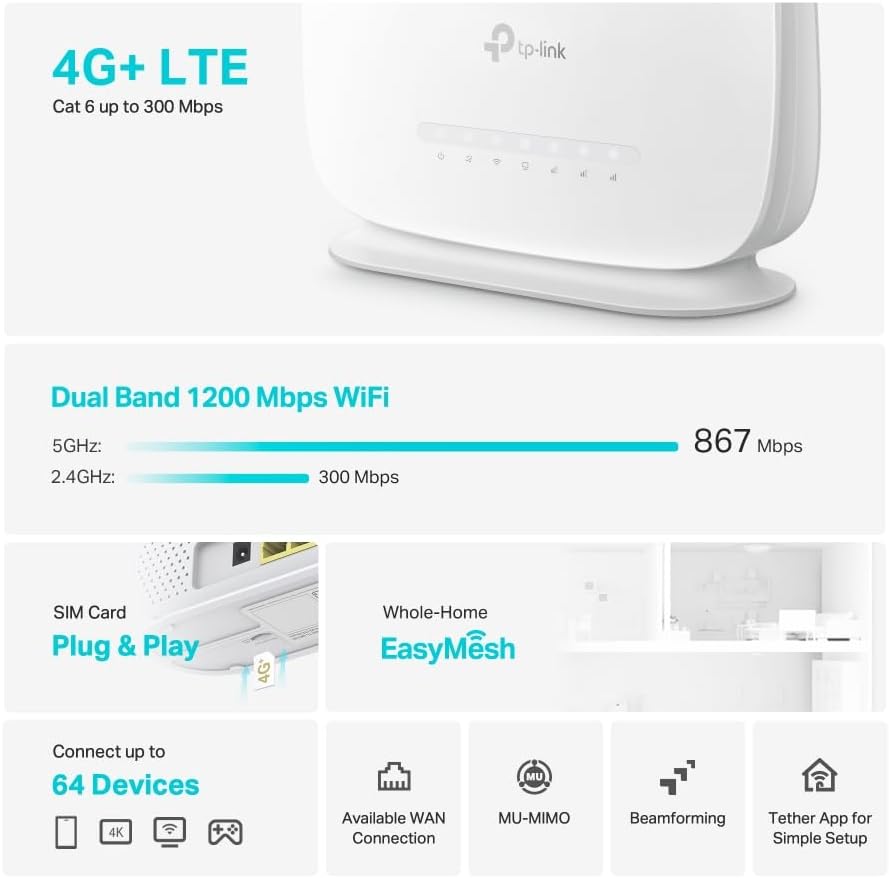
Figure 3: Key features and components of the Archer MR505.
Pokyny pro nastavení
Follow these steps to set up your Archer MR505 router:
- Vložte SIM kartu: Locate the SIM card slot on the router. Insert your 4G/LTE SIM card into the slot until it clicks into place. Ensure the SIM card is a normal data SIM for optimal compatibility. Some data-only SIM cards may require specific configurations or may not be fully compatible.
- Připojte napájení: Connect the provided power adapter to the router's power port and then plug it into a power outlet. The router will power on automatically.
- Čekání na inicializaci: Allow a few minutes for the router to boot up and establish a connection to the 4G/LTE network. The LED indicators on the front panel will show the connection status.
- Počáteční připojení k Wi-Fi:
- Find the default Wi-Fi network name (SSID) and password printed on the label at the bottom of the router.
- Connect your computer or mobile device to this Wi-Fi network.
- Správa přístupového routeru:
- Otevřete a web prohlížeče a zadejte výchozí adresu pro správu (např. http://tplinkwifi.net or http://192.168.1.1).
- Přihlaste se pomocí výchozího uživatelského jména a hesla (obvykle admin/admin or specified on the label).
- Konfigurace nastavení sítě: Follow the on-screen Quick Setup wizard to configure your internet connection, change the Wi-Fi network name (SSID), and set a strong, unique password for both your Wi-Fi and router management interface.
- Tether App Setup (Optional): Download the TP-Link Tether app from your device's app store. The app provides an intuitive way to manage your router settings from your smartphone or tablet.
- Externí anténa (volitelné): If using external antennas (not included), connect them to the designated ports on the back of the router. You may need to manually enable external antenna usage through the router's web rozhraní nebo aplikaci Tether.
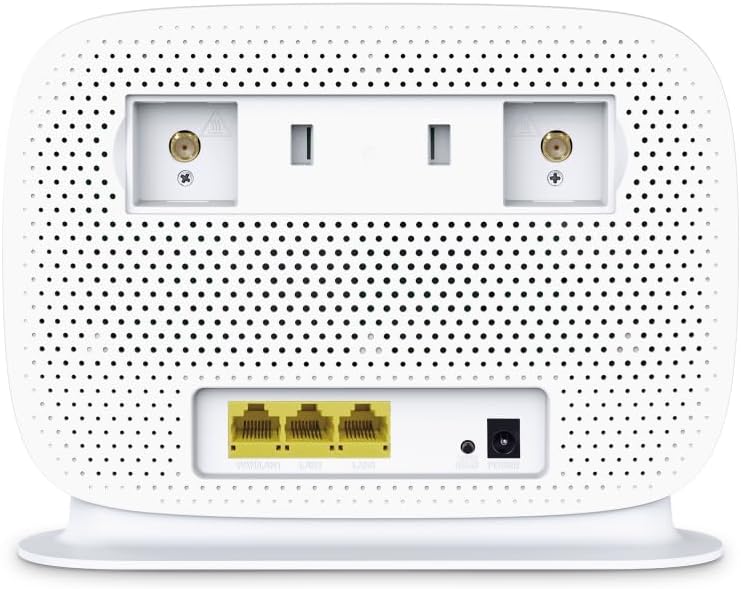
Figure 4: Rear panel of the Archer MR505 with ports and SIM slot.

Figure 5: Archer MR505 in various usage scenarios.
Návod k obsluze
The Archer MR505 provides robust wireless and wired connectivity:
- Dvoupásmová Wi-Fi: The router operates on both 2.4 GHz and 5 GHz bands, offering speeds up to 300 Mbps and 867 Mbps respectively, for a total of AC1200 Wi-Fi.
- 4G+ Cat6 Connectivity: Enjoy mobile broadband speeds up to 300 Mbps download and 300 Mbps upload (maximum upstream data transfer rate).
- Gigabitové ethernetové porty: Four Gigabit LAN ports (1000 Mbps) are available for high-speed wired connections to devices like computers, gaming consoles, or smart TVs. One port can also function as a WAN port for traditional broadband connections.
- Kapacita zařízení: The router can support connectivity for up to 64 devices simultaneously.
- Smart Connect: This feature automatically assigns devices to the best available Wi-Fi band (2.4 GHz or 5 GHz) for optimized performance.
- Kompatibilita s EasyMesh: The Archer MR505 is compatible with TP-Link EasyMesh, allowing you to create a seamless whole-home mesh Wi-Fi network by adding compatible range extenders.
- Pokročilé technologie: Features like MU-MIMO and Beamforming enhance Wi-Fi efficiency and range, especially for multiple connected devices.
- Zabezpečení: The router supports WPA3 encryption for enhanced network security.

Figure 6: Versatile connectivity and speed capabilities.

Figure 7: Whole-Home EasyMesh integration.
Údržba
To ensure optimal performance and security of your router:
- Aktualizace firmwaru: Pravidelně kontrolujte a instalujte nejnovější aktualizace firmwaru od oficiálního poskytovatele TP-Link. website or via the Tether app. Firmware updates often include security patches and performance improvements.
- Bezpečná hesla: Use strong, unique passwords for your Wi-Fi network and router management interface. Change them periodically.
- Fyzické umístění: Umístěte router do centrální polohy, mimo dosah překážek a zdrojů rušení (např. mikrovlnných trub, bezdrátových telefonů), abyste maximalizovali pokrytí Wi-Fi.
- Čištění: Keep the router clean and free from dust. Ensure ventilation holes are not blocked.
- Pravidelně restartovat: Restarting the router occasionally can help resolve minor network issues and improve performance.
Odstraňování problémů
If you encounter issues with your Archer MR505 router, consider the following:
- No Internet Connection via 4G/LTE:
- Ujistěte se, že je vaše SIM karta správně vložena a aktivována.
- Verify that your SIM card is a normal data SIM. Some data-only SIM cards may require specific APN settings or might not be fully compatible. Contact your mobile service provider for details.
- Check the 4G/LTE signal strength indicated by the router's LEDs. If the signal is weak, try repositioning the router or consider using external antennas (if supported and configured).
- Restartujte router a připojená zařízení.
- Problémy s připojením Wi-Fi:
- Ensure your device is within the router's Wi-Fi range.
- Ověřte, zda používáte správné heslo k Wi-Fi.
- If a device frequently connects and disconnects, try restarting that specific device.
- Zkontrolujte, zda nedochází k rušení jinými elektronickými zařízeními.
- Pomalá rychlost internetu:
- Check your 4G/LTE signal strength. Weak signal can significantly reduce speed.
- Ensure no other applications or devices are consuming excessive bandwidth.
- If using Wi-Fi, try connecting to the 5 GHz band for faster speeds, if your device supports it.
- Perform a speed test to confirm the actual speed you are receiving.
- Nelze přistupovat na stránku Správa routeru:
- Ensure your device is connected to the router's network (either via Wi-Fi or Ethernet cable).
- Verify you are entering the correct management address (e.g., http://tplinkwifi.net).
- Zkuste vymazat mezipaměť prohlížeče nebo použít jiný prohlížeč.
Specifikace
| Značka | TP-Link |
| Název modelu | Archer MR505 |
| Bezdrátové Standardní | 802.11ac (Wi-Fi 5) |
| Třída frekvenčního pásma | Dvoupásmové (2.4 GHz a 5 GHz) |
| Přenosová rychlost Wi-Fi | Up to 300 Mbps (2.4 GHz), Up to 867 Mbps (5 GHz) - AC1200 Total |
| 4G+ Cat6 Speed | Up to 300 Mbps Download, Up to 300 Mbps Upload |
| Ethernetové porty | 4 x Gigabit LAN Ports (1000 Mbps), 1 x WAN/LAN Port |
| Typ antény | Internal (External antenna support available) |
| Bezpečnostní protokol | WPA3 |
| Kontrolní metoda | App (TP-Link Tether) |
| Kompatibilní zařízení | Laptop, Personal Computer, Smart Television, Smartphone, Tablet |
| Vstup napájení | 12 voltů |
| Hmotnost položky | 0.93 kg |
| Zahrnuté komponenty | Archer MR505, Power Adapter, Quick Installation Guide, RJ45 Ethernet Cable |
Záruka a podpora
For warranty information, please refer to the warranty card included with your product or visit the official TP-Link website for your region. Support resources, including FAQs, firmware downloads, and contact information, are available on the TP-Link support website and through the TP-Link Tether app.
Official TP-Link Webmísto: https://www.tp-link.com
Aplikace TP-Link Tether: Available on iOS App Store and Google Play Store.