
Zavedení
Thank you for choosing the AMACOOL Portable Waist Fan K50. This manual provides essential information for the safe and efficient operation, maintenance, and troubleshooting of your new fan. Please read it thoroughly before use and retain it for future reference.

Image: The AMACOOL Portable Waist Fan K50, a compact and powerful personal cooling device.
Vlastnosti produktu
- Prodloužená životnost baterie: Equipped with a 10000mAh built-in battery, providing up to 40 hours of continuous airflow at the lowest speed and up to 8 hours at the highest speed.
- Výkonné chlazení: Features a straight-through structure and an upgraded motor, delivering a maximum airflow velocity of 16000 RPM across 5 adjustable speeds.
- Všestranné použití: Can be used as a waist fan, neck fan (with included lanyard), or a desk fan using its integrated bracket.
- Nouzová powerbanka: Includes a 5V-2A USB output port for charging mobile devices in emergencies.
- Integrované LED světlo: Features an ultra-bright LED light and an SOS flashlight function for nighttime visibility and emergencies.
- Odolný design: Constructed with an anti-slip silicone cover for drop and shock resistance, and an upgraded Manganese steel clamp for a secure grip.
- Přenosný: Weighs only 0.63lb, making it easy to carry for various outdoor activities.
Obsah balení
Po vybalení zkontrolujte obsah balení:
- AMACOOL Portable Waist Fan K50
- Nabíjecí kabel USB-C
- Nastavitelná šňůrka
- Uživatelská příručka
Nastavení
- Počáteční poplatek: Before first use, fully charge the fan. Connect the provided USB-C cable to the fan's input port and a compatible 5V-2A USB power adapter (not included). The LED display will show the charging progress.
- Připojte šňůrku (volitelné): If you intend to use the fan as a neck fan, attach the adjustable lanyard to the designated loop on the fan.
- Zajistěte ventilátor: Use the Manganese steel clamp to securely attach the fan to your belt, waistband, or shirt. Ensure the fan's air outlet is positioned to direct airflow as desired.
Návod k obsluze
Zapnutí/vypnutí a nastavení rychlosti
- Zapnutí: Press and hold the power button (usually marked with a power symbol) for 2 seconds to turn on the fan. It will start at the lowest speed setting.
- Upravte rychlost ventilátoru: Short press the power button repeatedly to cycle through the 5 available speed settings. The LED display will indicate the current speed level.
- Vypnout: Press and hold the power button for 2 seconds to turn off the fan.
LED displej
The integrated LED display shows the current fan speed level and the remaining battery percentage, allowing you to monitor usage and charging status.
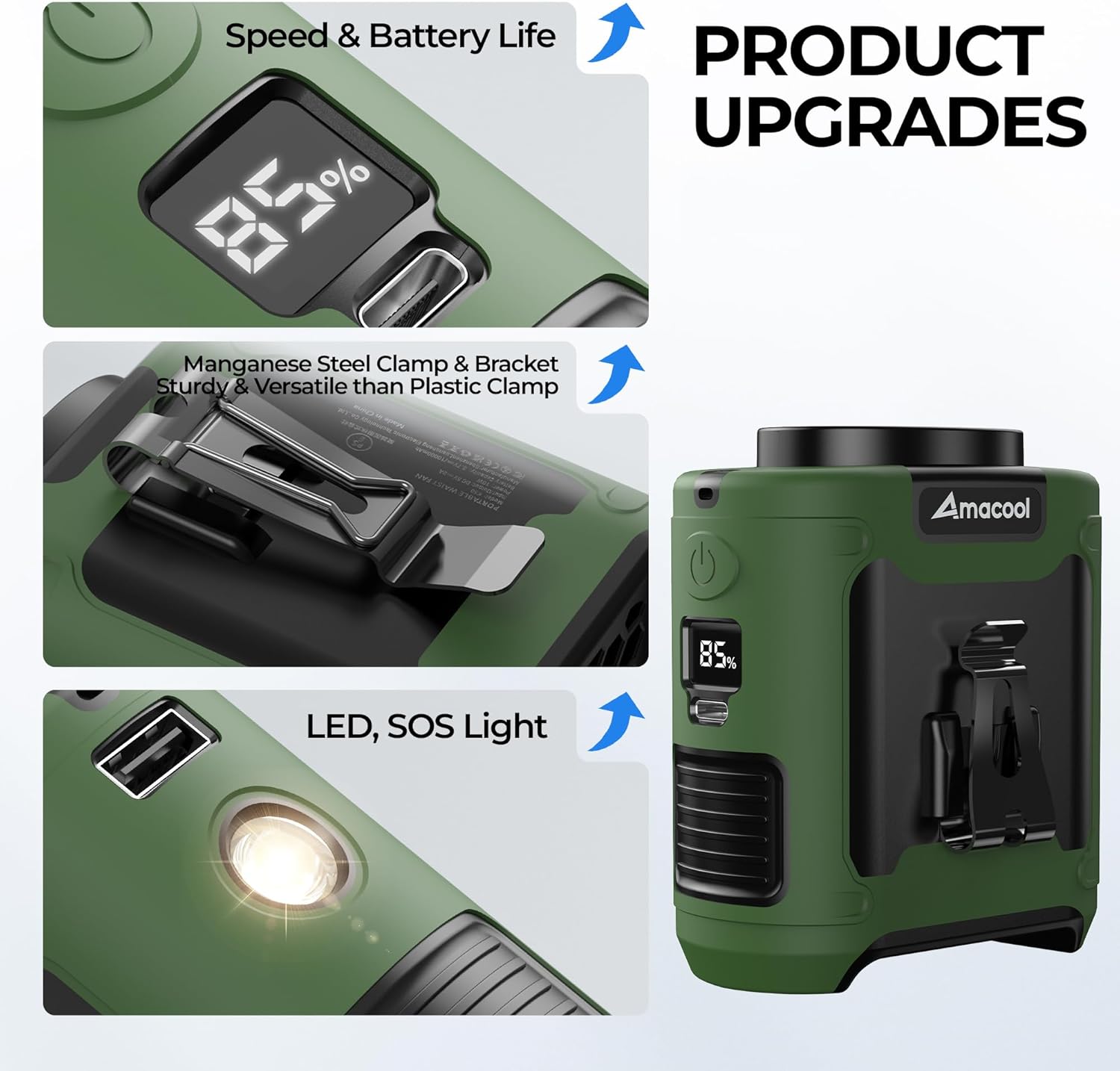
Image: Close-up of the fan showing the LED display for speed and battery, and the durable Manganese steel clamp.
LED Light and SOS Function
To activate the LED light or SOS function:
- Zapnutí/vypnutí LED světla: Locate the dedicated light button (often near the LED light itself). Short press to turn the light on or off.
- Aktivace režimu SOS: While the LED light is on, press and hold the light button to activate the SOS flashing mode. Short press again to return to steady light, or long press to turn off.

Image: The fan demonstrating its LED light for illumination and its capability to act as an emergency power supply.
Nabíjení ventilátoru
To charge the AMACOOL Portable Waist Fan K50:
- Connect the provided USB-C cable to the fan's input port.
- Connect the other end of the USB-C cable to a 5V-2A USB power adapter (e.g., phone charger, power bank, computer USB port).
- LED displej zobrazí procenta nabití baterietage increasing during charging. A full charge typically takes 4-5 hours.
- The fan can be used while it is charging.
Použití jako Power Bank
The fan can serve as an emergency power bank for your mobile devices:
- Connect your device's charging cable to the fan's USB-A output port (5V-2A).
- The fan will begin charging your device. Note that using the fan as a power bank will deplete its internal battery, reducing its operating time as a fan.
Možnosti nošení
The AMACOOL Portable Waist Fan K50 offers multiple ways to wear and position it for optimal cooling:
- Spona do pasu: Securely clip the fan to your belt or the waistband of your pants. Position it at your back or side to direct airflow upwards under your shirt, providing full-body cooling.
- Ventilátor na krk: Attach the adjustable lanyard and wear the fan around your neck. This hands-free option is ideal for activities where you need unrestricted movement.
- Stolní ventilátor: Utilize the integrated bracket to stand the fan upright on any flat surface, transforming it into a personal desk fan.

Image: Various ways to wear the AMACOOL fan, including clipped to a belt, worn around the neck, and used as a desk fan.
Údržba
Správná údržba zajišťuje dlouhou životnost a optimální výkon vašeho ventilátoru:
- Čištění: Use a soft, dry cloth to wipe the exterior of the fan. Do not use liquid cleaners or immerse the fan in water. Ensure the air inlet and outlet are free from dust and debris.
- Skladování: When not in use for extended periods, store the fan in a cool, dry place away from direct sunlight and extreme temperatures. It is recommended to charge the fan to about 50% before storing to preserve battery health.
- Péče o baterie: Avoid fully discharging the battery frequently. Recharge the fan when the battery level is low to extend its lifespan.
Odstraňování problémů
| Problém | Možná příčina | Řešení |
|---|---|---|
| Ventilátor se nezapne | Nízká nebo vybitá baterie | Ventilátor plně nabijte pomocí dodaného kabelu USB-C. |
| Slabé nebo žádné proudění vzduchu | Fan speed set too low; Air inlet/outlet blocked | Increase fan speed. Ensure air inlet and outlet are clear of obstructions. |
| Ventilátor se nenabíjí | Faulty cable or power adapter; Loose connection | Check the USB-C cable and power adapter. Ensure connections are secure. Try a different cable or adapter. |
| LED světlo nefunguje | Light function not activated; Low battery | Short press the light button. Charge the fan if the battery is low. |
| Znatelný hluk | Normal operation at higher speeds | The fan operates at 50-60dB, which is minimal for outdoor use but may be noticeable in quiet indoor environments. This is normal. |
Specifikace
| Funkce | Detail |
|---|---|
| Značka | AMACOOL |
| Název modelu | K50 |
| Kapacita baterie | 10000 XNUMX mAh |
| Počet rychlostí | 5 |
| Maximální rychlost | 16000 ot./min |
| Úroveň hluku | 55 decibelů |
| Zdroj napájení | Napájení z baterie (dobíjecí) |
| Typ hlavního napájecího konektoru | USB-C (Input) |
| USB výstup | 5V-2A (for emergency charging) |
| Rozměry produktu | 1.81"H x 3.38"Š x 3.85"V |
| Hmotnost položky | 320 gramů (0.71 lb) |
| Materiál | Legovaná ocel, silikon |
| Speciální funkce | LED Light, SOS Function, Lightweight, Portable, Power Bank Function |
| Vnitřní/venkovní použití | Venkovní |
Bezpečnostní informace
- Nevystavujte ventilátor vodě ani nadměrné vlhkosti.
- Uchovávejte mimo dosah dětí a domácích zvířat.
- Avoid disassembling or modifying the fan, as this may void the warranty and pose safety risks.
- Do not use the fan in environments with flammable gases or liquids.
- Avoid blocking the air inlet or outlet during operation to prevent overheating.
- Nevystavujte baterii extrémním teplotám ani přímému slunečnímu záření po delší dobu.
Záruka a podpora
AMACOOL is committed to providing high-quality products and excellent customer service. Your AMACOOL Portable Waist Fan K50 comes with:
- 365 dní zdarma: In case of any manufacturing defects or issues within one year of purchase, contact customer support for a free replacement.
- 24hodinová odpověď: Our customer support team is available to respond to your inquiries within 24 hours.
For support, please visit the AMACOOL store on Amazon or contact us through the Amazon platform.