
Pipishell PIMF9, PISM03
Uživatelská příručka k nástěnnému držáku na TV (PIMF9) a reproduktorům (PISM03) od Pipishell Full Motion
Model: PIMF9, PISM03
Zavedení
This manual provides comprehensive instructions for the safe and proper installation, operation, and maintenance of your Pipishell Full Motion TV Wall Mount (PIMF9) and Pipishell Speaker Wall Mounts (PISM03). Please read this manual thoroughly before installation and retain it for future reference.
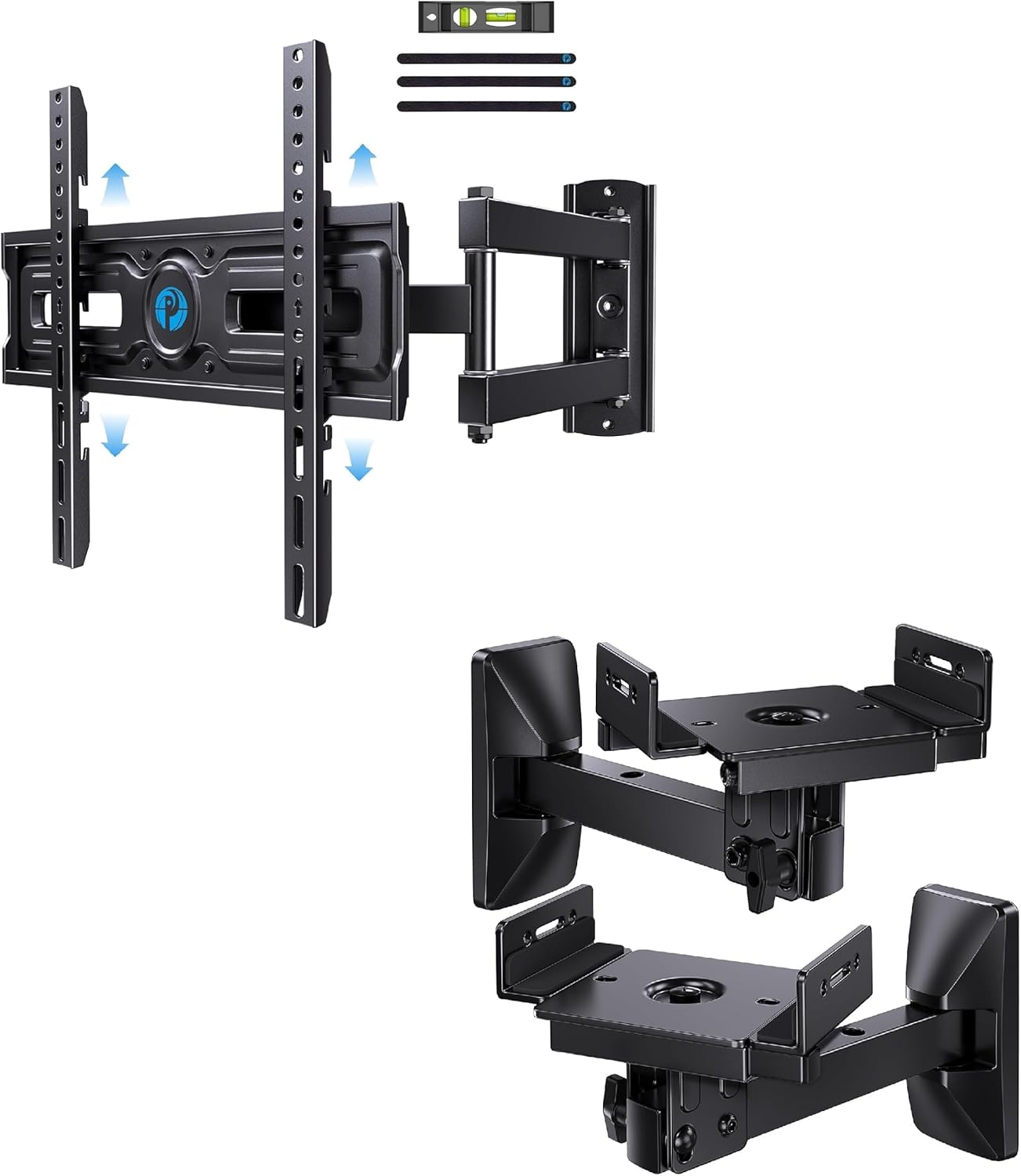
Obrázek: Overview of the Pipishell Full Motion TV Wall Mount and Speaker Wall Mounts.
Bezpečnostní informace
Improper installation or use of this product can result in serious injury or damage. Please follow all instructions carefully. If you are unsure about any part of the installation process, consult a qualified professional.
- Do not exceed the maximum weight capacity for each mount: 77 lbs for the TV mount (PIMF9) and 50 lbs per speaker mount (PISM03).
- Ensure the wall structure can safely support the combined weight of the mount and the attached device (TV or speaker).
- Always use appropriate mounting hardware for your specific wall type.
- Během instalace držte děti a domácí zvířata mimo dosah.
- Pravidelně kontrolujte všechna připojení, abyste se ujistili, že jsou bezpečná.
Obsah balení
Verify that all components are present and undamaged before beginning installation. If any parts are missing or defective, contact Pipishell customer support.
- Pipishell Full Motion TV Wall Mount (PIMF9) assembly
- Pipishell Speaker Wall Mounts (PISM03) (1 Pair)
- Mounting hardware kit (screws, anchors, washers, spacers)
- Instalační šablona (pokud je k dispozici)
- Bubble level (if included)
Nastavení a instalace
PIMF9 Full Motion TV Wall Mount Installation
Before installation, confirm your TV's weight, size, and VESA pattern are compatible with the PIMF9 mount. This mount supports TVs from 26" to 60" and up to 77 lbs, with VESA patterns from 100x100mm to 400x400mm.

Image: Illustrates wide compatibility for the TV mount, showing supported wall types (concrete, wood stud, brick) and VESA patterns with maximum load capacity.
- Kontrola před instalací: Measure your TV's VESA pattern (distance between mounting holes on the back of the TV). Ensure it falls within the 100x100mm to 400x400mm range. Verify your TV's weight does not exceed 77 lbs.
- Určete typ zdi: Identify if your wall is concrete, a single wood stud, or brick. Use appropriate anchors and screws provided in the hardware kit for your wall type.
- Mark Vrtné lokality: Use the provided template or the wall plate itself to mark the drilling points on your wall. Ensure the marks are level.
- Vrtací pilotní otvory: Drill holes at the marked locations according to the recommended drill bit size for your wall type and anchors.
- Připevnění nástěnné desky: Secure the TV mount's wall plate to the wall using the appropriate screws and anchors. Ensure it is firmly attached and level.
- Připevnění držáků televizoru: Secure the vertical TV brackets to the back of your TV using the correct screws, washers, and spacers that fit your TV's VESA holes.
- Zavěšení televize na nástěnnou desku: Carefully lift the TV with the attached brackets and hook them onto the wall plate. Secure the TV to the wall plate using the safety screws or locking mechanisms.
- Upravit výšku (volitelné): The TV mount features 3 levels of height adjustment after installation. Adjust the height of the TV on the vertical brackets to achieve your desired viewing pozice.
- Corner Placement (Optional): The full motion design allows for ideal corner placement. Extend and swivel the arm to position the TV optimally in a corner.

Image: Demonstrates the TV mount's robust construction, capable of supporting TVs up to 77 lbs securely.

Image: Shows the three height adjustment options available for the TV mount, allowing for fine-tuning of TV positioning.

Image: Illustrates how the full motion TV mount can be extended and swiveled for optimal placement in a room corner.
PISM03 Speaker Wall Mounts Installation
The PISM03 speaker mounts are designed for most surround sound and bookshelf speakers 5.9" - 11.2" wide and up to 50 lbs. They are compatible with concrete walls, single wood studs, and brick walls.
- Speaker Compatibility Check: Ensure your speakers fit within the 5.9" - 11.2" width range and do not exceed 50 lbs per speaker.
- Určete typ zdi: As with the TV mount, identify your wall type and select the appropriate mounting hardware.
- Mark Vrtné lokality: Mark the drilling points for the speaker mount's wall plate.
- Vrtací pilotní otvory: Na vyznačených místech vyvrtejte otvory.
- Připevnění nástěnné desky: Secure the speaker mount's wall plate to the wall.
- Attach Speaker to Mount: Place your speaker onto the adjustable clamping bracket of the mount. The anti-slip pads will help keep the speaker in place.
- Upravit šířku: Use the width adjustment mechanism to securely clamp váš reproduktor.
- Správa kabelů: Utilize the concealed cable management features to route speaker wires for a clean and organized look.

Image: Shows the heavy-duty steel construction of the speaker mount, demonstrating its ability to support speakers up to 50 lbs.

Image: Illustrates the concealed cable management feature of the speaker mount, allowing for a tidy installation.
Provoz a seřízení
PIMF9 TV Mount Adjustments
- Náklon: Gently push or pull the top or bottom of your TV to adjust the tilt angle for optimal viewing. The mount supports a maximum tilt angle of 10 degrees.
- Otočný: Extend the arm and swivel the TV left or right to achieve the desired viewúhlu z různých míst v místnosti.
- Rozšíření: Pull the TV away from the wall to extend the arm, allowing for greater flexibility in positioning.
PISM03 Speaker Mount Adjustments
The speaker mounts offer tool-free adjustments for precise sound direction.

Image: Shows the range of motion for the speaker mounts, including +/-10° tilt, +/-45° swivel, and 360° rotation for perfect speaker positioning.
- Náklon: Adjust the knob to tilt the speaker +/-10 degrees up or down.
- Otočný: Swivel the speaker +/-45 degrees left or right to direct sound.
- Otáčení: Rotate the speaker 360 degrees for comprehensive positioning flexibility.

Image: Details the tool-free adjustment mechanisms for the speaker mounts, specifically showing the tilt and width adjustment points.
Údržba
- Čištění: Use a soft, dry cloth to clean the mounts. Avoid abrasive cleaners or solvents.
- Pravidelné kontroly: Pravidelně kontrolujte všechny šrouby a spoje, abyste se ujistili, že jsou pevně utažené a bezpečné. V případě potřeby je dotáhněte.
- Mazání: No lubrication is typically required for these mounts. If movement becomes stiff, contact customer support.
Odstraňování problémů
| Problém | Možná příčina | Řešení |
|---|---|---|
| TV/Speaker not level after installation. | Wall plate or brackets not perfectly level. | For TV mount, use the height adjustment feature. For both, slightly loosen mounting screws, adjust, and re-tighten. Use a bubble level. |
| Držák se zdá být uvolněný nebo kymácející se. | Screws are not fully tightened; incorrect anchors used for wall type; wall structure is not strong enough. | Ensure all screws are securely tightened. Verify correct anchors were used. If wall is insufficient, consult a professional. |
| TV/Speaker does not fit the mount. | Incompatible VESA pattern (TV) or speaker dimensions (speaker mount); device exceeds weight capacity. | Double-check your device's specifications against the mount's compatibility. Ensure VESA pattern, weight, and speaker width are within limits. |
| Obtížné nastavení náklonu/otočení. | Klouby jsou příliš těsné. | Locate adjustment bolts on the mount's joints and slightly loosen them. Do not over-loosen. |
Specifikace
Držák na stěnu PIMF9 Full Motion TV
- Kompatibilní velikosti televizorů: 26" - 60"
- Nosnost: Až 77 liber (35 kg)
- Kompatibilita VESA: 100x100mm to 400x400mm (e.g., 100x100, 200x100, 200x200, 300x200, 300x300, 400x200, 400x300, 400x400)
- Typ pohybu: Kloubové, Otáčení, Natáčení, Naklápění
- Úhel náklonu: Up to +10 degrees
- Nastavení výšky: 3 levels after installation
- Materiál: Legovaná ocel
- Barva: Černý
PISM03 Speaker Wall Mounts (Pair)
- Compatible Speaker Width: 5.9" - 11.2"
- Nosnost: Up to 50 lbs (22.7 kg) per bracket
- Typ pohybu: Tilt, Swivel, Rotation
- Úhel náklonu: +/-10 stupňů
- Úhel otočení: +/-45 stupňů
- Otáčení: 360 stupňů
- Délka paže: 9.10"
- Materiál: Vysoce odolná ocel
- Barva: Černý
Záruka a podpora
For warranty information and customer support, please refer to the documentation included with your product packaging or visit the official Pipishell website. You can also contact Pipishell customer service directly for assistance with installation, troubleshooting, or parts replacement.
Výrobce: Pipishell
První k dispozici: 2. srpna 2024
Ask a question about this manual
Ask about setup, troubleshooting, compatibility, parts, safety, or missing instructions. Manuals+ will review the question and use this page’s manual context to help answer it.