
DOOGEE DOOGEE Blade 10 Ultra
Uživatelská příručka k chytrému telefonu DOOGEE Blade 10 Ultra
Model: DOOGEE Blade 10 Ultra
1. Úvod
This manual provides comprehensive instructions for the safe and efficient use of your DOOGEE Blade 10 Ultra smartphone. Please read this manual carefully before using the device to ensure optimal performance and longevity.

Obrázek: Přední a zadní strana view of the DOOGEE Blade 10 Ultra smartphone, highlighting its rugged design and key features like NFC and Android 14.
2. Nastavení
2.1 Vybalení a úvodní kontrola
Carefully unbox your DOOGEE Blade 10 Ultra and verify that all components are present and in good condition. The package should contain:
- 1 x DOOGEE Blade 10 Ultra Smartphone
- 1 x kabel USB Type-C
- 1x Nabíječka
- 1 x Tempered Glass Protector (pre-applied)
- 1 x Uživatelská příručka
2.2 Instalace SIM karty a karty microSD
Instalace SIM karty (kart) a/nebo karty microSD:
- Vyhledejte držák SIM karty na boku zařízení.
- Vložte nástroj pro vysunutí SIM karty do malého otvoru vedle zásuvky, abyste ji otevřeli.
- Place your Nano-SIM card(s) and/or microSD card into the designated slots. Ensure the gold contacts are facing down. The device supports up to 2TB external storage via microSD.
- Jemně zatlačte zásobník zpět do slotu, dokud nezacvakne na místo.

Image: Illustration of the internal storage components, showing 8GB+12GB RAM and 256GB ROM, with support for up to 2TB microSD card.
2.3 First Power On and Basic Setup
Press and hold the power button until the DOOGEE logo appears. Follow the on-screen prompts to complete the initial setup, including language selection, Wi-Fi connection, Google account setup, and security settings.
2.4 Nabíjení zařízení
Connect the USB Type-C cable to the phone's charging port and the other end to the provided charger. Plug the charger into a power outlet. The battery indicator will show charging status. For optimal battery life, fully charge the device before first use.
3. Ovládání smartphonu
3.1 Konecview of Android 14
Your DOOGEE Blade 10 Ultra runs on the latest Android 14 operating system, offering enhanced privacy features, improved security, and a more personalized user experience. Explore new customization options and streamlined notifications.

Image: The Android 14 system logo, emphasizing its smart, secure, and convenient features.
3.2 Zobrazení a navigace
The device features a 6.56-inch HD+ IPS waterdrop display with a 90Hz refresh rate for smooth visuals. Navigate the interface using touch gestures: swipe, tap, pinch-to-zoom, and long-press.
3.3 Použití kamery
Capture high-quality photos and videos with the 50MP AI main camera and 8MP front camera. The Morpho Imaging Algorithm enhances your photography with various modes including HDR, Watermark, Video, Picture, Beauty, Pro Mode, Portrait, Gif, Panorama, and Filter.

Image: Visual representation of the 50MP main camera and 8MP front camera, detailing the various imaging modes available through the Morpho Imaging Algorithm.
3.4 Konektivita
Your smartphone supports a wide range of connectivity options:
- Wi-Fi: Connect to 2.4G and 5G networks (802.11ac/a/b/g/n).
- Bluetooth: BT5.0 for connecting to wireless accessories.
- NFC: For contactless payments and quick data sharing.
- OTG: On-The-Go support for connecting USB devices.
- Navigace: Integrované systémy GPS, Glonass, Galileo a Beidou pro přesné určování polohy.
- Mobilní sítě: Supports 2G GSM (B2/3/5/8), 3G WCDMA (B1/2/4/5/8), and 4G FDD (B1/2/3/4/5/7/8/18/19/20/25/26/28A/28B/66) bands.
3.5 Správa baterie
The DOOGEE Blade 10 Ultra is equipped with a large 5150mAh battery, providing extended usage times. To maximize battery life:
- Optimize screen brightness.
- Zavřete nepoužívané aplikace na pozadí.
- Pokud Wi-Fi, Bluetooth nebo GPS nepoužíváte, vypněte je.
- Expected battery life: up to 470 hours standby, 111.9 hours music, 25.5 hours talk, 16.7 hours video, 7.6 hours web procházení.
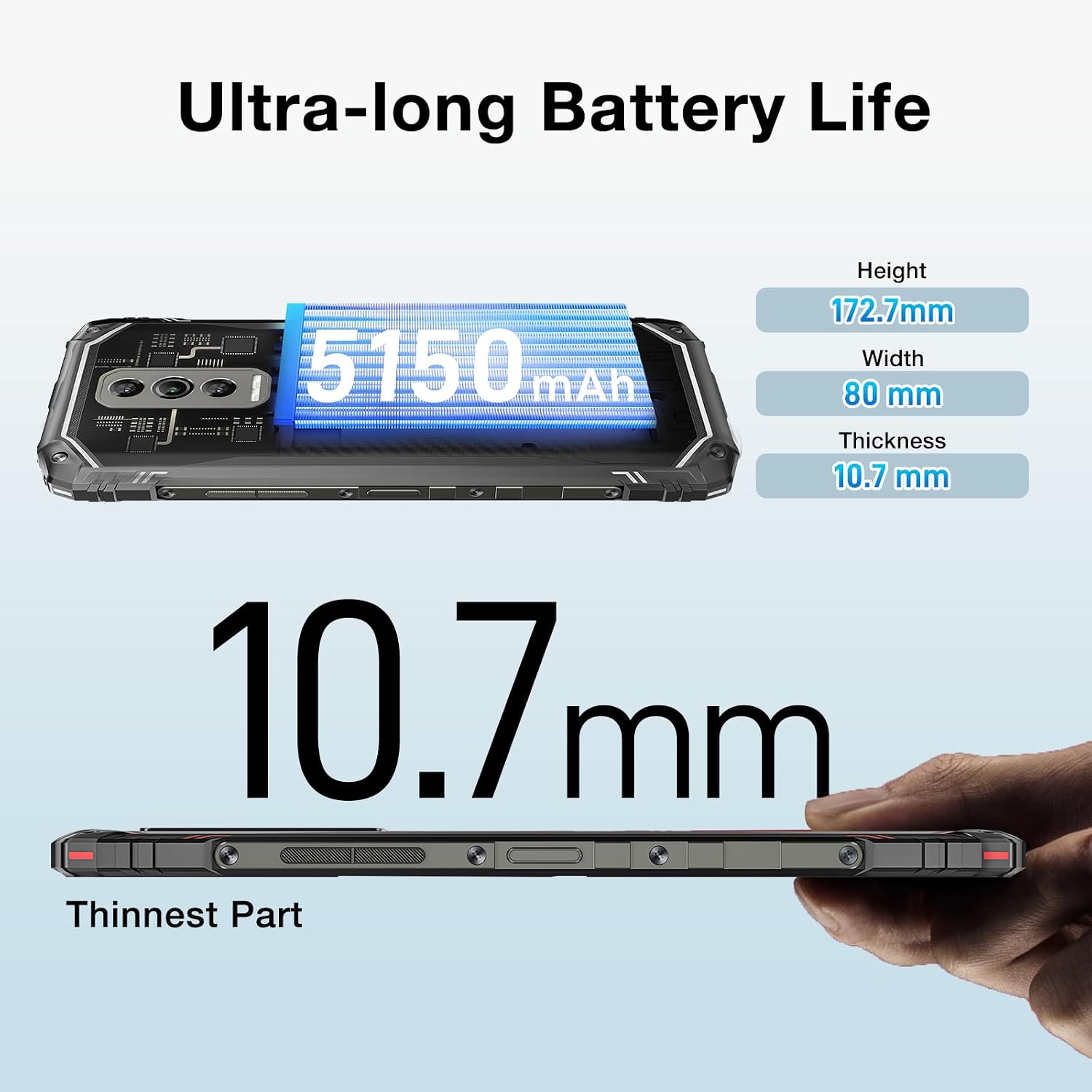
Image: The DOOGEE Blade 10 Ultra highlighting its 5150mAh battery capacity and physical dimensions (Height: 172.7mm, Width: 80mm, Thickness: 10.7mm).
3.6 Správa úložiště
The device comes with 256GB of internal storage (ROM) and up to 20GB of RAM (8GB physical + 12GB virtual). You can expand storage by up to 2TB using a microSD card. Regularly clear cache and unnecessary files pro udržení optimálního výkonu.
3.7 Podpora Widevine L1
The DOOGEE Blade 10 Ultra supports Widevine L1, enabling high-definition streaming from popular platforms. Enjoy your favorite movies and shows in crisp, clear quality.
4. Údržba
4.1 Čištění vašeho zařízení
Use a soft, lint-free cloth to clean the screen and body of your phone. Avoid using harsh chemicals or abrasive materials that could damage the device. For stubborn smudges, slightly damphadřík vodou nebo čističem obrazovek.
4.2 Aktualizace softwaru
Pravidelně kontrolujte a instalujte aktualizace softwaru, abyste zajistili, že vaše zařízení má nejnovější funkce, bezpečnostní záplaty a vylepšení výkonu. Přejděte na Nastavení > Systém > Aktualizace systému pro kontrolu aktualizací.
4.3 Optimalizace úložiště
To keep your phone running smoothly, periodically review and delete unnecessary apps, photos, videos, and files. Utilize cloud storage or transfer large files to a computer to free up internal space.
5. Řešení problémů
If you encounter issues with your DOOGEE Blade 10 Ultra, refer to the following common solutions:
| Problém | Řešení |
|---|---|
| Zařízení se nezapíná | Ujistěte se, že je baterie nabitá. Připojte ji k nabíječce alespoň na 10 minut a poté zkuste zařízení zapnout. Pokud nereaguje, proveďte vynucený restart podržením tlačítka napájení po dobu 10–15 sekund. |
| Problémy s nabíjením | Check the USB cable and charger for damage. Try a different power outlet. Ensure the charging port is clean and free of debris. |
| Špatné připojení k síti | Zkontrolujte, zda je vypnutý režim Letadlo. Restartujte zařízení. Ověřte, zda je SIM karta správně vložena. Pokud problém přetrvává, obraťte se na svého poskytovatele sítě. |
| Aplikace padá nebo zamrzá | Clear the app's cache and data (Settings > Apps > [App Name] > Storage). Update the app to the latest version. If the problem continues, uninstall and reinstall the app. |
| Zařízení běží pomalu | Close unused background apps. Clear cache and temporary files. Ensure sufficient storage space is available. Restart the device. |
5.1 Obnovení továrního nastavení
If other troubleshooting steps fail, you may need to perform a factory reset. Varování: Tímto smažete všechna data v telefonu. Před pokračováním si zálohujte důležitá data. Přejít na Nastavení > Systém > Možnosti resetování > Vymazat všechna data (obnovení továrního nastavení) a postupujte podle pokynů na obrazovce.
6. Specifikace
Detailed technical specifications for the DOOGEE Blade 10 Ultra:
| Funkce | Specifikace |
|---|---|
| Model | DOOGEE Blade 10 Ultra |
| Operační systém | Android 14 |
| Zobrazit | 6.56-inch HD+ IPS Waterdrop, 90Hz Refresh Rate |
| Procesor | Spreadtrum T606 Octa-core 1.6GHz (12nm) |
| BERAN | Až 20 GB (8 GB fyzické + 12 GB virtuální) |
| Interní úložiště (ROM) | 256 GB |
| Rozšiřitelné úložiště | Až 2 TB přes microSD kartu |
| Hlavní fotoaparát | 50MP umělá inteligence |
| Přední kamera | 8 MP |
| Kapacita baterie | 5150 XNUMX mAh |
| Síťová pásma | 2G GSM: B2/3/5/8; 3G WCDMA: B1/2/4/5/8; 4G FDD: B1/2/3/4/5/7/8/18/19/20/25/26/28A/28B/66 |
| Wi-Fi | 2.4G/5G (802.11ac/a/b/g/n) |
| Bluetooth | BT5.0 |
| NFC | Podporováno |
| OTG | Podporováno |
| Navigace | GPS | Glonass | Galileo | beidou |
| Rozměry (V x Š x H) | 172.7 mm x 80 mm x 10.7 mm |
| Barva | Černý |

Image: Diagram illustrating the powerful Octa-core 1.6GHz processor, highlighting its boosted performance and reduced consumption.
7. Záruka a podpora
Informace o záruce naleznete v záruční kartě, která je součástí balení produktu, nebo navštivte oficiální webové stránky DOOGEE. website. For technical support or further assistance, please contact DOOGEE customer service through their official channels.
Ask a question about this manual
Ask about setup, troubleshooting, compatibility, parts, safety, or missing instructions. Manuals+ will review the question and use this page’s manual context to help answer it.