
ALLIMITY RC45162
ALLIMITY RC45162 Voice Remote Control User Manual
Model: MME-RC45162-NP
Compatible with Panasonic TV models: TX-65MX700E, TX-65MX710E, TX-43MX700E, TX-55MX710E, TX-50MX710E, TX-55MX700E
1. Úvod
This manual provides instructions for the ALLIMITY RC45162 Voice Remote Control. This remote is designed to be fully compatible with various Panasonic TV models, offering a direct replacement experience without complex setup procedures. Its ergonomic design ensures comfortable handling and reliable performance for controlling your television.
2. Nastavení
2.1 Instalace baterie
The ALLIMITY RC45162 remote control requires batteries for operation. Please follow these steps to install them:
- Najděte kryt prostoru pro baterie na zadní straně dálkového ovladače.
- Slide or press the latch to open the battery compartment.
- Insert the required Lithium batteries, ensuring the positive (+) and negative (-) terminals align correctly with the markings inside the compartment.
- Bezpečně zavřete kryt bateriového prostoru.
Note: This remote control requires no programming or complex installation. Once batteries are correctly inserted, it is ready for use with compatible Panasonic TV models.

Obrázek: Zpět view of the remote control, highlighting the battery compartment for easy access and installation.
3. Návod k obsluze
The ALLIMITY RC45162 remote control is designed for intuitive use. Below are the primary functions:
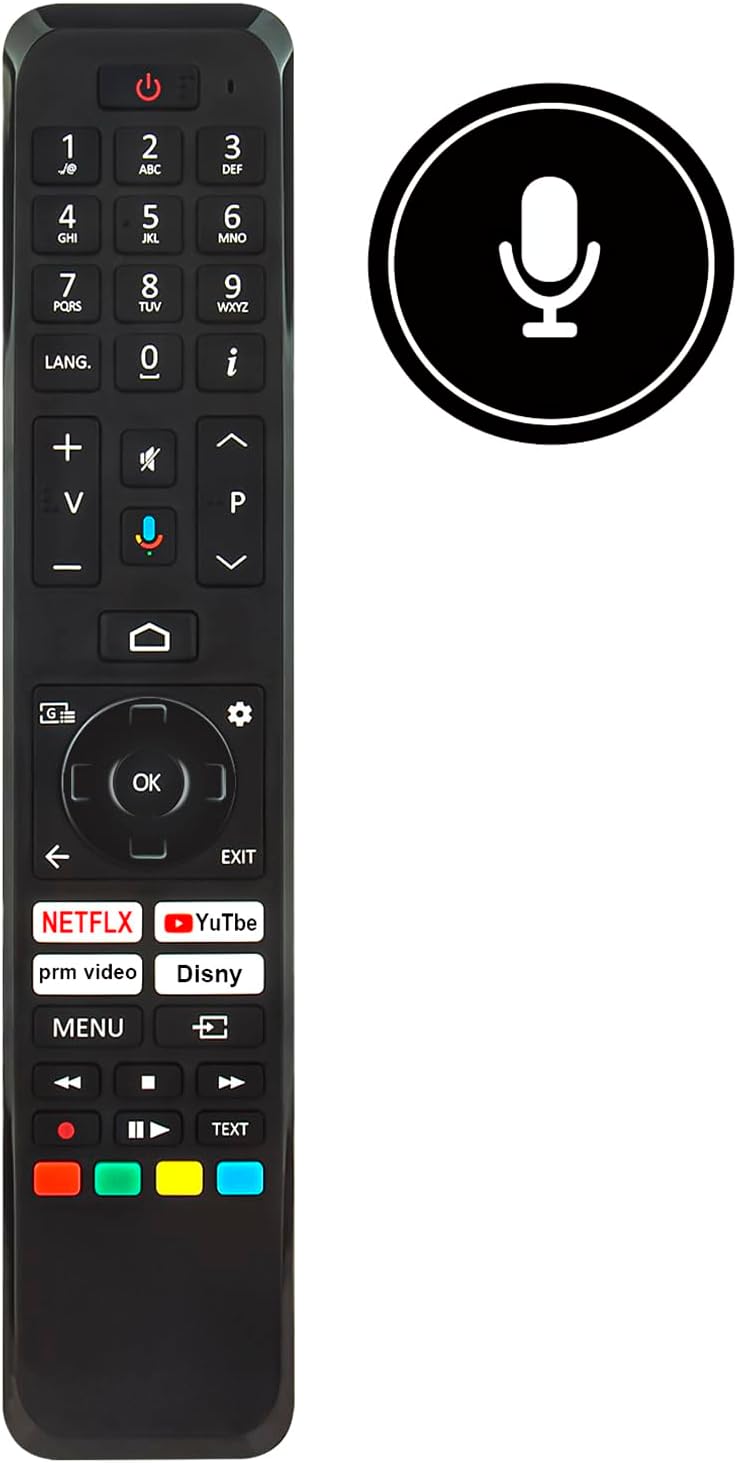
Obrázek: Přední strana view of the ALLIMITY RC45162 remote control, displaying the full button layout.
3.1 Základní funkce
- Tlačítko napájení (U): Zapíná nebo vypíná televizor.
- Číselná tlačítka (0-9): Přímý výběr kanálů.
- Zvýšení/snížení hlasitosti (+/-): Nastavuje hlasitost TV.
- Channel Up/Down (P^/P<): Mění televizní kanály.
- Tlačítko ztlumení: Ztlumí nebo zapne zvuk televizoru.
- Navigační tlačítko (nahoru, dolů, vlevo, vpravo, OK): Používá se k navigaci v nabídkách a potvrzování výběrů.
- Back Button (<): Vrátí se do předchozí nabídky nebo obrazovky.
- Tlačítko Konec: Ukončí aktuální menu nebo aplikaci.
- Tlačítko Domů: Přístup k hlavní domovské obrazovce televizoru nebo k rozhraní chytré televize.
3.2 Speciální funkce
- Voice Control Button (Microphone icon): Activates the voice control feature. Press and hold this button, then speak your command clearly into the remote. Release the button when finished.
- Tlačítka pro rychlý přístup: Dedicated buttons for popular streaming services such as Netflix, YouTube, Prime Video, and Disney+ for direct access.
- Tlačítko JAZYK: For language selection or audio track changes.
- Informační tlačítko (i): Zobrazuje informace o aktuálním programu nebo vstupu.
- Tlačítko nabídky: Přístup k hlavní nabídce nastavení televizoru.
- Barevná tlačítka (červená, zelená, žlutá, modrá): These buttons often correspond to specific functions within TV menus or applications, as indicated on the screen.
4. Údržba
4.1 Čištění
Pro zachování vzhledu a funkčnosti dálkového ovladače:
- Otřete dálkový ovladač měkkým, suchým hadříkem.
- Pro odolnou špínu lehceampnavlhčete hadřík vodou nebo jemným neabrazivním čisticím prostředkem.
- Nepoužívejte agresivní chemikálie, rozpouštědla nebo abrazivní materiály, protože by mohly poškodit povrch nebo vnitřní součásti dálkového ovladače.
4.2 Výměna baterie
Replace batteries when the remote control's response becomes sluggish or stops working. Always replace all batteries at the same time with new ones of the same type. Do not mix old and new batteries or different types of batteries.
4.3 Skladování
Pokud dálkový ovladač nebudete delší dobu používat, vyjměte baterie, abyste zabránili jejich vytečení a možnému poškození zařízení.
5. Řešení problémů
If you encounter issues with your ALLIMITY RC45162 remote control, please refer to the following common solutions:
- Dálkové ovládání nereaguje:
- Zkontrolujte, zda jsou baterie správně vloženy a zda jsou dostatečně nabité. V případě potřeby je vyměňte.
- Ujistěte se, že mezi dálkovým ovladačem a infračerveným senzorem televizoru nejsou žádné překážky.
- Namiřte dálkový ovladač přímo na televizor.
- Hlasové ovládání nefunguje:
- Ensure you are pressing and holding the voice control button while speaking.
- Mluvte jasně a normální hlasitostí.
- Check your TV's settings to ensure voice control is enabled and configured correctly.
- Omezený dosah nebo přerušovaná odezva:
- Replace the batteries. Low battery power can affect signal strength.
- Ensure the remote is within the maximum operating range (up to 10 meters).
- Minimize sources of infrared interference, such as direct sunlight or strong artificial light.
6. Specifikace

Obrázek: Přední a boční view of the remote control, illustrating its dimensions for reference.
| Značka | ALLIMITY |
| Název / číslo modelu | MME-RC45162-NP |
| Speciální funkce | Ergonomický |
| Barva | Černá/Bílá |
| Maximální počet podporovaných zařízení | 10 |
| Kompatibilní zařízení | TX-65MX700E, TX-65MX710E, TX-43MX700E, TX-55MX710E, TX-50MX710E, TX-55MX700E |
| Technologie připojení | Infračervený |
| Typ ovladače | Infračervené ovládání |
| Maximální dosah | 10 metrů |
| Typ baterie | Lithium |
| Hmotnost položky | 59 gramů |
7. Informace o záruce
This product is typically covered by a standard manufacturer's warranty. For specific details regarding warranty duration, coverage, and claims, please refer to the documentation provided at the time of purchase or contact your retailer. Extended warranty options may be available from third-party providers.
8. Podpora
For further assistance or if you have questions not covered in this manual, please contact the seller or the manufacturer directly. You may find contact information on the product packaging or the retailer's webmísto.
Ask a question about this manual
Ask about setup, troubleshooting, compatibility, parts, safety, or missing instructions. Manuals+ will review the question and use this page’s manual context to help answer it.