
1. Úvod
The BUSICOM PC-SeaV15c is a 15-inch Windows IoT touch panel PC designed for commercial and industrial applications. This manual provides essential information for the safe and efficient setup, operation, and maintenance of your device. Please read this manual thoroughly before using the product and retain it for future reference.
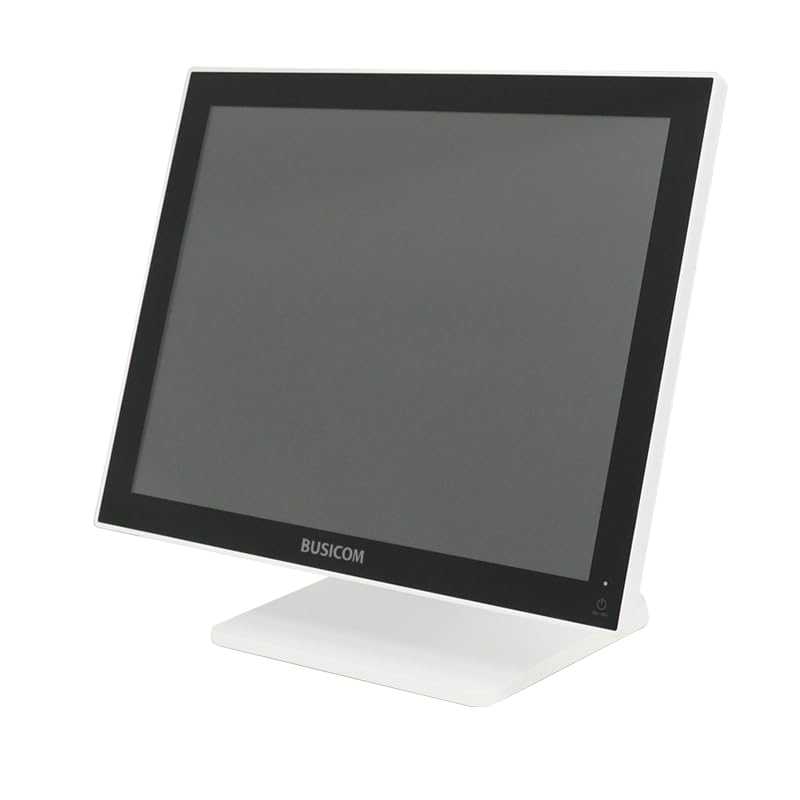
Obrázek 1: Přední strana view of the BUSICOM PC-SeaV15c Touch Panel PC.
2. Konec produktuview
2.1 Klíčové vlastnosti
- Pokročilý design: Features an ultra-thin bezel and a highly durable 7H reinforced display for enhanced aesthetics and protection.
- Špičkový výkon: Equipped with Microsoft Windows 10 IoT Enterprise, ensuring long-term support and reliable operation.
- Intuitivní dotykový panel: Utilizes a capacitive touch method, offering a familiar and responsive touch experience similar to smartphones and tablets.
- Snadná údržba: Designed for simple RAM and SSD replacement, facilitating upgrades and servicing.
- Versatile Interfaces: Provides a wide range of connectivity options to integrate with various peripherals.
- Efektivní úložiště: SSD storage ensures fast processing speeds, quiet operation, and excellent shock resistance.
2.2 Komponenty
The package typically includes the BUSICOM PC-SeaV15c unit and a power adapter. Additional accessories may vary.

Figure 2: Front and side profile of the PC-SeaV15c unit.

Obrázek 3: Zadní view showing access panels for RAM and SSD components.
3. Pokyny k nastavení
3.1 Vybalení
- Carefully remove the PC-SeaV15c from its packaging.
- Check for any visible damage. If damaged, contact your vendor immediately.
- Ujistěte se, že jsou přítomny všechny uvedené komponenty.
3.2 Připojení periferních zařízení
Refer to the interface diagram below for port locations and types.

Figure 4: Detailed diagram of the PC-SeaV15c's rear and bottom interfaces.
- Připojení napájení: Connect the provided power adapter to the DC In port and then to a power outlet.
- Zařízení USB: Use the USB 2.0 (4 ports) and USB 3.0 (2 ports) for connecting keyboards, mice, printers, and other USB peripherals.
- Internetové připojení: Pro kabelový přístup k síti připojte ethernetový kabel k portu LAN.
- Zvukový výstup: Connect external speakers or headphones to the Audio Out port.
- Serial Ports (RJ45): Utilize COM1, COM2, COM3, and COM6 for connecting specialized POS peripherals such as barcode scanners or receipt printers.
- Cash Drawer (RJ11): Connect a compatible cash drawer to the RJ11 port.
- Externí displej: If an external monitor is required, connect it to the Mini DisplayPort.
- USB Type-C: Pro kompatibilní zařízení.
3.3 Zapnutí/vypnutí
- Zapnutí: Press the power button located on the upper right side of the display bezel or the power mark on the rear panel.
- Vypnout: To safely shut down the system, use the standard Windows shutdown procedure. Avoid direct power disconnection during operation to prevent data loss.
4. Návod k obsluze
4.1 Windows 10 IoT Enterprise
The PC-SeaV15c operates on Windows 10 IoT Enterprise 2021. Familiarize yourself with the Windows operating system for basic navigation, application management, and system settings.
4.2 Touch Panel Usage
The capacitive touch screen supports multi-touch gestures.
- Klepněte na: Ekvivalent kliknutí myší.
- Dvojí poklepání: Ekvivalent dvojitého kliknutí.
- Stiskněte a podržte: Ekvivalent kliknutí pravým tlačítkem myši.
- Výpad: For scrolling or navigating.
- Přiblížení/zvětšení prsty: Pro přiblížení nebo oddálení použijte dva prsty.
5. Údržba
5.1 Čištění zařízení
- Před čištěním vždy přístroj vypněte a odpojte ze zásuvky.
- Použijte měkký hadřík, který nepouští vlákna dampvodou nebo neabrazivním čističem obrazovek.
- Do not spray liquids directly onto the screen or device.
- Vyhněte se používání agresivních chemikálií, rozpouštědel nebo abrazivních materiálů.
5.2 RAM and SSD Replacement
The PC-SeaV15c is designed for easy replacement of RAM and SSD components. Refer to Figure 3 for the access panel location. For detailed instructions on component replacement, consult a qualified technician or the BUSICOM support webmísto.
6. Řešení problémů
Tato část obsahuje řešení běžných problémů, se kterými se můžete setkat.
- Zařízení se nezapne:
- Ujistěte se, že je napájecí adaptér bezpečně připojen k zařízení i k funkční zásuvce.
- Ověřte funkčnost elektrické zásuvky zapojením jiného zařízení.
- Dotyková obrazovka nereaguje:
- Restartujte zařízení.
- Ujistěte se, že je obrazovka čistá a bez překážek.
- Žádný displej:
- Zkontrolujte, zda je zařízení zapnuto.
- If an external display is connected, ensure the correct input source is selected on the external display.
- Periferní zařízení nebylo detekováno:
- Ensure the peripheral is correctly connected to the appropriate port (USB, LAN, COM).
- Zkuste připojit periférii k jinému portu.
- Check the peripheral's own power supply, if applicable.
For further assistance, please contact BUSICOM customer support.
7. Specifikace
| Funkce | Detail |
|---|---|
| Značka | BUSICOM |
| Název modelu | PC-SeaV15c |
| Barva | Bílý |
| Velikost obrazovky | 15 palců |
| Rezoluce | 1024x768 |
| Operační systém | Windows 10 IoT Enterprise 2021 |
| Značka CPU | Intel |
| Procesorová zásuvka | Intel® N97 |
| Rychlost CPU | 3.6 GHz |
| Typ paměti | DDR4 |
| Nainstalovaná RAM | 4 GB |
| Typ pevného disku | SSD |
| Kapacita SSD | 128 GB (dle názvu produktu) |
| Typ grafické karty | Integrovaný |
| VRAM Type | DDR4 SDRAM |
| VRAM Capacity | 4 GB |
| Porty USB 2.0 | 4 |
| Porty USB 3.0 | 2 |
| Optická mechanika | Žádný |
| Hmotnost produktu | 6 kg |
| Výška (cca) | 307.5 mm (as per dimension diagram) |

Obrázek 5: Zadní view of the PC-SeaV15c with approximate height dimension.
8. Záruka a podpora
For warranty information and technical support, please refer to the warranty card included with your product or visit the official BUSICOM webUschovejte si účtenku jako doklad o koupi pro případ reklamace.
BUSICOM Official Webmísto: BUSICOM Store on Amazon.co.jp