
1. Úvod
This manual provides comprehensive instructions for the YISENCE 4K Digital Camera (Model 806). This camera is designed for capturing high-quality photos and videos, especially in underwater environments. It features 4K video recording, 56MP photo resolution, autofocus, and a dual-screen design for convenient selfies. Please read this manual thoroughly before using your camera to ensure proper operation and longevity.
2. Co je v krabici
- Tělo fotoaparátu
- Accessories (including a 32GB Micro SD card and USB-C charging cable)
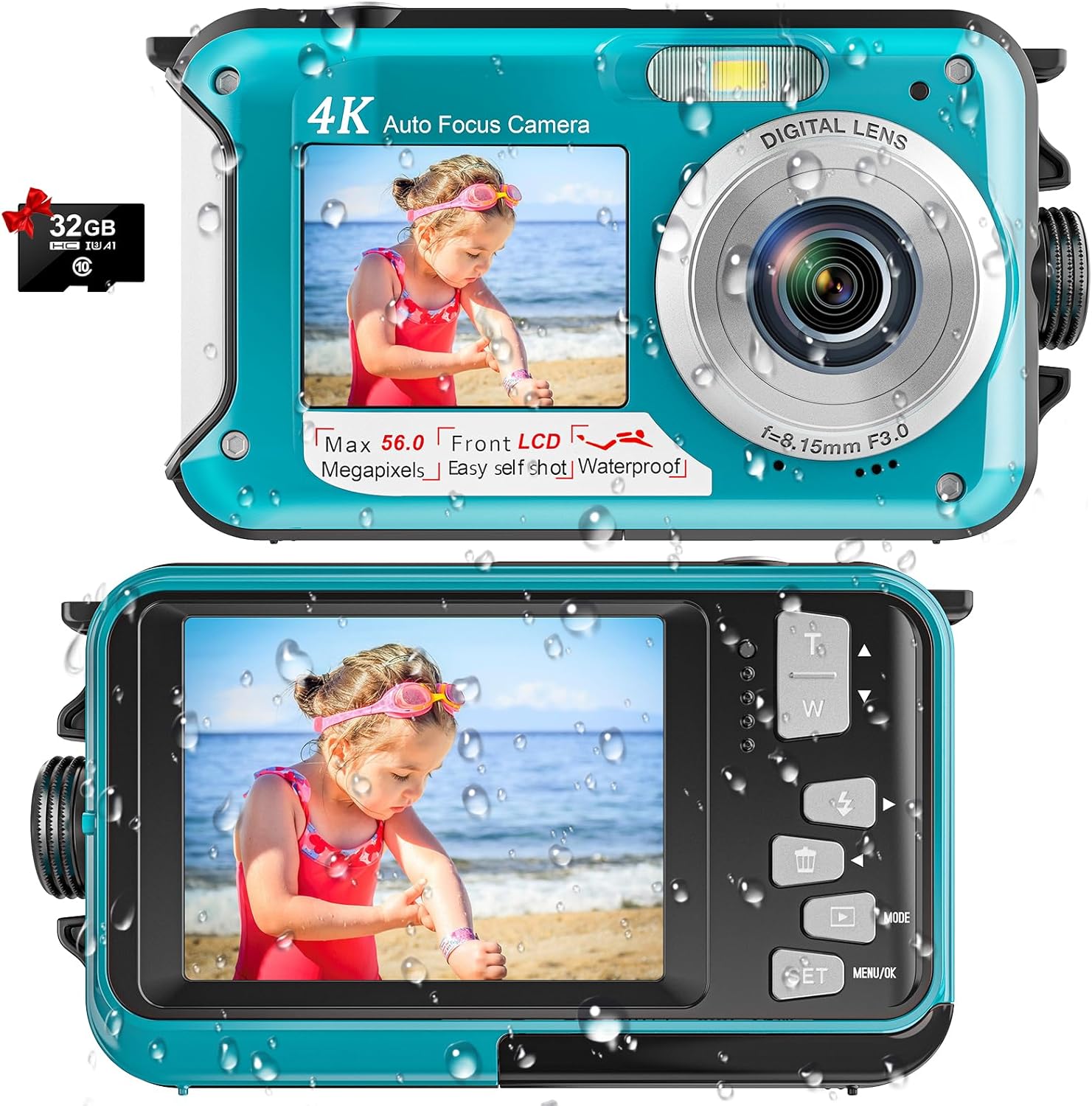
Image: The YISENCE 4K Digital Camera in light blue, shown with an included 32GB Micro SD card, highlighting its compact design and dual screens.
3. Klíčové vlastnosti
- 4K UHD Video & 56MP Photo Resolution: Captures crisp, breathtaking detail for both aquatic and terrestrial adventures.
- Autofocus Function: Simplifies photo capture; half-press the shutter to activate autofocus. The focus frame on the screen will turn green when focus is achieved.
- 11FT Waterproof Design: Ideal for snorkeling and underwater exploration, ensuring durability up to 11 feet depth.
- Dual-Screen Selfie Capability: Features front and rear screens for easy self-portraits and group photos.
- Vysokokapacitní baterie 10 000 mAh: Provides approximately 70 minutes of continuous operation at 11FT underwater on a single charge.
- Lehký a kompaktní: Easy to carry and operate, suitable for all ages.
- Rozšiřitelné úložiště: Podporuje Micro SD karty až do 128 GB (karta 32 GB je součástí balení).
4. Nastavení
4.1 Instalace baterie a SD karty
- Vyhledejte přihrádku na baterii na boku fotoaparátu.
- To open the battery door, firmly press the cover lock with one hand while pushing out the battery cover with the other. The compartment is expertly sealed for waterproof protection.
- Insert the provided 1250mAh battery into the battery slot, ensuring correct orientation.
- Insert the Micro SD card (up to 128GB supported) into its designated slot next to the battery.
- Close the battery cover securely until it clicks into place, ensuring the waterproof seal is maintained.

Image: A visual guide demonstrating the process of opening the battery compartment, inserting the battery, and inserting the Micro SD card into the camera.
4.2 Nabíjení fotoaparátu
The camera comes with a USB-C charging cable. Plug the USB-C end into the camera's port located within the battery compartment, and the other end into a compatible USB power adapter (not included) or computer USB port. A charging indicator light will illuminate during charging.
Video: An unboxing and setup guide for the YISENCE 4K Digital Camera, demonstrating how to install the battery and SD card, and how to charge the device. This video is provided by the seller.
5. Návod k obsluze
5.1 Zapnutí/vypnutí
Press and hold the power button (located on the top of the camera) to turn the camera on or off. The screen will display "Welcome" upon startup.
5.2 Fotografování a nahrávání videí
- Přepínací režimy: Use the 'Mode' button to switch between photo and video recording modes.
- Automatické zaostření: In photo mode, half-press the shutter button to activate autofocus. The focus frame on the screen will turn green when focus is achieved.
- Zachytit: Fully press the shutter button to take a photo or start/stop video recording.
- Lupa: Use the 'T' (Telephoto) and 'W' (Wide) buttons to adjust the 16x digital zoom.

Image: A demonstration of the camera's autofocus feature, showing the green focus frame on the screen when an object is in focus.

Image: The camera displaying a scene being recorded in 4K video mode, highlighting its video capabilities.
5.3 Dual-Screen Operation (Selfie Mode)
The camera features a front screen for easy selfies. When in selfie mode, you can see yourself on the front LCD to compose your shot perfectly. This is ideal for self-portraits or group photos where you want to be in the frame.

Image: A person using the camera's dual-screen feature to take a selfie, showing both the front and back screens in action.
5.4 Underwater Usage
The YISENCE 4K Digital Camera is waterproof up to 11 feet. Ensure the battery compartment is securely closed and sealed before submerging the camera. The camera is also floatable, reducing the risk of loss in water.

Image: The YISENCE 4K Digital Camera shown floating on the surface of water, demonstrating its floatable design.
6. Údržba
- Vodotěsné těsnění: After each underwater use, inspect the waterproof seal around the battery compartment for any debris or damage. Clean gently with a soft, damp cloth if necessary. Ensure no sand or particles are present before closing the compartment.
- Čištění: Wipe the camera body with a soft, dry cloth. For stubborn smudges, use a slightly damp hadříkem a poté důkladně osušte. Nepoužívejte agresivní chemikálie ani abrazivní čisticí prostředky.
- Péče o baterie: To prolong battery life, avoid fully discharging the battery frequently. Charge the battery regularly, even if the camera is not in use for extended periods.
- Skladování: Fotoaparát skladujte na chladném a suchém místě mimo dosah přímého slunečního záření a extrémních teplot.
7. Řešení problémů
7.1 Kamera se nezapíná
- Ujistěte se, že je baterie správně vložena a plně nabitá.
- Stiskněte a podržte tlačítko napájení na několik sekund.
7.2 Špatná kvalita obrazu/videa
- Zkontrolujte, zda je čočka čistá a bez šmouh nebo kapek vody.
- Ensure adequate lighting conditions, especially underwater.
- Verify that the camera is in the correct mode (photo/video) and settings are appropriate for the environment.
7.3 Únik vody
- Okamžitě vyjměte fotoaparát z vody.
- Open the battery compartment and remove the battery and SD card. Allow the camera to dry completely in a well-ventilated area.
- Inspect the waterproof seal for any signs of damage, cracks, or foreign objects before future use.
7.4 Chyba SD karty
- Ujistěte se, že je SD karta správně vložena.
- Try reformatting the SD card (this will erase all data, so back up important file(nejprve).
- If the issue persists, try a different compatible Micro SD card.
8. Specifikace
| Funkce | Detail |
|---|---|
| Značka | YISENCE |
| Název modelu | 806 |
| Maximum WebRozlišení obrazu kamery | 56 MP |
| Rozlišení videa | 2160p (4K) |
| Úroveň odolnosti proti vodě | Waterproof (up to 11FT) |
| Kapacita baterie | Lithium-iontová kapacita 1250 mAh |
| Průměrná životnost baterie | 70 minut (pod vodou) |
| Digitální zoom | 16x |
| Velikost obrazovky | 2.7 palců (LCD) |
| Podporováno File Formát | AVI (video), JPEG (obrázek) |
| Typ paměti Flash | Micro SD (až 128 GB) |
| Technologie připojení | USB |
| Hmotnost položky | 4.58 uncí |
9. Záruka a podpora
Popis záruky: This product comes with a 1-year warranty from the manufacturer, YISENCE.
For technical support, troubleshooting assistance, or warranty claims, please contact YISENCE customer service through the retailer's platform or the official YISENCE webweb. Před kontaktováním podpory si prosím připravte číslo modelu produktu (806) a podrobnosti o nákupu.