
Edifier W800BT SE
Uživatelská příručka k bezdrátovým sluchátkům Edifier W800BT SE
Model: W800BT SE
Zavedení
Thank you for choosing the Edifier W800BT SE Wireless Over-Ear Headphones. This manual provides detailed instructions for setting up, operating, and maintaining your headphones to ensure optimal performance and longevity. Please read this manual thoroughly before use.
Obsah balení
Ověřte, zda jsou v balení přítomny všechny položky:
- Edifier W800BT SE Headphones x 1
- Nabíjecí kabel USB Type-C x 1
- Návod k použití x 1
Konec produktuview
Vlastnosti sluchátek
- 40mm dynamické ovladače: Equipped with titanium-coated diaphragm driver units for clear and detailed audio.
- Bluetooth 5.4: Poskytuje stabilní a efektivní bezdrátové připojení.
- Redukce šumu při hovorech s umělou inteligencí: Enhances voice clarity during calls by filtering background noise.
- Vícebodové připojení: Allows simultaneous connection to two Bluetooth devices.
- Dlouhá výdrž baterie: Až 45 hodin přehrávání.
- Rychlé nabíjení: 15 minutes of charge provides 8 hours of playback.
- Herní režim s nízkou latencí: Snižuje zpoždění zvuku při hraní her.
- Pohodlný design: Lightweight (approx. 242g), adaptive fit, pressure-relief headband, and soft earpads.
- Skládací design: Pro snadné skladování a přenosnost.
Ovládací prvky a porty
The Edifier W800BT SE headphones feature intuitive button controls on the earcup and a USB-C port for charging.
Obrázek: Overview of headphone controls and USB-C charging port.
- Tlačítko zvýšení hlasitosti: Single press for volume up, press and hold for next track.
- Multifunkční tlačítko: Single press for play/pause or answer/end call, double press to reject call, triple press for voice assistant.
- Tlačítko snížení hlasitosti: Single press for volume down, press and hold for previous track.
- Tlačítko pro přepnutí režimu: Single press to cycle through Music mode, Game mode, and Theatre mode.
- Port USB-C: Pro nabíjení sluchátek.
Nastavení
1. Nabíjení sluchátek
Before first use, fully charge the headphones. A full charge takes approximately 1.5 hours. A 15-minute quick charge provides up to 8 hours of playback.
- Connect the supplied USB Type-C cable to the charging port on the headphones.
- Druhý konec kabelu připojte k napájecímu adaptéru USB (není součástí balení) nebo k portu USB počítače.
- The indicator light will show charging status (e.g., red for charging, off when fully charged).
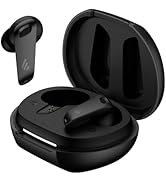
Obrázek: Nabíjecí port USB-C.

Obrázek: Podrobnosti o výdrži baterie a rychlém nabíjení.
2. Zapnutí/vypnutí
- Zapnutí: Press and hold the Multi-function button for approximately 3 seconds until the indicator light flashes.
- Vypnout: Stiskněte a podržte multifunkční tlačítko přibližně 5 sekund, dokud kontrolka nezhasne.
3. Párování Bluetooth
Připojení sluchátek k zařízení:
- Ujistěte se, že jsou sluchátka vypnutá.
- Press and hold the Multi-function button for approximately 5 seconds until the indicator light flashes red and blue alternately, indicating pairing mode.
- Na svém zařízení (chytrý telefon, tablet, počítač) povolte Bluetooth a vyhledejte dostupná zařízení.
- Select "EDIFIER W800BT SE" from the list of found devices.
- Po připojení bude kontrolka pomalu modře blikat.
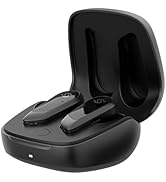
Obrázek: Technologie Bluetooth 5.4 pro stabilní připojení.
4. Vícebodové připojení
The W800BT SE headphones support connecting to two Bluetooth devices simultaneously.
- Pair the headphones with the first device (e.g., your smartphone) as described above.
- Vypněte Bluetooth na prvním zařízení. Sluchátka se znovu přepnou do režimu párování.
- Pair the headphones with the second device (e.g., your laptop).
- Re-enable Bluetooth on the first device. The headphones will automatically connect to both devices.
- To switch between devices, pause playback on the currently active device and start playback on the other. For calls, the headphones will automatically switch to the device receiving the call.

Image: Multipoint connection with phone and laptop.
Návod k obsluze
Základní ovládací prvky
| Akce | Tlačítko Stiskněte |
|---|---|
| Zapnutí/vypnutí | Press and hold Multi-function button (3s for On, 5s for Off) |
| Přehrát/Pozastavit hudbu | Single press Multi-function button |
| Přijmout/ukončit hovor | Single press Multi-function button |
| Odmítnout hovor | Double press Multi-function button |
| Zvýšení hlasitosti | Single press Volume Up button |
| Snížit hlasitost | Single press Volume Down button |
| Další stopa | Stiskněte a podržte tlačítko pro zvýšení hlasitosti |
| Předchozí stopa | Stiskněte a podržte tlačítko pro snížení hlasitosti |
| Aktivujte hlasového asistenta | Triple press Multi-function button |
| Switch Mode (Music/Game/Theatre) | Single press Mode Switch button |
Redukce šumu při hovorech s umělou inteligencí
The integrated AI call noise reduction algorithm and high-sensitivity microphones work to filter out ambient noise, ensuring your voice is clear during phone calls.

Image: AI Call Noise Reduction in action.
Herní režim
Activate Game Mode for an ultra-low latency experience (0.06s), providing enhanced sound effects and perfect audio-visual synchronization for gaming.
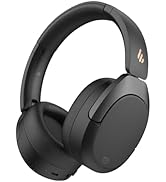
Image: Low latency gaming experience.
Edifier ConneX App
Enhance your headphone experience by downloading the EDIFIER ConneX app. The app provides additional functions:
- Personalized control settings
- Preset EQ options
- Přizpůsobitelné nastavení EQ
- Schedule power off
- "Find Your Product" feature

Image: Edifier ConneX App interface.
Údržba
- Udržujte sluchátka suchá. Nevystavujte je extrémním teplotám.
- Sluchátka čistěte měkkým, suchým hadříkem. Nepoužívejte agresivní chemikálie ani abrazivní materiály.
- Pokud sluchátka nepoužíváte, skladujte je na chladném a suchém místě. Skládací konstrukce umožňuje kompaktní skladování.
- Zabraňte pádu sluchátek na zem nebo jejich vystavení silným nárazům.
- Do not attempt to disassemble the headphones. This will void the warranty.
Odstraňování problémů
| Problém | Řešení |
|---|---|
| Cannot power on headphones. | Ujistěte se, že jsou sluchátka nabitá. Připojte je ke zdroji napájení pomocí kabelu USB-C. |
| Nelze spárovat se zařízením Bluetooth. |
|
| Žádný zvuk nebo nízká hlasitost. |
|
| Kvalita zvuku je nízká. |
|
| Hovory jsou nejasné. | Ensure the microphone is not obstructed. The AI Call Noise Reduction feature is active during calls. |
Specifikace
- Model: W800BT SE
- Verze Bluetooth: 5.4
- Bluetooth Profiles: A2DP, AVRCP, HFP
- Efektivní vzdálenost: 10 metrů
- Jednotka řidiče: 40mm Dynamic Driver with Titanium-coated Diaphragm
- Frekvenční odezva: Up to 20 kHz (Typical range is 20Hz-20kHz)
- Impedance: 32 ohmů
- Životnost baterie: Až 45 hodin (přehrávání)
- Nabíjecí port: USB Type-C
- Doba nabíjení: Approximately 1.5 hours (full charge), 15 minutes for 8 hours playback
- Hmotnost: Přibližně 242 g
- Rozměry: 3.35 x 3.15 x 3.35 inches (Product dimensions)
- Typ ovládání: Button Control, App Control (Edifier ConneX)
- Speciální vlastnosti: AI Call Noise Reduction, Multipoint Connection, Low Latency Game Mode (0.06s), Lightweight, Foldable Design
Záruka a podpora
Edifier products are designed for reliability and performance. For warranty information and technical support, please refer to the warranty card included in your package or visit the official Edifier webwebu. Uschovejte si účtenku jako doklad o koupi.
Official Edifier Webmísto: www.edifier.com
Oficiální video produktu
Video: Oficiální produkt skončilview of the Edifier W800BT SE Wireless Over-Ear Bluetooth 5.4 Headphones, demonstrating key features and design.
Ask a question about this manual
Ask about setup, troubleshooting, compatibility, parts, safety, or missing instructions. Manuals+ will review the question and use this page’s manual context to help answer it.