
1. Konec produktuview
The Pxton S1 Walkie Talkie is a versatile two-way radio designed for reliable communication across various environments. It features 16 communication channels, 155 privacy codes, and a range of functions including VOX, TOT, emergency alarm, and an LED flashlight, making it suitable for both personal and professional use.
Klíčové vlastnosti:
- 16 Komunikační kanály
- 155 Kódy ochrany osobních údajů (CTCSS/DCS)
- 5-level VOX Sensitivity Adjustment for hands-free operation
- TOT (Time-Out Timer) to prevent accidental prolonged transmissions
- Funkce nouzového alarmu
- Auto Squelch for clear audio
- Low Battery Alert and Power-Saving Mode
- Channel Scan and Monitoring functions
- Integrovaná LED svítilna
- Custom Programming Support (programming cable sold separately)
- Durable 1500mAh Li-ion Battery

Image 1.1: Pxton S1 Walkie Talkies in use, highlighting key features.
2. Obsah balení
Ověřte, zda jsou v balení obsaženy všechny níže uvedené položky:
- 2 x Pxton S1 Walkie Talkies
- 2 x nabíjecí základny
- 2 x 1500mAh Lithium Batteries
- 2x spona na opasek
- 2x sluchátka
- 1 x Uživatelská příručka

Image 2.1: Included components in the Pxton S1 Walkie Talkie package.
3. Schéma produktu
Familiarize yourself with the various parts and controls of your Pxton S1 Walkie Talkie:

Image 3.1: Labeled diagram of the Pxton S1 Walkie Talkie components.
- Integrated Sensitive Antenna: Pro vysílání a příjem signálů.
- Svítilna: Vestavěné LED světlo pro osvětlení.
- LED indikátor: Shows status (e.g., transmitting, receiving, low battery).
- Tlačítko PTT (Push-to-Talk): Stiskněte a podržte pro vysílání, uvolněte pro příjem.
- Clear Speaker: Pro audio výstup.
- Vestavěný mikrofon: Pro hlasový vstup.
- Konektory SP/MIC: For connecting earpieces or external microphones.
- MONI Button (Monitor): Dočasně deaktivuje umlčovač šumu pro poslech slabých signálů.
- Tlačítko svítilny: Aktivuje LED svítilnu.
- Přepínání kanálů: Otočný knoflík pro výběr komunikačních kanálů.
- Vypínač / ovládání hlasitosti: Otočný knoflík pro zapnutí/vypnutí rádia a nastavení hlasitosti.
4. Nastavení
4.1 Instalace a nabíjení baterie
Před prvním použitím baterii plně nabijte.
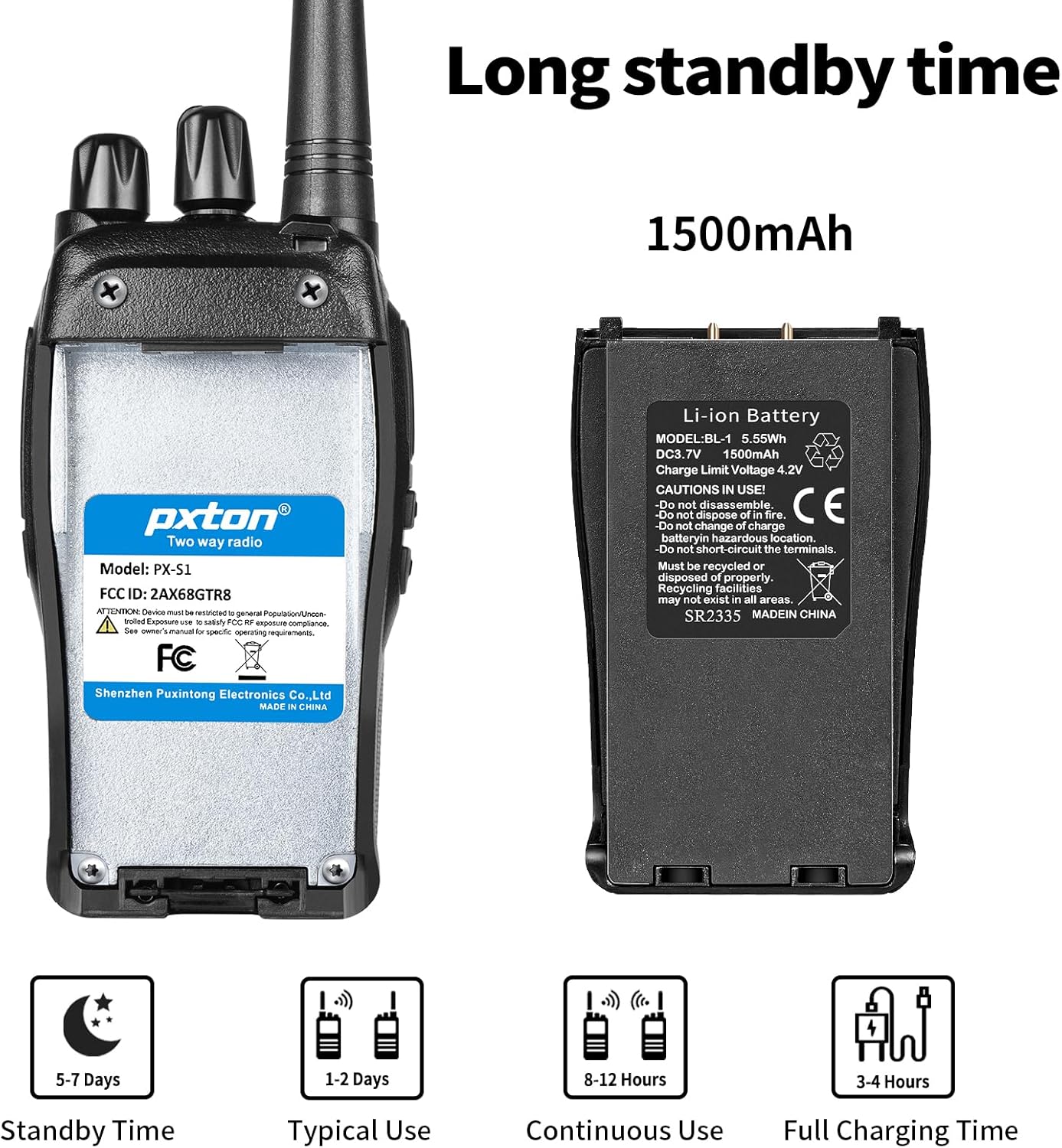
Image 4.1: Battery details and charging information.
- Nainstalujte baterii: Align the 1500mAh Li-ion battery with the battery compartment on the back of the walkie talkie and slide it into place until it clicks securely.
- Place in Charging Base: Insert the walkie talkie (with battery installed) into the charging base. Ensure the charging contacts on the radio align with those on the base.
- Připojte napájení: Plug the charging base's adapter into a standard wall outlet. The LED indicator on the charging base will typically show red while charging and turn green when fully charged.
- Doba nabíjení: Plné nabití obvykle trvá 3-4 hodiny.
4.2 Attaching the Belt Clip and Earpiece
- Spona na opasek: Secure the belt clip to the designated slot on the back of the walkie talkie using the provided screws.
- Sluchátko: Insert the earpiece plug into the SP/MIC jacks on the side of the walkie talkie. Ensure it is fully inserted for proper connection.
5. Návod k obsluze
5.1 Zapnutí/vypnutí a ovládání hlasitosti
- Zapnutí: Rotate the Power Switch/Volume Control knob clockwise until you hear a click. The radio will emit a tone, and the LED indicator may flash.
- Upravit hlasitost: Continue rotating the Power Switch/Volume Control knob clockwise to increase volume, or counter-clockwise to decrease volume.
- Vypnout: Rotate the Power Switch/Volume Control knob counter-clockwise until you hear a click.
5.2 Výběr kanálu
The Pxton S1 has 16 channels. To select a channel:
- Otáčením přepínače kanálů vyberte požadovaný kanál (1-16).
- Ensure all radios you wish to communicate with are set to the same channel and privacy code.
5.3 Vysílání a přijímání
- K přenosu: Press and hold the PTT (Push-to-Talk) button on the side of the radio. Speak clearly into the microphone. The LED indicator will typically glow red.
- Pro příjem: Release the PTT button. The radio will automatically switch to receive mode. The LED indicator will typically glow green when receiving a signal.
5.4 Funkce VOX (hlasově ovládaná ústředna)
VOX allows for hands-free transmission. When VOX is enabled, the radio will automatically transmit when it detects your voice, without needing to press the PTT button.

Image 5.1: Illustration of VOX/Hands-free function.
- VOX sensitivity can be adjusted (5 levels) to suit your environment and voice volume. This feature typically requires programming software to enable and adjust.
5.5 TOT (Časovač časového limitu)
The TOT function limits the duration of a single transmission to prevent accidental prolonged transmissions and conserve battery life. If the PTT button is held down for longer than the preset time, the radio will stop transmitting and emit a warning tone.
5.6 Nouzový alarm
The emergency alarm function can be activated to send out an alert signal. The method of activation may vary depending on programming, but it is typically assigned to a programmable side button.
5.7 Funkce skenování
The scan function allows the radio to automatically scan through all programmed channels to detect active conversations. When an active channel is found, the radio will stop on that channel until the transmission ends.
5.8 Svítilna
Vestavěná LED svítilna poskytuje pohodlné osvětlení.

Image 5.2: Walkie Talkie flashlight in use.
- Press the dedicated Flashlight Button (refer to Product Diagram) to turn the flashlight on or off.
6. Dosah komunikace
The actual communication range of the Pxton S1 Walkie Talkie can vary significantly based on terrain, obstacles, and electromagnetic interference. General estimates are:
- Flat or Unobstructed Areas: Až 3 mil (přibližně 4.8 km)
- Suburban or Rural Areas: Approximately 1.2 miles (approximately 1.9 km)
- Urban Settings: Approximately 0.6 miles (approximately 1 km)

Image 6.1: Communication range in various environments.
7. Údržba
7.1 Péče o baterii
- Abyste prodloužili životnost baterie, vyhněte se častému úplnému vybíjení.
- Nabíjejte baterii na chladném a suchém místě.
- Pokud rádio skladujete delší dobu, nabijte baterii přibližně na 50 % a vyjměte ji z rádia. Dobijte ji každé 3–6 měsíců.
- Staré baterie zlikvidujte zodpovědně v souladu s místními předpisy.
7.2 Čištění
- Otřete vnější povrch rádia měkkým hadříkemamp tkanina. Nepoužívejte agresivní chemikálie nebo abrazivní čisticí prostředky.
- Ensure the radio is powered off and the charging port cover is securely closed before cleaning.
8. Řešení problémů
| Problém | Možná příčina | Řešení |
|---|---|---|
| Rádio se nezapne | Baterie je vybitá nebo není správně nainstalována. | Charge the battery. Reinstall the battery ensuring proper contact. |
| Nelze vysílat ani přijímat | Incorrect channel or privacy code. Volume too low. Battery low. | Verify channel and privacy code settings. Increase volume. Charge battery. |
| Špatná kvalita zvuku / Statický šum | Out of range. Interference. Squelch level too low. | Move closer to other radios. Avoid sources of interference. Adjust squelch level. |
| Baterie se rychle vybíjí | Frequent transmissions. VOX sensitivity too high. Battery nearing end of life. | Reduce transmission time. Adjust VOX sensitivity. Consider replacing battery if old. |
9. Specifikace
| Funkce | Detail |
|---|---|
| Číslo modelu | PX-S1-0001 |
| Značka | pxton |
| Barva | Černý |
| Počet kanálů | 16 |
| Frekvenční rozsah | UHF |
| Maximální dosah hovoru | 3 mil (bez překážek) |
| Typ baterie | 1500mAh lithium-iontová baterie (součástí balení) |
| svtage | 3.7 V (DC) |
| Průměrná životnost baterie | 7 days (standby) / 12 hours (continuous use) |
| Doba nabíjení | 3-4 hodin |
| Úroveň odolnosti proti vodě | Vodě odolný |
| Rozměry produktu (D x Š x V) | 9.9" x 2.2" x 6.9" (including antenna) |
| Hmotnost položky | 1.4 libry |
| Rozsah provozních teplot | -10 °C až 40 °C |
| FCC ID | 2AX68GTR8 |

Image 9.1: Pxton S1 Walkie Talkie dimensions.
10. Kompatibilita
The Pxton S1 walkie talkie is compatible with the following models:
- PX-888S
- PX-777S
- PX-666S
- PX-888S Pro
These models can work together and utilize the same programming tools and cables. Note that the programming cable must be purchased separately and is not included with the PX-S1.
11. Záruka a podpora
11.1 Informace o záruce
Pxton offers a 30-day unconditional exchange and refund policy from the date of purchase. Additionally, the product comes with lifetime after-sales service.
11.2 Zákaznická podpora
If you encounter any issues or have questions regarding your Pxton S1 Walkie Talkie, please contact Pxton customer support. You can reach us via Amazon messages for assistance.