
1. Úvod
This manual provides comprehensive instructions for the installation, operation, maintenance, and troubleshooting of your EIMSOAH 7in HD Carplay Screen. Please read this manual thoroughly before using the product to ensure proper function and safety.
The EIMSOAH Carplay Screen is an advanced in-dash navigation and multimedia system designed to enhance your driving experience with features such as wireless CarPlay/Android Auto, GPS navigation, and a high-definition touch screen display.
2. Bezpečnostní informace
Always prioritize safety. Improper installation or operation can lead to damage to the device, vehicle, or personal injury. Observe the following safety guidelines:
- Před instalací se ujistěte, že je vypnuté zapalování vozidla a odpojená baterie, abyste předešli elektrickému zkratu.
- Pokud si nejste jisti některým krokem instalace, poraďte se s odborníkem.
- Do not operate the device in a way that distracts you from driving. Always keep your eyes on the road.
- Nevystavujte zařízení extrémním teplotám, delšímu přímému slunečnímu záření nebo nadměrné vlhkosti.
- Nepokoušejte se jednotku rozebírat ani upravovat. Zrušíte tak platnost záruky a může dojít k jejímu poškození.
- Ensure all wiring is properly insulated and secured to prevent short circuits or interference.
3. Obsah balení
Ověřte, zda jsou v balení přítomny všechny níže uvedené položky:
- 1 x Car Multimedia Player Display
- 7 x Wiring Harnesses (various types for power, audio, video, etc.)
- 1 x GPS Box/Antenna
- 1 x Návod k obsluze (tento dokument)
- 1 x Wiring Instruction Diagram

Figure 3.1: Complete package contents including the main display unit, wiring harnesses, and GPS antenna.
4. Nastavení a instalace
This section outlines the general steps for installing the EIMSOAH Carplay Screen. Specific wiring details are provided in the separate Wiring Instruction Diagram included in your package. Professional installation is recommended.
- Připravte vozidlo:
- Turn off the vehicle's ignition and remove the key.
- Disconnect the negative terminal of the car battery to prevent electrical hazards.
- Carefully remove the existing car stereo or dashboard panel to access the wiring harness and mounting area.
- Připojení kabelových svazků:
- Refer to the provided Wiring Instruction Diagram for detailed connections.
- Connect the main power harness, speaker wires, and other necessary connections (e.g., AUX, USB, reverse camera input if applicable) to the corresponding ports on the car multimedia player.
- Ujistěte se, že všechny spoje jsou bezpečné a řádně izolované.
- Instalace GPS antény:
- Namontujte anténu GPS na místo s volným view of the sky, typically on the dashboard or under the windshield, away from metal obstructions.
- Route the GPS antenna cable to the back of the head unit and connect it to the designated GPS input.
- Montáž jednotky:
- Carefully slide the car multimedia player into the dashboard opening.
- Secure the unit using the provided mounting brackets or screws, ensuring it is firmly in place.
- Znovu připojte baterii a otestujte:
- Znovu připojte záporný pól autobaterie.
- Turn on the vehicle's ignition and power on the car multimedia player.
- Test all functions, including audio, touch screen response, GPS signal, Bluetooth connectivity, and any connected accessories (e.g., reverse camera).
- Znovu sestavte palubní desku:
- Jakmile jsou ověřeny všechny funkce, opatrně zpět sestavte panely palubní desky.

Figure 4.1: The Carplay screen integrated into a vehicle's dashboard.
5. Návod k obsluze
The EIMSOAH Carplay Screen operates on Android 12, providing a user-friendly interface. Below are common operations:
5.1 Základní navigace
- Zapnutí/vypnutí: Press and hold the power button (usually on the left side of the unit) to turn the device on or off. A short press typically mutes/unmutes audio.
- Ovládání hlasitosti: Use the volume buttons on the unit or steering wheel controls (if configured) to adjust audio levels.
- Domovská obrazovka: Tap the "Home" icon to return to the main application screen.
- Tlačítko Zpět: Tap the "Back" icon to return to the previous screen or menu.
- Nedávné aplikace: Tap the "Recent Apps" icon to view a přepínat mezi naposledy otevřenými aplikacemi.
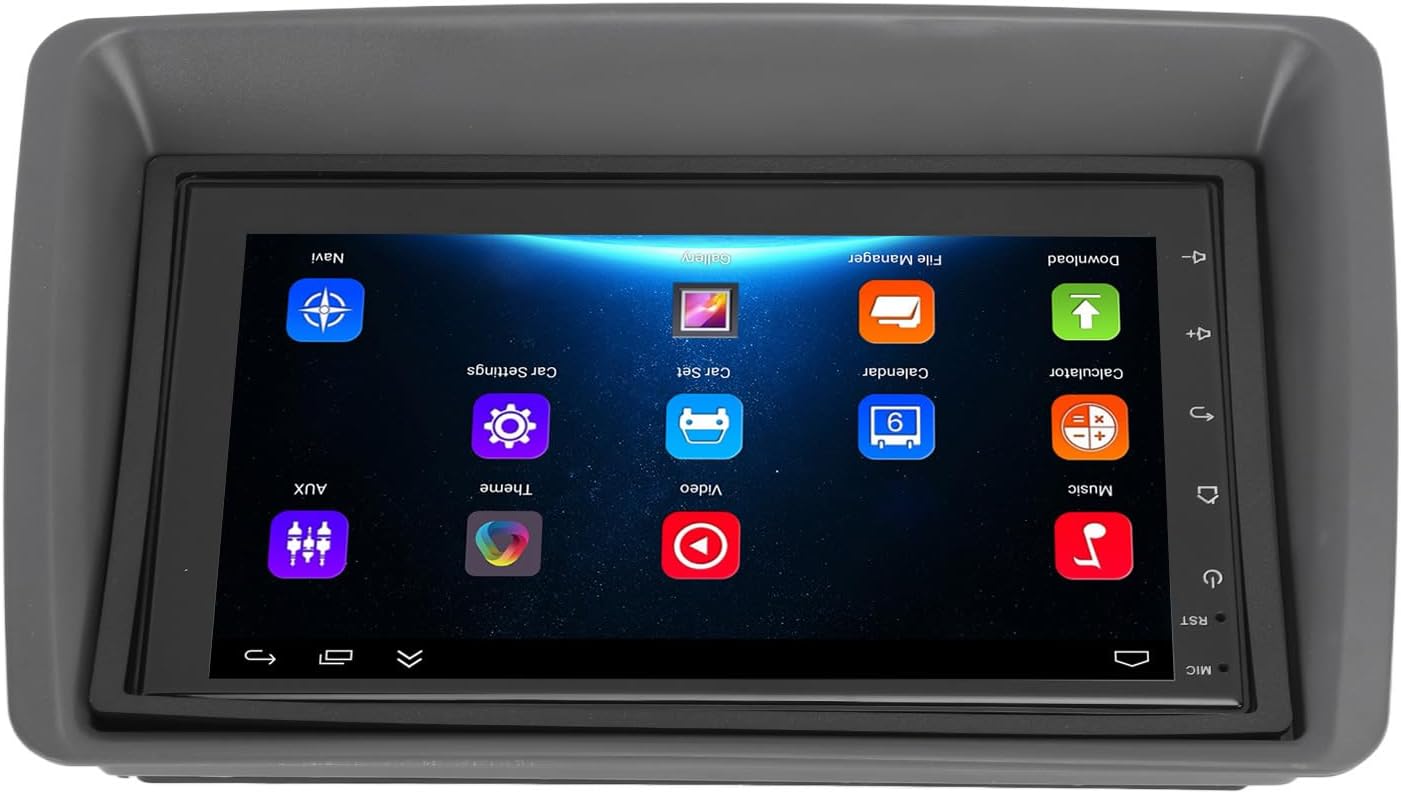
Figure 5.1: Main user interface of the Carplay screen.
5.2 Bezdrátové CarPlay / Android Auto
Jednotka podporuje bezdrátové Apple CarPlay a Android Auto pro bezproblémovou integraci chytrých telefonů.
- Ujistěte se, že je na vašem smartphonu povoleno Bluetooth a Wi-Fi.
- On the Carplay screen, navigate to the "CarPlay" or "Android Auto" application.
- Follow the on-screen prompts to pair your phone via Bluetooth. Once paired, the system will automatically establish a Wi-Fi connection for CarPlay/Android Auto functionality.
- Your phone's compatible apps (navigation, music, messaging) will be displayed on the Carplay screen.
5.3 GPS navigace
The unit supports both online and offline GPS navigation.
- Online navigace: Connect the unit to Wi-Fi (via a mobile hotspot or vehicle Wi-Fi) to use online mapping services. Download navigation apps from the pre-installed app store.
- Offline navigace: Download map data for offline use within your preferred navigation application. This allows navigation without an active internet connection.
5.4 Připojení Bluetooth
Připojte svůj smartphone přes Bluetooth pro handsfree volání a streamování hudby.
- Go to the "Settings" menu on the Carplay screen and select "Bluetooth".
- Enable Bluetooth and make the device discoverable.
- On your smartphone, search for available Bluetooth devices and select "EIMSOAH Carplay" (or similar name).
- Potvrďte párovací kód na obou zařízeních.
- Once connected, you can make/receive calls and play audio through the car's speakers.
5.5 Rozdělený displej
The unit supports split-screen functionality, allowing two applications to be viewed současně.
- Otevřete první aplikaci, kterou chcete použít.
- Press and hold the "Recent Apps" button (or swipe up and hold from the bottom of the screen, depending on the Android version).
- Drag the first app to one side of the screen.
- Select the second application from the recent apps list or app drawer to fill the other half of the screen.
5.6 Reverse Image Function
If a compatible reverse camera is connected (not included), the screen will automatically display the reverse view když je vozidlo zařazeno na zpátečku.
- Ensure the reverse camera is properly installed and connected to the designated video input.
- Systém se automaticky přepne na kameru view při zařazení zpátečky.
6. Údržba
Proper maintenance ensures the longevity and optimal performance of your EIMSOAH Carplay Screen.
- Čištění obrazovky: K jemnému otření obrazovky použijte měkký hadřík, který nepouští vlákna. V případě odolných šmouh lehceampOtřete hadřík vodou nebo čisticím prostředkem vhodným pro obrazovky. Vyhněte se abrazivním materiálům nebo agresivním chemikáliím.
- Aktualizace softwaru: Pravidelně kontrolujte aktualizace softwaru prostřednictvím nastavení systému (pokud jsou k dispozici), abyste měli jistotu, že máte nejnovější funkce a opravy chyb.
- Podmínky prostředí: Avoid exposing the unit to extreme temperatures, high humidity, or direct sunlight for extended periods.
- Správa kabelů: Ujistěte se, že všechny kabely jsou bezpečně připojeny a nejsou přiskřípnuté ani vystavené nadměrnému opotřebení.
7. Řešení problémů
If you encounter issues with your EIMSOAH Carplay Screen, refer to the following common problems and solutions:
| Problém | Možná příčina | Řešení |
|---|---|---|
| Jednotka se nezapne. | Žádné napájení; uvolněné zapojení; spálená pojistka. | Check power connections and vehicle fuse box. Ensure battery is connected. |
| Žádný audio výstup. | Volume muted; speaker wires disconnected; incorrect audio settings. | Check volume level and mute status. Verify speaker wire connections. Adjust audio output settings. |
| Dotyková obrazovka nereaguje. | Software glitch; screen protector interference; physical damage. | Restart the unit. Remove any screen protectors to test. If problem persists, contact support. |
| Slabý nebo ztracený signál GPS. | GPS antenna obstructed or disconnected; poor satellite coverage. | Ujistěte se, že má anténa GPS volný view of the sky and is securely connected. Move to an open area. |
| Problémy s připojením Bluetooth. | Bluetooth off on device/phone; pairing error; interference. | Ensure Bluetooth is enabled on both devices. Delete previous pairings and re-pair. Move phone closer to unit. |
| CarPlay/Android Auto se nepřipojuje. | Problémy s Wi-Fi/Bluetooth; kompatibilita s telefonem; problémy s aplikacemi. | Verify Wi-Fi and Bluetooth are active. Restart phone and unit. Ensure phone OS is up to date. |
If the problem persists after trying these solutions, please contact EIMSOAH customer support for further assistance.
8. Specifikace
Detailed technical specifications for the EIMSOAH 7in HD Carplay Screen:
| Funkce | Popis |
|---|---|
| Velikost obrazovky | 7 palců |
| Operační systém | Android 12 |
| CPU | 4 jádro |
| Rozlišení obrazovky | 1024x600 |
| Verze Bluetooth | 4.0 |
| Rádio | FM/RDS |
| Výstupní výkon | 4 x 45W |
| Image Connection | For Android / For iOS (Wireless Apple CarPlay, Wired/Wireless Android Auto) |
| GPS navigace | Support Online/Offline Navigation |
| Typ dotykové obrazovky | HD Capacitive Multi-Point Touch |
| Wireless WI-FI | Support 3G/4G/5G wireless signal reception |
| Rozdělení obrazovky | Supported (left and right split screen) |
| Ovládání na volantu | Podporováno |
| Reverse Image Input | Supported (HD reverse video input, camera not included) |
| Funkce USB | Two USB ports (media playback, file transfer, DVR) |
| Funkce AUX | Audio/Video input from external devices |
| Ochranné obvody | Přetížení, přetíženítage, Zkrat |
| Vypnutí paměti | Podporováno |
| Video vstup/výstup | Two video inputs, one video output |
| Zvukový výstup | Left Audio Output, Right Audio Output |
| Podporované formáty obrázků | JPEG, GIF, PNG, BMP, JPG |
| Podporované video formáty | MP4 / MP5 / MKV / AVI / RMVB / 1080P |
| Podporované zvukové formáty | MP3 / WMA / WAV / FLAC |
| Jazyk | Built-in Multiple Languages (Simplified Chinese, Traditional Chinese, English, German, Russian, Spanish, Italian, etc.) |
| Vybavení | Replacement for Fiat Panda 2003-2012 |
| Hmotnost položky | 2.57 libry |
| Rozměry balení | 14.17 x 8.27 x 4.72 palce |
9. Záruka a podpora
EIMSOAH products are designed for reliability and performance. For warranty information and technical support, please refer to the following:
- Záruka: Specific warranty terms and conditions may vary. Please refer to the warranty card included with your product or contact the seller/manufacturer directly for details regarding coverage period and claims process.
- Technická podpora: For technical assistance, troubleshooting beyond this manual, or inquiries about parts and service, please contact EIMSOAH customer support through the retailer where you purchased the product or visit the official EIMSOAH brand store on Amazon: EIMSOAH Store.