
Zavedení
This manual provides comprehensive instructions for the ECONTROLLY EUR7729KE0 Replacement Remote Control. This remote is designed to function as a direct replacement for various Panasonic DVD HDD TV Recorders, offering full functionality without the need for complex programming.
Kompatibilní modely:
- UR7729KE0
- EUR7721X10
- DMR-EH50
- DMR-E55K
- DMR-EH50S
- DMR-E55P9
- DMR-E55S
- DMR-ES10
- DMR-EH50P
- DMR-EH60
This replacement remote control covers all functions of the original remote, ensuring a seamless user experience.
Nastavení
Instalace baterie
The EUR7729KE0 remote control requires two AAA batteries (not included) for operation. Please follow these steps to install the batteries:
- Najděte přihrádku na baterie na zadní straně dálkového ovladače.
- Posuňte kryt přihrádky na baterie dolů a zvedněte jej.
- Vložte dvě baterie typu AAA a ujistěte se, že kladný (+) a záporný (-) pól správně odpovídají označením uvnitř přihrádky.
- Nasaďte kryt přihrádky na baterie tak, že jej zasunete zpět na místo, dokud bezpečně nezacvakne.

Zadní view of the ECONTROLLY EUR7729KE0 remote control with the battery cover removed, showing the compartment for two AAA batteries.
Poznámka: Vždy vyměňujte obě baterie najednou za nové. Nekombinujte staré a nové baterie ani různé typy baterií.
Návod k obsluze
To operate the remote control, point it directly at the infrared sensor on your Panasonic DVD HDD TV Recorder. Ensure there are no obstructions between the remote and the device.
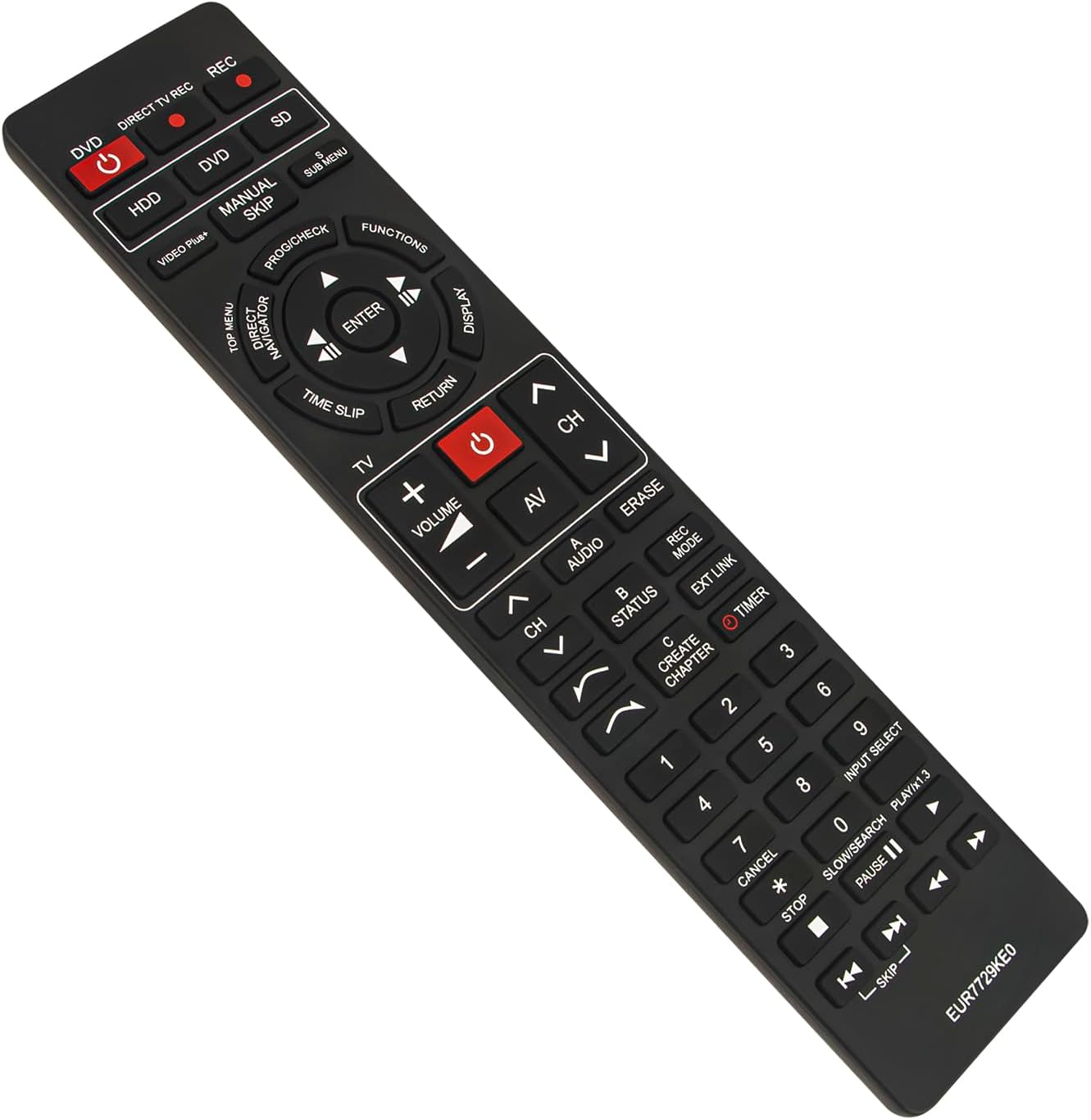
Přední view of the ECONTROLLY EUR7729KE0 replacement remote control, showing all buttons and their labels.
Funkce kláves Overview:
- Power Buttons (DVD, HDD, DIRECT TV REC, REC, SD): Used to power on/off or select specific modes for the respective components.
- Číselná tlačítka (0-9): For direct channel selection, inputting numbers, or menu navigation.
- Hlasitost (+/-): Nastavuje hlasitost zvuku.
- Channel (CH ^/v): Přepíná kanály nahoru nebo dolů.
- Navigační klávesnice (nahoru, dolů, vlevo, vpravo, ENTER): Používá se k navigaci v nabídkách a potvrzování výběrů.
- Playback Controls (PLAY/x1.3, PAUSE, STOP, SKIP, SLOW/SEARCH): Standardní ovládací prvky pro přehrávání médií.
- MENU Buttons (TOP MENU, SUB MENU, DIRECT NAVIGATOR): Access various menu options for DVD, HDD, or TV functions.
- Special Function Buttons (PROG/CHECK, FUNCTIONS, DISPLAY, TIME SLIP, RETURN, AV, AUDIO, ERASE, STATUS, REC MODE, EXT LINK, CREATE CHAPTER, TIMER): These buttons provide access to advanced features specific to your Panasonic recorder, such as recording options, chapter creation, and display settings. Refer to your recorder's manual for detailed use of these functions.

Comparison image showing the ECONTROLLY EUR7729KE0 replacement remote control on the left and an original Panasonic remote control on the right, highlighting their similar button layouts.
Údržba
Čištění
K čištění dálkového ovladače použijte měkký, suchý hadřík. V případě odolných nečistot lehceampOtřete hadřík vodou nebo jemným čisticím roztokem. Nepoužívejte abrazivní čisticí prostředky, alkohol ani rozpouštědla, protože by mohly poškodit povrch dálkového ovladače nebo jeho vnitřní součásti.
Skladování
Store the remote control in a cool, dry place away from direct sunlight and extreme temperatures. If the remote will not be used for an extended period, it is recommended to remove the batteries to prevent leakage and potential damage.
Odstraňování problémů
- Dálkové ovládání nereaguje:
- Zkontrolujte, zda jsou baterie vloženy správně se správnou polaritou (+/-).
- Vyměňte baterie za nové.
- Ujistěte se, že mezi dálkovým ovladačem a infračerveným senzorem zařízení nejsou žádné překážky.
- Make sure you are pointing the remote directly at the device.
- Některá tlačítka nefungují:
- This remote is designed to replicate all functions of the original. If specific buttons are not working, ensure your device is in the correct mode (e.g., DVD mode for DVD functions).
- Clean the remote's surface, as dirt or debris might be interfering with button presses.
If the issue persists after following these steps, please refer to the support section for further assistance.
Specifikace
| Značka | ECONTROLLY |
| Název modelu | EUR7729KE0 |
| Barva | Černý |
| Speciální funkce | Není vyžadováno žádné programování |
| Kompatibilní zařízení | DVD HDD TV Recorder (Panasonic DMR-EH50, etc.) |
| Technologie připojení | Infračervený |
| Typ ovladače | Ovládání tlačítkem |
| Maximální dosah | 33 stop |
| Hmotnost položky | 1 unce |
| Rozměry položky (D x Š x V) | 5"L x 2"W x 0.6"H (approx. 22.4 cm x 5 cm x 1.5 cm) |

Image displaying the dimensions of the ECONTROLLY EUR7729KE0 remote control: approximately 22.4 cm (8.82 inches) in length and 5 cm (1.97 inches) in width.
Záruka a podpora
This ECONTROLLY product has been tested to ensure proper functionality before shipping. As a replacement remote control, it is designed for immediate use without additional setup.
For further assistance, compatibility inquiries, or troubleshooting that is not covered in this manual, please contact ECONTROLLY customer support through the retailer's platform where the product was purchased. Provide your product model number (EUR7729KE0) and a detailed description of your issue for efficient support.


