
Wifi
Generic 4K Ultra HD WiFi Car Dash Camera
Uživatelská příručka
Model: Wifi (V21)
1. Úvod
This manual provides detailed instructions for the installation, operation, and maintenance of your Generic 4K Ultra HD WiFi Car Dash Camera. Designed to capture every moment of your journey with crystal clarity, this dual front and rear recording dash cam offers integrated GPS functionality and cellular phone connectivity for easy access and sharing of footage. It is an essential accessory for any driver prioritizing safety and reliable incident recording.
Mezi klíčové vlastnosti patří:
- Ultra HD 4K Recording: Captures crystal-clear 4K video with a dual-lens system, ensuring no detail is missed.
- GPS sledování: Built-in GPS logger tracks driving route, location, speed, and other detailed records.
- Design s dvojitým objektivem: Front and rear cameras provide comprehensive coverage from multiple angles.
- Vylepšené noční vidění: Superior night vision capabilities ensure clear video recording even in low-light conditions.
- Wi-Fi připojení: Seamlessly connect to your smartphone via Wi-Fi for easy video management and sharing.
2. Konec produktuview
The Generic 4K Ultra HD WiFi Car Dash Camera is a compact and reliable device designed for comprehensive vehicle surveillance. It features a main front camera unit and a rear camera for dual recording. The device integrates advanced technologies such as G-Sensor, loop recording, motion detection, and enhanced night vision to provide a secure driving experience.

Obrázek 2.1: Přední strana view of the Generic 4K Ultra HD WiFi Car Dash Camera.

Obrázek 2.2: Přesview of key features including Night Version, G-Sensor, 4K+1080P recording, and APP control.

Figure 2.3: Compact design with icons illustrating features like 4K Dual Camera, WiFi, GPS, 170° Wide Angle, Loop Recording, 256GB Support, G-Sensor, and Parking Monitor.
3. Obsah balení
Po vybalení zkontrolujte obsah balení, abyste se ujistili, že jsou všechny položky přítomny a v dobrém stavu:
- V21 Dash Camera (Front Unit)
- Zadní View Fotoaparát
- Napájecí kabel
- Extended Lines (for rear camera)
- Průvodce instalací
- Protiskluzová podložka
- Uživatelská příručka (tento dokument)
4. Nastavení
4.1. Příprava na instalaci
- Ensure your vehicle's windshield is clean and dry before mounting.
- Select a location on the windshield that does not obstruct your view or interfere with airbags. Typically, near the rearview mirror is ideal.
- Insert a high-speed Micro SD card (Class 10 or higher, up to 256GB) into the dash camera's slot. Format the card before first use.
4.2. Installing the Front Dash Camera
- Attach the anti-slip mat or adhesive mount to the dash camera bracket.
- Peel off the protective film from the adhesive and firmly press the dash camera onto the chosen spot on your windshield. Hold for 30 seconds to ensure strong adhesion.
- Adjust the camera lens angle to ensure it captures the road ahead clearly.
4.3. Instalace zadní kamery
- Namontujte zadní kameru na zadní čelní sklo a ujistěte se, že má jasný výhled. view.
- Route the rear camera cable to the front dash camera. Most vehicles allow routing along the headliner and A-pillar trim.
- Connect the rear camera cable to the designated port on the main dash camera unit.
4.4. Připojení napájení
- Connect the power cable to the dash camera.
- Plug the other end of the power cable into your vehicle's cigarette lighter socket or a suitable USB power source.
- Route the power cable neatly to avoid obstructing your driving or interfering with vehicle controls.
5. Návod k obsluze
5.1. Základní obsluha
- Zapnutí/vypnutí: The dash camera will automatically power on and begin recording when your vehicle starts and power is supplied. It will power off automatically when the vehicle is turned off.
- Záznam: Continuous loop recording is enabled by default. When the memory card is full, the oldest unlocked files budou přepsány.
- G-senzor: In case of a sudden impact or collision, the built-in G-Sensor will automatically lock the current video footage, aby se zabránilo jeho přepsání.
- Parkovací monitor: If enabled, the dash camera can detect impacts while parked and automatically record a short video. (Requires continuous power supply, e.g., hardwire kit, not included).
5.2. Připojení k Wi-Fi a ovládání aplikací
The dash camera features integrated Wi-Fi for seamless connection to your smartphone via a dedicated app (e.g., "Viidure" as suggested by images). This allows for live view, přehrávání videa, stahování a úprava nastavení.
- Download the recommended app from your smartphone's app store (App Store for iOS, Google Play Store for Android).
- Turn on Wi-Fi on your dash camera (refer to on-screen menu or specific button if available).
- On your smartphone, go to Wi-Fi settings and connect to the dash camera's Wi-Fi network (SSID and password usually displayed on the camera screen or in the manual).
- Open the app. You should now be able to view živé footage, access recorded videos, and modify settings.

Obrázek 5.1: Přample of 4K 3840*2160P recording quality and Super Night Vision capabilities.

Figure 5.2: Visual comparison demonstrating the superior clarity of 4K Ultra HD recording over 1080P.
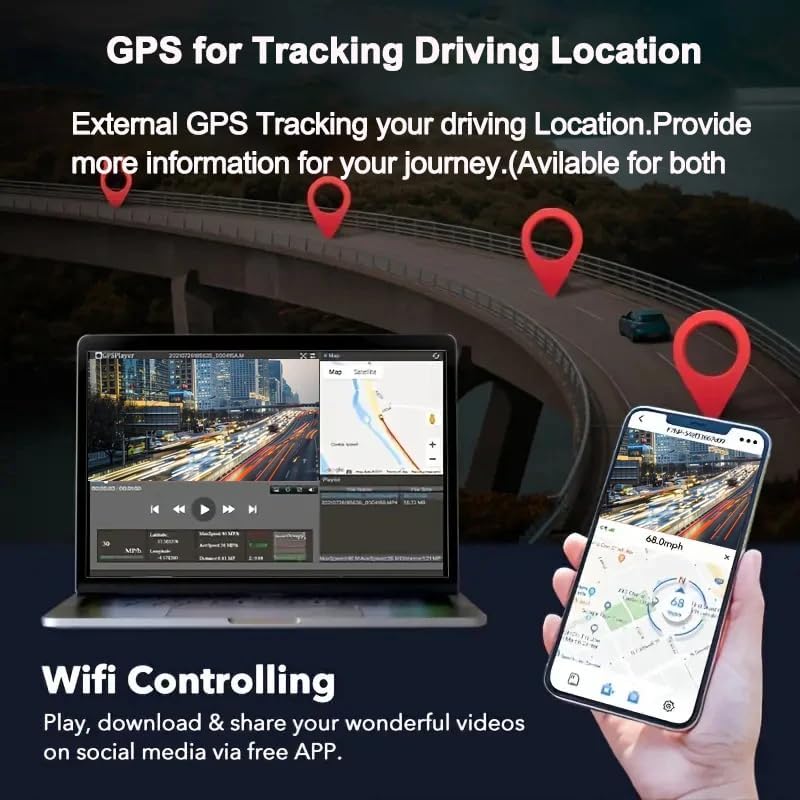
Figure 5.3: Illustration of GPS tracking functionality, showing route and location data on a map interface.

Figure 5.4: Wi-Fi control via the Viidure app, available for download on App Store and Android.
6. Údržba
- Formátování paměťové karty: It is recommended to format the Micro SD card regularly (e.g., once a month) to ensure optimal performance and prevent data corruption. Back up any important videos before formatting.
- Čištění objektivu: Gently clean the camera lenses with a soft, lint-free cloth to ensure clear video quality. Avoid abrasive materials or harsh chemicals.
- Aktualizace firmwaru: Zkontrolujte výrobce website or app periodically for firmware updates. Keeping your dash camera's firmware up-to-date can improve performance and add new features.
- Teplota: Avoid exposing the dash camera to extreme temperatures for prolonged periods, as this can affect battery life and component longevity.
7. Řešení problémů
| Problém | Možná příčina / řešení |
|---|---|
| Fotoaparát se nezapne. |
|
| Nahrávání se zastaví nebo zamrzne. |
|
| Video footage je rozmazané nebo nejasné. |
|
| Problémy s připojením k Wi-Fi. |
|
| GPS signál nebyl nalezen. |
|
8. Specifikace
| Funkce | Detail |
|---|---|
| Název modelu | V21 |
| Číslo modelu | Wifi |
| Značka | Obecný |
| Rozlišení videa | Front: 4K UHD (3840*2160P), Rear: 1080P (1920*1080) |
| Velikost obrazovky | 1.47 Inches (visible diagonal 2" / 4 cm) |
| Speciální funkce | Integrated Screen, G-Sensor + Loop Recording, Automatic Incident Detection, Built-in WiFi and App Control, Enhanced Night Vision, WDR |
| Technologie připojení | Wi-Fi, HDMI |
| Typ montáže | Držák na čelní sklo |
| Podporovaná paměťová karta | Up to 256GB (Micro SD, Class 10/U3 recommended) |
| Rozměry | 3.3 x 9.53 x 4.98 cm |
| Zdroj napájení | Vehicle Power (No internal battery included) |

Figure 8.1: Physical dimensions of the dash camera.
9. Záruka a podpora
S jakýmikoli dotazy týkajícími se produktu, technickou podporou nebo reklamací se prosím obraťte přímo na prodejce nebo výrobce. Konkrétní záruční podmínky a kontaktní informace naleznete v dokumentaci k nákupu.
As per product information, an electronic manual in English is available. Please contact the seller for the file if you require further detailed instructions.
Ask a question about this manual
Ask about setup, troubleshooting, compatibility, parts, safety, or missing instructions. Manuals+ will review the question and use this page’s manual context to help answer it.