
1. Úvod
Thank you for choosing the Hama DR2002BT Digital Radio. This device offers a comprehensive audio experience with FM, DAB/DAB+ digital radio reception, and Bluetooth connectivity. Its user-friendly design, featuring large buttons and a clear 4.3-inch TFT color display, makes it suitable for all users. This manual will guide you through the setup, operation, and maintenance of your new digital radio.
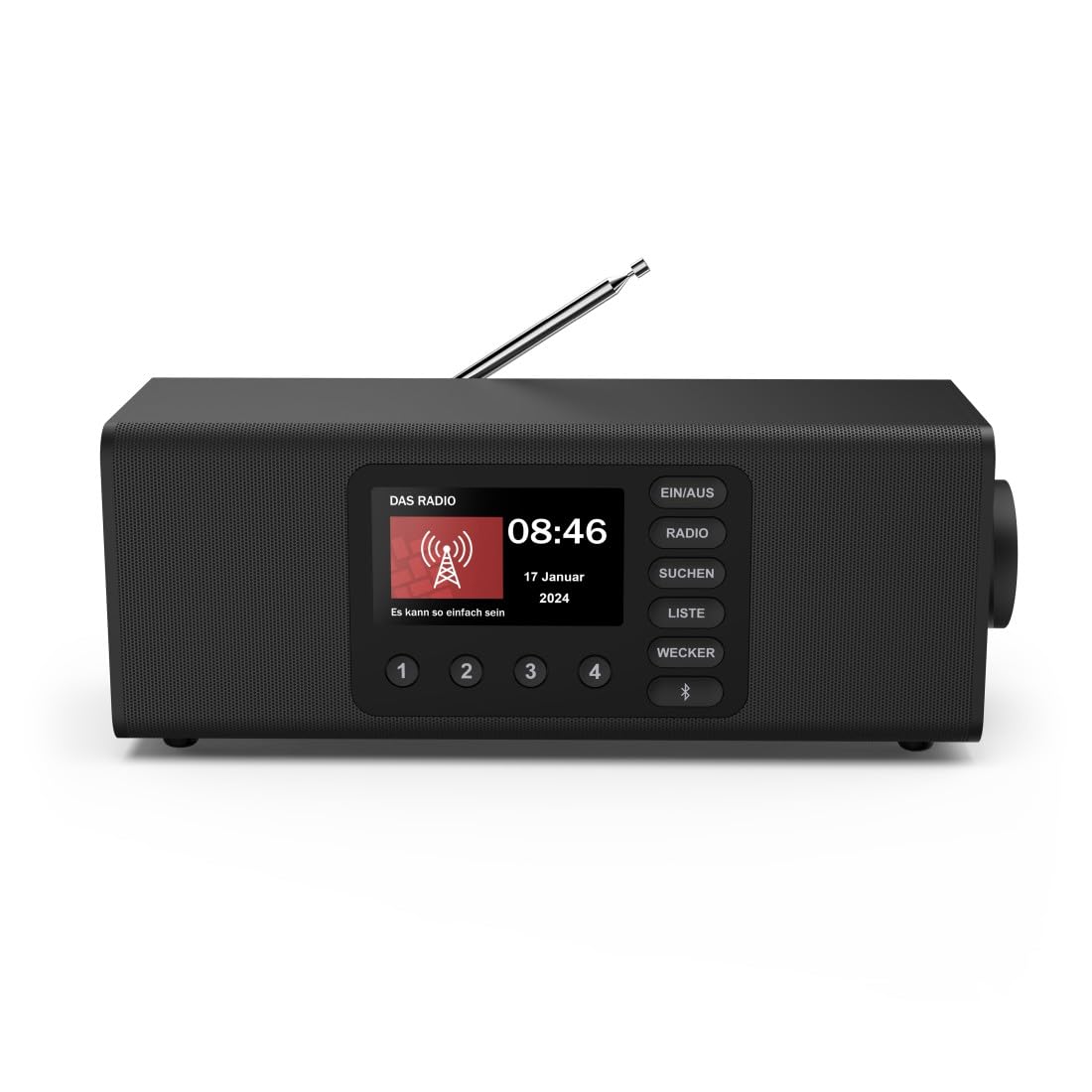
Obrázek: Přední strana view of the Hama DR2002BT Digital Radio, showcasinjeho displej a ovládací tlačítka.
2. Bezpečnostní informace
Před použitím zařízení si pečlivě přečtěte tyto bezpečnostní pokyny. Uschovejte si tento návod pro budoucí použití.
- Nevystavujte zařízení vlhkosti, dešti ani extrémním teplotám.
- Neumisťujte zařízení do blízkosti zdrojů tepla nebo na přímé sluneční světlo.
- Neotevírejte zařízení casing. Opravy by měl provádět pouze kvalifikovaný personál.
- Používejte pouze dodaný napájecí adaptér.
- Zajistěte řádné větrání kolem zařízení.
3. Obsah balení
Při vybalení ověřte, zda jsou všechny položky přítomny:
- Hama DR2002BT Digital Radio
- Napájecí adaptér
- Uživatelská příručka
4. Konec produktuview
4.1 Ovládací prvky a displej na předním panelu

Image: Front panel of the radio highlighting the display and control buttons, with icons for Bluetooth, DAB+, and Alarm functions.
The front panel features a 4.3-inch TFT color display, large control buttons, and a rotary knob for easy navigation and selection. Key buttons include:
- EIN/AUS (ON/OFF): Zapne nebo vypne zařízení.
- RÁDIO: Switches between FM and DAB/DAB+ modes.
- SUCHEN (SEARCH): Initiates station scanning.
- LISTE (LIST): Accesses the list of available stations.
- WECKER (ALARM): Konfiguruje nastavení alarmu.
- Tlačítko Bluetooth: Aktivuje režim párování Bluetooth.
- Přednastavená tlačítka (1–4): Rychlý přístup k uloženým oblíbeným stanicím.
- Rotary Knob (LAUTSTÄRKE/NAVIGIEREN): Controls volume and navigates menus.
4.2 Připojení zadního panelu
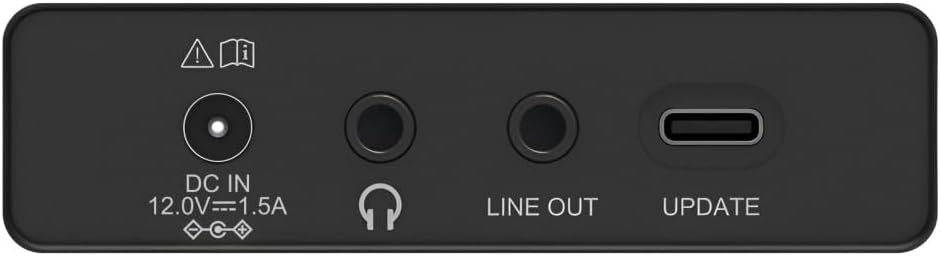
Image: Close-up of the rear panel showing the DC IN, Headphone, Line Out, and UPDATE (USB-C) ports.
The rear panel provides essential connectivity options:
- DC IN 12.0V --- 1.5A: Power input for the external adapter.
- Jack pro sluchátka (3.5 mm): Pro soukromý poslech.
- LINE OUT: Zvukový výstup pro připojení k externímu amplifikátory nebo reproduktory.
- UPDATE (USB-C): Pro aktualizace firmwaru.
- Teleskopická anténa: For FM and DAB/DAB+ reception.

Obrázek: Zadní view of the Hama DR2002BT Digital Radio with its telescopic antenna extended for optimal signal reception.
5. Nastavení
5.1 Připojení napájení
- Připojte dodaný napájecí adaptér k DC IN port na zadní straně rádia.
- Zapojte napájecí adaptér do vhodné zásuvky.
- Rádio se automaticky zapne nebo přejde do pohotovostního režimu.
5.2 Umístění antény
For optimal FM and DAB/DAB+ reception, fully extend the telescopic antenna. Position the radio near a window if reception is poor.
5.3 Počáteční nastavení (první použití)
Upon first power-on, the radio may guide you through an initial setup process, including language selection and an automatic DAB station scan. Follow the on-screen prompts.
6. Návod k obsluze
6.1 Zapnutí/vypnutí
Stiskněte tlačítko EIN/AUS tlačítko pro zapnutí nebo vypnutí rádia.
6.2 Režim rádia DAB/DAB+
- Stiskněte tlačítko RÁDIO tlačítkem vyberte režim DAB.
- If this is the first time in DAB mode or if you want to rescan, press SUCHEN to perform a full scan for available stations.
- Use the rotary knob to navigate through the station list. Press the knob to select a station.
- Na view the station list, press the LISTE tlačítko.
6.3 Režim rádia FM
- Stiskněte tlačítko RÁDIO tlačítko pro výběr režimu FM.
- Stiskněte SUCHEN to automatically scan for the next available FM station.
- Alternatively, use the rotary knob to manually tune to a frequency.
6.4 Ukládání a vyvolání předvoleb
The radio allows you to store up to 4 favorite stations using the dedicated preset buttons (1-4).
- Tune to the desired station (DAB or FM).
- Press and hold one of the preset buttons (1-4) until the display confirms the station has been saved.
- To recall a preset station, simply press the corresponding preset button (1-4).
6.5 Provoz Bluetooth

Obrázek: Přední strana view of the radio with Bluetooth and stereo speaker icons, indicating its wireless audio streaming capability.
The Hama DR2002BT can stream audio from your smartphone, tablet, or laptop via Bluetooth 5.0.
- Press the Bluetooth button on the front panel to enter Bluetooth pairing mode. The display will show a pairing indicator.
- On your external device (smartphone, tablet), enable Bluetooth and search for available devices.
- Select "Hama DR2002BT" from the list of devices to pair.
- Once paired, you can play audio from your device, and it will be output through the radio's speakers.
6.6 Funkce budíku

Image: A person waking up with the Hama DR2002BT Digital Radio placed on a bedside table, illustrating its alarm clock functionality.
The radio features two independent alarm settings.
- Stiskněte tlačítko WECKER tlačítko pro přístup k nastavení budíku.
- Use the rotary knob to select Alarm 1 or Alarm 2.
- Configure the alarm time, source (buzzer or radio station), and repetition (once, daily, weekdays, weekends, or specific days).
- Press the rotary knob to confirm each setting.
- To quickly activate/deactivate an alarm, press the WECKER button and use the rotary knob to toggle the alarm status.

Image: A person interacting with the Hama DR2002BT Digital Radio, demonstrating its ease of use for setting functions like alarms or tuning stations.
7. Údržba
To ensure the longevity and optimal performance of your Hama DR2002BT Digital Radio, follow these maintenance guidelines:
- Čištění: K čištění vnějšího povrchu rádia používejte měkký, suchý hadřík, který nepouští vlákna. Nepoužívejte abrazivní čisticí prostředky, vosky ani rozpouštědla.
- Prach: Regularly dust the device to prevent accumulation in vents and ports.
- Skladování: Pokud rádio skladujete delší dobu, odpojte jej od napájení a uložte na chladném a suchém místě.
- Anténa: S teleskopickou anténou zacházejte opatrně, abyste ji neohnuli nebo nezlomili.
8. Řešení problémů
Pokud narazíte na problémy s rádiem, podívejte se na následující běžné problémy a jejich řešení:
| Problém | Možná příčina | Řešení |
|---|---|---|
| Žádná síla | Napájecí adaptér není připojen; Vadná zásuvka | Check power adapter connection; Try a different power outlet. |
| Špatný příjem rádia (DAB/FM) | Anténa není vysunutá; Oblast se slabým signálem; Rušení | Fully extend the telescopic antenna; Reposition the radio (e.g., near a window); Perform a new station scan. |
| Párování Bluetooth se nezdařilo | Bluetooth not enabled on external device; Radio not in pairing mode; Device too far | Ensure Bluetooth is on and visible on your device; Press the Bluetooth button on the radio; Move devices closer (within 10m). |
| Žádný zvuk | Příliš nízká hlasitost; Aktivováno ztlumení; Vybrán nesprávný zdroj | Increase volume using the rotary knob; Check if mute is active; Ensure the correct mode (DAB, FM, Bluetooth) is selected. |
| Alarm nezazní | Alarm not activated; Incorrect alarm time/day set | Verify alarm is enabled in settings; Check alarm time and repetition settings. |
9. Specifikace

Image: Diagram showing the dimensions of the Hama DR2002BT Digital Radio: 35 cm (width), 12.5 cm (depth), and 13 cm (height).
| Funkce | Detail |
|---|---|
| Číslo modelu | DR2002BT (00054298) |
| Recepce | DAB, DAB+, FM |
| Verze Bluetooth | 5.0 |
| Výstupní výkon (RMS) | 10 W (Stereo) |
| Zobrazit | 4.3" barevný TFT displej |
| Spojení | 3.5mm Jack (Headphone), USB-C (Update), Line Out, DC IN |
| Napájení | Externí napájecí adaptér |
| Rozměry (Š x H x V) | 35 x 12.5 x 13 cm |
| Hmotnost | 1788 gramů |
| Materiál | Plast |
| Barva | Černý |
| Další funkce | Alarm Function (2 alarms), Direct Selection Keys |
10. Záruka a podpora
Hama GmbH & Co KG provides a warranty for this product. Please refer to the warranty card included in your package or visit the official Hama webpodrobné záruční podmínky naleznete na webu.
For technical support, troubleshooting assistance, or spare parts, please contact Hama customer service or visit their website. The availability of spare parts in the EU is guaranteed for 7 years.
- Výrobce: Hama GmbH & Co KG
- Země původu: Německo
- Dostupnost náhradních dílů v EU: 7 roky