
1. Úvod
The WFLY X9S is an advanced 9-channel radio transmitter designed for RC cars, offering high-speed response and a comprehensive set of features for precise control. It includes Hall gimbals for both the wheel runner and trigger, ensuring smooth and accurate input. With a low latency of 3.5ms, the X9S provides a highly responsive control experience. This manual provides detailed instructions for setting up, operating, and maintaining your WFLY X9S transmitter.

Figure 1.1: The WFLY X9S RC Car Radio Transmitter, showcasing its ergonomic design and integrated display.
2. Nastavení
2.1 Co je v krabici
- 1 x WFLY X9S RC Car Radio Transmitter
- 1 x RG209S Receiver
- 1 x Kabelka
- 1 x svtage Inspection Wire
2.2 Počáteční nabíjení
The WFLY X9S supports 15W fast charging. Before first use, ensure the transmitter's internal battery is fully charged. Connect the provided USB cable to the USB-C port on the side of the transmitter and to a compatible USB power adapter (not included). The charging indicator will provide status updates.

Obrázek 2.1: Strana view of the WFLY X9S showing the USB-C charging port and audio output.

Obrázek 2.2: Spodní strana view of the WFLY X9S, revealing the battery compartment designed for a double 18650 battery configuration.
2.3 Vazba přijímače
To establish communication between the X9S transmitter and the RG209S receiver, a binding process is required. Refer to the specific instructions provided with your RG209S receiver for detailed binding procedures. Generally, this involves powering on the receiver in binding mode and then initiating the binding sequence on the transmitter's menu.
3. Návod k obsluze
3.1 Ovládací prvky Overview
The WFLY X9S features intuitive controls for precise vehicle operation:
- Hall Gimbals Wheel Runner: Provides smooth and accurate steering input.
- Hall Gimbals Trigger: Offers precise throttle and brake control.
- 3.5palcový dotykový displej: Allows for easy navigation and configuration of settings.
- Auxiliary Switches and Knobs: Additional customizable controls for various functions.

Obrázek 3.1: Strana view of the WFLY X9S, highlighting the wheel and trigger controls.
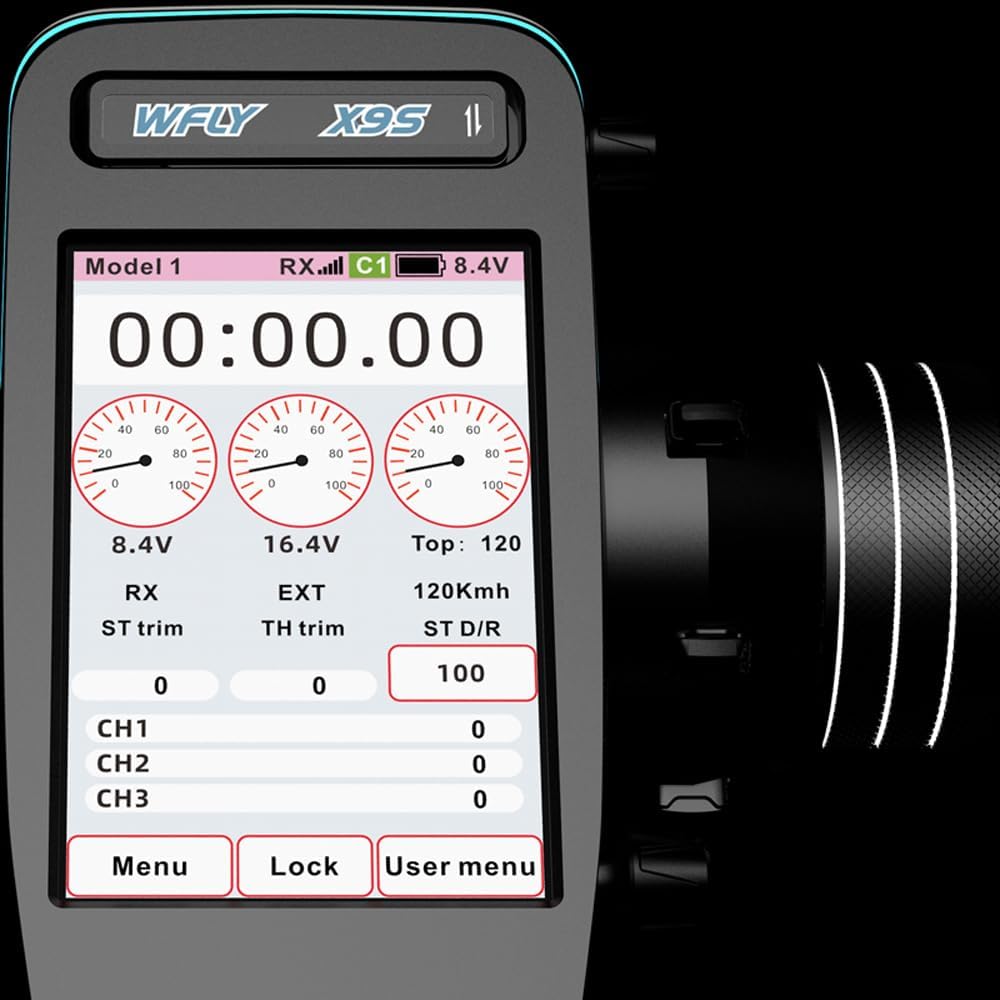
Figure 3.2: Close-up of the WFLY X9S trigger, demonstrating its ergonomic design for throttle and brake control.

Obrázek 3.3: Vnitřní view illustrating the Hall gimbals technology used in the trigger for enhanced precision and durability.
3.2 Key Functions and Features
The X9S offers a range of advanced functions accessible via its touchscreen interface:
- Paměť modelu: Uložte si nastavení až pro 30 různých modelů.
- Constant Speed Navigation: Utilize this function for maintaining a consistent vehicle speed.
- GPS Support: Compatible with the WFLY S01G module for GPS functionality, enabling features like speed testing.
- External Gyroscope Support: Enhance vehicle stability and control with external gyroscope integration.
- Hlasový příkaz: The touchscreen interface supports voice commands for convenient operation.
- Interface Customization: User-defined interface color, picture, channel, function, status, and trim settings for a personalized experience.
- Program Mixes: Supports 5 models program mix, including specific mixes for tanks.
- Vibrační zpětná vazba: Provides tactile alerts and notifications.
- Automatické vypnutí: Configurable automatic shutdown time to conserve battery.

Figure 3.4: The WFLY X9S 3.5-inch display, showing real-time telemetry data and menu options.

Figure 3.5: Illustration of the WFLY X9S's customizable interface, allowing users to define colors, images, and widget layouts.

Figure 3.6: A visual representation of various functions supported by the WFLY X9S, including GPS speed test, servo settings, and different vehicle types.
4. Údržba
Proper maintenance ensures the longevity and optimal performance of your WFLY X9S transmitter.
4.1 Čištění
Regularly wipe the transmitter's exterior with a soft, dry cloth. For stubborn dirt, a slightly damp cloth can be used, followed by immediate drying. Avoid using harsh chemicals, solvents, or abrasive materials, as these can damage the finish and electronic components.
4.2 Skladování
When not in use, store the transmitter in a cool, dry place, away from direct sunlight and extreme temperatures. Use the provided handbag for protection during transport and storage to prevent physical damage.
4.3 Péče o baterii
To maintain battery health, avoid fully discharging the battery frequently. If storing the transmitter for an extended period, charge the battery to approximately 50-60% capacity. Recharge the battery periodically if stored for very long durations to prevent deep discharge.
5. Řešení problémů
This section addresses common issues you might encounter with your WFLY X9S transmitter.
5.1 Transmitter Not Powering On
- Zkontrolujte baterii: Ensure the internal battery is charged. Connect the transmitter to a power source using the USB-C cable.
- Vypínač: Confirm the power button is pressed correctly and held for the required duration (if applicable).
5.2 Receiver Not Linking/Binding
- Postup vazby: Re-verify that you are following the correct binding procedure for both the transmitter and the RG209S receiver as outlined in their respective manuals.
- Blízkost: Ensure the transmitter and receiver are in close proximity during the binding process.
- Cyklus napájení: Try power cycling both the transmitter and receiver and attempt the binding process again.
- Firmware: Ensure both the transmitter and receiver have compatible and up-to-date firmware. Consult WFLY's official support resources for firmware updates.
5.3 Unresponsive Controls
- Úroveň baterie: Low battery on either the transmitter or the vehicle's receiver can cause erratic behavior or unresponsiveness.
- Rušení: Operate in an area free from significant radio interference.
- Znovu svázat: If the connection is lost, attempt to re-bind the transmitter and receiver.
6. Specifikace
| Funkce | Specifikace |
|---|---|
| Název modelu | X9S |
| Hmotnost položky | 1.1 libry (přibližně 0.5 kg) |
| Rozměry produktu | 4.7 x 3.9 x 9.5 palců (přibližně 11.9 x 9.9 x 24.1 cm) |
| Velikost displeje | 3.5 palce |
| Latence | 3.5 ms |
| Paměť modelu | modely 30 |
| Nabíjení | 15W Fast Charge (USB-C) |
| Technologie připojení | USB |
| Režim zvukového výstupu | Digitální |
| Typ montáže | Wrist Mount (implied by design) |
7. Záruka a podpora
7.1 Informace o záruce
The WFLY X9S RC Car Radio Transmitter comes with a 3-year manufacturer warranty. Please retain your proof of purchase for warranty claims. The warranty covers defects in materials and workmanship under normal use.
7.2 Zákaznická podpora
For technical assistance, troubleshooting beyond this manual, or warranty inquiries, please contact WFLY customer support through their official website or the retailer where the product was purchased. Provide your product model number (X9S) and a detailed description of the issue to facilitate support.