
s116 max
S116 MAX Brushless Optical Flow Remote Control Drone User Manual
Model: S116 MAX
Značka: Generické
Zavedení
This manual provides comprehensive instructions for the safe operation, setup, and maintenance of your S116 MAX Brushless Optical Flow Remote Control Drone. The S116 MAX is equipped with dual cameras, advanced optical flow technology, 360° intelligent infrared obstacle avoidance, and various intelligent flight modes, offering an immersive aerial experience. Please read this manual thoroughly before operating the drone to ensure proper use and to prevent damage or injury.
Bezpečnostní pokyny
Adhering to these safety guidelines is crucial for safe and responsible drone operation:
- Předletová kontrola: Always inspect the drone, remote control, and battery for any damage before each flight. Ensure propellers are securely attached.
- Letové prostředí: Létejte v otevřených prostorech, dál od lidí, zvířat, budov a překážek. Vyhněte se létání v blízkosti letišť nebo omezeného vzdušného prostoru.
- Povětrnostní podmínky: Do not fly in strong winds, rain, snow, or fog. Optimal conditions are calm and clear.
- Bezpečnost baterie: Use only the original battery and charging cable. Do not overcharge or puncture the battery. Discontinue use if the battery is swollen or damaged.
- Přímá viditelnost: Během letu udržujte s dronem neustále vizuální kontakt.
- Respektujte soukromí: Be mindful of privacy when using the camera. Do not record individuals without their consent.
- Doporučený věk: This product is recommended for adult users.
Co je v krabici
Po vybalení zkontrolujte, zda jsou všechny komponenty přítomny:
- S116 MAX Drone (White)
- Dálkové ovládání
- Dobíjecí lithium-iontová baterie (1 ks součástí balení)
- ESC Camera (Integrated)
- Náhradní čepele (4 kusy)
- Nabíjecí kabel (USB)
- Šroubovák
- Skladovací taška
- Uživatelská příručka (tento dokument)

Image: All components included in the S116 MAX drone package, laid out for clear identification.
Konec produktuview
The S116 MAX drone features a robust design with advanced functionalities. Key components include:
- Bezkartáčové motory: Provide efficient and quiet operation with enhanced durability.
- Systém duálního fotoaparátu: Features a main HD camera for aerial photography and video, and a bottom optical flow camera for stable hovering. The main camera is electrically adjustable up to 90 degrees.
- 360° Intelligent Infrared Obstacle Avoidance: Sensors detect obstacles from all directions to prevent collisions.
- Polohování optického toku: Assists in maintaining stable flight and precise hovering, especially indoors or at low altitudes.
- Skládací ramena: Pro kompaktní skladování a přenosnost.
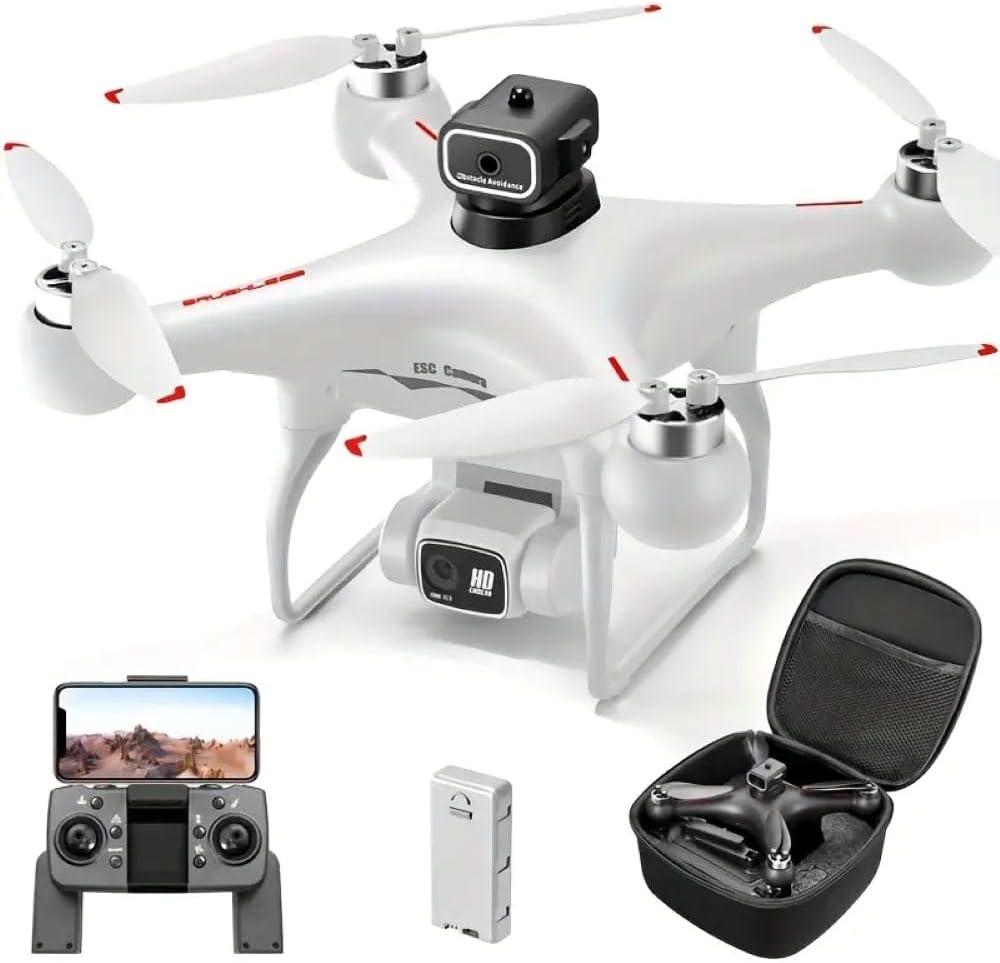
Image: The S116 MAX drone in white, alongside its remote control, battery, and a compact carrying case.

Obrázek: Podrobný view of the S116 MAX's dual camera, highlighting its electrical adjustability for varied shooting angles.

Image: Diagram illustrating the physical dimensions of the S116 MAX drone, showing its length, width, and height.
Nastavení
1. Instalace a nabíjení baterie
- Insert the fully charged Lithium-Ion battery into the drone's battery compartment until it clicks into place.
- To charge the battery, connect the provided USB charging cable to the battery and a suitable USB power source (e.g., computer USB port, USB wall adapter). The charging indicator light will show charging status.
- Ensure the battery is fully charged before each flight for optimal performance and safety.
2. Instalace vrtule
If propellers are not pre-installed, attach them according to the markings (A and B) on the propellers and motor arms. Use the provided screwdriver to secure them firmly.
3. Nastavení dálkového ovládání
- Install 3x AA batteries (not included) into the remote control's battery compartment.
- Zapněte dálkové ovládání.
- Place your smartphone into the phone holder on the remote control.
4. App Installation and Connection (WIFI FPV)
- Scan the QR code in the quick start guide (or search your app store) to download the official S116 MAX drone application.
- Zapněte dron a dálkové ovládání.
- On your smartphone, go to Wi-Fi settings and connect to the drone's Wi-Fi network (usually named "S116 MAX_XXXXXX").
- Open the drone application. The live video feed from the drone's camera should appear, indicating a successful connection.
Návod k obsluze
1. Předletové kontroly
- Ujistěte se, že je baterie dronu plně nabitá.
- Ensure remote control batteries are sufficient.
- Check propellers for damage and ensure they are securely fastened.
- Confirm Wi-Fi connection between drone and smartphone app.
- Choose a safe, open flying area.
2. Vzlet a přistání
- Kalibrace: Before first flight, perform gyroscope calibration as per app instructions.
- Vzlet/přistání jedním tlačítkem: Press the designated button on the remote or in the app for automatic take-off or landing.
- Ruční vzlet: Push both joysticks down and outwards simultaneously to start motors, then slowly push the left joystick up to ascend.
3. Řízení letu
- Levý joystick: Ovládá nadmořskou výšku (nahoru/dolů) a rotaci (doleva/doprava).
- Pravý joystick: Ovládá pohyb vpřed/vzad a vlevo/vpravo.
- Bezhlavý režim: Aktivuje režim, ve kterém je orientace dronu relativní vzhledem k pilotovi, což zjednodušuje ovládání bez ohledu na směr letu dronu vpřed.
- Trajektorie letu: Draw a path on your smartphone screen, and the drone will automatically follow it.
- 360° Intelligent Infrared Obstacle Avoidance: This feature automatically detects and avoids obstacles within its sensor range, enhancing flight safety.

Image: Visual representation of the S116 MAX drone's key features, including its obstacle avoidance system and various flight modes.
4. Camera Operation (Photo & Video)
- Živé FPV: View foo v reálném časetage on your smartphone via the app.
- Pořízení fotografie/videa: Pro pořizování fotografií nebo spuštění/zastavení nahrávání videa použijte vyhrazená tlačítka na dálkovém ovladači nebo v aplikaci.
- Nastavitelná kamera: The main camera's angle can be adjusted remotely via the app or remote control for different perspectives.
- Skladování: Captured media is typically saved to your smartphone or an inserted SD card (if supported by the drone).
Údržba
- Čištění: K čištění těla dronu a čoček fotoaparátu používejte měkký, suchý hadřík. Nepoužívejte agresivní chemikálie.
- Kontrola vrtule: Regularly check propellers for cracks, bends, or debris. Replace damaged propellers immediately using the provided spare blades.
- Péče o baterie: Baterie skladujte na chladném a suchém místě. Nevybíjejte baterie zcela po delší dobu. Pro dlouhodobé skladování je nabijte na přibližně 50–60 %.
- Údržba motoru: Keep motors free of dust and debris. Do not attempt to lubricate motors unless specified by the manufacturer.
- Skladování: When not in use, store the drone and its components in the provided storage bag or a protective case to prevent damage.
Odstraňování problémů
| Problém | Možná příčina | Řešení |
|---|---|---|
| Dron nereaguje na dálkové ovládání. | Not paired; low battery on drone or remote. | Ensure drone and remote are powered on and paired correctly. Charge batteries. |
| Dron se během letu unáší. | Není kalibrováno; silný vítr. | Proveďte kalibraci gyroskopu. Leťte v klidných podmínkách. |
| Žádný FPV video přenos. | Wi-Fi not connected; app issue. | Reconnect to drone's Wi-Fi network. Restart app and drone. |
| Vyhýbání se překážkám nefunguje. | Sensors blocked; feature disabled. | Clean sensors. Ensure feature is enabled in the app. |
Specifikace
| Funkce | Detail |
|---|---|
| Značka | Obecný |
| Název modelu | S116 MAX |
| Barva | Bílý |
| Hmotnost položky | 153 gramů (5.4 unce) |
| Rozměry produktu | 9.06"D x 9.06"Š x 4.7"V (23 cm x 23 cm x 12 cm) |
| Rozlišení záznamu videa | 480p (Main camera output: 1920x1080 Pixels) |
| Technologie připojení | USB, Wi-Fi |
| Typ ovládání | Dálkové ovládání, ovládání aplikací |
| Typ baterie | Lithium-iontová (1 v ceně) |
| Speciální funkce | Anti-Corrosion, Brushless Motor, Dual Camera, Optical Flow, Infrared Obstacle Avoidance, Headless Mode, Trajectory Flight |
| Úroveň dovedností | Středně pokročilý |
Záruka a podpora
Pro informace o záruce, technickou podporu nebo servisní dotazy se prosím obraťte na oficiální stránky výrobce webnebo se obraťte na prodejce, od kterého jste produkt zakoupili. Uschovejte si doklad o koupi pro případ reklamace.
Ask a question about this manual
Ask about setup, troubleshooting, compatibility, parts, safety, or missing instructions. Manuals+ will review the question and use this page’s manual context to help answer it.