
1. Konec produktuview
The FLEXISPOT Classic Ergonomic Office Chair is designed to provide optimal comfort and support for prolonged sitting. Its ergonomic features, including adjustable lumbar support, a 2D headrest, and a lockable tilt mechanism, ensure a customizable seating experience. The chair is constructed with a breathable mesh back and a high-density foam seat cushion for durability and comfort.
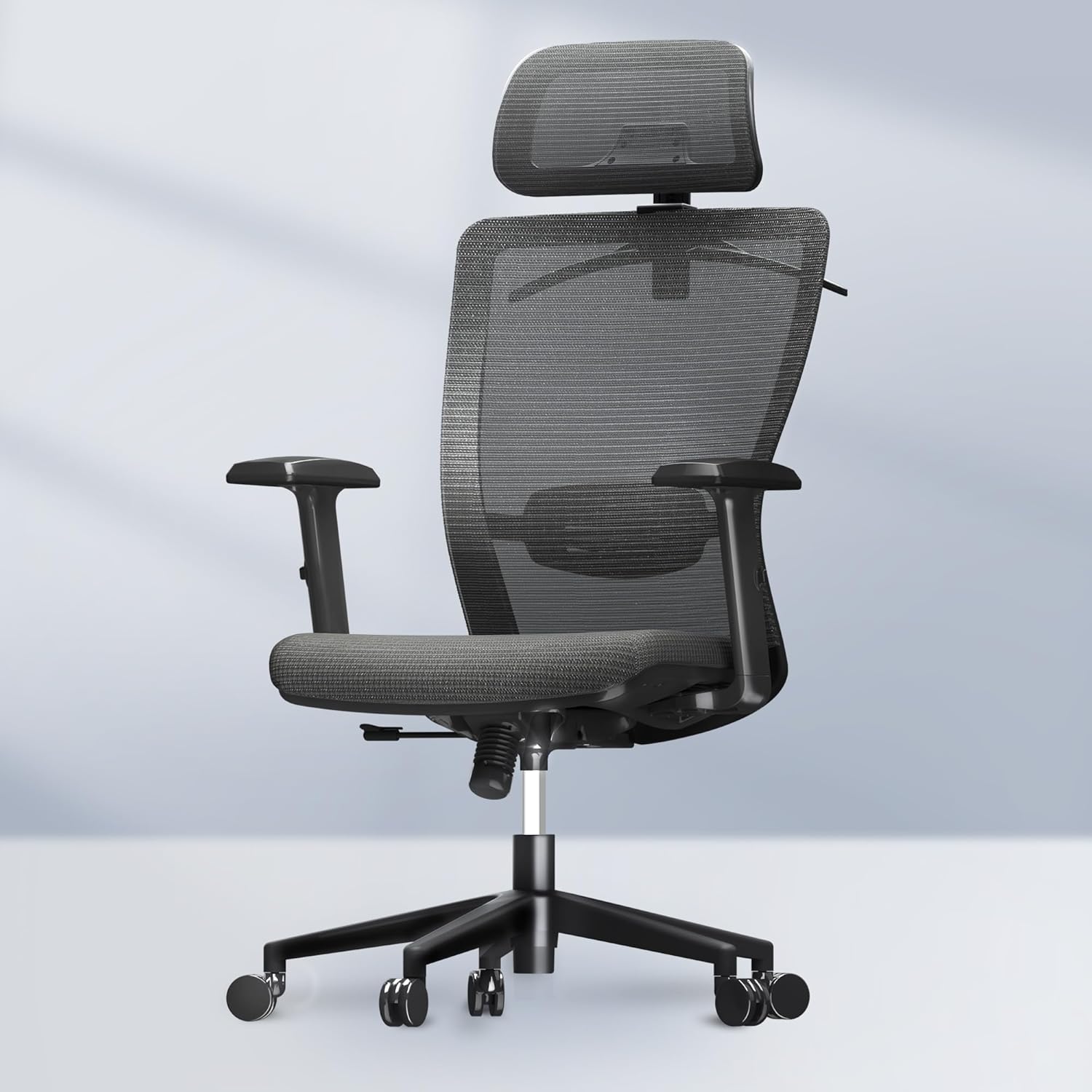
Obrázek 1.1: Přední strana view of the FLEXISPOT Classic Ergonomic Office Chair.
Klíčové vlastnosti:
- Ergonomický design: Provides reliable back support and alleviates body pressure.
- Multi-use Functionality: Suitable for office, computer, gaming, reading, and living room environments.
- Robustní konstrukce: Sturdy base structure supports up to 300 pounds.
- Prodyšná síťovina na zádech: High-density mesh ensures airflow and resists wear.
- Nastavitelné komponenty: Seat height, headrest, backrest, and armrests are easily adjustable.
- Integrovaný ramínko na šaty: Conveniently located on the headrest for clothing storage.

Figure 1.2: Detailed dimensions of the FLEXISPOT Classic Ergonomic Office Chair.
2. Nastavení a montáž
This section provides general guidelines for assembling your FLEXISPOT office chair. For detailed, step-by-step instructions, please refer to the assembly guide included in your product packaging. Ensure all components are present before beginning assembly.
Požadované nástroje (nejsou součástí dodávky):
- Phillips head screwdriver (if not provided)
- Imbusový klíč (obvykle součástí balení)
Kroky montáže (obecné):
- Rozbalte komponenty: Carefully remove all parts from the packaging and lay them out on a clean, flat surface. Verify all parts are present against the packing list.
- Připevnění koleček k základně: Insert the casters into the holes at the end of each leg of the chair base. Push firmly until they click into place.
- Vložte plynový zvedák: Place the larger end of the gas lift cylinder into the center hole of the chair base.
- Připevnění mechanismu k sedadlu: Připevněte ovládací mechanismus ke spodní straně sedáku pomocí dodaných šroubů. Ujistěte se, že přední část mechanismu je zarovnána s přední částí sedadla.
- Připevnění opěradla k sedáku: Connect the backrest to the seat assembly. This may involve sliding a bracket into a slot or securing with screws.
- Připevněte područky: Secure the armrests to the seat or backrest assembly using the designated screws.
- Připojení sestavy sedadla k plynovému zvedáku: Carefully place the assembled seat and backrest onto the gas lift cylinder, ensuring it is centered. Apply gentle downward pressure to secure.
- Instalace opěrky hlavy: Slide the headrest into its designated slot at the top of the backrest. Adjust as needed.
After assembly, test all adjustable functions to ensure proper operation and stability before regular use.
3. Návod k obsluze
Your FLEXISPOT office chair offers multiple adjustment options to customize your seating experience for optimal comfort and ergonomic support.
3.1. Nastavení výšky sedadla
To adjust the seat height, locate the lever on the right side, beneath the seat. While seated, pull the lever up to lower the seat. To raise the seat, stand up and pull the lever up. Release the lever at your desired height.
3.2. Backrest Tilt and Lock Function
The chair features a lockable tilt function, allowing you to recline and lock the backrest at various angles (90-130 degrees).
- Sklon: Lean back into the chair.
- To Lock Tilt: Once at your desired angle, push the tilt lever (usually on the left side, or a knob under the seat) inwards or downwards to lock the position.
- To Unlock Tilt: Pull the tilt lever outwards or upwards. The backrest will return to its upright position or allow free reclining.

Figure 3.1: Illustration of the chair's tilt angles (90°, 110°, 130°).
3.3. Nastavení bederní opěrky
The lumbar support can be adjusted vertically to align with the natural curve of your lower back. Locate the adjustment mechanism on the backrest. Gently push the lumbar support up or down to find your preferred position.
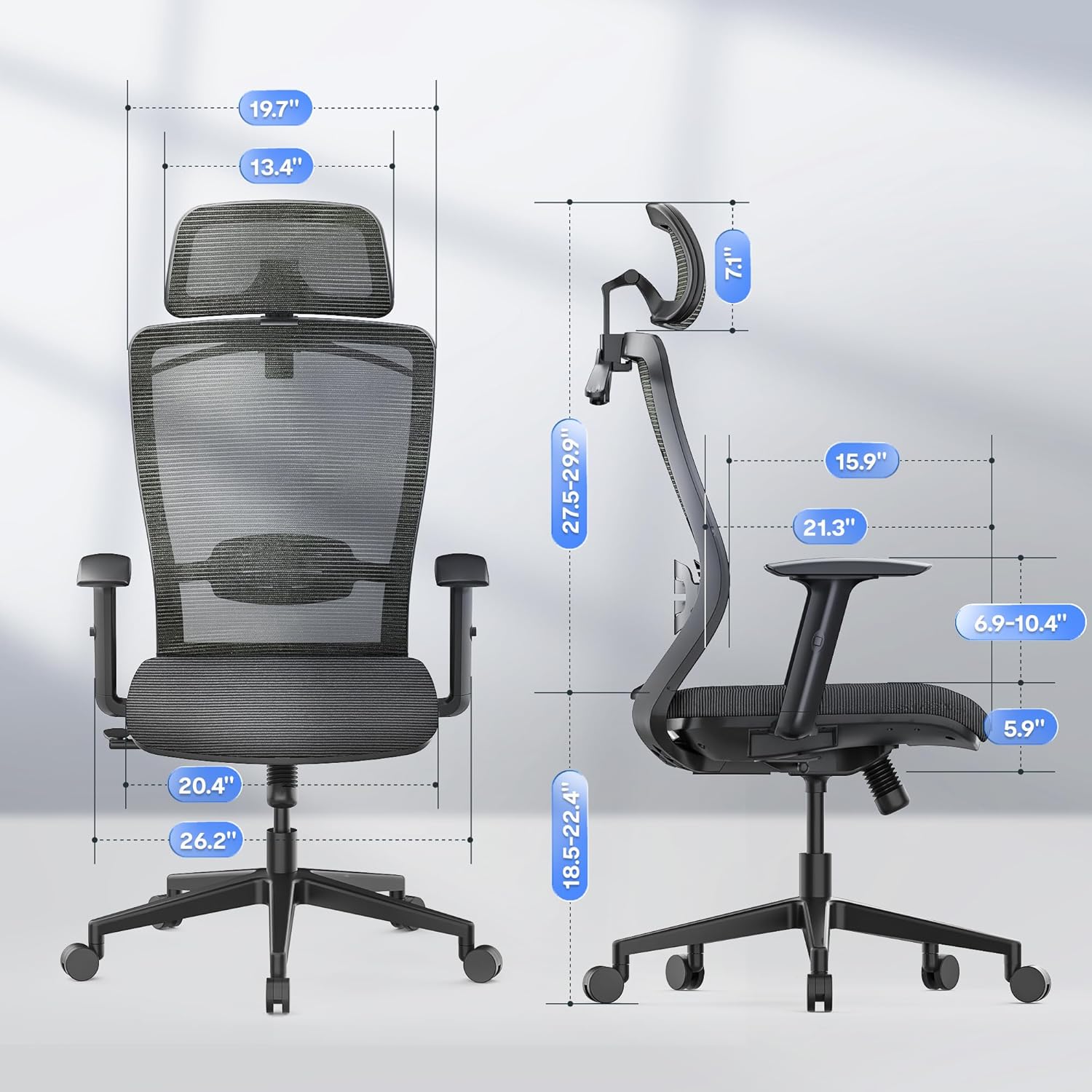
Figure 3.2: Adjusting the lumbar support for precise waist support.
3.4. Nastavení opěrky hlavy
The 2D headrest can be adjusted in multiple dimensions to provide precise support for your head and neck. It can be moved up and down, and also rotated to achieve the optimal angle.

Figure 3.3: Adjustments for the 2D headrest, including vertical and rotational movement.
3.5. Nastavení loketní opěrky
The armrests are adjustable to provide comfortable support for your arms and shoulders. Typically, they can be moved up and down. Locate the button or lever on the side of each armrest to unlock and adjust its height. Release the button/lever to lock it in place.

Figure 3.4: Adjustable armrests for personalized comfort.
3.6. Integrated Coat Hanger
The headrest features a built-in coat hanger for convenient storage of jackets or other clothing items, keeping them wrinkle-free and within reach.

Figure 3.5: The integrated coat hanger on the headrest.
4. Údržba a péče
Regular maintenance helps prolong the life and appearance of your FLEXISPOT office chair.
- Cleaning Mesh and Fabric: Pro běžné čištění použijte měkký hadřík dampened with mild soap and water. Gently wipe the mesh backrest and foam seat cushion. Avoid abrasive cleaners or harsh chemicals, as they may damage the material. Allow to air dry completely.
- Cleaning Base and Casters: Wipe the chair base and casters with a damp cloth. For casters, periodically remove any accumulated dust, hair, or debris to ensure smooth rolling.
- Kontrola hardwaru: Periodically check all screws and bolts to ensure they are tight. Retighten if necessary to maintain stability and prevent squeaking.
- Plynový výtah: The gas lift is a sealed unit and requires no maintenance. Do not attempt to disassemble it.
5. Řešení problémů
Tato část se zabývá běžnými problémy, se kterými se můžete setkat při používání kancelářské židle.
| Problém | Možná příčina | Řešení |
|---|---|---|
| Chair Squeaks or Wobbles | Loose hardware; friction between components. | Check and tighten all screws and bolts. Apply a small amount of silicone lubricant to moving parts if necessary. |
| Obtížnost s nastavením výšky | Gas lift malfunction; obstruction. | Ensure the height adjustment lever is fully engaged. Check for any obstructions around the gas lift. If the issue persists, contact customer support. |
| Kolečka se neotáčejí hladce | Debris caught in casters; worn casters. | Remove any hair, dust, or debris from the caster wheels. Clean the wheels thoroughly. If casters are worn, replacement may be necessary. |
| Backrest Does Not Lock in Position | Tilt mechanism issue; lever not fully engaged. | Ensure the tilt lock lever is fully engaged. Check for any obstructions preventing the mechanism from locking. |
6. Specifikace
Detailed specifications for the FLEXISPOT Classic Ergonomic Office Chair (Model: OC3 CLOUD).
| Atribut | Detail |
|---|---|
| Značka | FLEXISPOT |
| Název modelu | Office Chair OC3 FOAM |
| Barva | Šedá |
| Rozměry produktu (D x Š x V) | 21.3"H x 26.2"Š x 52.3"V |
| Hmotnost položky | 51 libry |
| Styl zad | Síťovaná záda |
| Materiál sedáku | Pěna |
| Recommended Weight Capacity | Až 300 liber |
| Funkce naklonění | Yes, 90-130 degrees lockable |
| Opěrka hlavy | 2D nastavitelné |
| Styl paže | Adjustable, Rounded |
| Kolečka | Silent and Smooth |
| UPC | 810072869159 |
| ASIN | B0D83B8Y25 |
7. Bezpečnostní informace
Please read and adhere to the following safety guidelines to ensure safe operation and prevent injury.
- Ensure the chair is used for individuals within the recommended weight limit of 300 lbs.
- Be cautious when operating adjustable components, such as the backrest angle, to prevent injury.
- Nestůjte na židli ani ji nepoužívejte jako schůdky.
- Nepokládejte na židli těžké předměty, které překračují její nosnost.
- Během nastavování se chraňte prstů a oděvu před pohyblivými částmi.
- Židli používejte na rovném a stabilním povrchu, aby se nepřevrhla.
- Do not expose the chair to extreme temperatures or direct sunlight for prolonged periods, as this may damage materials.
8. Záruka a zákaznická podpora
FLEXISPOT is committed to providing high-quality products. For information regarding product warranty, please refer to the warranty card included with your purchase or visit the official FLEXISPOT webmísto.
If you encounter any issues or have questions about your FLEXISPOT Classic Ergonomic Office Chair, please contact FLEXISPOT customer support. Contact details can typically be found on the manufacturer's webwebu nebo v dokumentaci k produktu.
Další zdroje a informace o produktech naleznete na Obchod FLEXISPOT na Amazonu.