
Zavedení
This manual provides detailed instructions for the assembly, operation, and maintenance of your FLEXISPOT 180x80cm motorized standing desk. Please read all instructions carefully before use to ensure proper function and safety. The desk is designed to offer a healthy work environment by allowing seamless transitions between sitting and standing positions, reducing fatigue and improving concentration.
Key features include a high-quality desktop, a digital control panel with memory presets, and robust, stable legs made from industrial carbon steel.
Bezpečnostní informace
Vždy dodržujte následující bezpečnostní opatření:
- Před obsluhou stolu se ujistěte, že jsou všechna připojení bezpečná.
- Do not overload the desk. The maximum recommended weight capacity is 70 kg.
- Během provozu držte děti a domácí zvířata v dostatečné vzdálenosti od stolu, abyste předešli nehodám.
- The control panel includes a child lock function to prevent accidental adjustments. Activate this function when the desk is not in use.
- Neumisťujte tekutiny přímo na ovládací panel nebo do blízkosti elektrických součástí.
- Do not attempt to disassemble or repair the motor or control system yourself. Contact qualified service personnel for assistance.
- Ensure there are no obstructions in the desk's path when adjusting its height.
Seznam komponent
Před montáží zkontrolujte, zda jsou všechny součásti přítomny a nepoškozené. Balení by mělo obsahovat:
- Desktop (180 x 80 cm)
- Desk Frame (legs and crossbar)
- Digital Control Panel with Memory Function
- Napájecí adaptér a kabel
- Háček na sluchátka
- Držák na pohár
- Montážní materiál (šrouby, nástroje)
- Návod k použití
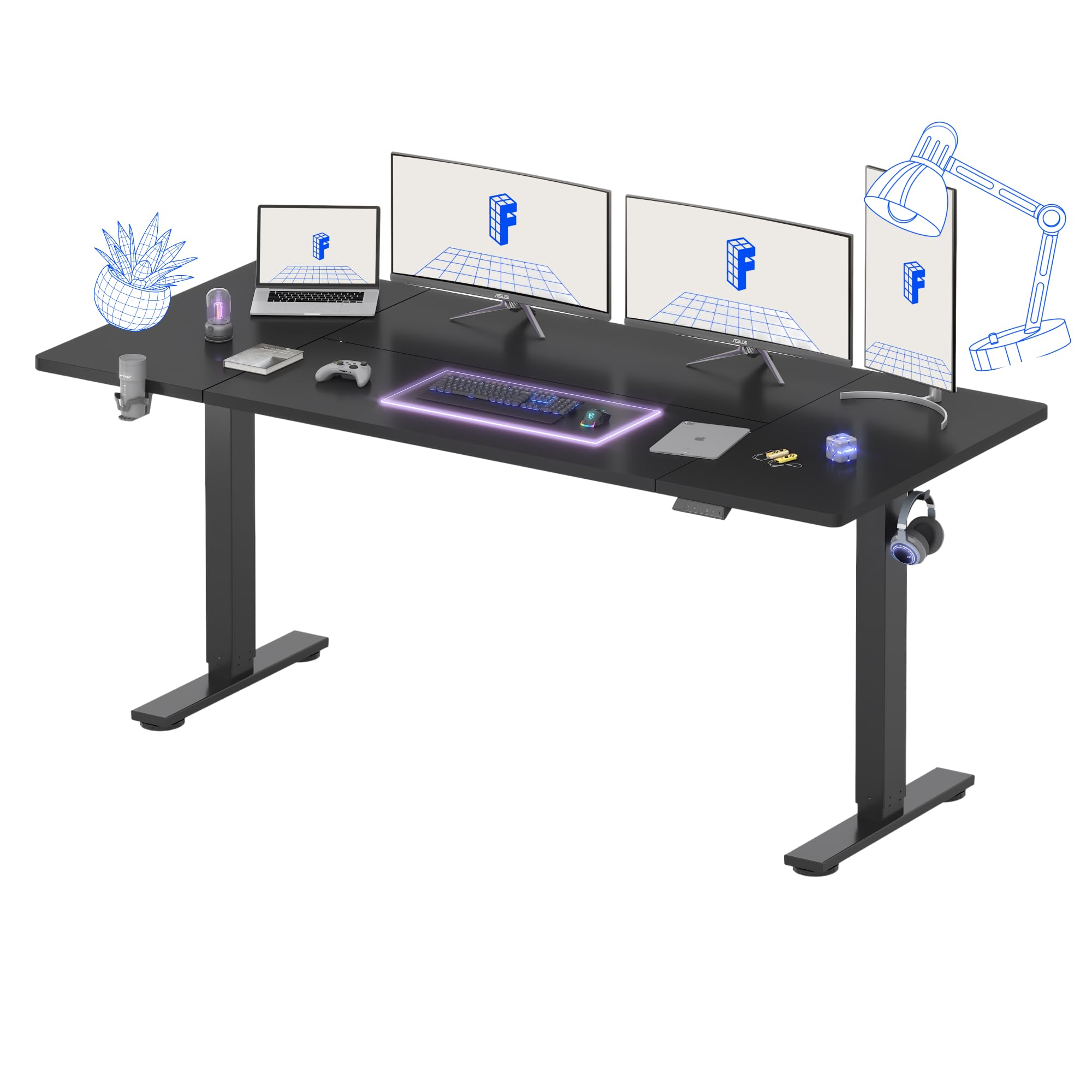
Obrázek 1: Přesview of the FLEXISPOT Standing Desk.
Pokyny pro nastavení
Assembly is recommended for one person. Follow the included assembly instructions carefully. Ensure you have adequate space and a clean work area.
- Rozbalte komponenty: Opatrně vyjměte všechny díly z obalu a položte je na měkký, čistý povrch, abyste zabránili poškrábání.
- Sestavení rámu stolu: Attach the desk legs to the crossbar according to the diagrams in the separate assembly guide. Ensure all screws are tightened securely.
- Připojit plochu: Place the desktop upside down on a soft surface. Carefully align the assembled frame with the pre-drilled holes on the desktop and secure it with the provided screws.
- Instalace ovládacího panelu a příslušenství: Mount the digital control panel, headphone hook, and cup holder in your desired positions using the provided hardware.
- Připojte napájení: Connect the power cable to the control box and then to a power outlet.
- Správa kabelů: Organize cables using the integrated cable management features to maintain a tidy workspace.
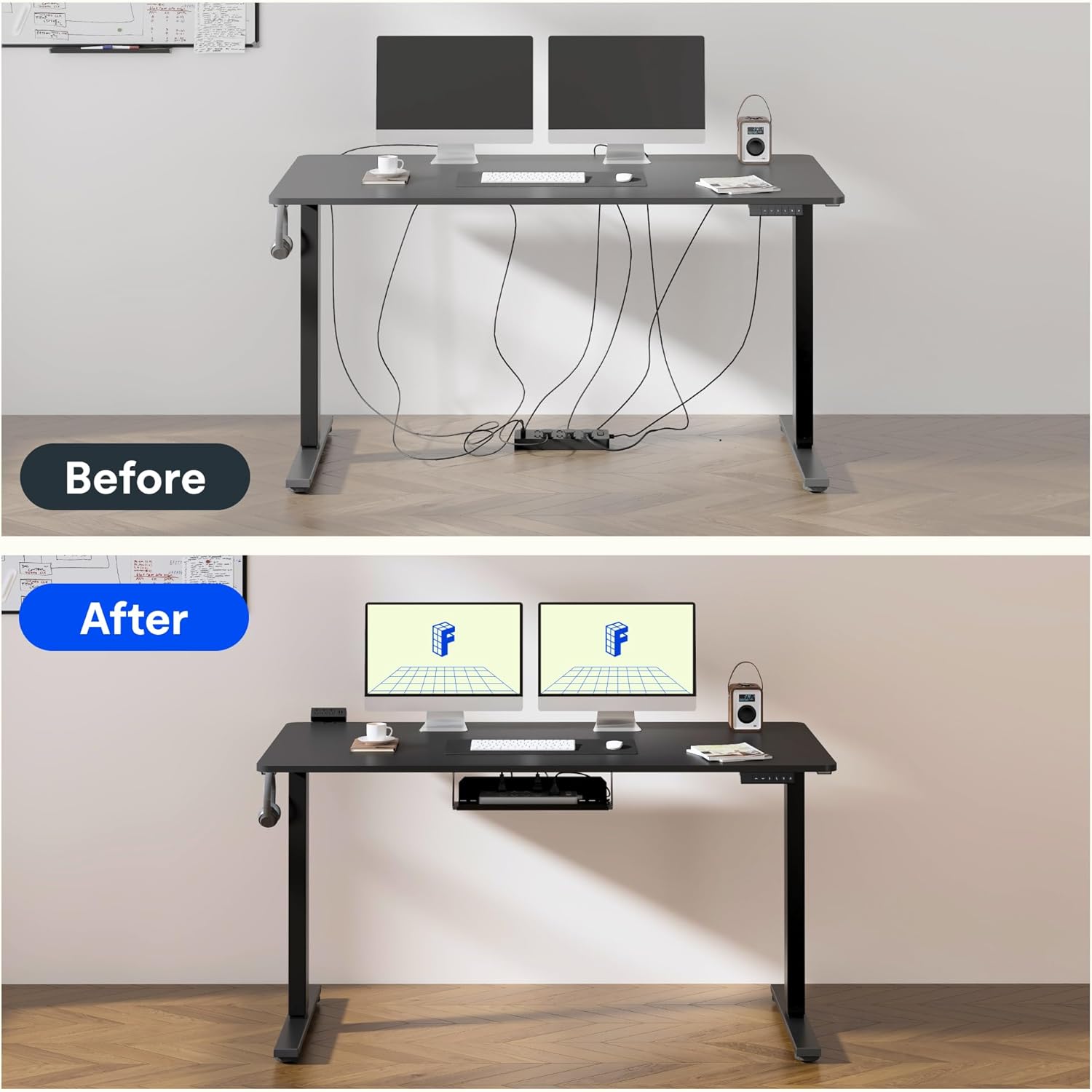
Figure 2: Effective cable management for a tidy workspace.

Figure 3: Close-up of integrated cable organization features.
Návod k obsluze
Your FLEXISPOT standing desk features an intuitive digital control panel for easy height adjustments and memory functions.

Figure 4: Digital control panel with LED display and memory buttons.
Nastavení výšky
- Tlačítka nahoru/dolů: Use the ▲ (Up) and ▼ (Down) buttons on the control panel to manually adjust the desk height. The current height will be displayed on the LED screen.
- Stůl lze nastavit od minimální výšky 75 cm do maximální výšky 120 cm.

Figure 5: Desk height adjustment range, illustrating minimum and maximum positions.
Předvolby paměti
The control panel allows you to save preferred sitting and standing heights for quick adjustments.
- Nastavte stůl do požadované výšky pomocí tlačítek Nahoru/Dolů.
- Press the 'M' button (Memory) followed by a number button (1 or 2) to save the current height. The LED display will confirm the save.
- To recall a saved height, simply press the corresponding number button (1 or 2). The desk will automatically move to the preset position.
Funkce dětské pojistky
To activate the child lock, press and hold the 'M' button for 3 seconds until 'LOC' appears on the display. To deactivate, press and hold 'M' again for 3 seconds.
Provoz s nízkou hlučností
The desk operates with a low noise level of approximately 50dB, ensuring a quiet environment suitable for focused work or shared spaces.

Figure 6: Illustration of the desk's low noise operation, ideal for quiet environments.
Údržba
Pravidelná údržba zajistí dlouhou životnost a optimální výkon vašeho stolu.
- Čištění: Otřete pracovní plochu a rám měkkým hadříkemamp hadříkem. Nepoužívejte abrazivní čisticí prostředky ani agresivní chemikálie, které by mohly poškodit povrchovou úpravu.
- Kontrola kabelu: Periodically inspect all cables for wear or damage. Ensure they are properly routed and not pinched.
- Kontrola upevňovacích prvků: Občas zkontrolujte všechny šrouby a upevňovací prvky, zda jsou pevně utažené. V případě potřeby je dotáhněte.
- Rozložení hmotnosti: Distribute weight evenly across the desktop to prevent strain on the motor and frame.
Odstraňování problémů
If you encounter issues with your FLEXISPOT standing desk, refer to the following common problems and solutions:
| Problém | Možná příčina | Řešení |
|---|---|---|
| Stůl se nehýbe | Power cable disconnected; Child lock activated; Overload protection triggered. | Zkontrolujte připojení k napájení; Deaktivujte dětskou pojistku; Snižte váhu na stole. |
| Nerovnoměrné nastavení výšky | Obstruction; Loose connection in frame. | Remove obstructions; Check and tighten frame connections. |
| Kód chyby na displeji | Specifická systémová chyba. | Refer to the detailed troubleshooting section in the full assembly manual or contact customer support. |
Specifikace
Detailed technical specifications for your FLEXISPOT standing desk:
- Značka: FLEXISPOT
- Model: 180 x 80 cm
- Design stolu: Stojící stůl
- Rozměry produktu (H x Š x V): 80P x 180d x 73v cm
- Barva: Černý
- Materiál pracovní plochy: Dřevo
- Základní materiál: Industrial Carbon Steel
- Speciální funkce: Nastavitelná výška
- Zvedací mechanismus: Elektrický
- Minimální výška: 75 centimetrů
- Maximální výška: 120 centimetrů
- Tloušťka plochy: 25 milimetrů
- Maximum Recommended Weight: 70 kg
- Požadovaná montáž: Yes (1 person recommended)
- Zahrnuté komponenty: Headphone hook, cup holder, control panel with memory function
- GTIN: 810072888365

Figure 7: The robust frame is designed to support up to 70 kg.
Informace o záruce
This FLEXISPOT standing desk comes with a Limited Warranty. For specific terms and conditions, please refer to the warranty card included in your product packaging or visit the official FLEXISPOT webUschovejte si doklad o koupi pro případ reklamace.
Podpora
For further assistance, technical support, or to order replacement parts, please contact FLEXISPOT customer service. Contact details can typically be found on the official FLEXISPOT webmístě nebo na obalu produktu.
Online zdroje: Navštivte Obchod FLEXISPOT na Amazonu pro další informace o produktu a podporu.