
1. Úvod
The XODO SA2 Smart Home Security System is a wireless siren alarm designed to enhance the security of your home. Featuring a loud 90dB siren and a strobe LED, it provides both audible and visual alerts in case of an unauthorized entry. This system is app-controlled and can integrate with smart home platforms like Google Home and Alexa, offering convenient management and monitoring.
2. Co je v krabici
- 1 x SA2 Security Alarm Unit
- 1 x Dálkový ovladač
- 1 x Uživatelská příručka (tento dokument)
3. Vlastnosti produktu
- Programovatelné funkce: The SA2 system can be grouped with other smart home devices to create a comprehensive security network, providing multiple layers of protection.
- Snadná instalace: The rechargeable SA2 unit plugs directly into a standard power socket. Its wireless design allows for flexible placement, even in hard-to-reach areas. Setup is simplified with a 1-2-3 process via WiFi.
- Monitorování napájení: Monitor the status of your system, including battery life and arm/disarm status, directly through the XODO app. This allows for quick deactivation of the alarm to prevent false alerts.
- Hearing-Impaired Support: In addition to the 90dB siren, the unit features a bright red strobe LED that flashes to alert hearing-impaired individuals. Notifications are also sent to connected smartphones.
4. Nastavení
4.1 Počáteční zapnutí
Plug the SA2 Security Alarm unit into a standard power outlet. The unit is rechargeable and will begin charging automatically.
4.2 Stažení aplikace a vytvoření účtu
Download the XODO app from your smartphone's app store (available for iOS and Android). Follow the on-screen instructions to create an account or log in if you already have one.
4.3 Připojení k WiFi
- Open the XODO app and select to add a new device.
- Follow the app's prompts to put the SA2 unit into pairing mode. This usually involves pressing and holding a button on the device until an indicator light flashes.
- Connect the SA2 to your home's 2.4GHz WiFi network using the app. Ensure your smartphone is also connected to the same network during setup.
- Po připojení aplikace potvrdí úspěšné spárování.
4.4 Párování dálkového ovladače
The included remote controller is typically pre-paired. If not, refer to the XODO app's device settings for instructions on how to add or re-pair the remote.

Image: The XODO SA2 Smart Home Security System unit (left) and its accompanying remote controller (right). The main unit features a speaker grille and a red ring, while the remote has buttons for arm, disarm, home mode, and SOS.
5. Návod k obsluze
5.1 Použití dálkového ovladače
- Arm Button (closed padlock icon): Press to arm the security system. The siren will emit a confirmation sound, and the LED will indicate armed status.
- Disarm Button (open padlock icon): Press to disarm the security system. The siren will emit a confirmation sound, and the LED will indicate disarmed status.
- Home Mode Button (ikona domu): Activates a partial arming mode, typically for when you are home, securing perimeter sensors while allowing movement inside.
- SOS Button (SOS text): Press and hold to trigger an immediate alarm in an emergency.
5.2 Aktivace alarmu
When the system is armed and a connected sensor (e.g., door/window sensor, motion sensor, sold separately) is triggered, the SA2 unit will activate its 90dB siren and flash its red strobe LED. Notifications will also be sent to all connected smartphone devices.
6. Ovládání aplikací
The XODO app provides comprehensive control and monitoring capabilities for your SA2 system:
- Dálkové zapnutí/vypnutí: Arm or disarm your system from anywhere using your smartphone.
- Sledování stavu: Check the current status of your system, including battery levels and armed state.
- Oznámení: Receive instant alerts on your smartphone when the alarm is triggered.
- Seskupení zařízení: Group the SA2 with other XODO smart home devices for integrated security scenarios.
- Integrace chytré domácnosti: The SA2 is compatible with Google Home and Alexa, allowing for voice control and integration into broader smart home routines.
7. Údržba
- Pravidelný úklid: Wipe the unit with a soft, dry cloth to remove dust. Do not use liquid cleaners.
- Monitorování baterie: Periodically check the battery status via the XODO app to ensure the unit remains powered during outages.
- Aktualizace firmwaru: Ensure your XODO app and SA2 unit's firmware are up to date for optimal performance and security. Updates are typically managed through the app.
8. Řešení problémů
8.1 Alarm Triggers Falsely
- Check connected sensors for proper installation and functionality.
- Ensure pets or environmental factors are not triggering motion sensors if applicable.
- Deactivate the alarm via the XODO app or remote controller.
8.2 Nelze se připojit k Wi-Fi
- Ensure your WiFi network is 2.4GHz. The SA2 does not support 5GHz networks.
- Verify your WiFi password is entered correctly in the app.
- Move the SA2 unit closer to your WiFi router.
- Try resetting the SA2 unit (see 8.4 Resetting the Device).
8.3 Dálkový ovladač nereaguje
- Check the remote controller's battery.
- Ensure the remote is within range of the SA2 unit.
- Attempt to re-pair the remote controller through the XODO app settings.
8.4 Resetování zařízení
If the device is unresponsive or you need to reconfigure it, locate the 'RESET' button on the side of the unit. Use a small pin or paperclip to press and hold the reset button for approximately 5-10 seconds until the indicator light changes, signaling a reset. You will then need to re-add the device to the XODO app.
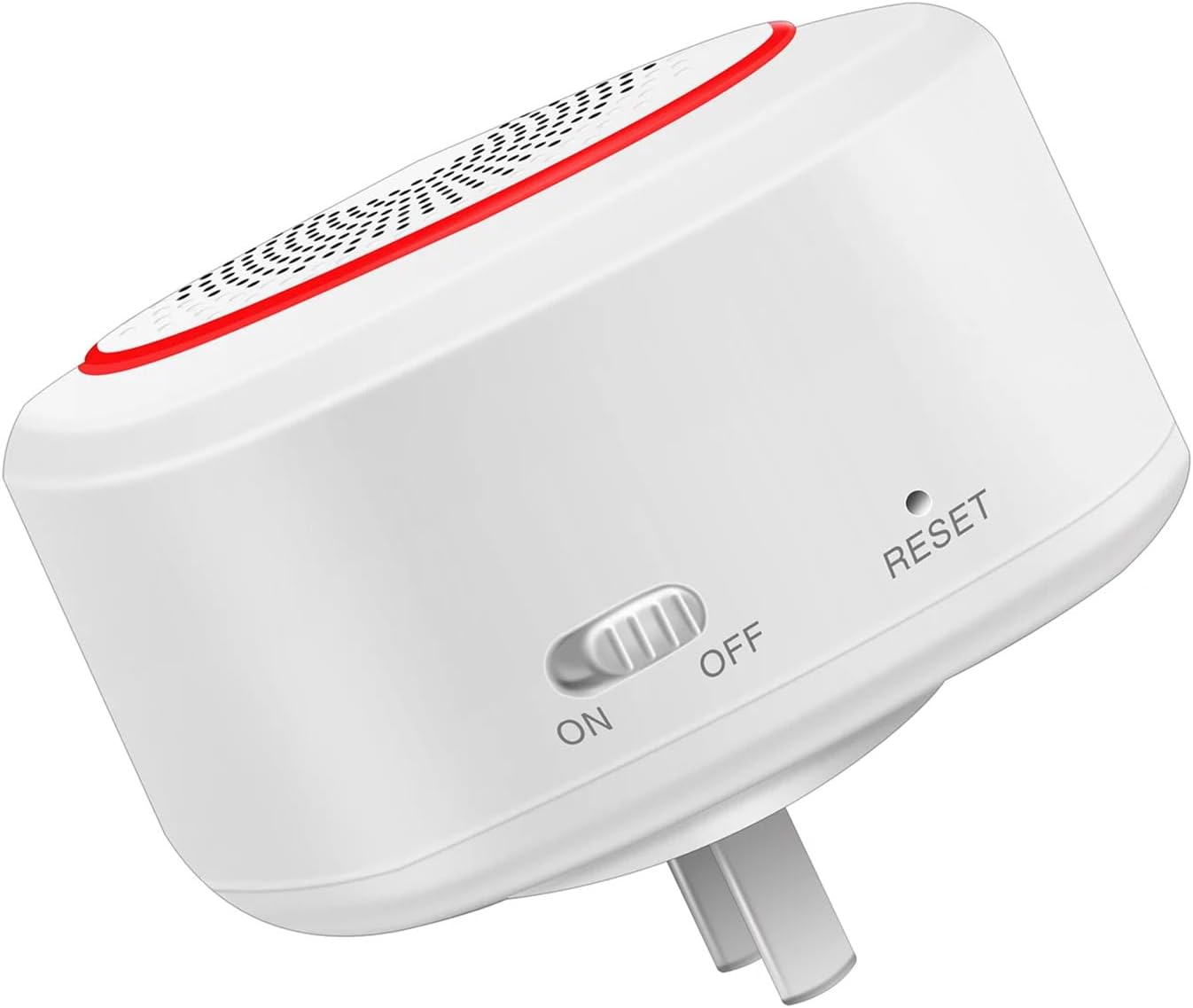
Obrázek: Boční view of the XODO SA2 unit, highlighting the ON/OFF switch and the recessed 'RESET' button. The unit is designed to plug directly into a wall socket.
9. Specifikace
| Značka | XODO |
| Číslo modelu | SA2 |
| Zdroj napájení | Napájení z baterie (dobíjecí) |
| Technologie připojení | Bezdrátové (2.4 GHz Wi-Fi) |
| Kompatibilní zařízení | Home Security System, Smartphone (iOS/Android) |
| Kontrolní metoda | App, Voice (Google Home, Alexa), Remote Controller |
| Typ instalace | Bezdrátové DIY |
| Typ upozornění | Entry (Siren, Strobe LED, App Notifications) |
| Úroveň hluku | 90 decibelů |
| Rozměry položky (D x Š x V) | 5 x 5 x 5 palce |
| Hmotnost položky | 8 unce |
10. Záruka a podpora
The XODO SA2 Smart Home Security System comes with a Worry-Free Warranty. For detailed warranty information, technical support, or service inquiries, please refer to the XODO official website or contact their customer support directly. Contact information can typically be found on the product packaging or the XODO brand webmísto.