
1. Úvod
This manual provides detailed instructions for the installation, operation, and maintenance of the Yitouniu EWeLink 2-Channel Smart WiFi Switch Relay. This device enables remote control of household appliances and electronic devices via a mobile application, RF remote control, and voice commands through smart assistants like Alexa and Google Home. It supports various operating modes and timing functions to enhance smart home automation.
2. Bezpečnostní informace
- Před instalací nebo údržbou se ujistěte, že je odpojeno napájení, abyste předešli úrazu elektrickým proudem.
- Installation should be performed by qualified personnel or under strict adherence to electrical safety guidelines.
- Nepřekračujte maximální proud a objtagjmenovité hodnoty e specifikované pro dané zařízení.
- Udržujte zařízení mimo dosah vody, vlhkosti a extrémních teplot.
- Před obnovením napájení zkontrolujte, zda jsou všechna zapojení bezpečná a správná.
3. Konec produktuview
The Yitouniu EWeLink Smart WiFi Switch Relay is a compact, 2-channel device designed for integrating traditional appliances into a smart home system. It features WiFi and Bluetooth connectivity for app control and supports RF 433MHz for remote control.

Obrázek 3.1: Přední strana view of the Yitouniu EWeLink Smart WiFi Switch Relay. The device is white with branding and connection labels visible.

Obrázek 3.2: Detail view of the Yitouniu EWeLink Smart WiFi Switch Relay, showing input terminals (N, L), output terminals (NO, COM, NC), and model information.

Image 3.3: The compact size of the Yitouniu EWeLink Smart WiFi Switch Relay, held in a hand for scale.
4. Specifikace
| Parametr | Hodnota |
|---|---|
| Vstupní objemtage | AC/DC 85-250V, Micro USB 5V input |
| Max. Proud | 10A |
| Maximální výkon | 2200W |
| WiFi standard | WiFi 2.4GHz b/n/g + Bluetooth (IEEE 802.11b/g/n) |
| Provozní teplota | -20 °C až 70 °C |
| Materiál | Samozhášecí ABS |
| Rozměry produktu | 2.76 x 1.77 x 1.1 palce |
| Hmotnost položky | 1.76 unce |
| Typ kontaktu | Normálně otevřeno |
| Hodnocení mezinárodní ochrany | IP65 |
| Osvědčení | FCC |
5. Nastavení a instalace
5.1 Pokyny pro zapojení
The device supports both AC/DC 85-250V input and Micro USB 5V input. Ensure correct wiring based on your application. The relay has Normally Open (NO), Common (COM), and Normally Closed (NC) contacts for controlling external devices.
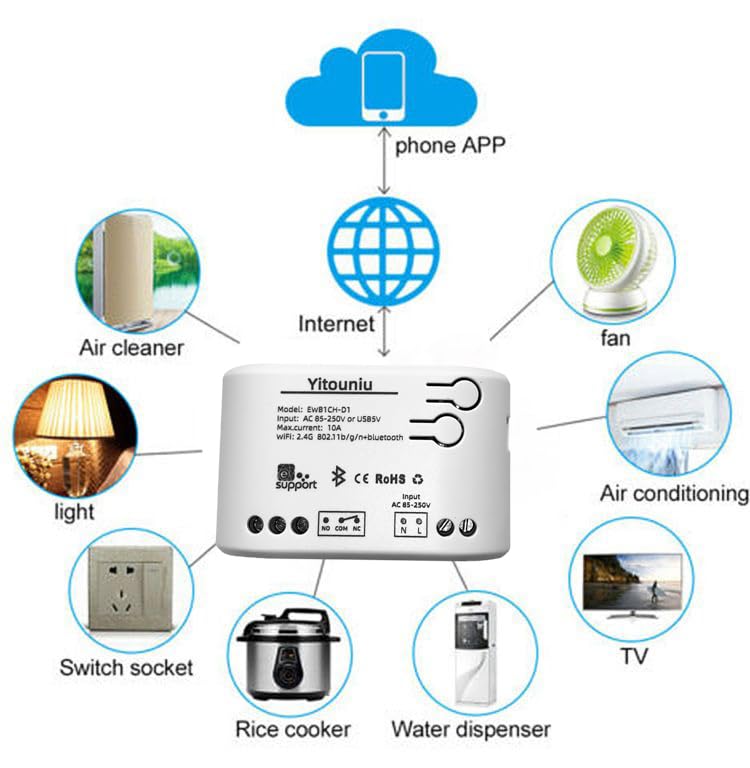
Image 5.1: Diagram illustrating the connectivity of the Yitouniu EWeLink Smart WiFi Switch Relay to various household appliances like lights, fans, and air conditioners, all controlled via a phone app and the internet.
5.2 Stažení a párování aplikace
- Stáhněte si eWeLink aplikace z Apple App Store nebo Google Play Store.
- Zaregistrujte si účet a přihlaste se.
- Power on the Smart WiFi Switch Relay.
- Open the eWeLink app, tap the '+' icon to add a device.
- Follow the on-screen instructions to connect the device to your 2.4GHz WiFi network.

Image 5.2: Screenshots of the eWeLink app interface, showing controls for a garage door (ON/OFF) and a scheduling function for setting specific times.
6. Provozní režimy
The device supports three operating modes: self-locking, interlocking, and inching (micromotion). These modes can typically be configured within the eWeLink app or via physical buttons on the device, depending on the specific model variant.
- Režim samosvorného uzamčení: Each channel operates independently. Pressing the button (or app control) turns the relay ON, pressing it again turns it OFF.
- Interlocking Mode: When one channel is turned ON, all other channels are automatically turned OFF. This is useful for applications where only one device should be active at a time.
- Inching (Micromotion) Mode: The relay turns ON for a set duration (e.g., 0.5 seconds to 1 hour) and then automatically turns OFF. This is suitable for momentary actions like garage door openers or pulse controls.
7. Ovládání aplikací a hlasové ovládání
7.1 eWeLink App Features
The eWeLink app provides comprehensive control over your Smart WiFi Switch Relay:
- Dálkové zapnutí/vypnutí: Ovládejte připojená zařízení odkudkoli s připojením k internetu.
- Funkce časování: Set schedules, countdowns, or recurring timers for automatic on/off operations.
- Nezávislé ovládání: Each of the two channels can be controlled independently.
- Sdílení zařízení: Share control of your devices with family members.
- Ovládání skupiny: Uspořádejte více chytrých zařízení do skupin pro simultánní ovládání.

Image 7.1: A user remotely controlling home lighting via the eWeLink mobile application, demonstrating the convenience of app-based control.

Image 7.2: Illustration of the eWeLink app's group control and sharing functions, allowing multiple users to manage devices across different rooms.

Image 7.3: The timing function interface within the eWeLink app, enabling users to set specific on/off times for connected appliances.
7.2 Integrace hlasového ovládání
The Yitouniu Smart WiFi Switch Relay is compatible with popular voice assistants, including Amazon Alexa and Google Home/Nest. To enable voice control:
- Ensure your Smart WiFi Switch Relay is successfully paired with the eWeLink app.
- Otevřete aplikaci Alexa nebo Google Home.
- Přejděte do sekce „Dovednosti“ nebo „Spolupracuje s Googlem“.
- Hledat and enable the 'eWeLink Smart Home' skill/service.
- Link your eWeLink account when prompted.
- Discover devices. Your Smart WiFi Switch Relay should now be controllable via voice commands.
Example příkazy:
- „Alexo, rozsviť světlo v obýváku.“
- „Hej Google, vypni ventilátor.“

Image 7.4: A user interacting with voice assistants like Amazon Alexa and Google Home to control smart devices, highlighting the voice control capability of the relay.
8. Údržba
The Yitouniu Smart WiFi Switch Relay requires minimal maintenance. Follow these guidelines:
- Čištění: Wipe the device with a dry, soft cloth. Do not use liquid cleaners or solvents.
- Kontrola připojení: Pravidelně kontrolujte kabeláž, abyste se ujistili, že je bezpečná.
- Aktualizace firmwaru: Keep the eWeLink app updated to receive the latest firmware for the device, which may include performance improvements and new features.
9. Řešení problémů
- Zařízení se nepřipojuje k Wi-Fi:
- Ujistěte se, že vaše WiFi síť je 2.4 GHz. Zařízení nepodporuje sítě 5 GHz.
- Check if the WiFi password entered in the app is correct.
- Přesuňte zařízení blíže k routeru WiFi.
- Restartujte zařízení a router.
- Zařízení offline v aplikaci:
- Ověřte, zda je vaše domácí internetové připojení aktivní.
- Zkontrolujte, zda je zařízení napájeno.
- Restartujte zařízení.
- Hlasové ovládání nefunguje:
- Confirm the eWeLink skill/service is enabled and linked in your Alexa or Google Home app.
- Ensure the device is named clearly in the eWeLink app and discovered by your voice assistant.
- Zkontrolujte připojení k internetu.
- Device not responding to RF remote:
- Ensure the RF remote is paired with the switch. Refer to the RF pairing instructions (if applicable to your specific remote).
- Check the battery in the RF remote.
10. Co je v krabici
Po otevření obalu produktu byste měli najít následující položky:
- 1 x Yitouniu Wifi 2-Channel Relay Switch
- 1 x Návod k obsluze (tento dokument)
11. Záruka a podpora
This product comes with a standard manufacturer's warranty. For specific warranty terms, conditions, and duration, please refer to the documentation included with your purchase or contact Yitouniu customer support. For technical assistance or further inquiries, please visit the official Yitouniu webwebu nebo kontaktujte jejich zákaznický servis.