
1. Úvod a konecview
The WUBEN E1 is a versatile, portable LED ring light designed to enhance your smartphone photography and videography. Featuring a magnetic attachment system, it seamlessly integrates with MagSafe-compatible iPhones and can be used with other smartphones via an included magnetic ring. This compact device offers three distinct light modes (Warm, Natural, Cool) and stepless dimming, providing optimal illumination for various scenarios, from selfies and vlogs to product photography and general lighting needs. Its durable aluminum construction and USB Type-C rechargeable battery make it an ideal everyday carry (EDC) accessory.

Figure 1: WUBEN E1 Selfie Light in Camouflage Blue.
2. Obsah balení
Zaškrtněte prosím políčko u následujících položek:
- WUBEN E1 Selfie Light
- Nabíjecí kabel USB typu C.
- Magnetic Suction Ring (for non-MagSafe phones)
- Přepravní pouzdro
- Uživatelská příručka
Video 1: Unboxing and package contents of the WUBEN E1.
This video demonstrates the items included in the WUBEN E1 package, such as the light unit, charging cable, magnetic ring, and carrying case.
3. Vlastnosti produktu
- Phone Flashlight: The WUBEN E1 is equipped with advanced SMD3030 LEDs, offering a maximum output of 300 lumens. It functions as a powerful, portable flashlight for various lighting needs.
- Cell Phone Selfie Light: Features 3 adjustable light modes (Warm Tone: 3000K-3500K, Natural Tone: 3500K-5000K, Cool Tone: 5000K-6000K) and stepless dimming from 10% to 100%. This allows for customized lighting for selfies, video recording, makeup application, and live streaming.
- Magnetic Phone Holder: Utilizes top-of-the-line N54 magnets for secure attachment to MagSafe-compatible devices (iPhone 12 series and above). It can also function as an adjustable phone stand, offering various viewing úhly.
- Convenient USB Type-C Rechargeable: The E1 simplifies recharging with its USB Type-C port, ensuring quick and efficient power replenishment. A full charge takes approximately 50 minutes, providing up to 70 hours of battery life in 'Low' mode.
- Ideal for Everyday Carry: Weighing only 38 grams, its ultra-compact size and lightweight design make it easy to carry in pockets, purses, or attached to a keychain.

Figure 2: Multiple Light Modes and Brightness Adjustment.

Figure 3: Adjustable Mobile Phone Holder Functionality.
4. Nastavení
4.1 Nabíjení zařízení
Before first use, fully charge your WUBEN E1. Connect the provided USB Type-C cable to the charging port on the device and plug the other end into a compatible USB power source. The indicator light will show red during charging and turn blue when fully charged.

Figure 4: USB Type-C Fast Charging.
4.2 Připojení k telefonu
The WUBEN E1 is designed for magnetic attachment to your smartphone.
- For MagSafe-compatible iPhones (iPhone 12 series and above): Simply align the WUBEN E1 with the MagSafe area on the back of your phone. The strong N54 magnets will securely attach the light.
- For other smartphones: Use the included magnetic suction ring. Peel off the adhesive backing from the magnetic ring and firmly attach it to the center of the back of your phone or phone case. Once the ring is in place, the WUBEN E1 can be magnetically attached to it.

Figure 5: Strengthened Magnetic Stability.
5. Návod k obsluze
5.1 Power On/Off and Locking
To prevent accidental activation, the WUBEN E1 has a lock feature. To unlock and power on the device, quickly press the control button 4 times. To power off, press the button once. To re-lock, quickly press the button 4 times again.
5.2 Adjusting Light Modes and Brightness
The WUBEN E1 offers flexible lighting control:
- Změna světelných režimů: Press the control button once to cycle through the three light modes: Warm Tone, Natural Tone, and Cool Tone.
- Nastavení jasu: Rotate the small dial on the side of the device to adjust the brightness from 10% to 100%.
Video 2: Demonstration of WUBEN E1's light modes and brightness adjustment.
This video illustrates how to switch between warm, natural, and cool light tones and adjust the brightness of the WUBEN E1.
5.3 Použití jako stojan na telefon
The WUBEN E1 features a flexible flip design that allows it to be used as a phone stand. Simply unfold the light to the desired angle (over 270 degrees of rotation) to prop up your phone for hands-free viewv orientaci na výšku i na šířku.
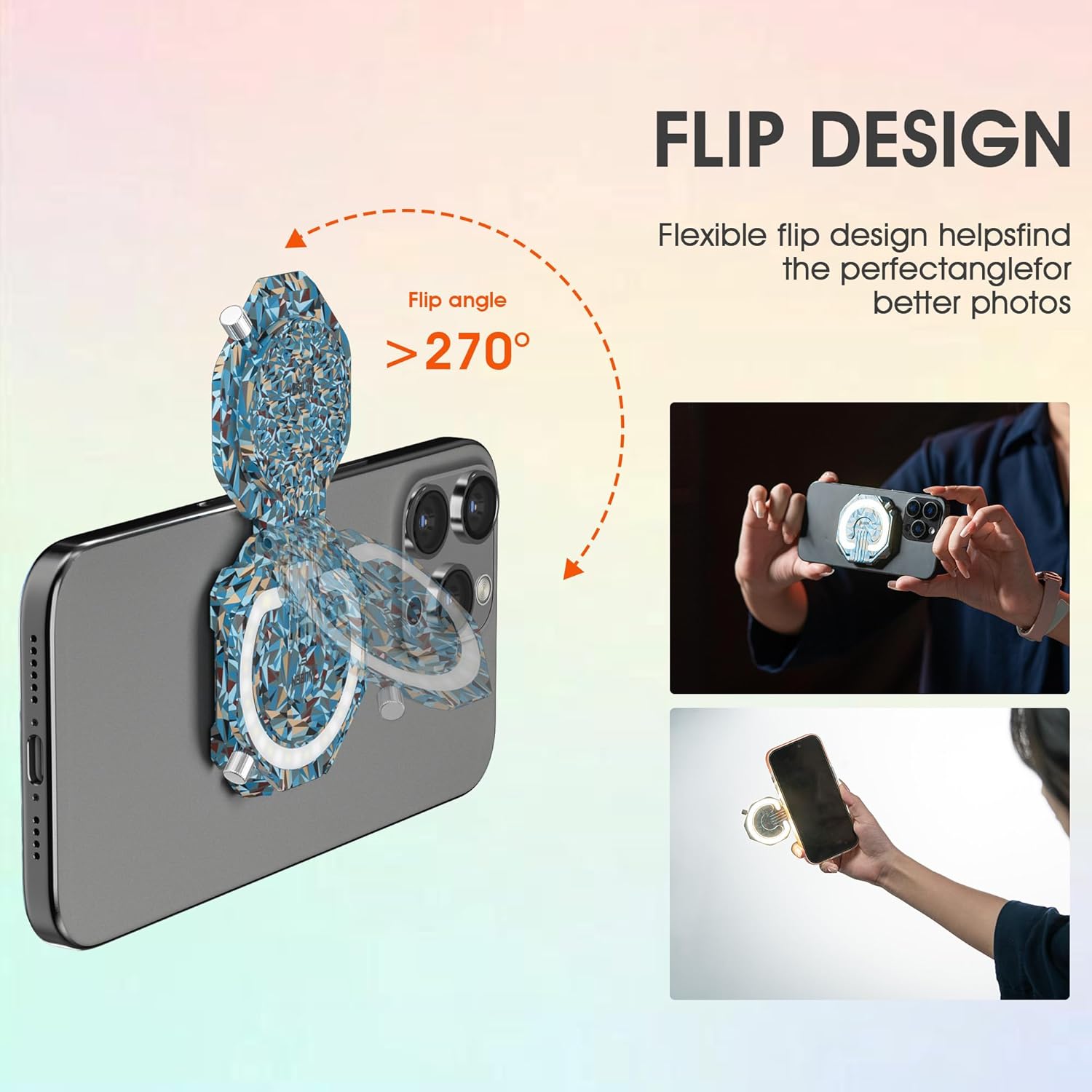
Figure 6: Flexible Flip Design for Phone Stand Functionality.
5.4 Versatile Lighting Applications
The WUBEN E1 can be used in various ways beyond just a selfie light:
- Vyplnit světlo: Attach it to your phone for improved lighting during video calls, vlogs, or product photography.
- Přenosná svítilna: Detach it from your phone and use it as a standalone flashlight for navigating dark areas, campnebo nouzových situacích.
- Magnetic Work Light: Its magnetic base allows it to be fixed onto any iron surface, providing hands-free illumination for tasks like working under a car hood or in a workshop.

Figure 7: Diverse Applications of the WUBEN E1.
6. Údržba
6.1 Čištění
To maintain the performance and appearance of your WUBEN E1, wipe it regularly with a soft, dry cloth. Avoid using abrasive cleaners or solvents that could damage the surface or internal components.
6.2 Skladování
When not in use, store the WUBEN E1 in its provided carrying case to protect it from dust, scratches, and impacts. Store in a cool, dry place away from direct sunlight and extreme temperatures.
7. Řešení problémů
| Problém | Možná příčina | Řešení |
|---|---|---|
| Světlo se nerozsvítí. | Device is locked or battery is low. | Quickly press the control button 4 times to unlock. Charge the device if the battery is low. |
| Magnetické uchycení je slabé. | Phone is not MagSafe compatible or magnetic ring is not properly installed. | Ensure your phone is MagSafe compatible or use the included magnetic suction ring. Make sure the ring is centered and securely attached to your phone or case. |
| Světlo bliká nebo je nekonzistentní. | Slabá baterie nebo vnitřní problém. | Charge the device fully. If the issue persists, contact customer support. |
8. Specifikace
| Funkce | Detail |
|---|---|
| Značka | WUBEN |
| Číslo modelu | E1 |
| Typ světelného zdroje | LED (SMD3030) |
| Maximální lumenový výstup | 300 XNUMX lumenů |
| Teplota barev | 3000K-6000K (Warm, Natural, Cool) |
| Nastavení jasu | Plynulé stmívání 10 %–100 % |
| Zdroj napájení | Napájení z baterie |
| Nabíjecí port | USB Type-C |
| Maximální výdrž baterie | 70 hours (in Low mode) |
| Materiál | Hliník |
| Hmotnost položky | 5.3 unce (cca 38 gramů) |
| Rozměry produktu | 12"D x 4"W x 6"H (packaging dimensions, actual product is smaller) |
| Úroveň odolnosti proti vodě | Not Water Resistant (IP65 mentioned in feature bullets, but 'Not Water Resistant' in specs. Will state 'Splash-proof' as per video, but advise caution.) |
Note: While some promotional materials indicate IP65, the official specifications list 'Not Water Resistant'. It is advisable to protect the device from direct water exposure. However, it is designed to be splash-proof as shown in promotional videos.
9. Záruka a podpora
9.1 Omezená záruka
The WUBEN E1 comes with a limited warranty. Please refer to the warranty information provided on the official WUBEN website or contact their customer service for specific details regarding coverage and duration.
9.2 Zákaznická podpora
For any questions, technical assistance, or warranty claims, please contact WUBEN customer support through their official webwebu nebo kontaktních informací uvedených v obalu produktu. Uschovejte si účtenku jako doklad o koupi.