Zavedení
This manual provides instructions for the Generic replacement remote control designed for various Bauhn Smart UHD LED HDTV Android TV models. This remote functions as an infrared (IR) replacement and does not require complex pairing. For optimal compatibility, ensure your original remote control visually matches the replacement remote shown in this manual.
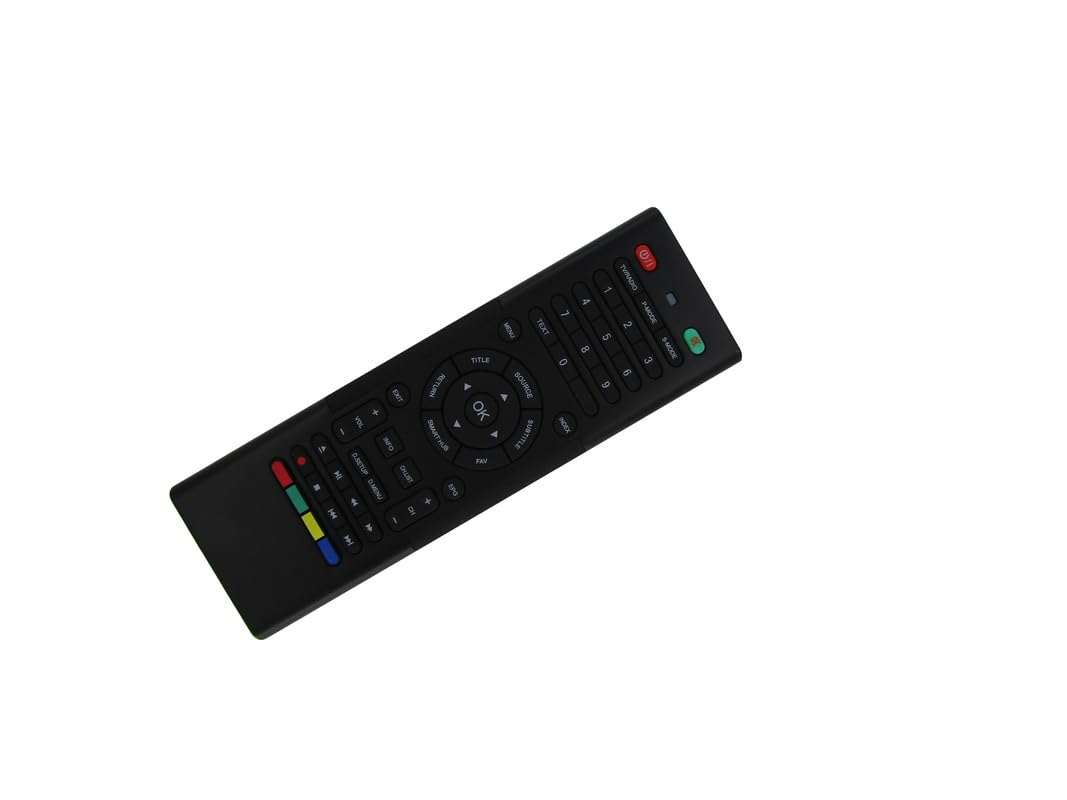
Image: The Generic replacement remote control, displaying both its primary button-side and the secondary QWERTY keyboard-side.
Nastavení
1. Instalace baterie
- Najděte přihrádku na baterie na zadní straně dálkového ovladače.
- Posunutím otevřete kryt baterie.
- Vložte dvě (2) baterie typu AAA a dbejte na správnou polaritu (+/-) vyznačenou uvnitř přihrádky.
- Pevně zavřete kryt baterie.

Obrázek: Zadní view of the remote control with the battery cover detached, revealing the empty battery compartment for AAA batteries.
2. První použití
This remote control is an infrared (IR) replacement and typically does not require any programming or pairing. Once batteries are installed, point the remote directly at your Bauhn TV and begin operation. Ensure there are no obstructions between the remote and the TV's IR receiver.
Návod k obsluze
The remote features a dual-sided design: a standard TV remote layout on one side and a QWERTY keyboard on the other for easier text input.
Front Side: Standard TV Controls
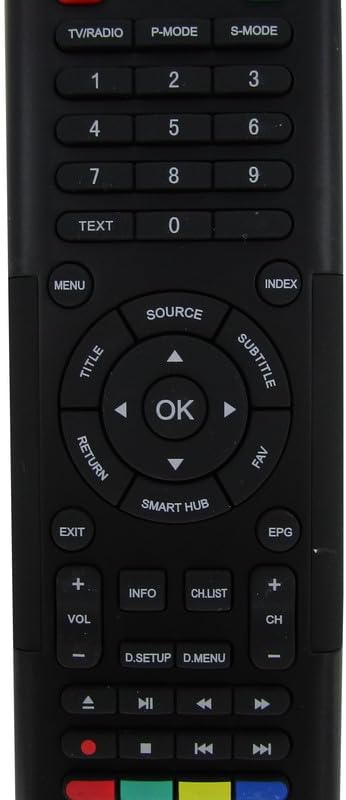
Obrázek: Podrobný view of the front face of the remote control, highlighting the power, channel, volume, navigation, and media control buttons.
- Vypínač: Zapíná nebo vypíná televizor.
- TV/RÁDIO: Přepíná mezi režimy TV a Rádio.
- P-MODE / S-MODE: Picture Mode and Sound Mode selection.
- Číselná tlačítka (0-9): Přímý výběr kanálu.
- TEXT: Přístup k teletextovým službám.
- JÍDELNÍ LÍSTEK: Otevře hlavní nabídku televizoru.
- ZDROJ: Výběr vstupních zdrojů (HDMI, AV atd.).
- Navigation Pad (Up/Down/Left/Right) & OK: Prochází menu a potvrzuje výběr.
- TITLE / SUBTITLE: Accesses title or subtitle options.
- NÁVRAT / VÝCHOD: Návrat na předchozí obrazovku nebo opuštění nabídky.
- SMART HUB: Accesses the TV's smart features/apps.
- EPG: Elektronický programový průvodce.
- VOL +/-: Upravuje hlasitost.
- CH +/-: Mění kanály.
- INFO: Zobrazuje informace o programu.
- CH.LIST: Zobrazí seznam kanálů.
- Tlačítka pro ovládání médií (Přehrát, Pozastavit, Zastavit, Přetočit zpět, Rychle přetočit vpřed): Ovládá přehrávání médií.
- Barevná tlačítka (červená, zelená, žlutá, modrá): Funkce se liší v závislosti na nabídce televizoru nebo aplikaci.
Rear Side: QWERTY Keyboard
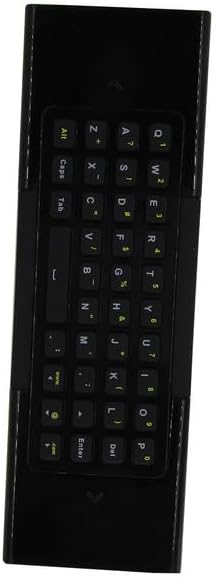
Obrázek: Podrobný view of the reverse side of the remote control, featuring a full QWERTY keyboard for text input.
The QWERTY keyboard on the back of the remote allows for convenient text entry in smart TV applications, web browsers, and search functions. Simply flip the remote to use the keyboard. The remote may automatically detect which side is facing up and activate the corresponding input mode.
Údržba
Výměna baterie
Replace batteries when the remote's response becomes sluggish or stops working. Always replace both AAA batteries simultaneously with new ones. Do not mix old and new batteries, or different types of batteries.
Čištění
K čištění dálkového ovladače použijte měkký, suchý hadřík. V případě odolných nečistot jej lehce setřete.amphadřík vodou. Nepoužívejte agresivní chemikálie, abrazivní čisticí prostředky ani nadměrnou vlhkost, protože by mohly poškodit povrch dálkového ovladače nebo jeho vnitřní součásti.
Odstraňování problémů
- Dálkové ovládání nereaguje:
- Zkontrolujte, zda jsou baterie správně vloženy se správnou polaritou.
- Vyměňte staré baterie za nové baterie typu AAA.
- Ujistěte se, že mezi infračerveným vysílačem dálkového ovladače a infračerveným přijímačem televizoru je volná viditelnost. Odstraňte všechny překážky.
- Zkontrolujte, zda je dálkový ovladač namířen přímo na televizor.
- Některé funkce nefungují:
- This is a replacement remote. While designed for broad compatibility, it may not replicate every single function of your original remote, especially for highly specific or proprietary features.
- Ensure your TV model is among those listed as compatible. If your specific model is not listed, full functionality cannot be guaranteed.
- Dálkové ovládání funguje přerušovaně:
- To může znamenat nízký stav baterie. Vyměňte baterie.
- Check for strong light sources (like direct sunlight or bright fluorescent lights) that might interfere with the IR signal.
Specifikace
| Značka | Obecný |
| Výrobce | Easytry |
| Kompatibilní zařízení | Television (Bauhn Smart UHD LED HDTV Android TV models) |
| Maximální počet podporovaných zařízení | 1 |
| Jsou vyžadovány baterie | 2 AAA baterie |
| Speciální funkce | Ergonomic, Replacement, QWERTY Keyboard |
| Barva | Černý |
| ASIN | B0D7MFQJMX |


