
1. Konec produktuview
The Daytona Mio MiVue M802WD is a motorcycle-specific drive recorder designed for reliable recording with front and rear 2-megapixel Full HD cameras. It offers convenient operation via a smartphone app for video confirmation and settings adjustments.
Mezi klíčové vlastnosti patří:
- Front and Rear Full HD Cameras: Equipped with high-sensitivity CMOS image sensors for clear recording even at night.
- SuperMP4 / High-Speed Data Storage: Records data every second, ensuring reliable saving even if power is cut, preventing file korupce.
- H.264 Codec & microSDXC 256GB Support: Enables high-quality, long-duration recording without overwriting, optimizing file velikost.
- 2x Speed Wi-Fi: Faster data transfer to smartphones for quick video review.
- Automatic Impact Recording: G-sensor detects impacts and automatically saves footage to a dedicated folder, preventing overwriting. Manual recording is also available via a control switch.
- Vestavěná GPS: Records location, date/time, and speed. Supports 5 types of GPS signals (GPS, GLONASS, GALILEO, BDS, Michibiki) for improved accuracy.
- Kompaktní a odolný design: Dustproof and waterproof (main unit: IP65, cameras/remote/GPS antenna: IP67) for use in various weather conditions.
- National LED Signal Support: Compatible with LED traffic lights across Japan.
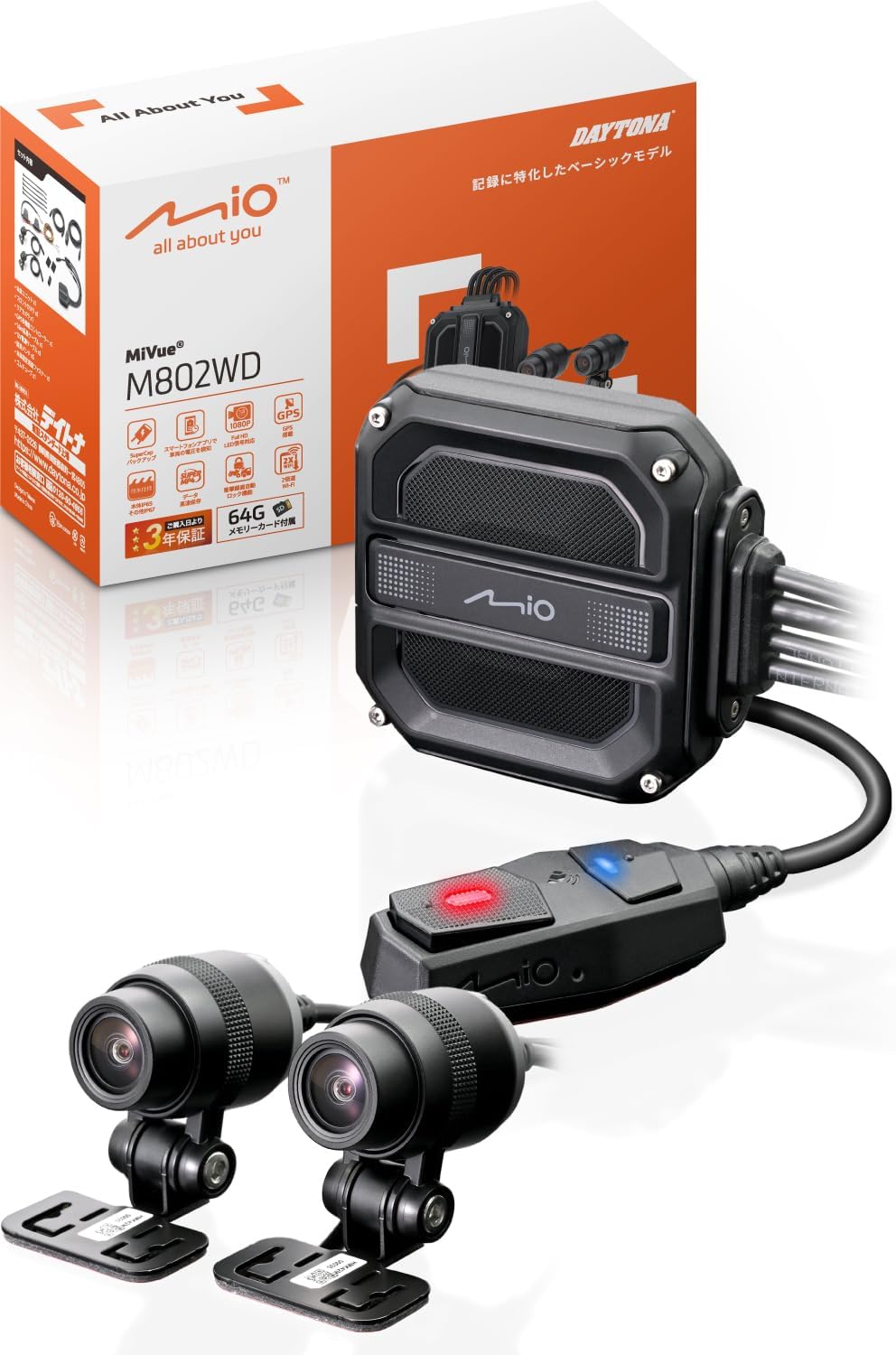
Image 1.1: Daytona Mio MiVue M802WD Motorcycle Dash Cam components, including the main unit, front and rear cameras, and remote control.
2. Nastavení a instalace
2.1 Bezpečnostní opatření
- Ensure the device is installed in a location that does not obstruct driving or visibility, complying with road transport vehicle safety standards.
- Pokud si nejste jisti procesem instalace, poraďte se s odborníkem.
2.2 Identifikace součásti
Before installation, identify all components:
- Hlavní jednotka
- Přední kamera
- Zadní kamera
- Remote Control Switch with GPS Antenna
- Napájecí kabel
- Camera Cables
- Mounting Brackets and Adhesive Pads
- microSD Card (64GB included)
2.3 kroky instalace
- Namontujte hlavní jednotku: Find a secure, dry location on your motorcycle, typically under the seat or within a fairing, to mount the main unit. Ensure it is protected from direct exposure to elements.
- Instalace kamer: Attach the front and rear cameras to suitable locations on your motorcycle using the provided mounting brackets and adhesive pads. Ensure a clear, unobstructed view for both cameras. The cameras are IP67 rated for dust and water resistance.
- Připojit kabely: Route the camera cables from the cameras to the main unit. Connect the power cable to the main unit and to a suitable 12V power source on your motorcycle (e.g., ACC power).
- Mount Remote Control Switch: Install the remote control switch on your handlebar for easy access. This switch also houses the GPS antenna. Ensure it has a clear view of the sky for optimal GPS signal reception. The remote control is IP67 rated.
- Vložte microSD kartu: Open the main unit's cover and insert the provided 64GB microSD card into the designated slot. Secure the cover.
- Initial Power-On and App Connection: Turn on your motorcycle's ignition. The dash cam should power on. Download the Mio MiVue Pro app on your smartphone (available on iOS and Android). Connect your smartphone to the dash cam via Wi-Fi to verify camera angles and adjust settings.

Obrázek 2.1: Příkladample of main unit installation on a motorcycle, typically under the seat.

Obrázek 2.2: Příkladample of front camera installation on a motorcycle, showing various mounting positions.

Obrázek 2.3: Příkladample of rear camera installation on a motorcycle, showing various mounting positions.
3. Návod k obsluze
3.1 Automatický záznam
Once installed and powered, the MiVue M802WD will automatically begin recording when your motorcycle's ignition is turned on. Recording will stop when the ignition is turned off.
3.2 Impact Detection and Emergency Recording
The built-in G-sensor detects impacts. If an impact exceeding a preset value is detected, the device automatically saves the recording as an emergency file in a dedicated folder, preventing it from being overwritten by continuous recording. This emergency recording includes footage from 20 seconds before and 20 seconds after the impact.

Image 3.1: Illustration of automatic recording upon impact detection, saving footage before and after the event.
3.3 Manual Emergency Recording
In emergencies or when you wish to record a specific moment, press the control switch on your handlebar. This will save the current footage as an emergency file, čímž jej chrání před přepsáním.

Image 3.2: A gloved hand pressing the control switch on a motorcycle handlebar to initiate manual recording.
3.4 Using the MiVue Pro Smartphone App
The MiVue Pro app (available for iOS and Android) allows you to:
- View Živé footage: Check camera angles and live video feed.
- Review Nahrávky: Access and play back recorded videos.
- Stáhnout Files: Transfer recorded videos to your smartphone at approximately twice the speed of previous models.
- Upravit nastavení: Modify various dash cam settings.
- Zkontrolujte objem baterietage: Sledujte stav baterie vašeho vozidla.
- Aktualizace firmwaru: Update the dash cam's firmware wirelessly.

Image 3.3: A smartphone displaying the vehicle's battery voltage via the MiVue Pro app.
3.5 Funkce GPS
The built-in GPS records your driving location, date, time, and speed. Through the MiVue Pro app, you can view your route on Google Maps simultaneously with video playback and even upload videos to YouTube.
4. Údržba
4.1 Správa karet microSD
- Regularly format the microSD card using the MiVue Pro app to ensure optimal performance and prevent recording errors.
- Replace the microSD card if you experience frequent recording issues or if the card is old.
4.2 Čištění
- Wipe the camera lenses periodically with a soft, clean cloth to ensure clear video quality.
- Keep the main unit and remote control free from excessive dirt and debris.
4.3 aktualizací firmwaru
Check for firmware updates regularly via the MiVue Pro app to ensure your device has the latest features and bug fixes.
5. Řešení problémů
| Problém | Možná příčina | Řešení |
|---|---|---|
| Zařízení se nezapne. | Chybí napájení nebo je zapojení nesprávné. | Check power cable connections and ensure the motorcycle's ignition is on. |
| Nahrávání se neočekávaně zastaví. | microSD card error or full. | Format the microSD card via the app or replace it. |
| Špatná kvalita videa. | Dirty lens or low light conditions. | Clean camera lenses. Ensure sufficient lighting for optimal night recording. |
| Problémy s připojením k Wi-Fi. | Interference or distance from smartphone. | Ensure your smartphone is close to the main unit. Avoid strong electromagnetic interference. |
| Nebyl zachycen signál GPS. | Zabráněno view of the sky for the GPS antenna. | Ensure the remote control switch (with built-in GPS antenna) has a clear view of the sky. Allow time for initial GPS lock. |
| LED traffic lights appear to flash in recordings. | Normal behavior due to LED light frequency. | This is a characteristic of LED traffic lights. Judge the signal status from surrounding vehicles and context. |
6. Specifikace
| Funkce | Detail |
|---|---|
| Značka | Daytona |
| Název modelu | M802WD |
| Číslo modelu produktu | 47750 |
| Rozměry produktu (hlavní jednotka) | 2.26 x 6.4 x 6.58 cm |
| Hmotnost položky | 294 g |
| Pozice kamery | Přední, zadní |
| Rozlišení záznamu videa | Full HD 1080p |
| Snímková frekvence | 58 snímků za sekundu |
| Speciální funkce | G-sensor, App control, Automatic incident detection, Compact design, Built-in GPS |
| Dustproof/Waterproof Rating | Main Unit: IP65, Cameras/Remote/GPS Antenna: IP67 |
| Zahrnuté komponenty | Warranty card, microSD 64GB |
| Typ montáže | Lepidlo |
| Kontrolní metoda | App |
| Kompatibilní typ vozidla | Motocykl |
7. Záruka a podpora
7.1 Informace o záruce
Tento produkt je dodáván s a 3-letá záruka from the date of delivery. A delivery note or proof of purchase is required for warranty claims. The warranty is limited to use within Japan.
7.2 Zákaznická podpora
For technical assistance, troubleshooting not covered in this manual, or warranty claims, please contact Daytona customer support. Refer to the warranty card or Daytona's official webstránky pro kontaktní údaje.