
Zavedení
This manual provides essential instructions for the safe and efficient use of your Aiwa AW-KF4 Portable Bluetooth Speaker. Please read this manual thoroughly before using the product and retain it for future reference.
The Aiwa AW-KF4 is a portable Bluetooth speaker designed for robust audio performance with dynamic LED lighting, a rechargeable battery, and resistance to water and dust (IPX6). It offers versatile connectivity options including Bluetooth, USB, and AUX input.
Obsah balení
Carefully unpack your speaker and ensure all items are present and in good condition. If any items are missing or damaged, please contact your retailer.
- Aiwa AW-KF4 Portable Bluetooth Speaker
- Nabíjecí kabel USB-C
- Návod k použití

Image: The Aiwa AW-KF4 speaker in its retail packaging, showing the speaker and branding.
Konec produktuview
The Aiwa AW-KF4 speaker features a compact, cylindrical design with integrated controls and dynamic LED lighting. It is built for portability and durability.
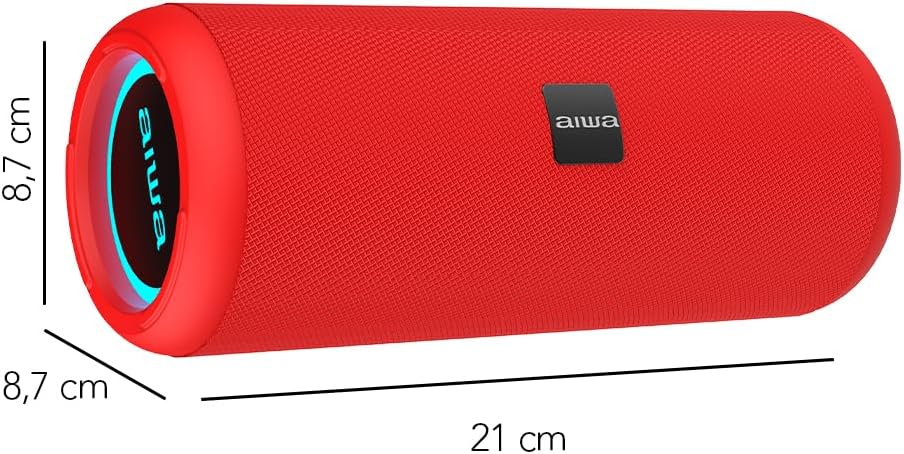
Image: A red Aiwa AW-KF4 speaker showing its approximate dimensions: 21 cm in length and 8.7 cm in diameter.

Image: Two Aiwa AW-KF4 speakers (red and black) illustrating key features: 20W output, LED lighting, TWS function, IPX6 water resistance, Bluetooth, USB, and SD card compatibility.

Image: A collage showing the Aiwa AW-KF4 speaker in various outdoor settings, emphasizing its IPX6 water resistance, up to 10 hours of battery life, and hands-free calling capability with an integrated microphone.
Nastavení
1. Nabíjení reproduktoru
Before first use, fully charge the speaker. Use the provided USB-C cable to connect the speaker to a compatible USB power adapter (not included) or a computer's USB port.
- Během nabíjení bude svítit kontrolka nabíjení.
- Plné nabití trvá přibližně 3 hodin.
- Po plném nabití se může kontrolka změnit nebo zhasnout.
A fully charged battery provides up to 10 hours of playback, depending on volume level and usage.
2. Zapnutí/vypnutí
- To power on: Press and hold the Power button for a few seconds until you hear an audible prompt and the LED lights activate.
- To power off: Press and hold the Power button for a few seconds until you hear an audible prompt and the LED lights turn off.
Návod k obsluze
1. Párování Bluetooth
The speaker will automatically enter Bluetooth pairing mode when powered on for the first time or if no device is connected. The LED indicator will flash, indicating it's ready to pair.
- Ujistěte se, že je reproduktor zapnutý a v režimu párování.
- Povolte Bluetooth na svém smartphonu, tabletu nebo jiném audio zařízení.
- Hledat "AW-KF4" in the list of available Bluetooth devices.
- Select "AW-KF4" to connect. You will hear a confirmation sound once paired.
- The LED indicator will stop flashing and remain solid.
Reproduktor má dosah Bluetooth až 10 metrů (33 stop).
2 Funkce True Wireless Stereo (TWS)
The TWS function allows you to pair two Aiwa AW-KF4 speakers together for a stereo sound experience.

Image: A visual representation of the TWS (True Wireless Stereo) function, showing two Aiwa AW-KF4 speakers being used together for synchronized sound.
- Ensure both AW-KF4 speakers are powered on and not connected to any Bluetooth device.
- On one speaker (this will be the primary speaker), press and hold the TWS button (if available, or a designated button as per specific model instructions) until you hear a pairing tone.
- The two speakers will automatically connect to each other. A confirmation tone will sound once connected.
- Now, connect your Bluetooth device to the primary speaker as described in the "Bluetooth Pairing" section.
Note: Refer to the specific button layout on your speaker for the exact TWS pairing button.
3. Přehrávání z USB a AUX
- USB přehrávání: Vložte USB flash disk obsahující zvuk filedo portu USB. Reproduktor automaticky detekuje disk a začne z něj přehrávat hudbu.
- Přehrávání AUX: Connect an audio device using a 3.5mm AUX cable (not included) to the AUX input port. The speaker will switch to AUX mode.
4. LED světla
The speaker features dynamic LED lights. These lights typically activate automatically when the speaker is powered on. Specific controls for changing light modes or turning them off may be available via a dedicated button on the speaker (refer to your speaker's button layout).
5. Ovládací prvky
The speaker features tactile controls for various functions:
- Vypínač: Stiskněte a podržte pro zapnutí/vypnutí.
- Tlačítko Přehrát/Pozastavit: Stisknutím spustíte nebo pozastavíte hudbu.
- Zvýšení hlasitosti/další skladba: Stisknutím zvýšíte hlasitost. Stisknutím a podržením přejdete na další skladbu.
- Snížit hlasitost/předchozí stopa: Stisknutím snížíte hlasitost. Stisknutím a podržením přejdete na předchozí skladbu.
- Tlačítko režimu: Press to switch between Bluetooth, USB, and AUX modes.
- Call Button (if applicable): Press to answer/end calls. Press and hold to reject calls.
Note: Button functions may vary slightly. Consult the diagrams in your physical manual for precise button identification.
Údržba
To ensure the longevity and optimal performance of your Aiwa AW-KF4 speaker, follow these maintenance guidelines:
- Čištění: K čištění vnější strany reproduktoru používejte měkký, suchý hadřík. Nepoužívejte abrazivní čisticí prostředky, rozpouštědla ani agresivní chemikálie.
- Voděodolnost (IPX6): The speaker is resistant to strong water jets. It is not designed for submersion. Ensure all port covers are securely closed before exposing the speaker to water or dust. After exposure to water, wipe the speaker dry before charging.
- Skladování: Reproduktor skladujte na chladném a suchém místě mimo dosah přímého slunečního záření a extrémních teplot.
- Péče o baterie: Pro prodloužení životnosti baterie reproduktor pravidelně nabíjejte, i když jej nepoužíváte často. Nevystavujte baterii úplnému vybíjení po delší dobu.

Image: The Aiwa AW-KF4 speaker positioned near a pool, illustrating its IPX6 water resistance feature, suitable for outdoor and poolside use.
Odstraňování problémů
Pokud narazíte na problémy s reproduktorem, podívejte se na následující běžné problémy a jejich řešení:
| Problém | Možná příčina / řešení |
|---|---|
| Reproduktor se nezapne. |
|
| Nelze spárovat přes Bluetooth. |
|
| Žádný zvuk. |
|
| Zkreslení zvuku. |
|
| Párování TWS selhalo. |
|
Specifikace
| Název modelu | AW-KF4 (AWKF4B) |
| Značka | Ne |
| Výstupní výkon reproduktoru | 20 W RMS |
| Frekvenční odezva | 80 Hz (minimální specifikovaná frekvence) |
| Technologie připojení | Bluetooth 5.0, USB, AUX |
| Režim zvukového výstupu | Stereo |
| Materiál bydlení | Plast |
| Typ reproduktoru | Basový reproduktor |
| Úroveň odolnosti proti vodě | IPX6 (Odolný vůči silnému tryskajícímu moři) |
| Dosah Bluetooth | Až 10 metrů (33 stop) |
| Mikrofony | 1 (for hands-free calling) |
| Kapacita baterie | Lithium-iontová kapacita 2000 mAh |
| Životnost baterie | Až 10 hodin (liší se v závislosti na objemu a využití) |
| Doba nabíjení | Přibližně 3 hodiny |
| Vstupní objemtage | 5 voltů |
| Impedance | 4 ohmů |
| Kontrolní metoda | Hmatová tlačítka |
| Rozměry (D x H) | Přibližně 21 cm x 8.7 cm |
| Kompatibilní zařízení | Chytré telefony, tablety |
| Původ | Čína |
Záruka a podpora
Your Aiwa AW-KF4 Portable Bluetooth Speaker comes with a 1letá záruka výrobce od data nákupu. Tato záruka se vztahuje na výrobní vady vzniklé při běžném používání.
Záruka se nevztahuje na:
- Damage caused by misuse, abuse, negligence, or accident.
- Poškození způsobené neoprávněnými opravami nebo úpravami.
- Běžné opotřebení.
For warranty claims or technical support, please contact your retailer or the official Aiwa customer service in your region. Please have your proof of purchase and product model number (AW-KF4) ready when contacting support.